
1. Introduction
The JICHAMOXY Mini Massager TENS Unit is a compact, rechargeable device designed to provide temporary relief from muscle pain and fatigue. It utilizes Transcutaneous Electrical Nerve Stimulation (TENS) and Electrical Muscle Stimulation (EMS) technology to deliver low-frequency electrical pulses, promoting muscle relaxation and improved circulation. This manual provides essential information for the safe and effective use of your device.

Image 1.1: The JICHAMOXY Mini Massager TENS Unit with its two electrode pads, shown both individually and applied to a user's neck.
2. Safety Information
Please read all safety warnings and instructions before using this device. Failure to do so may result in injury or device malfunction.
- Do not use on vital areas such as carotid sinus nerves (front of the neck), chest, or the head.
- Consult a physician before use if you have a pacemaker, heart condition, epilepsy, or are pregnant.
- Do not use on broken or irritated skin.
- Keep out of reach of children.
- Discontinue use if you experience any discomfort or adverse reactions.
3. Package Contents
Verify that all items are present in your package:
- 1 x JICHAMOXY Mini Massager Device
- 2 x Adhesive Electrode Pads (pre-gelled)
- 1 x USB Charging Cable
- 1 x User Manual
- 1 x Gift Box (packaging)

Image 3.1: The complete package contents, including the main device, two electrode pads, USB cable, user manual, and gift box.
4. Product Overview
The device uses low-frequency pulses to stimulate nerves and muscles, which can help block pain signals and improve blood circulation. This dual TENS and EMS functionality targets both pain relief and muscle stimulation.

Image 4.1: An illustration depicting how TENS (Transcutaneous Electrical Nerve Stimulation) and EMS (Electrical Muscle Stimulation) work to relieve pain and stimulate muscles.
5. Charging Instructions
Before first use, fully charge the device. A full charge takes approximately 30 minutes.
- Connect the provided USB charging cable to the charging port on the massager device.
- Plug the other end of the USB cable into any standard USB power source (e.g., computer, power bank, wall adapter).
- The blue indicator lights on the device will flash during charging. All four lights will remain solid when fully charged.

Image 5.1: The massager device shown connected to a micro USB cable for charging, with blue indicator lights visible.
6. Setup and Application
Proper application of the electrode pads is crucial for effective and safe use.
- Attach the Device: Snap the main massager unit onto the two studs on the electrode pad.
- Prepare Skin: Ensure the skin where the pad will be applied is clean, dry, and free of lotions or oils.
- Remove Film: Carefully peel off the protective film from the adhesive side of the electrode pad.
- Apply Pad: Firmly press the adhesive pad onto the desired area of your body. Ensure full contact with the skin.
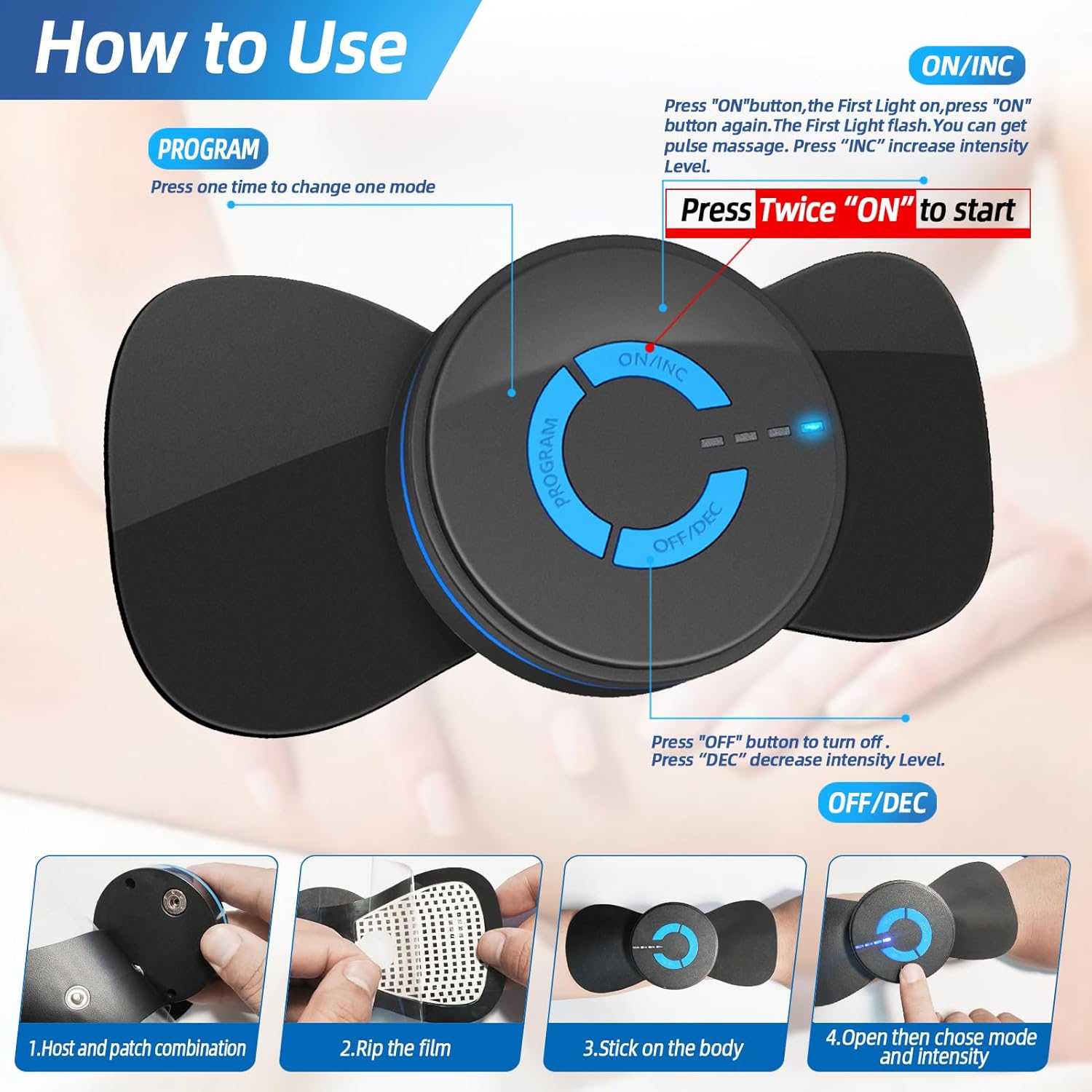
Image 6.1: A detailed view of the reusable electrode pad, illustrating its components (paste cover film, pulse gel, TENS pad) and how it adheres to the skin.

Image 6.2: A visual guide demonstrating the four steps of using the device: combining host and patch, ripping the film, sticking on the body, and opening to choose mode and intensity.
7. Operating Instructions
The device features 6 massage modes and 10 intensity levels. Each session has an automatic shut-off function.
- Power On: Press the "ON/INC" button once. The first blue light will flash, indicating the device is in standby. Press "ON/INC" a second time to start the pulse massage.
- Change Mode: Press the "PROGRAM" button to cycle through the 6 available massage modes (Shiatsu, GuaSha, Percussion, Acupuncture, Kneading, Thrashing).
- Adjust Intensity:
- Press "ON/INC" to increase the intensity level (1-10).
- Press "OFF/DEC" to decrease the intensity level.
Note: For first-time users, start with the lowest intensity level (1) and gradually increase to a comfortable sensation. Due to variations in body sensitivity, it is recommended to test the gear from the first gear.
- Automatic Shut-off: The device will automatically turn off after 15 minutes of continuous use to ensure safety.
- Power Off: Press and hold the "OFF/DEC" button to turn off the device manually.

Image 7.1: An illustration detailing the six massage modes (Shiatsu, GuaSha, Percussion, Acupuncture, Kneading, Thrashing) and how the 10 intensity levels correspond to different massage experiences (Leisure, Relieve Muscle Fatigue, Relieve Shoulder and Neck Stiffness).

Image 7.2: An overview of the device's features including TENS & EMS, 12-minute auto-off, 6 massage modes, 10 intensity levels, electrode pads, and the recommendation of 15 minutes per day for pain relief and muscle massage.
8. Maintenance
Proper care of your electrode pads will extend their lifespan.
- Cleaning Pads: If the adhesive pads lose their stickiness, gently wash them with warm, soapy water. Allow them to air dry completely before reattaching the protective film.
- Storage: Store the pads with their protective film reattached in a cool, dry place.
- Replacement: Electrode pads are consumable items. Their stickiness will diminish over time (typically 20-40 uses). Replace pads when they no longer adhere effectively to the skin. Replacement pads can be found by searching for B0D422DJ4V.
- Device Cleaning: Wipe the main massager unit with a soft, damp cloth. Do not submerge the device in water.
9. Troubleshooting
If you encounter issues with your device, refer to the following common solutions:
- Device Not Turning On: Ensure the device is fully charged. Connect it to a USB power source and check if the charging indicator lights activate.
- No Sensation/Weak Sensation:
- Check if the electrode pads are firmly attached to clean, dry skin. Poor contact reduces effectiveness.
- Increase the intensity level using the "ON/INC" button.
- Ensure the pads are not worn out; replace them if they have lost their adhesive quality.
- Pads Not Sticking: Clean the adhesive pads as described in the Maintenance section. If cleaning does not restore stickiness, replace the pads.
- Device Shuts Off Prematurely: The device has a 15-minute auto-shutoff. If it turns off before this time, ensure it is fully charged. If the issue persists, contact customer support.
10. Specifications
| Feature | Specification |
|---|---|
| Product Dimensions | 5.5 x 3.5 x 0.8 inches |
| Product Weight | 2.4 ounces |
| Manufacturer | JICHAMOXY |
| Power Source | Rechargeable Battery (USB) |
| Charging Time | Approx. 30 minutes |
| Massage Modes | 6 |
| Intensity Levels | 10 |
| Auto Shut-off | 15 minutes |
11. Warranty and Support
For warranty information or customer support, please refer to the contact details provided with your purchase documentation or visit the official JICHAMOXY website. Keep your purchase receipt for warranty claims.