

1. Introduction
Thank you for purchasing the Goldair GMO-25 25 Liter Microwave Oven. This manual provides important information for the safe and efficient operation, maintenance, and troubleshooting of your new appliance. Please read these instructions thoroughly before use and retain them for future reference.
The Goldair GMO-25 microwave is designed for simple, no-frills microwaving, offering a user-friendly control panel and features that help reduce bacteria growth and odor formation within the cavity, contributing to easier cleaning.
Important Safety Instructions
- Read all instructions before using the appliance.
- Do not operate the microwave if the door or door seals are damaged. Contact qualified service personnel.
- Ensure proper ventilation around the appliance.
- Do not heat liquids or other foods in sealed containers as they are liable to explode.
- Only use microwave-safe utensils.
- Supervise children closely when the microwave is in use.
2. Product Features
The Goldair GMO-25 microwave oven is equipped with features designed for convenience and efficiency:
- 35 Minute Cooking Timer: Allows for precise control over cooking durations.
- 5 Power Levels: Offers versatility for various cooking and heating needs.
- Push Button Door: Provides easy and quick access to the microwave cavity.
- 245 mm Turntable Glass Tray: Ensures even heating of food.
- Multi-functional Use: Suitable for reheating, defrosting, and cooking a variety of dishes.
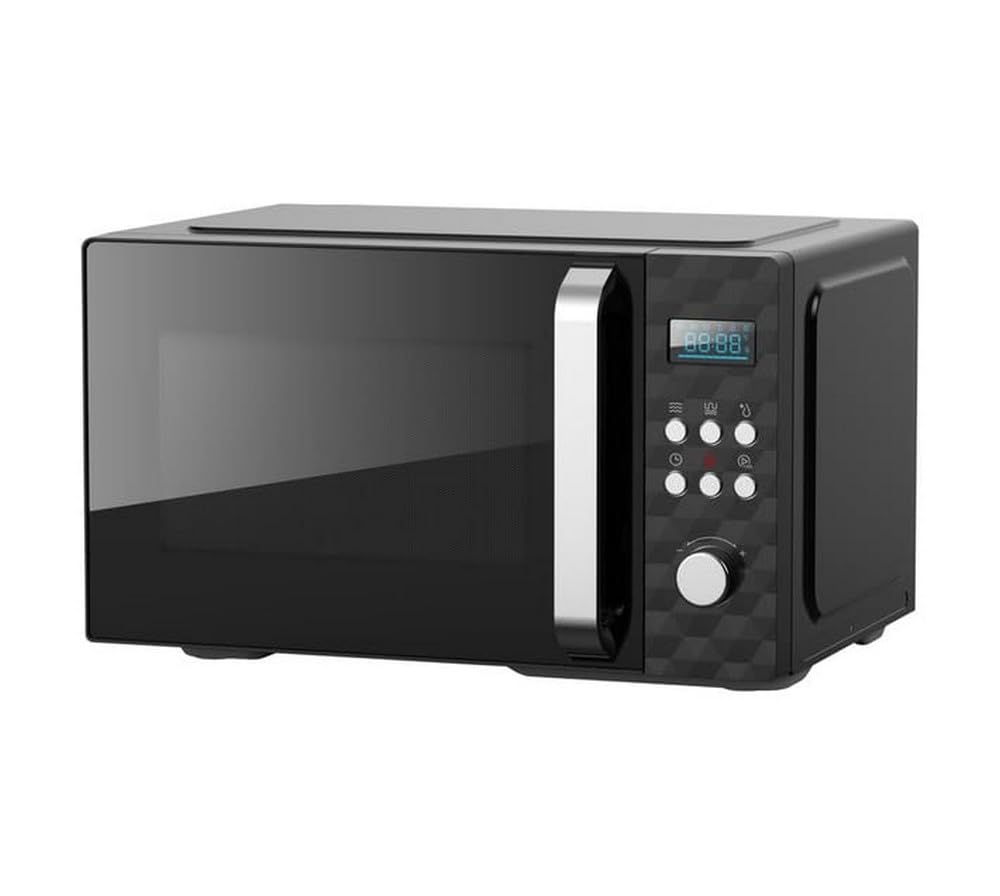
A front-side view of the Goldair GMO-25 microwave oven in black, showing the door, control panel with knobs and buttons, and the digital display.
3. Setup
3.1 Unpacking
- Carefully remove the microwave oven and all packaging materials from the carton.
- Check the oven for any damage, such as dents or a misaligned door. Do not operate if damaged.
- Remove any protective film from the cabinet surface.
3.2 Placement
- Place the microwave on a flat, stable surface that can support its weight and the heaviest food likely to be cooked in it.
- Ensure adequate ventilation: allow at least 10 cm of space at the rear, 20 cm at the top, and 5 cm on each side for proper airflow. Do not block any ventilation openings.
- Keep the microwave away from heat sources, steam, or splashing water.
3.3 Turntable Assembly
- Place the turntable ring inside the microwave cavity.
- Position the glass turntable tray securely on top of the turntable ring, ensuring it sits correctly on the central hub.
3.4 Electrical Connection
- Plug the power cord into a standard 230 Volt, 50 Hz AC electrical outlet. Ensure the outlet is properly grounded.
- Do not use extension cords or adapters.
4. Operating Instructions
4.1 Control Panel Overview
The Goldair GMO-25 features a user-friendly control panel, typically consisting of a power level selector knob, a cooking timer knob, and a push-button door release.
- Power Level Knob: Used to select one of the 5 available power levels.
- Cooking Timer Knob: Used to set the desired cooking time, up to 35 minutes.
- Door Release Button: Press to open the microwave door.
4.2 Basic Cooking/Reheating
- Place food in a microwave-safe container on the glass turntable tray.
- Close the microwave door firmly.
- Turn the Power Level Knob to your desired power setting (e.g., High for quick reheating, Medium for general cooking).
- Turn the Cooking Timer Knob to set the required cooking time (up to 35 minutes). The microwave will start automatically once the timer is set.
- When the cooking time expires, the microwave will emit an audible signal and turn off.
- Carefully remove the food. Be aware that the container and food may be hot.
4.3 Defrosting
To defrost food, use a lower power level and longer time:
- Place frozen food in a microwave-safe container.
- Turn the Power Level Knob to a lower setting, typically 'Defrost' or a low power level (e.g., Level 2 or 3).
- Set the Cooking Timer Knob for the appropriate defrosting time. You may need to pause and turn the food periodically for even defrosting.
- Once defrosted, remove the food and cook immediately.
5. Maintenance and Cleaning
Regular cleaning of your Goldair microwave will ensure its longevity and hygienic operation. The design helps in easy cleaning and reduces odor formation.
5.1 Exterior Cleaning
- Wipe the exterior surface with a soft, damp cloth. Do not use abrasive cleaners or solvents.
5.2 Interior Cleaning
- Clean the inside cavity immediately after spills to prevent food from drying and sticking.
- Wipe with a damp cloth and a mild detergent. For stubborn stains, place a bowl of water with lemon juice inside and microwave for a few minutes to loosen residue.
- The glass turntable tray and turntable ring can be removed and washed in warm soapy water or in a dishwasher. Ensure they are dry before placing them back in the oven.
5.3 Door Seals and Surfaces
- Keep the door seals, the area around the door, and the control panel clean. Use a soft, damp cloth.
- Do not use harsh abrasive cleaners or metal scrapers to clean the oven door glass as they can scratch the surface, which may result in shattering of the glass.
6. Troubleshooting
If you encounter issues with your microwave, refer to the following common problems and solutions:
| Problem | Possible Cause | Solution |
|---|---|---|
| Microwave does not start | Power cord not plugged in; Door not closed properly; Fuse blown or circuit breaker tripped. | Ensure plug is firmly in outlet; Close door securely; Check household fuse/circuit breaker. |
| Food not heating | Power level set too low; Cooking time too short; Door not closed properly. | Increase power level or cooking time; Ensure door is securely closed. |
| Turntable not rotating | Turntable not correctly placed; Turntable ring obstructed. | Ensure glass tray is seated correctly on the hub; Check for food debris under the ring. |
| Unusual noise during operation | Turntable or roller ring not positioned correctly. | Adjust the turntable and roller ring for proper seating. |
If the problem persists after trying these solutions, please contact Goldair customer service for assistance.
7. Specifications
| Specification | Detail |
|---|---|
| Brand | Goldair |
| Model Number | GMO-25 |
| Item Type Name | Microwave |
| Capacity | 25 Liters |
| Wattage | 900 watts |
| Voltage | 230 Volts |
| Colour | Black |
| Included Components | 1 x Goldair Microwave, 25 Liter Capacity, Black |
| Manufacturer | Goldair |
| Country of Publication | China |
8. Warranty and Support
Your Goldair GMO-25 Microwave Oven comes with a manufacturer's warranty. Please refer to the warranty card included with your purchase for specific terms and conditions, including the warranty period and coverage details.
For technical support, service, or warranty claims, please contact Goldair customer service. Contact information can typically be found on the Goldair official website or on your product packaging.


