
1. Introduction
Thank you for choosing the Goldair GCF-505 Ceiling Fan with 3 Lights. This manual provides important information regarding the safe installation, operation, and maintenance of your new ceiling fan. Please read this manual thoroughly before installation and keep it for future reference.
The Goldair GCF-505 is a modern and versatile ceiling fan designed to provide efficient cooling and illumination. It features a sleek design, a 3-speed regulator, and silent pull chain operation for ease of use.
2. Safety Instructions
WARNING: To reduce the risk of fire, electric shock, or personal injury, always follow these basic safety precautions:
- Read all instructions carefully before installing and operating the fan.
- Ensure the electrical supply is disconnected at the main circuit breaker before installation or servicing.
- All electrical work must be performed by a qualified and licensed electrician.
- The fan must be mounted to a ceiling joist or support structure capable of supporting a minimum of 15 kg.
- Ensure the fan blades are at least 2.3 meters (7.5 feet) from the floor and 0.5 meters (1.6 feet) from any wall or obstruction.
- Do not insert any objects into the path of the rotating blades.
- Do not operate the fan if any part is damaged or missing.
- This appliance is not intended for use by persons (including children) with reduced physical, sensory or mental capabilities, or lack of experience and knowledge, unless they have been given supervision or instruction concerning use of the appliance by a person responsible for their safety.
3. Package Contents
Carefully unpack your ceiling fan and ensure all items are present. If any parts are missing or damaged, contact your retailer immediately.
- Motor housing assembly
- Fan blades (quantity as specified)
- Blade holders/brackets
- Downrod and canopy
- Mounting bracket
- Light kit with 3 light sockets
- Glass shades (3 pieces)
- Pull chains for fan speed and light control
- Hardware pack (screws, washers, wire nuts)
- Instruction Manual
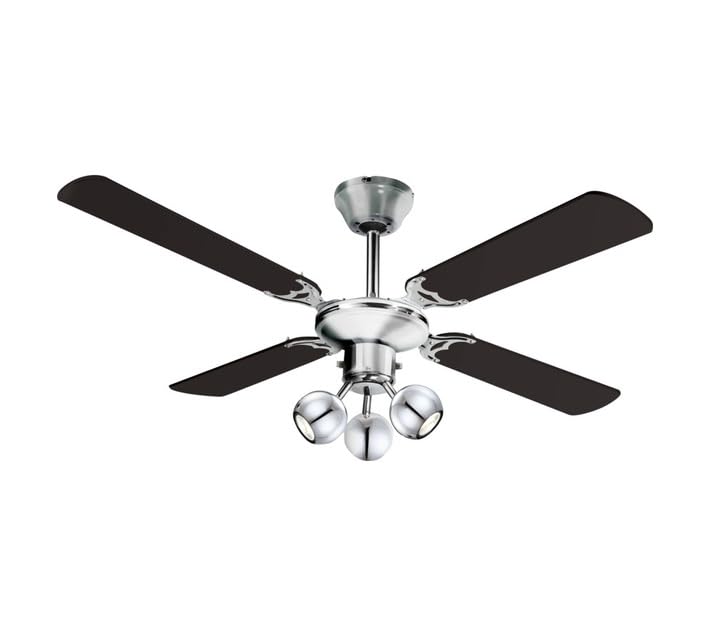
Figure 1: Goldair GCF-505 Ceiling Fan with 3 Lights. This image shows the assembled ceiling fan, highlighting its black finish, three fan blades, and integrated light kit with three downward-facing light shades.
4. Setup and Installation
IMPORTANT: Before beginning installation, ensure the power is turned OFF at the circuit breaker. Installation should be performed by a qualified electrician.
- Mounting Bracket Installation: Secure the mounting bracket to a ceiling joist or a suitable support structure using the provided screws and washers. Ensure it is firmly attached and can support the fan's weight.
- Wiring Connections: Connect the household electrical wires to the fan's wiring according to the wiring diagram provided in the full installation guide (not included here, refer to product packaging for detailed diagrams). Ensure all connections are secure and insulated with wire nuts.
- Attach Downrod and Canopy: Feed the electrical wires through the downrod. Secure the downrod to the motor housing and then lift the fan assembly and hang it on the mounting bracket. Slide the canopy up to cover the mounting bracket.
- Blade Assembly: Attach the fan blades to the blade holders using the provided screws. Then, attach the blade assemblies to the motor housing. Ensure all screws are tightened securely.
- Light Kit Installation: Connect the light kit wiring to the fan's wiring. Secure the light kit to the bottom of the motor housing. Install the light bulbs (not included) into the sockets and attach the glass shades.
- Final Checks: Double-check all connections and ensure no loose wires. Restore power at the circuit breaker.
5. Operating Instructions
Your Goldair GCF-505 Ceiling Fan is operated by two pull chains:
- Fan Speed Control: One pull chain controls the fan speed. Pull the chain repeatedly to cycle through the speed settings: High, Medium, Low, Off. The fan features a 3-speed regulator for optimal comfort.
- Light Control: The other pull chain controls the integrated light kit. Pull the chain to turn the lights On or Off.
The silent pull chain operation ensures quiet and convenient control of your fan and lights.
6. Maintenance
Regular maintenance will ensure the longevity and optimal performance of your ceiling fan.
- Cleaning: To clean the fan, wipe the surfaces with a soft, damp cloth. Do not use abrasive cleaners or solvents, as these may damage the finish. Ensure the power is off before cleaning.
- Blade Cleaning: Dust the fan blades regularly to prevent dust buildup, which can affect fan balance and performance.
- Tighten Fasteners: Periodically check all screws and fasteners on the fan and mounting hardware. Tighten any loose screws to prevent wobbling or noise.
- Light Bulbs: Replace light bulbs as needed. Ensure the power is off and the bulbs have cooled before replacing. Use bulbs of the correct wattage and type as specified for the light kit.
7. Troubleshooting
If you experience issues with your Goldair GCF-505 Ceiling Fan, refer to the following common problems and solutions:
| Problem | Possible Cause | Solution |
|---|---|---|
| Fan does not start | No power supply; Loose wire connections; Blown fuse/tripped circuit breaker. | Check power supply; Ensure all wires are securely connected; Reset circuit breaker. |
| Fan wobbles | Loose blade screws; Unbalanced blades; Loose mounting bracket. | Tighten all blade screws; Check blade balance (use a balancing kit if necessary); Ensure mounting bracket is secure. |
| Lights do not work | Loose wire connections; Faulty light bulb; Light switch/pull chain issue. | Check light kit wiring; Replace light bulb; Check pull chain mechanism. |
| Noisy operation | Loose screws; Motor housing rubbing; Bearings need lubrication. | Tighten all screws; Ensure no parts are rubbing; Consult a qualified technician for motor issues. |
If the problem persists after attempting these solutions, please contact Goldair customer support or a qualified electrician.
8. Specifications
| Feature | Detail |
|---|---|
| Brand | Goldair |
| Model Number | GCF-505 |
| Colour | Black |
| Blade Length | 132 cm |
| Power / Wattage | 60 watts |
| Voltage | 230 Volts |
| Material | Metal |
| Item Weight | 4.2 kg |
| Special Features | Quiet Operation, 3 Speed regulator, Silent pull chain operation |
| Electric Fan Design | Ceiling Fan |
| Mounting Type | Ceiling Mount |
| Product Dimensions (Package) | 54.5D x 24.5W x 23.4H centimetres |
9. Warranty and Support
Goldair products are manufactured to the highest standards and are backed by a manufacturer's warranty against defects in materials and workmanship. Please refer to the warranty card included with your product for specific terms and conditions, including the warranty period.
For technical support, spare parts, or warranty claims, please contact Goldair customer service. Contact details can typically be found on the product packaging or the official Goldair website.
Please retain your proof of purchase for warranty purposes.


