
1. Introduction
The HUIOP AMT-560 is a versatile electronic device designed to assist musicians with accurate instrument tuning and precise rhythm practice. It functions as both a chromatic tuner and a metronome, suitable for a wide range of instruments including guitar, bass, violin, and ukulele. Its compact size and multiple signal input options make it a convenient tool for both beginners and experienced players.
2. Product Features
- Dual Functionality: Operates as both a tuner and a metronome.
- Wide Compatibility: Supports Chromatic, Guitar, Bass, Violin, and Ukulele tuning modes.
- Clear Display: Features a super bright LCD (5.2 x 2.6 cm) with backlight for excellent visibility in various lighting conditions.
- Flexible Signal Input: Equipped with a built-in microphone for acoustic tuning and a 6.3mm input jack for a pickup cable.
- Portable Design: Small and exquisite appearance, making it easy to carry.
- Integrated Stand: Includes a foldable holder on the back for convenient tabletop placement.
- Auto Power-Off: Automatically turns off after 3 minutes of no signal or operation to conserve battery life.
3. Package Contents
Please check the package for the following items:
- 1 x HUIOP AMT-560 Electronic Tuner & Metronome Unit
- 1 x 6.3mm Pickup Cable

This image displays the AMT-560 tuner unit and the separate 6.3mm pickup cable, which can be used for direct instrument connection.
4. Product Overview

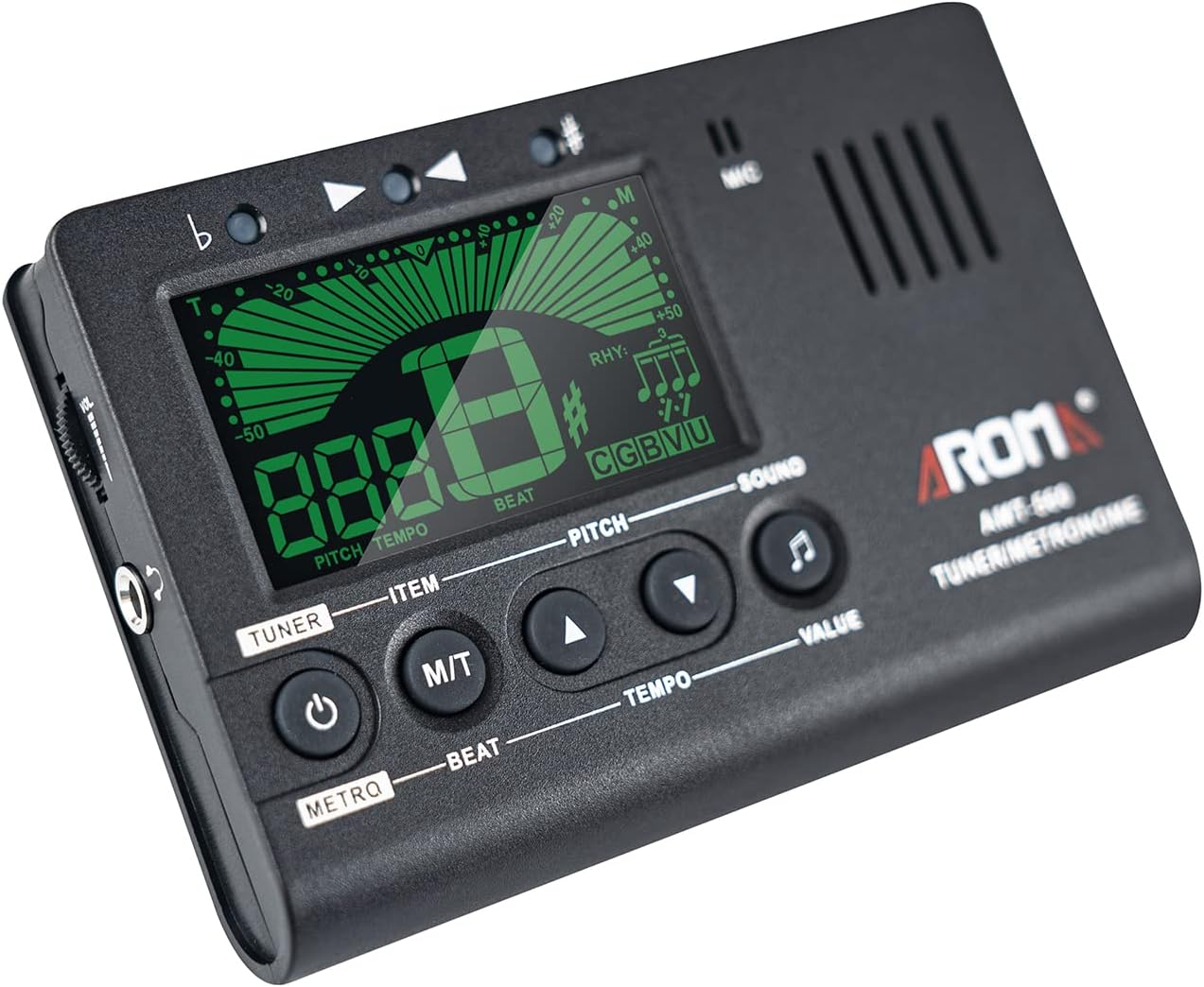
A clear front view of the AMT-560 device, illustrating the LCD screen, power button, M/T mode button, pitch/tempo adjustment buttons, and sound button.
Front Panel Controls:
- Power Button (U): Press and hold to turn the device on or off.
- M/T Button (Mode): Switches between Tuner mode and Metronome mode.
- Up Arrow (^): Increases Pitch (Tuner mode) or Tempo/Beat/Rhythm (Metronome mode).
- Down Arrow (v): Decreases Pitch (Tuner mode) or Tempo/Beat/Rhythm (Metronome mode).
- Sound Button (♪): Activates the reference tone (Tuner mode) or metronome click sound (Metronome mode).
- MIC: Built-in microphone for acoustic signal detection.
- LCD Display: Shows tuning information, tempo, beat, rhythm, and selected instrument mode.
Side and Back Features:

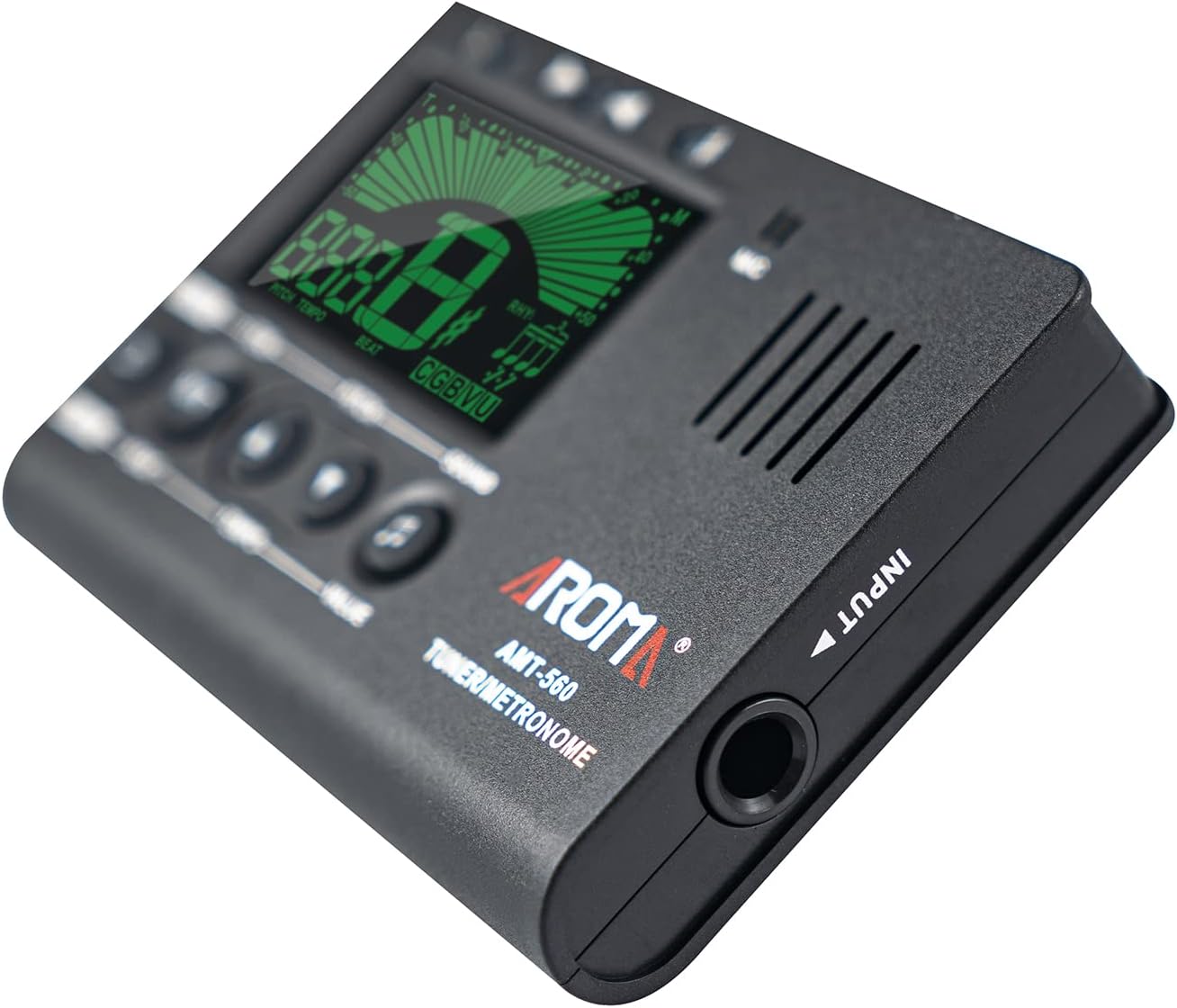
An angled view of the AMT-560, emphasizing the 6.3mm input jack on the side for connecting the pickup cable.
- 6.3mm Input Jack: For connecting the included pickup cable to directly detect instrument vibrations.
- Battery Compartment: Located on the back, holds 2 x AAA batteries.
- Foldable Stand: A metal stand on the back allows the unit to be propped up for easy viewing.
The rear of the AMT-560, featuring the integrated foldable stand for tabletop use and the battery compartment.
5. Setup
5.1 Battery Installation
- Locate the battery compartment on the back of the AMT-560 unit.
- Slide open the battery compartment cover.
- Insert two (2) AAA batteries, ensuring correct polarity (+/-) as indicated inside the compartment.
- Close the battery compartment cover securely.
Note: Batteries are not included with the product.
5.2 Connecting the Pickup Cable
For direct and accurate tuning, especially in noisy environments, use the included pickup cable.
- Plug the 6.3mm jack of the pickup cable into the INPUT jack on the side of the AMT-560 unit.
- Attach the clip end of the pickup cable securely to the headstock or soundboard of your instrument.
The AMT-560 tuner with the included pickup cable plugged into its input jack, ready for instrument connection.
6. Operating Instructions
6.1 Power On/Off
Press and hold the Power button (U) for approximately 2 seconds to turn the device on or off.
6.2 Mode Selection
Press the M/T button to switch between Tuner mode and Metronome mode. The current mode will be displayed on the LCD screen.
6.3 Tuner Mode
In Tuner mode, the display will show the note name, pitch deviation, and selected instrument mode.
- Selecting Instrument Mode: Repeatedly press the M/T button (or a dedicated 'ITEM' button if present, referring to the image) to cycle through tuning modes: Chromatic (C), Guitar (G), Bass (B), Violin (V), Ukulele (U).
- Adjusting Pitch (A4 Calibration): Press the Up/Down arrow buttons to adjust the reference pitch (A4) from 430Hz to 450Hz. The default is typically 440Hz.
- Tuning Your Instrument:
- Play a single note on your instrument. The tuner will detect the note and display its name.
- The needle on the display will indicate if the note is flat (left), sharp (right), or in tune (center).
- Adjust your instrument's string until the needle is centered and the display turns green (or indicates 'in tune').
- Reference Tone: Press the Sound button (♪) to play a reference tone for manual tuning by ear.
6.4 Metronome Mode
In Metronome mode, the display will show Tempo, Beat, and Rhythm settings.
- Adjusting Tempo: Press the Up/Down arrow buttons to set the tempo from 30 to 260 beats per minute (BPM).
- Selecting Beat: Press the 'BEAT' button (if labeled, otherwise use M/T or another designated button to cycle through parameters) to select the beat from 0 to 9. This sets the number of beats per measure.
- Selecting Rhythm: Press the 'RHYTHM' button (if labeled, otherwise cycle through parameters) to choose from 9 different rhythm patterns.
- Start/Stop Metronome: Press the Sound button (♪) to start or stop the metronome click sound.
7. Maintenance
- Cleaning: Wipe the unit with a soft, dry cloth. Do not use liquid cleaners or abrasive materials.
- Battery Replacement: Replace batteries when the display dims or the unit fails to power on. Always use fresh AAA batteries. Remove batteries if the unit will not be used for an extended period to prevent leakage.
- Storage: Store the tuner in a cool, dry place away from direct sunlight and extreme temperatures.
8. Troubleshooting
- Unit does not power on:
- Check if batteries are inserted correctly with the right polarity.
- Replace with new AAA batteries.
- Inaccurate tuning:
- Ensure the correct instrument mode is selected (Chromatic, Guitar, Bass, etc.).
- If using the built-in microphone, ensure there is no excessive background noise.
- Try using the pickup cable for direct signal input.
- Check the A4 pitch calibration setting (default 440Hz).
- Metronome sound is too low/high:
- The unit has a fixed volume output for the metronome. Ensure the speaker is not obstructed.
9. Specifications
| Tuning Mode | Chromatic, Guitar, Bass, Violin, Ukulele |
| Pitch Range | 430-450Hz |
| Tempo Precision | ±0.5% |
| Tempo Range | 30-260bpm |
| Beat Settings | 0, 1, 2, 3, 4, 5, 6, 7, 8, 9 |
| Rhythm Types | 9 types |
| Signal Pickup Methods | Built-in Mic, Pickup Cable |
| Power | 2 x AAA batteries (not included) |
| Display Size | Approx. 5.2 x 2.6 cm (2 x 1 inch) |
| Product Weight | 65g (2.3oz) |
| Product Dimensions | 5.12 x 3.15 x 0.87 inches |
10. Safety Information
- Do not expose the unit to water or excessive moisture.
- Avoid dropping the unit or subjecting it to strong impacts.
- Keep out of reach of small children.
- Dispose of used batteries responsibly according to local regulations.
11. Warranty and Support
This product comes with a standard manufacturer's warranty. For specific warranty details, returns, or technical support, please refer to the documentation provided at the time of purchase or contact the seller directly through the platform where the product was acquired.