Important Safety Instructions
Please read these instructions carefully before using the Goldair GIWF-26A Wall Fan and retain them for future reference. Failure to follow these instructions may result in electric shock, fire, or serious injury.
- Ensure the power supply voltage matches the rating label on the fan.
- Do not operate the fan with a damaged cord or plug. If the cord is damaged, it must be replaced by the manufacturer, its service agent, or similarly qualified persons to avoid a hazard.
- Unplug the fan from the power outlet before cleaning, servicing, or moving.
- Do not insert fingers or any objects through the grille when the fan is operating.
- Keep the fan away from water and moisture. Do not use it in bathrooms or other wet environments.
- Ensure the fan is mounted securely to a solid wall structure capable of supporting its weight.
- This appliance is not intended for use by persons (including children) with reduced physical, sensory or mental capabilities, or lack of experience and knowledge, unless they have been given supervision or instruction concerning use of the appliance by a person responsible for their safety.
- Children should be supervised to ensure that they do not play with the appliance.
Product Overview
The Goldair GIWF-26A is a high-power 26-inch wall-mounted fan designed for efficient air circulation. Its robust construction and multiple speed settings provide optimal cooling performance.
Package Contents
- Goldair GIWF-26A Wall Fan Unit
- Mounting Bracket
- Mounting Hardware (screws, wall anchors)
- User Manual (this document)
Key Features
- 3 Speed settings for varied airflow control.
- Automatic oscillation for wide area coverage.
- Modern design suitable for various environments.
- High quality aluminum blades for durability and efficient air movement.
- Lightweight construction for easier installation.
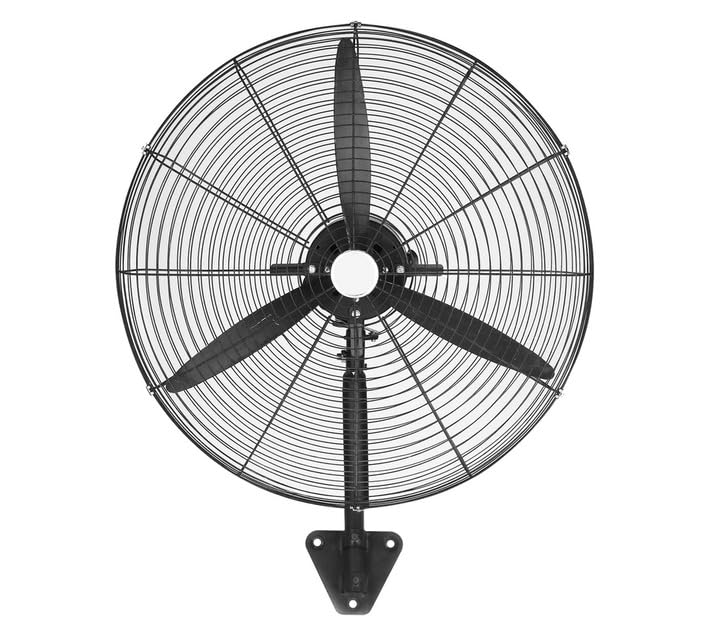
Image: Goldair GIWF-26A High Power 26-Inch Wall Fan, showcasing its black finish and robust design. This image illustrates the overall appearance of the fan unit.
Setup
Mounting the Fan
The Goldair GIWF-26A Wall Fan must be securely mounted to a sturdy wall surface. Choose a location that allows for optimal airflow and is away from obstructions.
- Select Mounting Location: Identify a suitable wall location, ensuring it is structurally sound and can support the fan's weight (approximately 10.8 kg).
- Mark Drilling Points: Hold the mounting bracket against the wall at the desired height and use a pencil to mark the positions for drilling holes.
- Drill Holes: Drill pilot holes at the marked positions using an appropriate drill bit for your wall type. Insert wall anchors if necessary.
- Attach Mounting Bracket: Securely fasten the mounting bracket to the wall using the provided screws. Ensure it is level and firmly attached.
- Mount the Fan: Carefully lift the fan unit and align its mounting points with the bracket. Secure the fan to the bracket according to the specific design (e.g., sliding into place and tightening screws).
Electrical Connection
Before connecting the fan to power, ensure all mounting steps are complete and the fan is stable.
- Ensure your hands are dry before handling the power cord or plug.
- Plug the fan's power cord into a standard 230 Volt AC electrical outlet.
- Avoid using extension cords if possible. If an extension cord is necessary, ensure it is rated for the fan's power requirements (200 watts) and is in good condition.
Operating Instructions
Control Panel
The Goldair GIWF-26A Wall Fan is operated via a button control panel located on the fan unit. This panel typically includes buttons for power, speed selection, and oscillation control.
Power On/Off
- To turn the fan ON, press the Power button once.
- To turn the fan OFF, press the Power button again.
Speed Settings
The fan offers three distinct speed settings to adjust airflow intensity:
- Speed 1 (Low): Provides a gentle breeze for quiet operation and minimal air movement.
- Speed 2 (Medium): Offers moderate airflow for general cooling.
- Speed 3 (High): Delivers maximum airflow for rapid cooling or larger spaces.
To change the speed, press the Speed button repeatedly until the desired setting is reached.
Automatic Oscillation
The oscillation feature allows the fan head to sweep from side to side, distributing air across a wider area.
- To activate oscillation, press the Oscillation button.
- To stop oscillation, press the Oscillation button again. The fan head will stop in its current position.
Maintenance
Regular maintenance ensures the longevity and efficient operation of your Goldair GIWF-26A Wall Fan. Always unplug the fan before performing any maintenance.
Cleaning
- Exterior Cleaning: Wipe the exterior surfaces of the fan with a soft, damp cloth. Do not use abrasive cleaners or solvents, as these may damage the finish.
- Blade Cleaning: Periodically, dust may accumulate on the fan blades. To clean, carefully remove the front grille (refer to assembly instructions if needed) and gently wipe the blades with a soft, dry or slightly damp cloth. Ensure blades are completely dry before reassembling the grille.
- Do not immerse the fan in water or allow water to drip into the motor housing.
Storage
When not in use for extended periods, store the fan in a cool, dry place, preferably in its original packaging, to protect it from dust and damage.
Troubleshooting
If you encounter issues with your Goldair GIWF-26A Wall Fan, please consult the following table before contacting customer support.
| Problem | Possible Cause | Solution |
|---|---|---|
| Fan does not turn on. | No power supply. Power button not pressed. | Check if the fan is plugged into a live outlet. Press the Power button firmly. |
| Weak airflow. | Low speed setting. Dust accumulation on blades. | Increase the speed setting. Clean the fan blades and grille as per maintenance instructions. |
| Fan is noisy. | Loose parts. Fan not mounted securely. | Check for any loose screws or components and tighten them. Ensure the fan is securely mounted to the wall bracket. |
| Oscillation not working. | Oscillation button not activated. Obstruction. | Press the Oscillation button. Ensure there are no obstructions preventing the fan head from moving. |
Specifications
Technical specifications for the Goldair GIWF-26A High Power 26-Inch Wall Fan:
| Brand | Goldair |
| Model Number | GIWF-26A |
| Colour | Black |
| Power / Wattage | 200 watts |
| Voltage | 230 Volts |
| Material | Aluminum |
| Item Weight | 10.8 kg |
| Product Dimensions | 72D x 19W x 96H centimetres |
| Number of Blades | 3 |
| Mounting Type | Wall Mount |
| Controller Type | Button Control |
Warranty and Support
Goldair products are manufactured to high-quality standards. For information regarding warranty coverage, please refer to the warranty card included with your purchase or visit the official Goldair website.
If you require technical assistance, troubleshooting beyond this manual, or spare parts, please contact Goldair customer support. Contact details can typically be found on the product packaging or the official Goldair website.
Please have your model number (GIWF-26A) and purchase date available when contacting support.


