
1. Introduction
Thank you for choosing the labebe Montessori Foldable Learning Tower. This versatile product is designed to safely bring your child to counter height, allowing them to participate in household activities, and also converts into a child's table and drawing easel. Please read this manual carefully before assembly and use to ensure safe and proper operation.
2. Safety Information
- Weight Limit: The learning tower has a maximum weight capacity of 50 kg (110 lbs). Do not exceed this limit.
- Adult Supervision: Always supervise your child when they are using the learning tower or activity desk.
- Stable Placement: Ensure the product is placed on a flat, stable surface before use.
- Safety Bar: Always ensure the safety bar is properly installed and secured when used as a learning tower.
- Material Safety: Constructed from solid wood and MDF, all materials and colors comply with ASTM/CE safety standards in the USA and EN71 CE in Europe.
- Rounded Edges: The product features rounded and polished edges to prevent injuries.
- Folding Mechanism: Exercise caution when folding or converting the product to prevent pinching. Keep children clear of moving parts during conversion.
3. Product Features
The labebe Montessori Foldable Learning Tower offers multiple functionalities to support your child's development and participation in daily activities.
- Learning Tower: Safely elevates your child to counter height, promoting independence and engagement in kitchen or bathroom tasks.
- Convertible Design: Easily transforms into a child's table and chair set.
- Drawing Easel: Includes a chalkboard surface for creative activities.
- Foldable: Designed for convenient storage when not in use.
- Safety Features: Equipped with a safety bar, wide platform, rounded edges, and stable feet for child security.

Figure 1: Multifunctional Step Stool. This image illustrates the product's three primary uses: as a toddler tower for reaching elevated surfaces, an easel for drawing, and a weaning table for eating or playing.
4. Setup and Conversion
The learning tower is designed for easy conversion between its different modes.
4.1 Converting to Kids Desk
- Unlock the Buckle: Locate and unlock the buckles on the sides of the learning tower.
- Fold the Step Stool: Carefully fold the top section of the tower downwards.
- Lock the Sides: Secure the two sides in their new position to form the desk and chair.
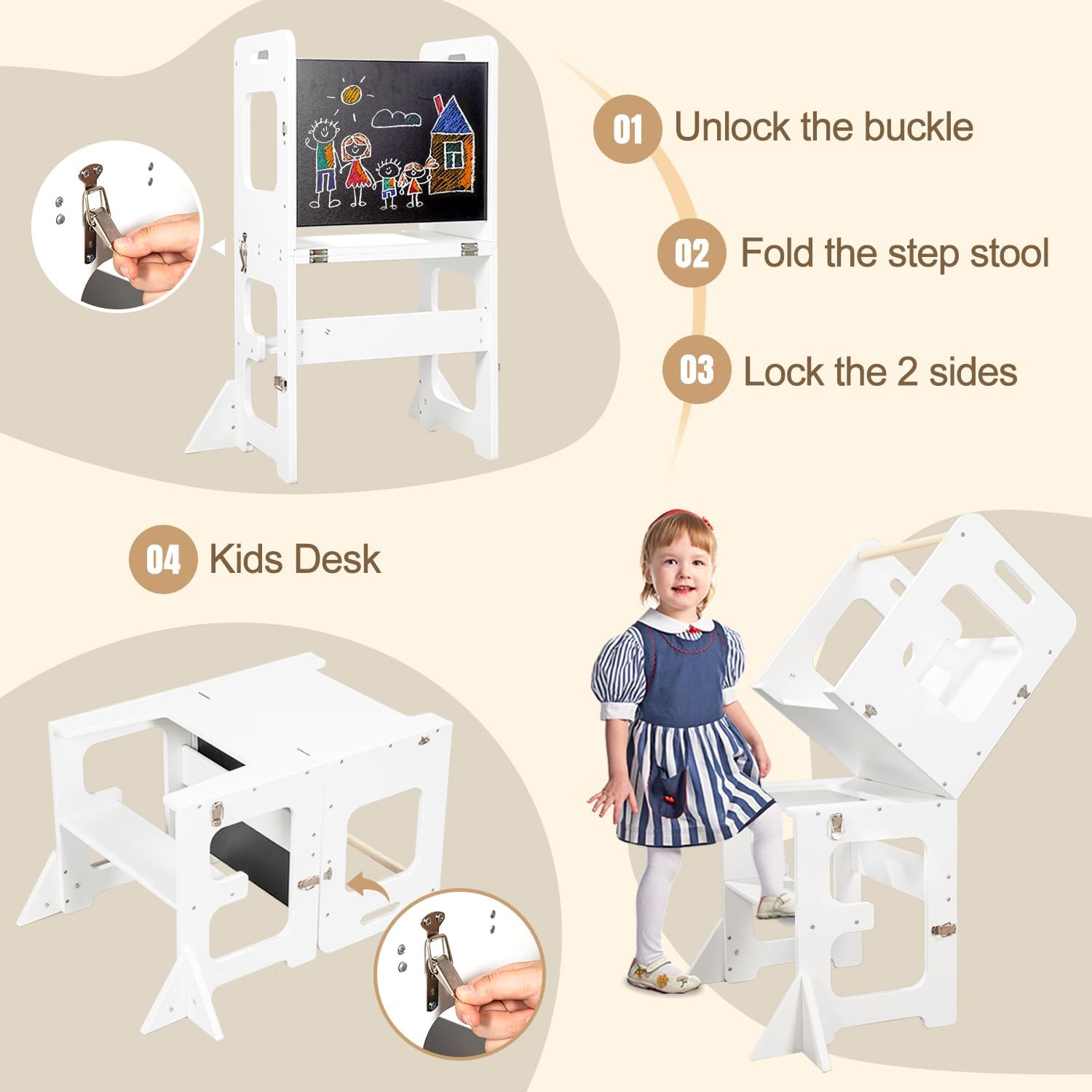
Figure 2: Conversion to Kids Desk. This image details the three steps for converting the learning tower into a kids' desk, including unlocking the buckle, folding the stool, and locking the sides. It also shows the final desk configuration.
4.2 Kid-Friendly Design Elements

Figure 3: Kid-Friendly Design. This image points out specific safety and comfort features: (1) Safety Rail, (2) Rounded Edges, (3) Wide Platform, and (4) Stable Feet, ensuring a secure environment for children.
5. Operating Instructions
5.1 Using as a Learning Tower
- Ensure the tower is fully assembled and all locking mechanisms are engaged.
- Place the tower on a flat, non-slip surface near the counter or sink.
- Help your child step onto the wide platform. The safety bar should be positioned to prevent falls.
- Encourage your child to participate in activities such as washing hands, helping with food preparation, or observing.
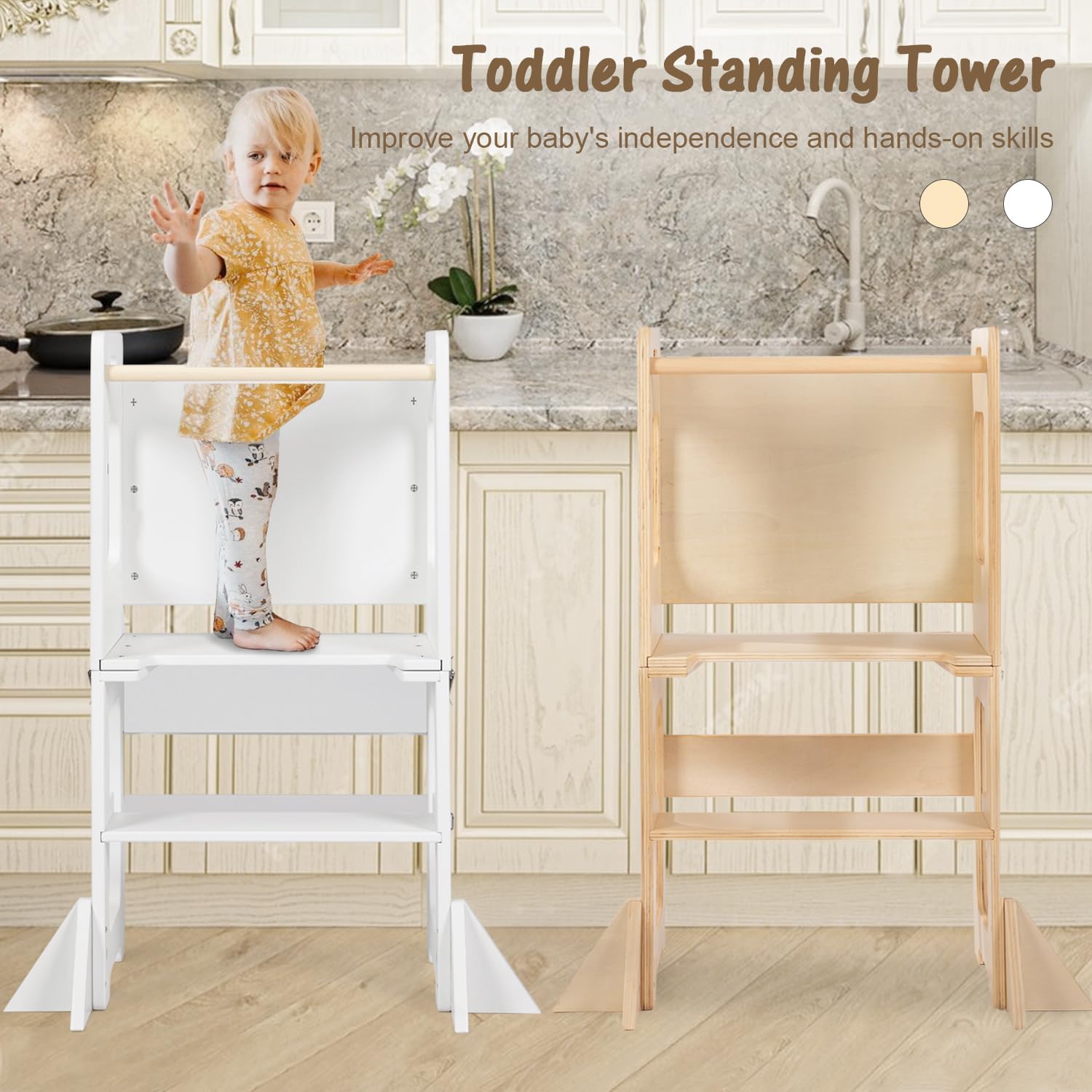
Figure 4: Toddler Standing Tower. This image shows a child using the learning tower to reach a kitchen counter, demonstrating how it improves independence and hands-on skills.
5.2 Using as an Activity Desk and Easel
- Convert the tower into the desk configuration as described in Section 4.1.
- The flat surface can be used as a table for eating, playing, or reading.
- The integrated chalkboard can be used for drawing with chalk. Ensure chalk dust is cleaned regularly.
6. Maintenance
- Cleaning: Wipe surfaces with a damp cloth and mild soap. Avoid abrasive cleaners or harsh chemicals.
- Drying: Dry immediately after cleaning to prevent moisture damage to the wood and MDF.
- Inspection: Regularly check all screws, bolts, and locking mechanisms to ensure they are tight and secure. Tighten if necessary.
- Storage: When not in use, store the folded product in a dry place away from direct sunlight or extreme temperatures.
7. Troubleshooting
- Product feels wobbly: Check all connections and ensure screws are tightened. Make sure the product is on a level surface.
- Difficulty converting: Ensure all buckles and latches are fully disengaged before attempting to fold or unfold. Do not force the mechanism.
- Chalkboard not erasing cleanly: Use a slightly damp cloth to wipe the chalkboard surface, then dry thoroughly.
8. Specifications
| Feature | Specification |
|---|---|
| Brand | labebe |
| Model Number | HY2330021 |
| Color | White |
| Material | Wood, MDF |
| Product Dimensions (L x W x H) | 30 x 42 x 80 cm (11.81 x 16.54 x 31.5 inches) |
| Folded Dimensions (L x W x H) | 60 x 42 x 13 cm (23.62 x 16.54 x 5.12 inches) - Approximate for desk mode |
| Item Weight | 8.06 kg (17.77 lbs) |
| Maximum Weight Capacity | 50 kg (110 lbs) |
| Special Features | Foldable, Convertible, Safety Bar |
| Age Range (Description) | Child (from 1 year) |

Figure 5: Size Chart. This image provides detailed dimensions for the learning tower in its upright position and when converted into a desk, along with the maximum weight capacity of 110 lbs.
9. Warranty and Support
For warranty information or customer support, please refer to the product packaging or contact labebe customer service directly through their official website or the retailer where the product was purchased. Please retain your proof of purchase for any warranty claims.
