
1. Introduction
Thank you for choosing Govee Curtain Lights. This manual provides essential information for the safe and effective use of your smart LED curtain lights. The Govee H70B1 model features 520 RGBIC LEDs per set, offering dynamic color-changing capabilities and smart control via the Govee Home App, Alexa, and Google Assistant. Designed for both indoor and outdoor use with an IP65 waterproof rating, these lights are suitable for various decorative applications.

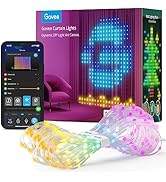
This image displays the Govee Curtain Lights product, including its packaging, a smartphone screen showing the Govee Home app interface, and the coiled light strands. The lights are shown illuminating a room with dynamic patterns.
2. Package Contents
Ensure all components are present before installation. The package for the 2-pack Govee Curtain Lights (H70B1) includes:
- Curtain Lights x 2 (each 5 x 6.6 ft with 520 RGBIC LEDs)
- Control Box x 2
- Power Adapter x 2
- G4 Hooks x 24 (20 standard + 4 extra)
- VHB Adhesive Pads x 24 (20 standard + 4 extra)
- Seamless Nails x 8
- Screwdriver x 2
- Screws x 64
- User Manual x 2

A comprehensive diagram illustrating all items included in the Govee Curtain Lights package. This includes the curtain lights (x2), control boxes (x2), power adapters (x2), G4 hooks, VHB adhesive pads, seamless nails, screwdrivers, and screws, along with user manuals.
3. Product Specifications
| Model Number | H70B1 |
| Light Source Type | LED (RGBIC) |
| Number of Light Sources | 1040 (520 per curtain) |
| Dimensions (per curtain) | 5 x 6.6 ft (1.5m x 2m) |
| Color | Multicolor |
| Power Source | Corded Electric |
| Voltage | 5 Volts (DC) |
| Wattage | 25 watts |
| Control Method | Voice, Govee Home App |
| Indoor/Outdoor Usage | Indoor & Outdoor |
| Water Resistance Level | IP65 Waterproof |
| Material | Plastic |
| Item Weight | 6 Pounds (total for 2-pack) |
| Special Features | Dimmable, Color Changing, Corded |
For detailed dimensions of a single curtain light set:
This technical diagram provides precise measurements for a single Govee H70B1 Curtain Light set. It details the length of the power adapter cable (1m/3.3ft), the control box cable (3m/9.8ft), and the light curtain dimensions (1.5m/4.9ft width x 2m/6.6ft height), along with a close-up of the LED spacing.
For detailed dimensions of two curtain light sets (as included in this 2-pack):
This technical diagram provides precise measurements for two Govee H70B1 Curtain Light sets. It details the length of the power adapter cable (1m/3.3ft), the control box cable (3m/9.8ft), and the light curtain dimensions (1.5m/4.9ft width x 2m/6.6ft height), along with a close-up of the LED spacing. This configuration is for a 2-pack.
4. Installation Guide
4.1 Mounting Options
The Govee Curtain Lights offer flexible installation methods to suit various surfaces and environments. Choose the most appropriate method for your desired location:
- G4 Hooks with VHB Adhesive Pads: Ideal for smooth, clean surfaces where drilling is not preferred. Ensure the surface is dry and free of dust before applying.
- Seamless Nails: Suitable for walls or surfaces where small, discreet nails can be used for a secure hold.
- G4 Hooks (alone): Can be used with existing hooks or wires, or for temporary installations.
This image demonstrates various installation methods for the Govee Curtain Lights within an indoor setting. It shows the use of G4 hooks with VHB adhesive pads, seamless nails, and G4 hooks alone, providing flexibility for mounting.
4.2 Connecting the Lights
- Unroll the curtain lights carefully to avoid tangling.
- Attach the G4 hooks, seamless nails, or VHB adhesive pads to the desired mounting points on your wall or window frame.
- Hang the curtain lights securely using the chosen mounting method. Ensure the lights are evenly spaced for optimal display.
- Connect the curtain light string to the control box.
- Connect the power adapter to the control box, then plug the power adapter into a standard electrical outlet.
- For outdoor installations, ensure all connections are secure and protected from direct water exposure, despite the IP65 rating, to prolong product life.

This image demonstrates various installation methods for the Govee Curtain Lights within an indoor setting. It shows the use of G4 hooks with VHB adhesive pads, seamless nails, and G4 hooks alone, providing flexibility for mounting.
5. Operating Instructions
5.1 Powering On/Off
Once connected to power, the lights will automatically turn on. Use the control box button or the Govee Home App to turn the lights on or off.
5.2 Govee Home App Control
The Govee Home App provides full control over your curtain lights. Download the app from the App Store (iOS) or Google Play Store (Android). Follow the in-app instructions to pair your device. The app allows you to:
- Change colors and brightness.
- Select from various scene modes.
- Activate Music Mode.
- Create custom DIY patterns.
- Set timers and schedules.
- Remotely control your lights from anywhere.

An exterior view of a house showcasing Govee Curtain Lights installed in multiple windows, displaying different festive patterns. The image highlights the smart app control capabilities, with logos for Google Home, Alexa, and Govee Home App.
5.3 Voice Control
The Govee Curtain Lights are compatible with Amazon Alexa and Google Assistant. After pairing your lights with the Govee Home App, enable the Govee skill/action in your smart home assistant app and link your Govee account. You can then use voice commands such as:
- "Alexa, turn on the curtain lights."
- "Hey Google, set curtain lights to blue."
- "Alexa, dim the curtain lights to 50%."
6. Key Features
6.1 DIY Mode
Unleash your creativity by designing custom patterns, text, or even uploading pictures and GIFs through the Govee Home App. The app provides 5 canvas layers for intricate designs. Note: GIF function works with one set of curtain lights only.

This image illustrates the DIY mode feature of the Govee Curtain Lights, showing custom text and patterns displayed on the lights. A smartphone screen demonstrates the app interface for creating these personalized designs.
6.2 Dynamic Scene Modes
Choose from over 107 pre-set dynamic scene modes to instantly transform your space for any occasion, from holidays to everyday ambiance.

A detailed close-up of the Govee Curtain Lights, emphasizing the individual 520 RGBIC LEDs creating a smooth, colorful gradient pattern. This illustrates the high-density lighting for detailed displays.
6.3 Music Mode
Synchronize your lights with your favorite music. The enhanced Music Mode allows the lights to react to audio, creating an immersive visual experience. Utilize DreamView to sync with other Govee lights for a cohesive lighting environment.

An interior scene featuring Govee Curtain Lights displaying a responsive, equalizer-style light pattern that synchronizes with music. The setup includes a drum set, illustrating the 'Music Mode' functionality.
6.4 Multi-Set Synchronization
The newest app version supports linking up to 2 or 3 sets of Govee Curtain Lights to create larger, more intricate patterns and displays across multiple curtains.
6.5 IP65 Waterproof Design
With an IP65 waterproof rating, these curtain lights are suitable for both indoor and outdoor use, providing durability against splashes and dust. This makes them ideal for holiday decor, parties, or everyday ambiance in various settings.

This image shows the Govee Curtain Lights installed outdoors next to a swimming pool, displaying a vibrant light pattern. It emphasizes the product's IP65 waterproof rating, making it suitable for outdoor events and decorations.
7. Maintenance
To ensure the longevity and optimal performance of your Govee Curtain Lights, follow these maintenance guidelines:
- Cleaning: Gently wipe the light strands and control box with a soft, dry cloth. Avoid using harsh chemicals or abrasive cleaners.
- Storage: When not in use, carefully coil the lights and store them in a cool, dry place away from direct sunlight and extreme temperatures.
- Inspection: Periodically check the cables and connections for any signs of damage or wear. Do not use if any part is damaged.
8. Troubleshooting
If you encounter issues with your Govee Curtain Lights, refer to the following common troubleshooting steps:
- Lights not turning on:
- Ensure the power adapter is securely plugged into both the control box and a working electrical outlet.
- Check if the control box button is pressed to turn on the lights.
- Verify that the power outlet is functional by plugging in another device.
- Lights not connecting to Govee Home App:
- Ensure your smartphone's Bluetooth and Wi-Fi are enabled.
- Make sure the lights are within range of your Wi-Fi router (2.4GHz network required).
- Restart the Govee Home App and try pairing again.
- Unplug the lights for 10 seconds and plug them back in to reset.
- Inconsistent light patterns or colors:
- Ensure all connections between the light strings and control box are firm.
- If using multiple sets, verify they are properly synchronized through the Govee Home App.
- Perform a factory reset (refer to the Govee Home App or Govee support for specific instructions).
- Voice control not working:
- Confirm that your Govee account is correctly linked to Alexa or Google Assistant.
- Check your internet connection.
- Ensure your voice assistant device is online and functioning correctly.
For further assistance, please refer to the official Govee support resources.
9. Safety Information
Please read and follow all safety instructions to prevent injury or damage:
- Do not expose the product to open flames or extreme heat sources.
- Do not immerse the control box or power adapter in water. Only the light strings are IP65 waterproof.
- Avoid bending or twisting the light strings excessively, as this may damage the internal wiring.
- Do not attempt to disassemble or modify the product. This will void the warranty.
- Keep out of reach of children.
- Use only the provided power adapter.
- Ensure proper ventilation around the control box during operation.
10. Warranty and Support
Govee products come with a limited warranty. For detailed warranty information, product support, and frequently asked questions, please visit the official Govee website or refer to the warranty card included in your package.
You can also download the official User Manual (PDF) for this product from the following link: Govee Curtain Lights User Manual (PDF)