
1. Product Overview
This manual provides detailed instructions for the Radiomaster series of multi-protocol receivers, including models R81, R84, R86, R86C, and R88. These receivers are designed for use with FPV drones and other RC applications, offering compatibility with Frsky D8 protocol and various channel configurations (4CH, 6CH, 8CH) with PWM and SBUS output options.
Please ensure to verify the model and part number for compatibility before installation.
2. Technical Specifications
Below are the detailed specifications for each receiver model:
2.1. Radiomaster R81 Receiver
| Feature | Specification |
|---|---|
| Channels | 8 |
| Frequency Range | 2400-2483.5Mhz |
| Power Input Range | 4.5-6V |
| Signal Format | D8 |
| Output Format | SBUS |
| Telemetry Support | RSSI |
| Control Distance | Over 1km |
| Antenna Length | Approx. 6cm |
| Size | 17x11mm |
| Weight | 2 grams |
2.2. Radiomaster R84 4CH Receiver
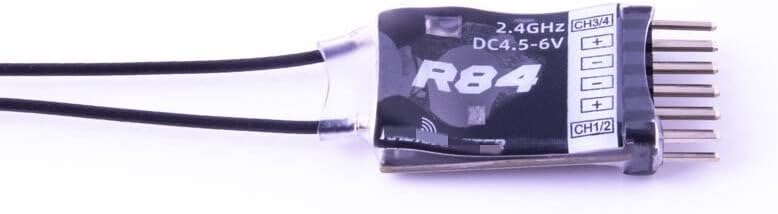
Image: Radiomaster R84 4CH Receiver, showing its compact size and pin configuration for channels 1-4 and power input.
| Feature | Specification |
|---|---|
| Channels | 4 |
| Frequency Range | 2400-2483.5Mhz |
| Power Input Range | 4.5-8.4V |
| Signal Format | Frsky D8 compatible |
| Output Format | PWM |
| Telemetry Support | RSSI |
| Control Distance | Over 1km |
| Antenna Length | 6cm |
| Size | 17x11mm |
| Weight | 2 grams |
2.3. Radiomaster R86 6CH Receiver
| Feature | Specification |
|---|---|
| Channels | 6 (PWM), 8 (SBUS) |
| Frequency Range | 2400-2483.5Mhz |
| Power Input Range | 4.5-8.4V |
| Signal Format | Frsky D8 compatible |
| Output Format | PWM |
| Range | Over 1km |
| Antenna Length | 15cm |
| Size | 45x21.2x12.7mm |
| Weight | 8 grams |
2.4. Radiomaster R86C Receiver
| Feature | Specification |
|---|---|
| Channels | 6 (PWM), 8 (SBUS) |
| Frequency Range | 2400-2483.5Mhz |
| Power Input Range | 4.5-8.4V |
| Signal Format | Frsky D8 compatible |
| Output Format | PWM / SBUS |
| Telemetry Support | RSSI |
| Range | Over 1km |
| Antenna Length | 15cm |
| Size | 45x21.2x12.7mm |
| Weight | 8 grams |
2.5. Radiomaster R88 8CH Receiver
| Feature | Specification |
|---|---|
| Channels | 8 |
| Frequency Range | 2400-2483.5Mhz |
| Power Input Range | 4.5-8.4V |
| Signal Format | Frsky D8 compatible |
| Output Format | PWM |
| Telemetry Support | RSSI |
| Range | Over 1km |
| Antenna Length | 15cm |
| Size | 40x26x16mm |
| Weight | 11 grams |
3. Setup and Binding Instructions
This section outlines the general procedure for setting up and binding your Radiomaster receiver to a compatible transmitter (e.g., Radiomaster TX16S, SE).
3.1. Pre-binding Checklist
- Ensure your transmitter is powered on and set to the correct protocol (Frsky D8).
- Verify the receiver is correctly connected to a power source within its specified voltage range (e.g., 4.5-8.4V for R84, R86, R86C, R88; 4.5-6V for R81).
- Confirm all connections are secure.
3.2. Binding Procedure
- Power On Receiver in Bind Mode: Connect power to the receiver while holding down the bind button (if present) or follow the specific power-on sequence for bind mode. For most Radiomaster R-series receivers, the LED will flash rapidly indicating bind mode.
- Activate Bind Mode on Transmitter: On your Radiomaster transmitter, navigate to the model setup menu. Select the Frsky D8 protocol. Choose the "Bind" option.
- Confirm Binding: The receiver's LED should change from rapidly flashing to solid, indicating a successful bind. If the LED continues to flash, repeat the binding process.
- Test Connections: After successful binding, power cycle both the transmitter and receiver. Test all control surfaces and functions to ensure proper communication.
Note: Specific bind button locations or power-on sequences may vary slightly between receiver models. Refer to your transmitter's manual for detailed binding instructions.
4. Operation
Once bound, the receiver will establish a connection with your transmitter upon power-up. Ensure your transmitter is powered on first, then power on your model with the receiver. The receiver's LED should illuminate solid, indicating a stable connection.
4.1. Channel Output
- PWM Output: Models like R84, R86, R86C, and R88 provide individual PWM outputs for each channel. Connect your servos or ESCs directly to the corresponding pins.
- SBUS Output: The R81 and R86C models also offer SBUS output. SBUS allows for a single wire connection to flight controllers, transmitting all channel data digitally.
4.2. RSSI Telemetry
All listed Radiomaster R-series receivers support RSSI (Received Signal Strength Indicator) telemetry. This feature allows your transmitter to display the signal strength received by the receiver, providing critical information about link quality during flight. Consult your flight controller or transmitter manual for instructions on how to enable and display RSSI data.
5. Maintenance
Proper maintenance ensures the longevity and reliable operation of your receiver.
- Physical Inspection: Regularly inspect the receiver for any physical damage, loose wires, or corrosion.
- Antenna Placement: Ensure antennas are properly positioned and not obstructed by carbon fiber or metal components. Avoid sharp bends in the antenna wires.
- Environmental Protection: Protect the receiver from moisture, dust, and extreme temperatures. Consider using conformal coating or heat shrink for added protection in harsh environments.
- Firmware Updates: Periodically check the Radiomaster official website for any available firmware updates for your receiver or transmitter. Updates can improve performance and add new features.
6. Troubleshooting
If you encounter issues with your receiver, consider the following troubleshooting steps:
- No Link/No Control:
- Verify the receiver is correctly bound to the transmitter. Re-bind if necessary.
- Check that the transmitter is powered on and set to the correct protocol (Frsky D8).
- Ensure the receiver is receiving adequate power within its specified voltage range.
- Inspect all wiring for loose connections or damage.
- Check antenna placement; ensure they are not shielded or damaged.
- Intermittent Signal/Short Range:
- Check for sources of interference (e.g., other 2.4GHz devices, noisy ESCs, FPV video transmitters).
- Ensure antennas are positioned optimally, away from carbon fiber, metal, and other electronics.
- Verify the transmitter's RF power setting is appropriate.
- Inspect antennas for damage.
- Incorrect Channel Output:
- Confirm the correct output format (PWM/SBUS) is selected on your flight controller or device.
- Check channel mapping on your transmitter and flight controller.
7. Warranty and Support
For warranty information, technical support, or service inquiries, please refer to the official Radiomaster website or contact your authorized dealer. Keep your proof of purchase for warranty claims.
Manufacturer: HePbak
First Available Date: October 16, 2023


