
Introduction
Thank you for choosing the DreamSky Wireless Indoor Outdoor Weather Station. This device provides real-time indoor and outdoor temperature and humidity readings, along with a 12-24 hour weather forecast. It also features an atomic clock for precise timekeeping and customizable alerts. This manual will guide you through the setup, operation, and maintenance of your new weather station.
What's in the Box
- Weather Station Main Unit
- Wireless Outdoor Sensor (1 unit)
- User Manual
- Ruler
- Nails (for mounting)
Product Features
- 7.2-inch large LCD display for clear readability.
- Wireless transmission of outdoor temperature and humidity up to 330 feet (100 meters).
- Displays indoor and outdoor temperature and humidity with MAX/MIN records.
- 12-24 hour weather forecast based on barometric pressure trends.
- High/Low temperature alerts with selectable flash & beep or flash & mute modes.
- Atomic clock with automatic time setting, date, day of week, and Daylight Saving Time (DST) adjustment.
- Supports up to 3 outdoor sensors (one sensor included).
- Battery operated for flexible placement.
Setup
1. Battery Installation
Main Unit: Insert 3 AAA alkaline batteries into the main weather station unit, observing the correct polarity (+/-).
Outdoor Sensor: Insert 2 AA alkaline batteries into the wireless outdoor sensor, observing the correct polarity (+/-).
Once batteries are installed, the main unit will power on and begin searching for the outdoor sensor signal and the atomic clock signal.
2. Sensor Placement

This image illustrates the main weather station unit and its wireless outdoor sensor, highlighting the effective signal range of up to 330 feet (100 meters).
- Place the outdoor sensor in a shaded, dry location to ensure accurate readings and prolong battery life. Avoid direct sunlight and rain.
- Ensure the sensor is within 330 feet (100 meters) of the main unit, minimizing obstructions like thick walls or large metal objects.
- The sensor can be placed on a flat surface or mounted using the integrated hanging hole.
3. Mounting Options
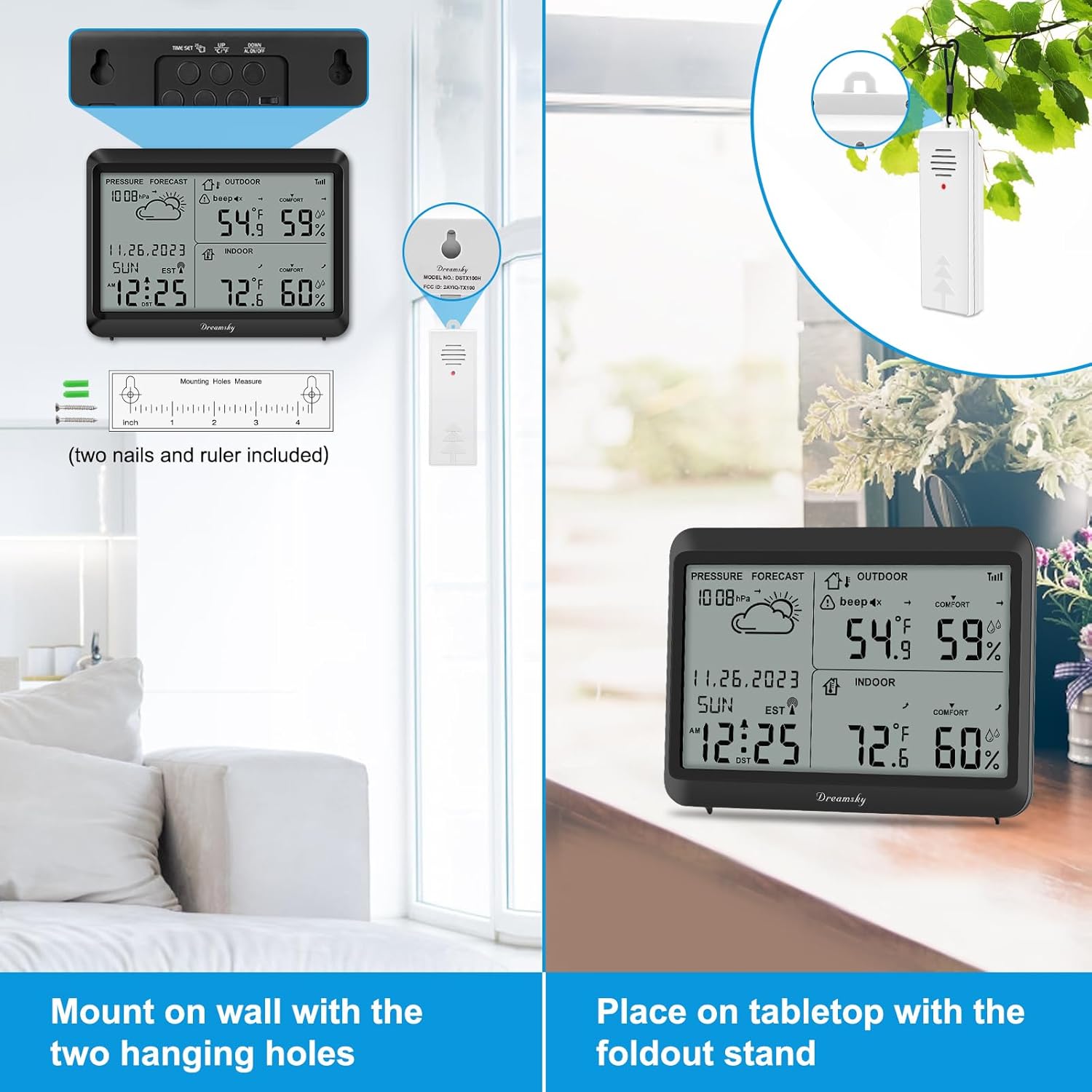
The main unit can be mounted on a wall using the two integrated hanging holes or placed on a tabletop using its foldout stand.
- Tabletop Placement: Extend the foldout stand on the back of the main unit to place it on any flat surface.
- Wall Mounting: Use the two hanging holes on the back of the main unit to mount it securely on a wall using screws or nails (included).
Operating Instructions
1. Display Overview

The display shows current indoor and outdoor temperature and humidity. The indoor temperature range is 32°F to 122°F (0°C to 50°C) and humidity 10% to 99% RH. The outdoor temperature range is -40°F to 158°F ((-40°C to 70°C) and humidity 10% to 99% RH.
The large LCD screen displays various information including:
- Current Time and Date
- Indoor Temperature and Humidity
- Outdoor Temperature and Humidity
- Weather Forecast Icon (Sunny, Partly Sunny, Cloudy, Rainy, Snowy)
- Barometric Pressure Trend
- MAX/MIN records for temperature and humidity
- Alert indicators
2. Atomic Clock Function

The weather station features an atomic clock that automatically sets the time, date, and day of the week. It supports automatic Daylight Saving Time (DST) adjustments and offers both 12-hour and 24-hour time formats.
The weather station automatically receives the WWVB signal to set the precise time, date, and day of the week. This feature eliminates the need for manual time adjustments, including automatic Daylight Saving Time (DST) changes.
- The atomic clock icon will flash during signal reception and become solid once synchronized.
- If the signal is not received, the time can be set manually (refer to the full user manual for detailed steps).
3. Weather Forecast
The weather station forecasts weather conditions for the next 12-24 hours based on changes in barometric pressure. The forecast is indicated by graphical icons:
- Sunny
- Partly Sunny
- Cloudy
- Rainy
- Snowy
Note: The weather forecast is an estimation and may not always be 100% accurate, especially for localized, rapidly changing weather patterns.
4. High/Low Temperature Alerts
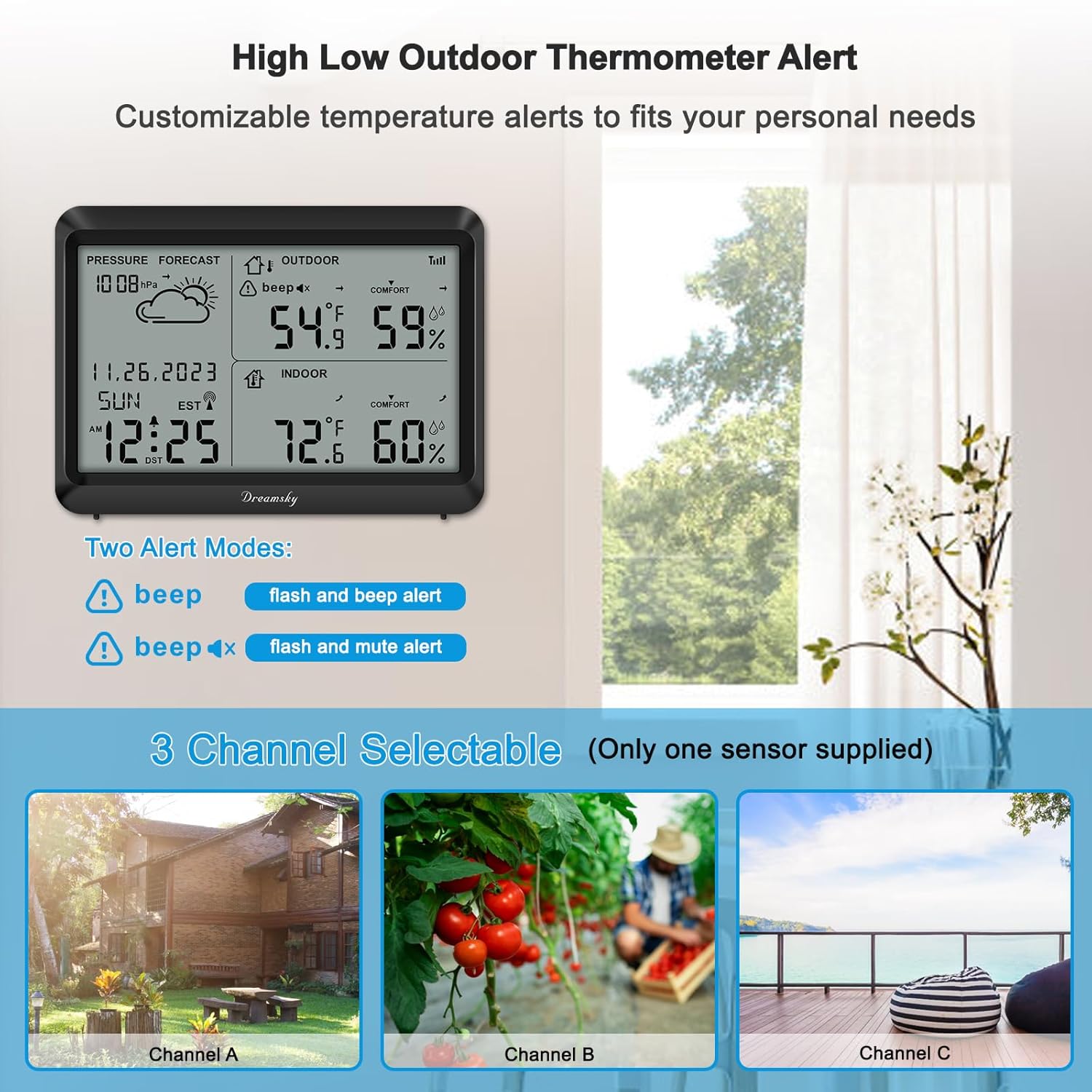
This image details the high/low temperature alert feature, offering two modes: flash & beep alert, and flash & mute alert. It also shows the capability to connect up to three outdoor sensors, though only one is included.
You can set customizable high and low temperature alerts for the outdoor sensor. When the temperature exceeds or falls below your set limits, the station will notify you.
- Flash & Beep Alert: The display will flash, and an audible beep will sound.
- Flash & Mute Alert: The display will flash without an audible beep.
Refer to the full user manual for detailed instructions on setting temperature alert thresholds.
5. Channel Selection
The weather station supports up to three wireless outdoor sensors. If you have multiple sensors (additional sensors sold separately), you can switch between their readings using the 'CHANNEL' button on the main unit. The included sensor is typically set to Channel 1 by default.
Maintenance
- Clean the display and unit with a soft, dry cloth. Do not use abrasive cleaners or solvents.
- Replace batteries in both the main unit and outdoor sensor when the low battery indicator appears on the display.
- Ensure the outdoor sensor is protected from extreme weather conditions to prolong its lifespan.
- Avoid exposing the main unit to direct sunlight, extreme temperatures, or moisture.
Troubleshooting
| Problem | Solution |
|---|---|
| No outdoor temperature/humidity reading. |
|
| Atomic clock not setting automatically. |
|
| Inaccurate weather forecast. |
|
| Display is dim or blank. |
|
Specifications
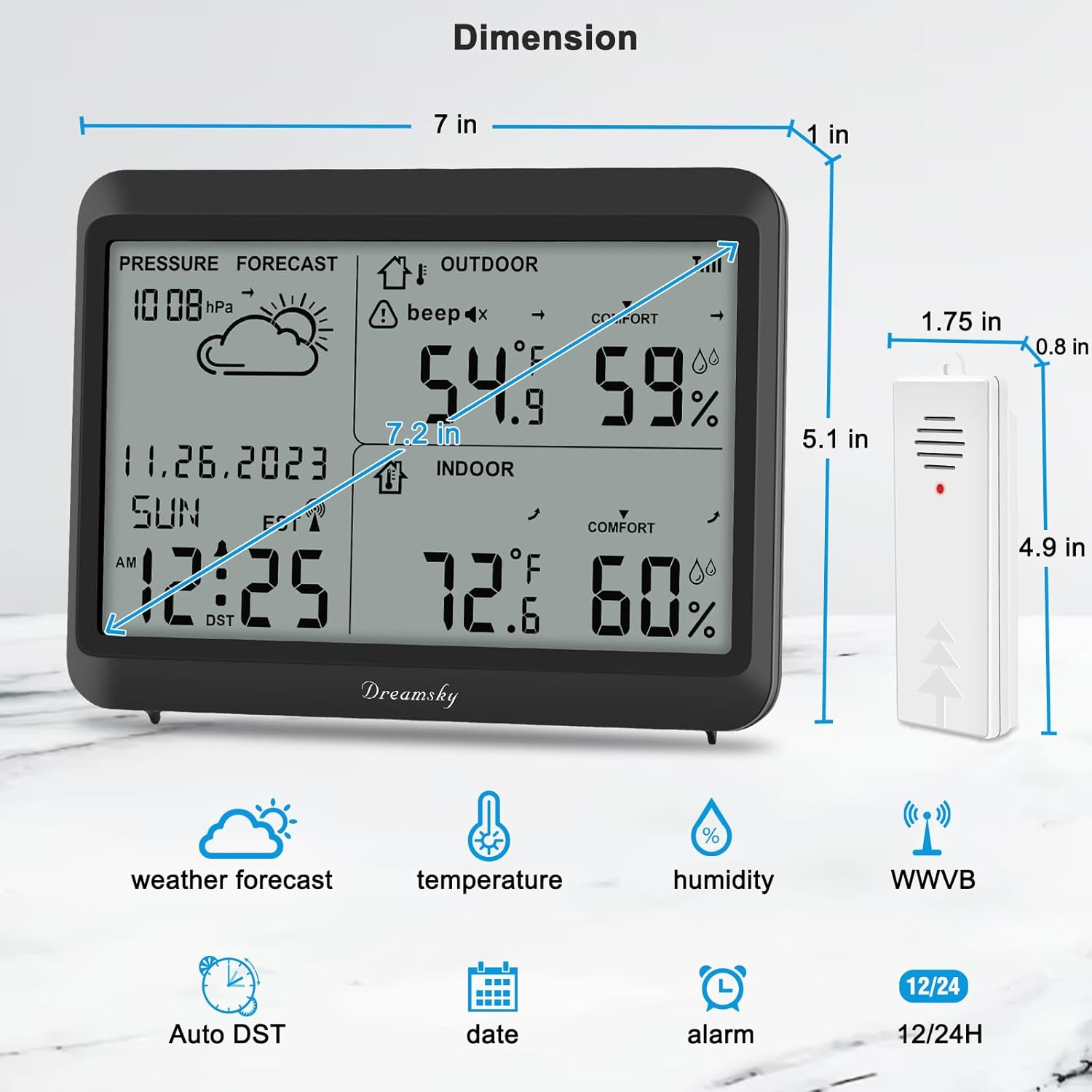
This diagram provides the physical dimensions of the weather station main unit (7 inches wide, 5.1 inches high, 1 inch deep) and the outdoor sensor (1.75 inches wide, 4.9 inches high, 0.8 inches deep).
| Feature | Detail |
|---|---|
| Brand | DreamSky |
| Model | B0CL4L238R |
| Power Source | Main Unit: 3 AAA Batteries; Sensor: 2 AA Batteries |
| Display Type | LCD |
| Indoor Temperature Range | 32°F to 122°F (0°C to 50°C) |
| Outdoor Temperature Range | -40°F to 158°F (-40°C to 70°C) |
| Humidity Range | 10% to 99% RH |
| Temperature Accuracy | ±1°C |
| Wireless Range | Up to 330 feet (100 meters) in open air |
| Connectivity Technology | Radio Frequency |
| Special Features | Atomic Clock, Auto DST, High/Low Alerts, Weather Forecast |
| Material | Plastic |
Warranty and Support
DreamSky products are designed for reliability and performance. For specific warranty information, please refer to the warranty card included with your product or visit the official DreamSky website.
If you encounter any issues or have questions regarding your weather station, please contact DreamSky customer support through the retailer where you purchased the product or via the contact information provided on the DreamSky website.
For additional resources and FAQs, please visit the DreamSky Store on Amazon.