
Product Overview
The ZdalaMit RC-978 is a direct replacement remote control designed for various Denon AV Receiver models. This remote offers immediate functionality without the need for complex programming or setup, providing a convenient solution for lost or damaged original remotes.
Key Features:
- No programming required; ready for use upon battery installation.
- Compatible with Denon AV Receiver models: AVR-1905, AVR-1906, AVR-785, AVR-785S, AVR-19/78505.
- Operates using 2X 1.5V AAA Alkaline Batteries (not included).
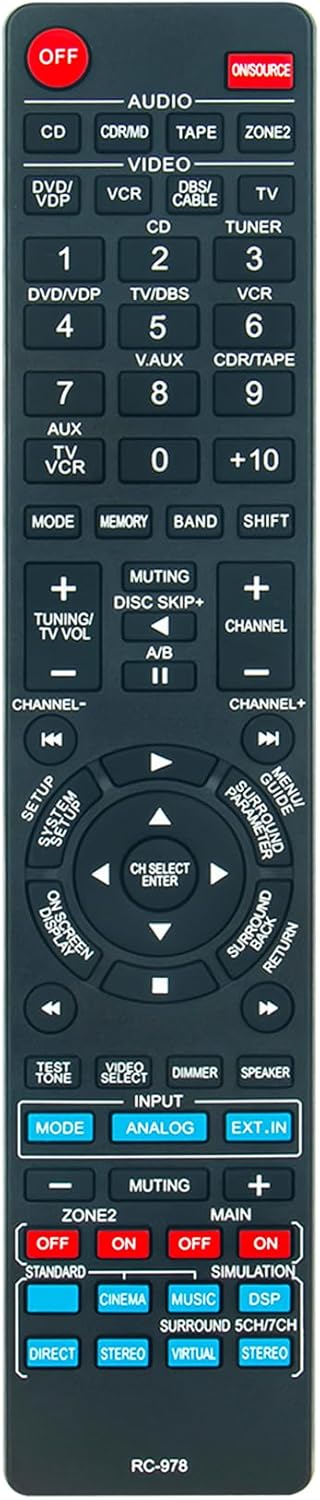
Figure 1: Front view of the RC-978 Replacement Remote Control.

Figure 2: Comparison of the RC-978 Replacement Remote (left) and an Original Denon Remote (right).
Setup
Battery Installation
To begin using your RC-978 remote control, you must first install the batteries.
- Locate the battery compartment on the back of the remote control.
- Slide the battery compartment cover downwards or in the direction indicated by an arrow to open it.
- Insert two (2) 1.5V AAA Alkaline batteries, ensuring that the positive (+) and negative (-) terminals align correctly with the markings inside the compartment.
- Slide the battery compartment cover back into place until it clicks securely.
Once batteries are installed, the remote is ready for immediate use with compatible Denon AV Receivers.
Operating Instructions
The RC-978 remote control is designed to replicate the functions of your original Denon AV Receiver remote. Below are common operations:
- Power On/Off: Press the OFF button located at the top left to turn the receiver on or off.
- Input Selection: Use the dedicated input buttons (e.g., CD, DVD/VDP, TUNER, V.AUX) to switch between different audio/video sources connected to your receiver.
- Volume Control: Adjust the volume using the TUNING/TV VOL + and - buttons.
- Channel Navigation: For tuner functions, use the CHANNEL + and - buttons.
- Muting: Press the MUTING button to temporarily silence the audio output. Press again to unmute.
- Navigation Pad: Use the central directional buttons (UP, DOWN, LEFT, RIGHT) and CH SELECT ENTER button for menu navigation and selection on your receiver's display.
- Menu Access: Buttons like SETUP SYSTEM SETUP, MENU/GUIDE PARAMETER, ON SCREEN DISPLAY, and SURROUND BACK RETURN provide access to receiver settings and menus.
Refer to your Denon AV Receiver's original manual for detailed instructions on specific functions and advanced settings.
Maintenance
Battery Replacement
Replace batteries when the remote's responsiveness decreases or it stops functioning. Always replace both batteries simultaneously with new 1.5V AAA Alkaline batteries. Do not mix old and new batteries, or different types of batteries.
Cleaning
To clean the remote control, gently wipe its surface with a soft, dry cloth. For stubborn dirt, slightly dampen the cloth with water or a mild, non-abrasive cleaner. Avoid using harsh chemicals, solvents, or abrasive materials, as these can damage the remote's finish or internal components.
Storage
Store the remote control in a cool, dry place away from direct sunlight and extreme temperatures. If the remote will not be used for an extended period, it is recommended to remove the batteries to prevent leakage and potential damage.
Troubleshooting
| Problem | Possible Cause | Solution |
|---|---|---|
| Remote not responding. |
|
|
| Certain buttons not working. |
|
|
| Remote works intermittently. |
|
|
Specifications
| Model Number | RC-978 |
| Compatible Devices | Denon AV Receiver models: AVR-1905, AVR-1906, AVR-785, AVR-785S, AVR-19/78505 |
| Power Supply | 2 x 1.5V AAA Alkaline Batteries (not included) |
| Product Dimensions | 5.9 x 1.57 x 0.55 inches (15 x 4 x 1.4 cm) |
| Item Weight | 1.41 ounces (40 grams) |
| Color | Black |
| Special Feature | Ergonomic design |
Warranty and Support
This product is designed for reliable performance. For any queries or assistance regarding the RC-978 Replacement Remote Control, please contact the seller or manufacturer directly. Your satisfaction is important, and support is available to address any concerns you may have.
Please refer to your purchase documentation for specific warranty terms and contact information.