
Lemorele G60-USB
Contents
Lemorele USB to Wireless HDMI Transmitter and Receiver User Manual
Model: G60-USB
1. Introduction
The Lemorele USB to Wireless HDMI Transmitter and Receiver kit provides a convenient solution for wireless video and audio transmission. This device allows you to stream content from your computer to an HD TV or projector without the need for messy HDMI cables, creating a clean and comfortable environment for work or home entertainment. It supports streaming from devices running Windows 7 and above, and Mac OS 10.15.7 and above.
This kit is ideal for various applications including conferences, home theaters, multimedia classrooms, educational settings, live lectures, media interviews, and travel.
2. What's in the Box

Figure 2.1: Package Contents
- Wireless USB A Transmitter (TX) x 1
- Wireless HDMI Receiver (RX) x 1
- USB C Charging Cable x 1
- Power Adapter x 1
- 25cm HDMI Cable x 1
- User Manual x 1
- Exquisite Box x 1
3. Product Overview

Figure 3.1: Lemorele Wireless HDMI Kit Components
The Lemorele Wireless HDMI Kit consists of two main components: the Transmitter (TX) and the Receiver (RX).
- Transmitter (TX): Connects to your source device (e.g., laptop, PC) via USB-A.
- Receiver (RX): Connects to your display device (e.g., HDTV, projector) via HDMI. It features two antennas for stable wireless transmission.
4. Setup Instructions
Follow these steps for the initial setup of your Lemorele Wireless HDMI Transmitter and Receiver.
4.1. Connection Diagram

Figure 4.1: Connection Overview
- Connect the Wireless USB A Transmitter (TX) to a USB-A port on your source device (laptop, desktop PC).
- Connect the Wireless HDMI Receiver (RX) to an HDMI input on your display device (HDTV, projector). Ensure the RX unit is powered using the provided USB-C charging cable and power adapter.
4.2. Driver Installation (First Use)
For the first-time use, a driver installation is required for both Windows and Mac OS systems. This enables true plug-and-play functionality for subsequent uses.
4.2.1. Windows System Setup

Figure 4.2: Windows Driver Access
- After connecting the TX unit to your Windows computer, navigate to "This PC" or "My Computer".
- Locate and double-click the "CD Drive (G:) UDisplay" (or similar) virtual drive that appears.
- Run the installer program within this virtual drive.
- Follow the on-screen prompts to complete the driver installation. You may be asked to confirm the installation or restart your computer.
- Once installed, the application interface will appear, showing the connection status as "connected" and the screen display.
4.2.2. Mac OS System Setup

Figure 4.3: Mac OS Authorization
- Connect the TX unit to your Mac computer.
- Click on the UDisplay application icon that appears.
- For first-time use, you must authorize the application. Click "Authorize" and then "Settings" to grant necessary permissions.
- After the application interface appears, it can be used normally. The connection status will show as "connected" and the screen will be displayed.
Note: UDisplay supports 1080p output and is compatible with Mac OS 10.15.7 and above, and Windows 7 and above.
5. Operating Instructions
Once the initial setup and driver installation are complete, the Lemorele Wireless HDMI Kit is ready for use.
5.1. Basic Operation
After the driver is installed, the system will automatically detect the transmitter and receiver. Your computer's display should be mirrored or extended to the connected display device.

Figure 5.1: Wireless Transmission in Use
- The system utilizes 2.4G/5G transmission protocols for a stronger and more stable signal.
- The wireless transmission range can reach up to 165 feet (50 meters) in an open environment.
- Note: Walls or floor penetrations will reduce the effective range to approximately 32 feet (10 meters).
5.2. Multi-Transmitter Support
The system supports connecting up to four Transmitters (TX) to one Receiver (RX), allowing for easy switching between multiple source devices.
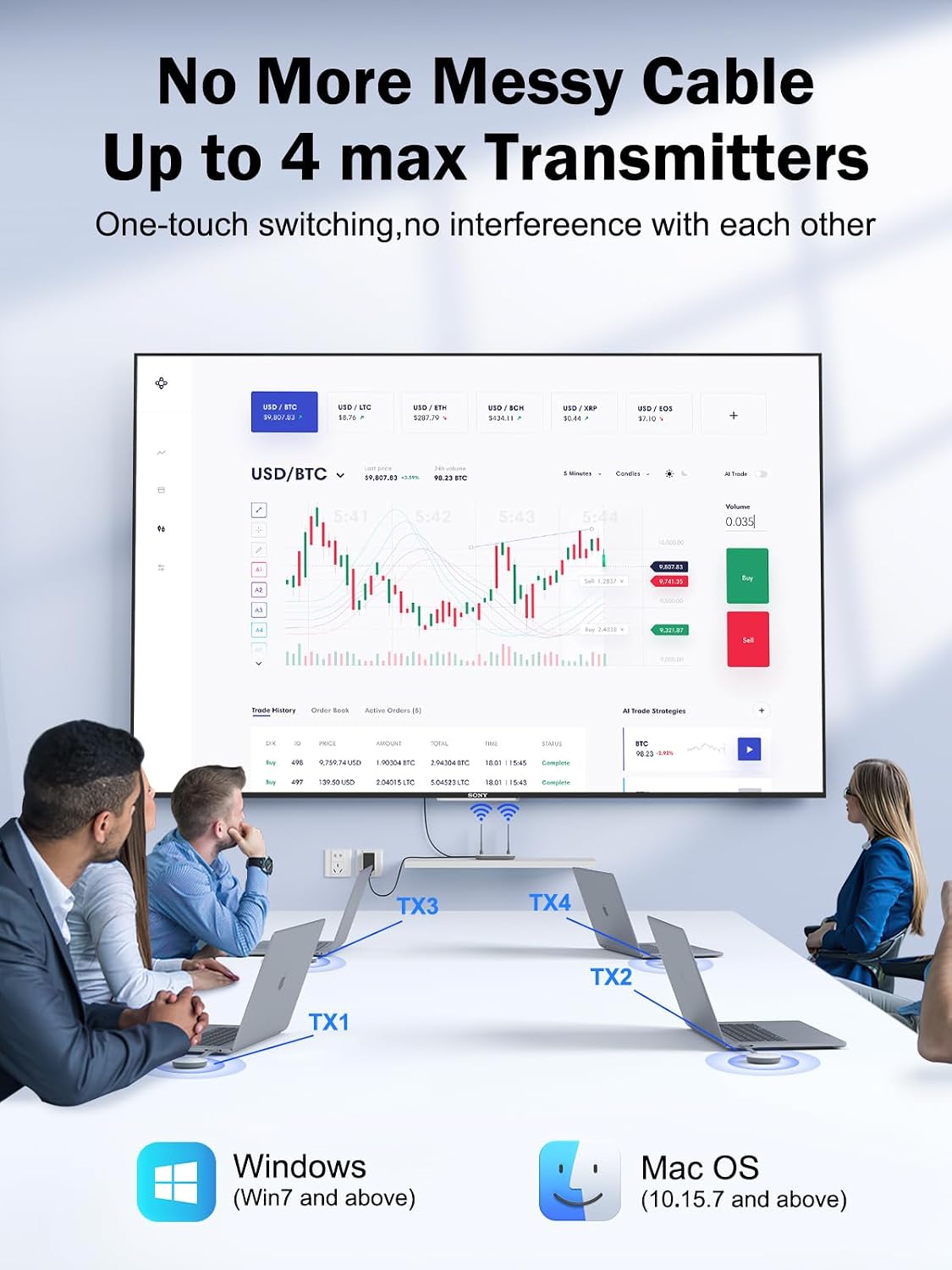
Figure 5.2: Multiple Transmitters to One Receiver Setup
- Connect each additional TX unit to its respective source device.
- To switch between connected TX devices, simply press the button on the TX unit you wish to display.
- The screen conversion will occur automatically within 10 seconds.
Caution: When using multiple transmitters with one receiver, ensure the receiver's pairing mode is entered by pressing its button for more than 5 seconds before attempting to pair additional TX units.
6. Maintenance
To ensure the longevity and optimal performance of your Lemorele Wireless HDMI Transmitter and Receiver, please follow these maintenance guidelines:
- Cleaning: Use a soft, dry cloth to clean the surfaces of the transmitter and receiver. Do not use liquid cleaners or aerosol sprays, as they may damage the devices.
- Storage: When not in use for extended periods, store the devices in a cool, dry place away from direct sunlight and extreme temperatures.
- Handling: Handle the devices with care. Avoid dropping them or subjecting them to strong impacts, which could damage internal components.
- Ventilation: Ensure the receiver unit has adequate ventilation to prevent overheating, especially during prolonged use.
7. Troubleshooting
If you encounter issues with your Lemorele Wireless HDMI Kit, refer to the following common problems and solutions:
| Problem | Possible Cause | Solution |
|---|---|---|
| No signal on display. |
|
|
| Video quality is poor or choppy. |
|
|
| Cannot switch between multiple TX units. |
|
|
| Driver installation failed. |
|
|
8. Specifications
| Feature | Detail |
|---|---|
| Brand | Lemorele |
| Model Name | G60 |
| Model Number | G60-USB |
| Connectivity Technology | Transmitter with USB A port, Receiver with HDMI port |
| Connector Type | USB Transmitter, HDMI Receiver |
| Resolution | 1080p |
| Supported Internet Services | Netflix, Hulu, Amazon Prime Video |
| Controller Type | Button |
| Form Factor | TV-Stick |
| Color | TX&RX(USB) |
| Product Dimensions | 14.7 x 6.1 x 2 cm; 446 Grams |
| First Available | 16. October 2023 |
| Manufacturer | Lemorele |
| Country of Origin | China |
9. Warranty and Support
Lemorele stands behind the quality of its products. Your purchase includes:
- 30-Day Return/Refund Policy: If you are not satisfied with your product, you may be eligible for a return or refund within 30 days of purchase.
- 12-Month Warranty: The product is covered by a 12-month warranty from the date of purchase, protecting against manufacturing defects.
- Lifetime Technical Support: Lemorele provides lifetime technical support for this product.
For any questions or technical assistance, please contact Lemorele customer support. You can typically find contact information on the official Lemorele website or through your purchase platform. A satisfactory response will be provided within 24 hours.
Ask a question about this manual
Ask about setup, troubleshooting, compatibility, parts, safety, or missing instructions. Manuals+ will review the question and use this page’s manual context to help answer it.