
Waytronic M14Black
User Manual
Infrared Motion Sensor Activated Sound Speaker
Brand: Waytronic | Model: M14Black
1. Introduction
This manual provides detailed instructions for the setup, operation, and maintenance of your Waytronic Infrared Motion Sensor Activated Sound Speaker. This device is designed to detect motion and play a pre-recorded or custom voice message, serving various purposes such as greeting visitors, providing security alerts, or acting as a reminder.
2. Product Features
The Waytronic Infrared Motion Sensor Activated Sound Speaker offers the following key functionalities:
- Customizable Voice Recording: Equipped with a built-in microphone, allowing users to record and customize their own voice messages. Recording is initiated by pressing a button.
- Extended Recording Capacity: Supports recording up to 130 seconds, with the ability to segment recordings.
- Wide Motion Detection: Features a detection range with a 120-degree horizontal and 60-degree vertical angle.
- Adjustable Volume: Provides two distinct volume levels for clear audio output.
- Flexible Power Options: Can be powered by three AAA dry batteries or a DC5V USB power supply.
- Easy Re-recording: Messages can be re-recorded as many times as needed, simply by pressing a button.
3. Package Contents
Please verify that all items are present in the package:
- Infrared Motion Sensor Activated Sound Speaker (Black)
- Mounting Screws
- Ball Mounting Accessories
- User Manual (this document)
4. Product Overview

Figure 4.1: Front and side view of the Waytronic Infrared Motion Sensor Activated Sound Speaker. The front features the PIR sensor and speaker grille, while the side shows the mounting bracket.
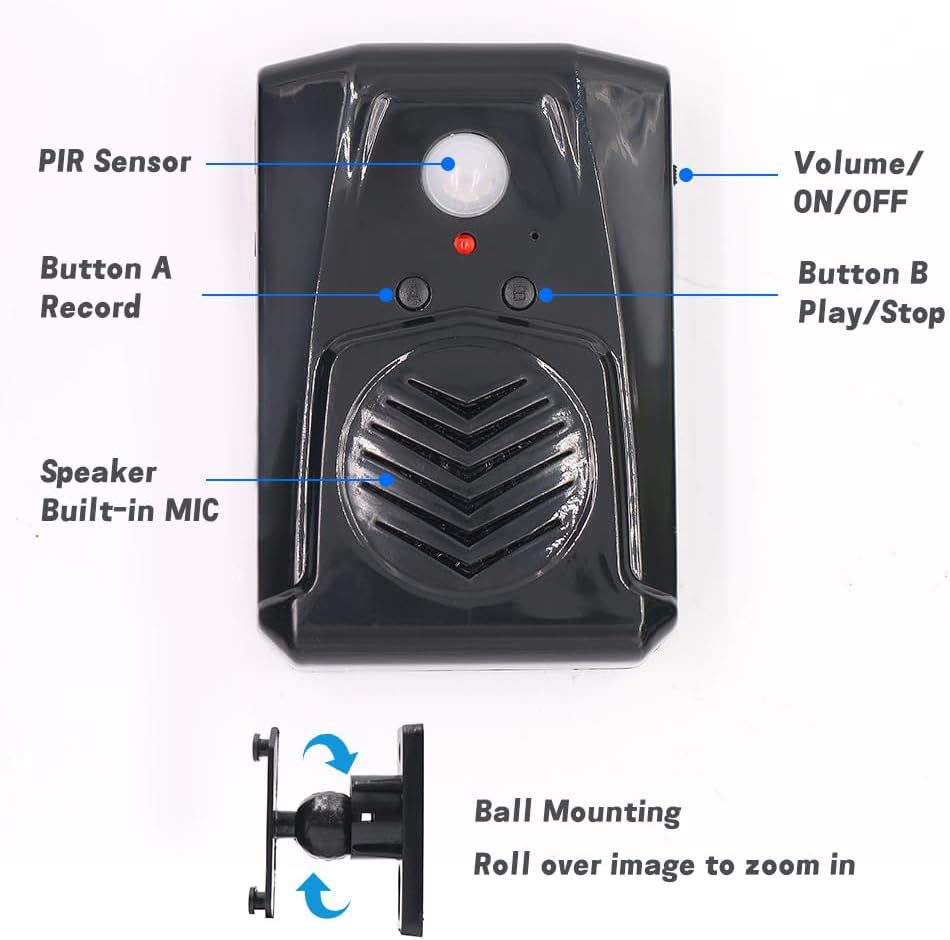
Figure 4.2: Detailed front view of the speaker with key components labeled: PIR Sensor, Volume/ON/OFF switch, Button A (Record), Button B (Play/Stop), and the built-in speaker/microphone. The ball mounting accessory is also shown.

Figure 4.3: Rear view of the speaker showing the Screw Mounting Hole, Bracket Mounting points, and the Battery Case for three AAA batteries.

Figure 4.4: Side view illustrating the USB port for power supply (DC5V) and the 360-degree rotatable mounting bracket.
5. Installation
- Power Supply:
- Insert three AAA batteries into the battery case located on the back of the device (refer to Figure 4.3). Ensure correct polarity.
- Alternatively, power the device using a DC5V USB cable connected to the USB port on the side (refer to Figure 4.4).
- Mounting Location:
- Choose an indoor location such as a front door, corridor, or shop entrance.
- For optimal performance and to prevent false triggers, avoid areas with direct sunlight, significant temperature variations, or proximity to air conditioners and heaters.
- Mounting the Device:
- Use the provided mounting screws and ball mounting accessories to secure the speaker to a wall or surface. The ball mounting allows for 360-degree rotation to adjust the detection angle.
- Ensure the PIR sensor (Figure 4.2) faces the area where motion detection is desired.
6. Operation
6.1. Recording a Message
- Ensure the device is powered on using the Volume/ON/OFF switch (Figure 4.2).
- Press and hold Button A (Record). The indicator light may change to confirm recording mode.
- Speak clearly into the built-in microphone (located near the speaker grille, Figure 4.2). The maximum recording time is 130 seconds.
- Release Button A to stop recording. A successful recording typically requires more than 3 seconds of audio.
- To re-record, simply repeat the process. The new recording will overwrite the previous one.
6.2. Playing a Message
- After recording, the device is ready to play the message upon motion detection.
- To manually play the current message, press Button B (Play/Stop). Press again to stop playback.
6.3. Adjusting Volume
Use the Volume/ON/OFF switch (Figure 4.2) to select between two volume levels. Slide the switch to the desired position.
6.4. Motion Detection
Once powered on and a message is recorded, the device will automatically play the message when motion is detected within its 120-degree horizontal and 60-degree vertical detection range.

Figure 6.1: This diagram illustrates that audio files are changed via button recording, not through USB data cable or TF card.
7. Applications
The Waytronic Motion Sensor Speaker can be utilized in various scenarios:
- Greeting Visitors: Place at an entrance to play a welcoming message.
- Security Reminder: Record a warning message to deter intruders or remind individuals of security protocols.
- Daily Audio Reminders: Use for personal reminders in homes or offices.
- Sale Advertising: Play promotional messages in retail environments.
- Animal Deterrent: Record sounds to discourage animals from entering certain areas.
- Event Enhancement: Integrate into festive displays or haunted house setups for interactive sound effects.
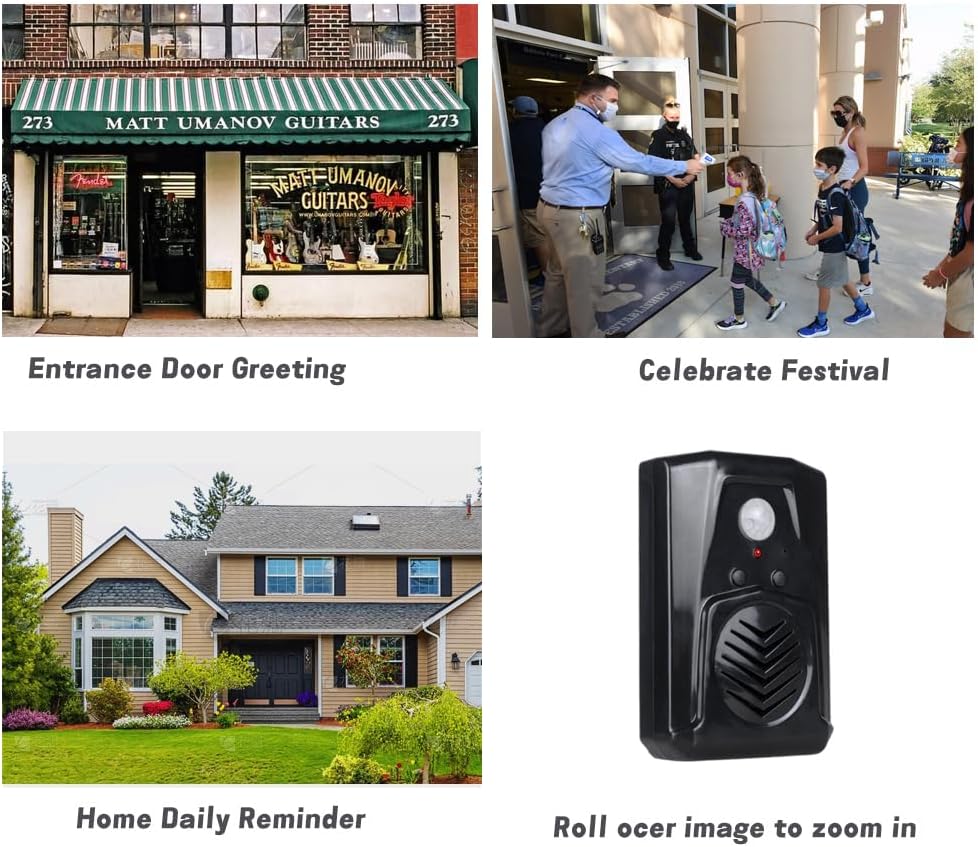
Figure 7.1: Examples of applications including entrance door greeting, celebrating festivals, and home daily reminders.

Figure 7.2: The speaker used to greet visitors upon entry.

Figure 7.3: The speaker playing a security message to an approaching individual.

Figure 7.4: The speaker used to deter animals, such as a lemur, with an audible message.
8. Troubleshooting
| Problem | Possible Cause | Solution |
|---|---|---|
| Device does not power on. | Batteries are dead or incorrectly inserted; USB cable not connected or faulty. | Check battery polarity and replace if necessary. Ensure USB cable is securely connected and functional. |
| Cannot record a message. | Button A not held long enough; recording time too short (less than 3 seconds). | Press and hold Button A for the entire duration of your message. Ensure the recording is at least 3 seconds long. |
| Motion sensor not detecting. | Obstruction in detection path; incorrect placement; sensor malfunction. | Ensure a clear line of sight for the PIR sensor. Reposition the device to avoid direct sunlight or heat sources. Verify the device is powered on. |
| Sound quality is poor or distorted. | Low battery power; volume set too high; microphone too far during recording. | Replace batteries or use USB power. Adjust volume to a lower setting. Ensure you speak close to the microphone during recording. |
| Device triggers falsely. | Placed in an area with direct sunlight, large temperature variations, or near air conditioners/heaters. | Relocate the device to an area free from environmental factors that can cause false triggers. |
9. Specifications
| Feature | Detail |
|---|---|
| Brand | Waytronic |
| Model Number | M14Black |
| Color | Black |
| Power Source | Battery Powered (3x AAA) or DC5V USB |
| Item Weight | 0.11 Kilograms (3.84 ounces) |
| Maximum Range (Motion Detection) | 13 Feet (4 Meters) |
| Detection Angle (Horizontal) | 120 degrees |
| Detection Angle (Vertical) | 60 degrees |
| Recording Time | Up to 130 seconds |
| Mounting Type | Door Mount (with included accessories) |
| Operating Temperature | 60 Degrees Fahrenheit |
| Package Dimensions | 5.28 x 3.66 x 2.6 inches |
10. Safety Information
- Do not expose the device to extreme temperatures, direct sunlight, or high humidity.
- Keep the device away from water and other liquids.
- Do not attempt to open or repair the device yourself. Refer to qualified personnel for service.
- Dispose of batteries according to local regulations. Do not mix old and new batteries or different types of batteries.
- Keep out of reach of children to prevent accidental ingestion of small parts or batteries.
11. Customer Support
If you have any questions or encounter issues with your Waytronic Infrared Motion Sensor Activated Sound Speaker, please contact our customer support team. We are committed to assisting you within 24 hours.
For support, please visit the Waytronic Store on Amazon or refer to the contact information provided with your purchase.
Ask a question about this manual
Ask about setup, troubleshooting, compatibility, parts, safety, or missing instructions. Manuals+ will review the question and use this page’s manual context to help answer it.