Introduction
The JBL Professional IRX ONE is an all-in-one column PA system designed for clear, powerful audio performance. Featuring a custom-tuned, C-shaped speaker array and an 8-inch woofer, it delivers rich clarity and deep bass. This system includes a 3-channel mixer, Bluetooth 5.0 audio streaming, dbx automatic feedback suppression (AFS), five EQ presets, and Soundcraft audio ducking, making it suitable for various applications from live music to presentations.
What's in the Box
- IRX ONE All-in-one PA System (Base Unit, Column Spacers, Array Cabinet)
- Power Cable
- Quick Start Guide
Key Features
- Custom-Tuned C-Shaped Array: Six 2-inch high-frequency drivers provide rich clarity and wide, seamless coverage.
- Powerful Bass: An 8-inch woofer delivers low-frequency response down to 40 Hz.
- Integrated 3-Channel Mixer: Supports 1/4-inch and XLR inputs with 48V phantom power, and a 1/4-inch balanced mix-out.
- Bluetooth 5.0: For wireless audio streaming from compatible devices.
- Advanced Audio Processing: Features dbx automatic feedback suppression (AFS), five EQ presets, and Soundcraft audio ducking.
- Portable Design: Ergonomically optimized carry handle and lightweight cabinet for easy transport. Column spacers and array tower store conveniently in the base unit.
Setup
The JBL IRX ONE is designed for quick and easy assembly. Follow these steps to set up your system:
- Unpack Components: Carefully remove the base unit, column spacers, and array cabinet from their packaging.
- Assemble the Column: Insert the column spacers into the top of the base unit. Then, attach the array cabinet to the top of the column spacers. Ensure all connections are secure.
- Power Connection: Connect the provided power cable to the power input on the rear of the base unit and then to a suitable power outlet.
- Initial Power On: Press and hold the power button on the control panel until the unit powers on.

Image: The JBL IRX ONE speaker system shown fully assembled, ready for use.

Image: The JBL IRX ONE speaker system with its components (base unit, column spacers, and array cabinet) laid out separately, illustrating its modular design.
Operating Instructions
The JBL IRX ONE offers versatile control options for various audio sources.
Mixer Controls
The integrated 3-channel mixer allows you to connect microphones, instruments, and other audio devices. Each channel features dedicated controls for gain, bass, mid, and treble, along with effects like reverb, delay, and chorus.
- Inputs: Use the 1/4-inch and XLR combination inputs for microphones and line-level devices. 48V phantom power is available for condenser microphones.
- Output: A 1/4-inch balanced mix-out allows you to send the mixed audio to another speaker or recording device.
Bluetooth Audio Streaming
Connect your smartphone, tablet, or laptop wirelessly via Bluetooth 5.0 for audio playback.
- Activate Bluetooth: On the control panel, navigate to the Bluetooth settings using the Master/Menu knob and Mode Select button.
- Pair Device: On your audio device, search for "JBL IRX ONE" in the Bluetooth settings and select it to pair.
- Stream Audio: Once paired, you can stream audio directly to the speaker system.
App Control
For advanced control and customization, download the JBL Pro Connect app on your compatible smartphone or tablet. The app provides remote control over mixer settings, EQ presets, effects, and more.
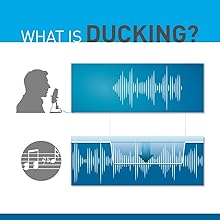
Image: A diagram explaining the Soundcraft audio ducking feature, where background music volume automatically lowers when speech is detected.
Maintenance
To ensure the longevity and optimal performance of your JBL IRX ONE speaker system, follow these maintenance guidelines:
- Cleaning: Use a soft, dry cloth to clean the exterior surfaces. Avoid abrasive cleaners or solvents.
- Storage: When not in use, store the speaker in a cool, dry place. Utilize the integrated storage for column spacers and the array cabinet within the base unit for compact and secure storage.
- Transportation: Use the ergonomically designed carry handle for easy transport. For longer distances, consider using a protective case to prevent damage.
- Ventilation: Ensure proper ventilation around the unit to prevent overheating. Do not block any ventilation openings.
Troubleshooting
If you encounter issues with your JBL IRX ONE, refer to these common troubleshooting tips:
- No Power: Ensure the power cable is securely connected to both the speaker and a working power outlet. Check the power button.
- No Sound: Verify that all audio cables are correctly connected. Check the volume levels on the speaker, mixer channels, and your audio source. Ensure Bluetooth is properly paired if streaming wirelessly.
- Feedback: Activate the dbx automatic feedback suppression (AFS) feature. Adjust microphone placement and gain levels to minimize feedback.
- Bluetooth Connectivity Issues: Ensure your device is within the 10-meter Bluetooth range. Disconnect and re-pair the device. Try restarting both the speaker and your audio device.
For more detailed troubleshooting or persistent issues, please contact JBL Professional customer support.
Specifications
| Brand | JBL |
| Model Number | JBL IRX ONE |
| Speaker Maximum Output Power | 1300 Watts |
| Frequency Response | 40 Hz |
| Connectivity Technology | Auxiliary, Bluetooth, XLR |
| Audio Output Mode | Bluetooth |
| Mounting Type | Floor Standing |
| Enclosure Material | Plastic |
| Speaker Type | Tower |
| Additional Features | Portable |
| Subwoofer Diameter | 8 Inches |
| Color | Black |
| Item Dimensions D x W x H | 10.5"D x 15.73"W x 80"H |
| Item Weight | 34.1 Pounds |
| Bluetooth Range | 10 Meters |
| Total USB 2.0 Ports | 1 |
Warranty & Support
The JBL Professional IRX ONE comes with a 3-Year Manufacturer's Warranty.
Who is protected by the warranty? This warranty protects only the original end-user ("you") and is not transferrable. Any attempt to transfer this warranty shall immediately make this warranty void. This warranty is valid only for Harman Professional products, as listed above, purchased from authorized Harman Professional dealers within the fifty United States, and it does not apply to products purchased or transferred elsewhere. If you purchased this product (or have subsequently transferred it) outside the fifty United States, you should contact your local Harman distributor for warranty information.
For technical support, service, or warranty claims, please contact your authorized JBL Professional dealer or visit the official JBL Professional website for contact information in your region.


