
1. Introduction
Thank you for choosing the Mpayel 46" Low Profile Indoor Ceiling Fan with Light. This manual provides detailed instructions for installation, operation, and maintenance to ensure safe and efficient use of your new ceiling fan.
- Convenient Control: Features both remote control and APP control for effortless adjustment of fan speed, dimmable lighting, and a 2-hour timing off function.
- Quiet Operation: Equipped with a DC motor for silent performance, ensuring a peaceful environment.
- Optimal Airflow: The 5-blade design provides efficient air circulation, suitable for various indoor spaces.
- Versatile Lighting: Dimmable lighting system with adjustable color temperatures to create the perfect ambiance.
- Seasonal Comfort: Reversible motor allows for changing fan direction to provide cooling in summer and heat distribution in winter.
- Durable Design: Crafted with high-quality materials and a sleek black finish for long-lasting performance.
2. Safety Instructions
Please read all instructions carefully before beginning installation. Failure to follow these instructions may result in electric shock, fire, or personal injury.
- Always disconnect power at the main circuit breaker before installation or maintenance.
- Installation should be performed by a qualified electrician.
- Ensure the mounting structure can support the weight of the fan (approximately 11.27 pounds).
- Do not bend the blade holders during installation or cleaning.
- Keep hands clear of fan blades when operating.
- Use only the remote control and APP provided for operation.
3. Package Contents
Verify all parts are present before beginning assembly:
- Fan Motor Assembly
- Canopy
- Controller & Remote
- Blades (5x)
- Screws and Washers (various sizes for assembly)
- Light Board (LED integrated)
- Leaf Forks / Blade Brackets (5x)
- User Manual

Image: All components included in the Mpayel ceiling fan package.
4. Setup and Installation
Follow these steps for proper assembly and installation:
4.1 Blade Assembly
- Attach each blade to a leaf fork (blade bracket) using the provided screws and washers. Ensure screws are tightened securely.
- Repeat for all five blades.

Image: Close-up of the reversible fan blades, showing both black and reddish-brown wood grain sides.
4.2 Motor Assembly
- Carefully attach each assembled blade-and-leaf-fork unit to the fan motor assembly. Align the screw holes and secure with the appropriate screws.
- Ensure all blade units are firmly attached to the motor.
4.3 Light Assembly
- Connect the LED light board wires to the corresponding wires from the fan motor assembly.
- Carefully place the LED light board into its designated slot on the fan motor assembly.
- Attach the light cover by twisting or securing it into place.
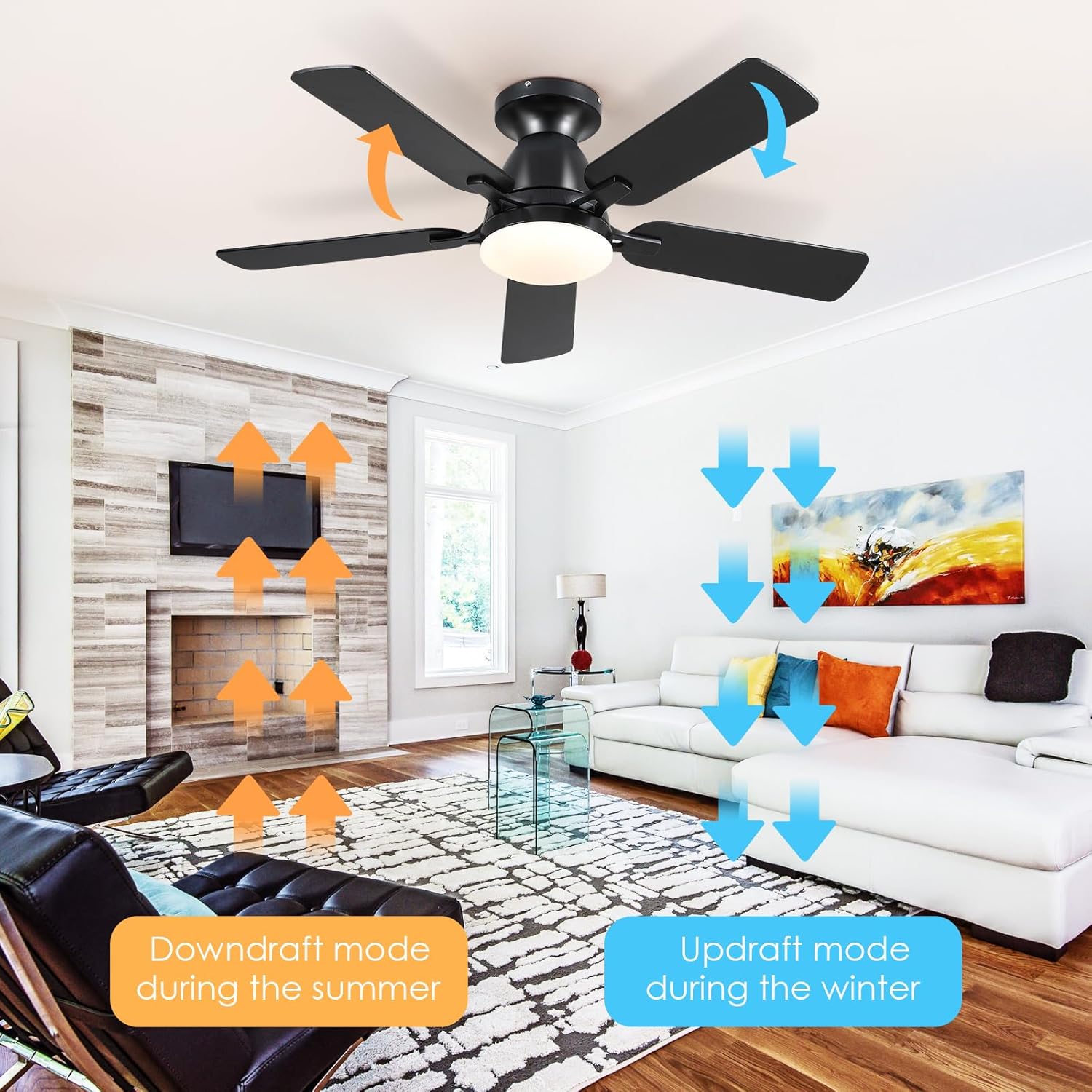
Image: The integrated LED light module, showing its compact design and multiple light color temperatures (3000K Warm Light, 4500K Natural Light, 6000K Cold White Light).
4.4 Mounting to Ceiling
Before mounting, ensure the main power is disconnected at the circuit breaker.
- Secure the mounting bracket (canopy) to the ceiling junction box using the provided screws. Ensure it is firmly attached and can support the fan's weight.
- Connect the fan's electrical wires (live, neutral, ground) to the corresponding household wires. Refer to the wiring diagram in the full manual for detailed connections.
- Carefully lift the assembled fan and attach it to the mounting bracket. Secure with screws.
- Ensure all connections are secure and the fan is stable before restoring power.
Video: Detailed step-by-step guide for installing the Mpayel Ceiling Fan with Light, covering assembly and ceiling mounting.
5. Operating Instructions
Your Mpayel ceiling fan can be operated using the included remote control or the dedicated mobile application.
5.1 Remote Control
The remote control allows you to manage all fan functions:
- ON/OFF: Turn the light on or off.
- ALL OFF: Turn off both the fan and the light.
- Brightness & Color Temperatures Adjust: Adjust light brightness and cycle through 3 color temperatures (Warm, Natural, Cool White).
- F/R (Forward/Reverse): Change the direction of the fan blades for seasonal use.
- 2H Timing: Set a 2-hour timer for automatic fan shutdown.
- Wind Speed (1-6): Select from 6 fan speeds.
- Night Mode: Activates a low-light, low-speed setting for comfortable sleep.
- Natural Wind: Simulates a natural breeze by varying fan speed.

Image: Overview of the remote control with labeled buttons for fan speed, light control, timer, and reversible function.

Image: The remote control can be conveniently stored in a wall-mounted holder, allowing it to function as a wall switch.
5.2 APP Control
Download the 'Fan Lamp Pro' APP to control your fan from your smartphone:
- Scan the QR code provided in the manual or on the product packaging to download the APP.
- Ensure Bluetooth is enabled on your smartphone.
- Open the APP and click 'Add Device'.
- Select 'Light Fan' and follow the on-screen prompts to pair with your fan.
- Once connected, you can control fan speed, light settings, and other features directly from the APP interface.

Image: QR code for downloading the 'Fan Lamp Pro' application for smartphone control.
Video: Demonstrates the APP operation flow, including connecting to the fan and controlling various functions like speed and light settings.
Video: Shows the scene function within the APP, allowing users to set specific lighting and fan speed combinations.
Video: Illustrates the 8505 APP operation, providing a comprehensive look at its features and user interface.
5.3 Reversible Motor Function
The reversible motor allows you to optimize airflow for different seasons:
- Summer Mode (Downdraft): Blades rotate counter-clockwise, pushing cool air down to create a wind-chill effect.
- Winter Mode (Updraft): Blades rotate clockwise, drawing air up towards the ceiling to circulate warm air trapped near the ceiling.

Image: Diagram showing the fan's reversible motor function, illustrating downdraft mode for summer and updraft mode for winter.
6. Maintenance
Regular maintenance ensures optimal performance and longevity of your ceiling fan:
- Cleaning: Use a soft, damp cloth to clean the fan blades and motor housing. Do not use abrasive cleaners or solvents.
- Tighten Screws: Periodically check all screws on the fan blades and mounting bracket to ensure they are tight. Loose screws can cause noise or wobbling.
- LED Light: The LED light is integrated and designed for long-term use. Do not attempt to replace the LED module yourself.
7. Troubleshooting
If you encounter issues with your fan, refer to the following common problems and solutions:
- Fan does not operate: Check power supply at the circuit breaker. Ensure all wiring connections are secure. Verify remote control batteries are not depleted.
- Fan wobbles: Ensure all blade screws are tightened. Check that the mounting bracket is securely fastened to the ceiling.
- Noisy operation: Verify all screws are tight. Check for any obstructions in the fan's path.
- Light does not work: Check power supply. Ensure light wires are properly connected.
- Remote/APP not responding: Ensure remote batteries are fresh. Re-pair the remote/APP with the fan following the pairing instructions in Section 5.2.
8. Specifications
| Feature | Detail |
|---|---|
| Brand | Mpayel |
| Model Name | A8505 Ceiling Fans with Lights |
| Color | Black |
| Material | Metal |
| Style | Modern |
| Product Dimensions | 46"L x 46"W x 12"H |
| Item Weight | 11.27 pounds |
| Power Source | Corded Electric |
| Installation Type | Flush Mount |
| Control Method | App, Remote |
| Light Source Type | LED |
| Light Color | White, Warm White (Dimmable, 3 Color Temperatures) |
| Number of Blades | 5 |
| Motor Type | DC Reversible Motor |

Image: Energy efficiency label for the Mpayel ceiling fan, indicating its energy class and consumption.
9. Warranty and Support
Mpayel stands behind the quality of its products. For warranty information, technical support, or any inquiries regarding your ceiling fan, please refer to the contact details provided in the original product packaging or visit the official Mpayel website. Please retain your proof of purchase for warranty claims.
