Introduction
This manual provides detailed instructions for the KNYBTHY Gaming Audio Mixer F91. This device is designed to enhance your audio experience for gaming, live streaming, podcasting, and recording. It features an XLR microphone interface with 48V phantom power, individual channel controls, customizable RGB lighting, and various audio effects.
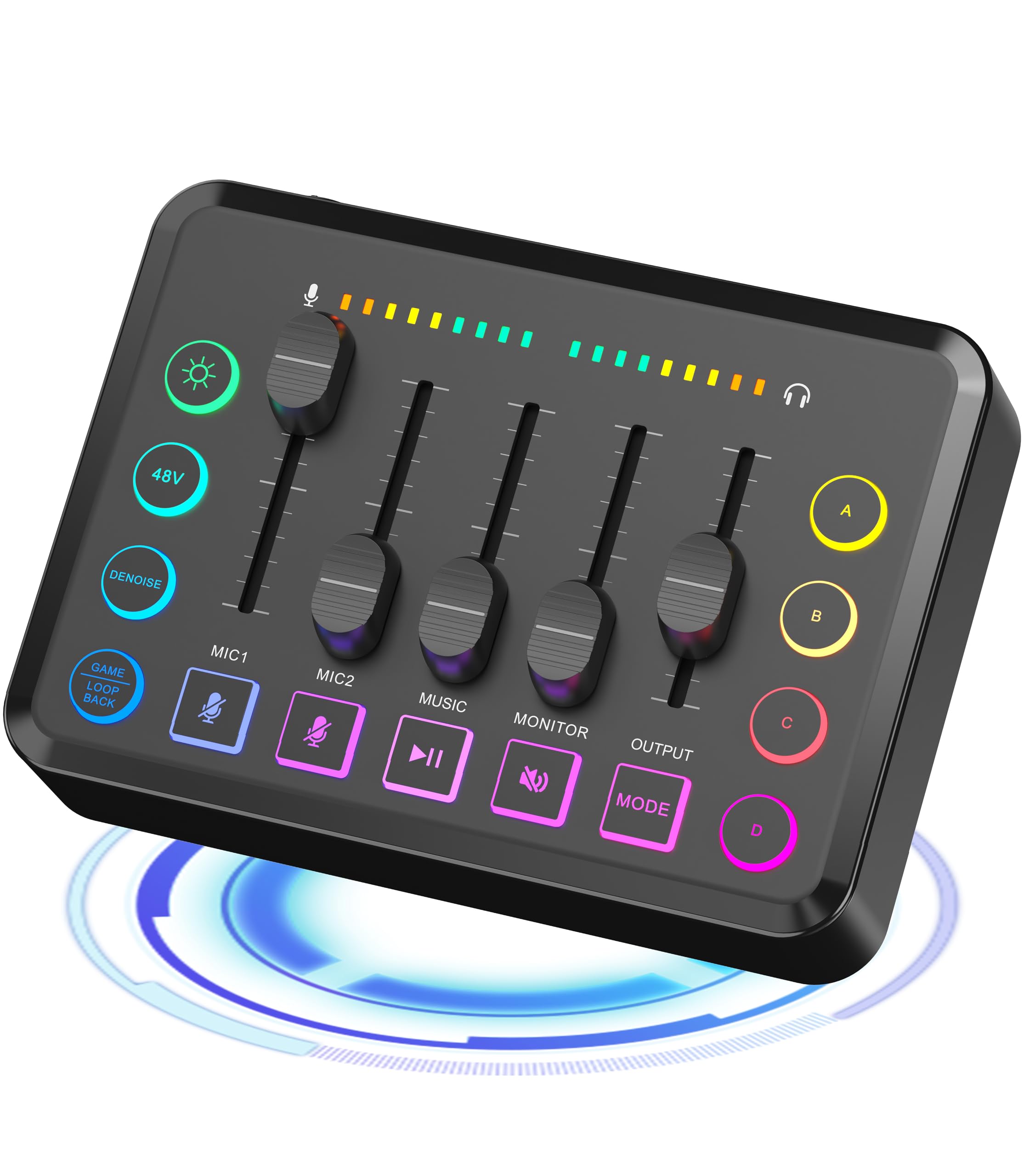
Image: Front view of the KNYBTHY Gaming Audio Mixer F91, showing its various knobs, faders, and buttons with RGB lighting.
Product Features
- Individual Sound Channel Control: Bluetooth wireless audio input offers flexibility. Smooth fader for microphone level. Four independent channels are adjustable for Microphone 1 & 2, backing tracks, ear return monitoring, and external Line Out channels.
- XLR Microphone Input with 48V Phantom Power: Integrated XLR microphone input interface for enhanced audio quality. 48V phantom power activates XLR condenser microphones, boosting sound output.
- Controllable Vibrant RGB Design: RGB button on the mixing panel for various live streaming themes. Vibrant, non-distracting lights with flowing RGB color rotation or a steady pace.
- One-Press Audio Broadcast Mixer: Four pre-recorded custom buttons for quick activation, saving post-production time. Six voice changer modes to alter output style.
- Easy to Use: Simple and intuitive audio port. Supports two computer setups or audio mixing. Balances music, games, or sound settings. Broad compatibility with mobile phones, computers, tablets, or cameras.
- Enhance Live Broadcast Atmosphere: Audio interface allows voice clarity and noise reduction. Mute function prevents background noise. One-button on/off monitor switch for easy monitoring control.
- Built-in Long-Life Battery: Compact 1800mAh battery ensures uninterrupted live streaming for up to 8 hours on a full charge. Fully charges in two hours. Operates while charging.
Package Contents
Please check the package for the following items:
- KNYBTHY Gaming Audio Mixer F91
- USB-C to USB-C Cable
- USB-C to USB-B Cable
- 3.5mm Stereo Male to Male Audio Cable
- User Manual
Note: A power adapter is not included. Please use a standard 5V USB power adapter for charging.
Device Layout
Familiarize yourself with the various ports and controls on your KNYBTHY Gaming Audio Mixer F91.
Image: Detailed view of the KNYBTHY Gaming Audio Mixer F91, highlighting input/output ports, faders, knobs, and buttons.
- Microphone 1 & 2 Faders: Adjust the volume for connected microphones.
- Backing Track Fader: Controls the volume of background music or audio.
- Ear Return Monitor Fader: Adjusts the volume for your monitoring headphones.
- Line Out Fader: Controls the overall output volume.
- XLR Microphone Input: Connects XLR microphones. Supports 48V phantom power.
- Bluetooth Input: Wireless audio input from Bluetooth-enabled devices.
- Custom Sound Effect Buttons (4): Pre-record and trigger custom audio effects.
- Voice Changer Modes (6): Select different voice modulation effects.
- RGB Button: Cycles through RGB lighting modes (flowing or static).
- Mute Button: Mutes all audio output.
- Monitor On/Off Button: Toggles ear return monitoring.
- USB-C Port: For power, charging, and data connection to computers.
- 3.5mm Audio Jacks: For various audio input/output connections (e.g., headphones, external devices).
Setup Instructions
1. Powering On and Charging
- Connect the provided USB-C cable to the mixer's USB-C port and the other end to a 5V USB power adapter (not included) or a computer's USB port.
- The device will power on automatically or can be turned on by pressing the power button (if available, refer to device layout).
- A full charge takes approximately 2 hours and provides up to 8 hours of operation. The mixer can be used while charging.
2. Connecting Microphones
- XLR Microphones: Plug your XLR microphone into the XLR input port. If using a condenser microphone that requires phantom power, the 48V phantom power will be supplied automatically.
- Other Microphones: Use appropriate adapters (not included) to connect other microphone types to the available 3.5mm input jacks if necessary.
3. Connecting to a Computer/Streaming Device
- Use the USB-C to USB-C or USB-C to USB-B cable to connect the mixer to your computer.
- Your computer should recognize the mixer as an audio input/output device. Select it in your operating system's sound settings and your streaming/recording software (e.g., OBS Studio, Twitch, YouTube, TikTok).
- For mobile devices or tablets, use the appropriate 3.5mm audio cables or Bluetooth connection.
4. Connecting Headphones/Monitors
- Plug your headphones into the dedicated headphone jack for monitoring your audio.
Operating Instructions
1. Adjusting Audio Levels
- Use the individual faders for Microphone 1, Microphone 2, Backing Track, and Ear Return Monitor to set desired volume levels.
- The Line Out fader controls the master output volume sent to your computer or recording device.
2. Using Bluetooth Input
- Activate Bluetooth on your mobile device.
- Search for the mixer (e.g., "KNYBTHY Mixer") in your device's Bluetooth settings and pair.
- Once connected, audio from your device will be routed through the mixer's Bluetooth channel. Adjust its volume using the dedicated fader or your connected device.
3. Custom Sound Effects
- The four custom sound effect buttons can store pre-recorded audio clips.
- To record: Press and hold a custom button until it blinks, then speak or play the desired audio. Release the button to save.
- To play: Press the custom button once to trigger the recorded sound effect.
4. Voice Changer Modes
- Press the Voice Changer button to cycle through the 6 available voice modulation effects.
- Select the desired effect for your broadcast or recording.
5. RGB Lighting Control
- Press the RGB button to change the lighting mode. Options include flowing color rotation and static colors.
6. Mute and Monitoring
- Press the Mute button to instantly silence all audio output. Press again to unmute.
- Use the Monitor On/Off button to toggle the ear return monitoring feature, allowing you to hear your own audio mix through headphones.
Maintenance
- Keep the device clean by wiping it with a soft, dry cloth. Avoid using liquid cleaners or abrasive materials.
- Store the mixer in a cool, dry place away from direct sunlight and extreme temperatures.
- Avoid dropping the device or exposing it to excessive shock.
- Do not attempt to disassemble or repair the device yourself. Contact customer support for assistance.
Troubleshooting
| Problem | Possible Cause | Solution |
|---|---|---|
| No sound output | Volume faders are too low or muted. Incorrect audio device selected on computer. Cables not connected properly. | Increase fader levels. Check if the Mute button is active. Ensure the mixer is selected as the default audio output device in your computer's sound settings and streaming software. Verify all cables are securely connected. |
| Microphone not working | Microphone fader is low. Microphone not connected correctly. Faulty microphone. | Increase the microphone fader. Ensure the XLR microphone is fully plugged in. Test with another microphone if possible. |
| Background noise/hum | Ground loop issue. Interference from other electronics. | Ensure all devices are on the same power strip. Try using a ground loop isolator (not included). Move the mixer away from other electronic devices. |
| Bluetooth connection issues | Device not in pairing mode. Out of range. Interference. | Ensure Bluetooth is enabled on both devices. Move the devices closer. Disconnect and reconnect. |
| Battery not charging | Faulty USB cable or power adapter. | Try a different USB-C cable and a different 5V USB power adapter. Ensure the cable is securely connected. |
Specifications
- Brand: KNYBTHY
- Model: F91
- Number of Channels: 5
- Connectivity Technology: Bluetooth, USB, XLR
- Power Source: Battery Powered (Built-in 1800mAh)
- Output Connector Type: XLR
- Input Audio: XLR
- Battery Life: Up to 8 hours (fully charged)
- Charging Time: Approximately 2 hours
Warranty and Support
For warranty information and technical support, please refer to the documentation included with your purchase or contact KNYBTHY customer service through their official website or the retailer where the product was purchased.
Please retain your proof of purchase for warranty claims.


