
1. Introduction
Welcome to the Gtek Canada Gurbani Radio user manual. This device is designed to provide convenient access to a wide range of Gurbani tracks, including Nitnem, Sukhmani Sahib, Simran, Kirtan, and Sampooran Sehaj Paath. It features a compact design, recording capabilities, playback repeat, and FM radio functionality. Please read this manual carefully to ensure proper use and maintenance of your Gurbani Radio.
2. Product Overview
The Gurbani Radio is a portable device with pre-assigned buttons for easy navigation through various Gurbani tracks. It offers premium sound quality and includes a recording function, playback repeat, and FM radio. The device charges via USB, making it convenient for use anywhere.
2.1. Key Features
- Pre-assigned buttons for convenient Gurbani track playback.
- Premium sound quality.
- Recording and playback repeat functions.
- Plays Nitnem, Sukhmani Sahib, Kirtan, Dhadi Vaaraan, and Sampooran Sehaj Paath.
- USB charging for universal compatibility.
- Compact and portable design.
- Hidden antenna for durability and sleek appearance.
2.2. Components and Controls
Familiarize yourself with the various parts of your Gurbani Radio:
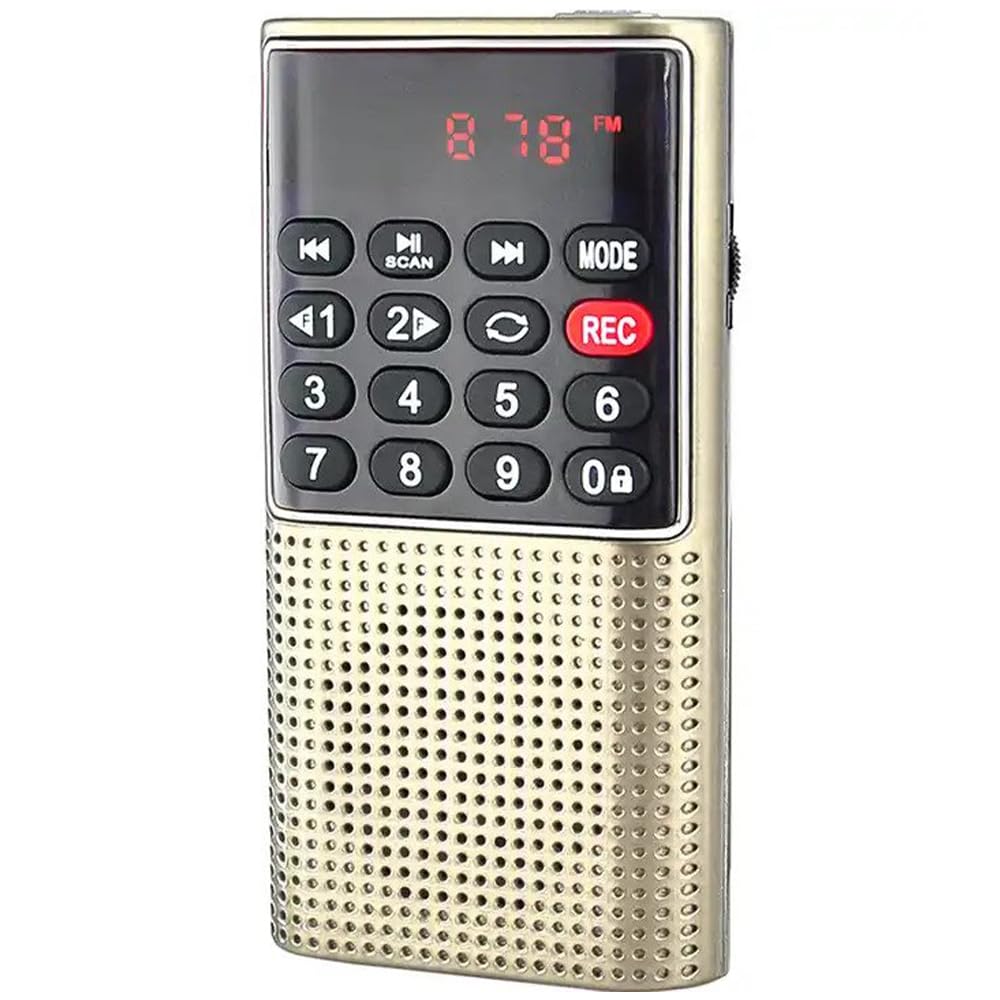
Figure 1: Front view of the Gtek Canada Gurbani Radio (Gold).

Figure 2: Overview of additional functions including automatic shutdown, FM radio, remote HD voice recording, and A-B repeating.

Figure 3: The Gurbani Radio features a hidden antenna integrated into the strap for enhanced durability and a sleek design.

Figure 4: Product dimensions, illustrating its small and portable size (104mm x 51mm) compared to a credit card.

Figure 5: Detailed view of the keypad and digital display for track selection and information.
3. Setup
3.1. Charging the Device
The Gurbani Radio is powered by a rechargeable Lithium Ion battery. To charge the device:
- Connect the small end of the provided USB charging cable to the charging port on the side of the radio.
- Connect the larger USB end of the cable to a standard USB power adapter (not included) or a computer's USB port.
- The device will indicate charging status (e.g., an LED light). Charge until the indicator shows a full charge.
The USB charging capability allows the device to be charged and used globally, including in vehicles or on airplanes.
3.2. Powering On/Off
Locate the power switch on the side of the device. Slide the switch to the 'ON' position to power on the radio. Slide it to the 'OFF' position to power off. The device will remember the last played track and position when powered off and resume from there upon restart.
Video 1: Unboxing and initial setup of the Gurbani Radio, demonstrating charging and power functions. This video shows how to connect the USB charging cable and power on the device.
4. Operating Instructions
4.1. Track Playback
The Gurbani Radio features a numerical keypad for direct track selection. Refer to the track list provided on the back of the device or in the included documentation.
- Power on the device.
- Enter the desired track number using the numerical keypad (0-9). For example, to play track 7, press '7'.
- The track will begin playing automatically.
- Use the 'Previous' (|<<) and 'Next' (>>|) buttons to skip between tracks.
- Press the 'Play/Pause' (>||) button to pause or resume playback.
4.2. Volume Control
Adjust the volume using the dedicated volume dial or buttons, typically located on the side of the device. Rotate or press the appropriate controls to increase or decrease the sound level.
4.3. Recording Function
The device supports remote HD voice recording. To use this feature:
- Ensure a compatible storage device (USB drive or Micro-SD card) is inserted if you wish to save recordings externally.
- Press the 'REC' button to start recording.
- Press 'REC' again to stop and save the recording.
4.4. Playback Repeat (A-B Repeating)
The A-B repeating function allows you to loop a specific segment of a track:
- During playback, press the 'A-B' button at the desired starting point (A).
- Press the 'A-B' button again at the desired ending point (B).
- The device will continuously repeat the segment between points A and B.
- Press 'A-B' a third time to exit the repeat mode.
4.5. FM Radio
To access and tune the FM radio:
- Press the 'MODE' button to switch to FM radio mode.
- Use the 'SCAN' button to automatically search for and save available FM stations.
- Alternatively, use the numerical keypad to directly enter a frequency or the 'Previous' and 'Next' buttons to manually tune.
4.6. External Storage Playback
The device supports playback from USB drives and Micro-SD cards:
- Insert a USB drive into the USB port or a Micro-SD card into the dedicated slot.
- The device should automatically detect the storage and begin playing audio files. If not, use the 'MODE' button to switch to the appropriate input.
- Use the numerical keypad or 'Previous' and 'Next' buttons to navigate through files.
Video 2: Demonstration of Gurbani Radio features, including track selection using the numerical keypad and an overview of the pre-loaded Gurbani tracks. This video also highlights the various ports and controls.
5. Maintenance
- Keep the device dry and away from moisture.
- Clean the device with a soft, dry cloth. Do not use harsh chemicals or abrasive cleaners.
- Avoid dropping the device or subjecting it to strong impacts.
- Store in a cool, dry place when not in use for extended periods.
6. Troubleshooting
6.1. No Power
- Ensure the device is fully charged. Connect it to a power source using the USB cable.
- Check if the power switch is in the 'ON' position.
6.2. No Sound
- Increase the volume using the volume dial/buttons.
- If using headphones, ensure they are properly plugged in and functional.
- If playing from a USB drive or Micro-SD card, ensure the files are in a compatible format and not corrupted.
6.3. FM Radio Not Tuning
- Ensure the device is in FM mode.
- Perform an automatic scan to find available stations.
- Adjust the position of the device to improve reception, as the hidden antenna may require optimal placement.
7. Specifications
- Brand: Gtek Canada
- Model Number: B0CKXZ43K1
- Batteries: 1 Lithium Ion battery (included)
- Parcel Dimensions: 12.5 x 7 x 4.5 cm; 125 g
- Connectivity Technology: USB
- Tuner Technology: AM, FM
- Special Feature: Recording and Playback Repeat Function
- Frequency: 20 KHz
- Power Source: Battery Powered
- Radio Bands Supported: 2-Band
- Compatible Devices: MP3 Player, Digital Audio Player
8. Warranty and Support
For warranty information or technical support, please refer to the contact details provided on the product packaging or visit the official Gtek Canada website. The manufacturer is Gtek Canada.