
Luqeeg Luqeegyt3eudbc92
Luqeeg 3D Hologram Fan User Manual
Model: Luqeegyt3eudbc92
Introduction
The Luqeeg 3D Hologram Fan is an innovative holographic advertising display designed for projecting 3D visuals. It features 48 LEDs, a built-in speaker, and a transparent protective cover, making it suitable for various indoor and outdoor applications. This manual provides essential information for the safe and effective use of your device.

Image: The Luqeeg 3D Hologram Fan, showcasing its compact design with a transparent protective cover and a connected USB power cable.
Safety Information
- Ensure the device is placed on a stable, flat surface to prevent tipping.
- Keep the device away from water and excessive moisture.
- Do not attempt to open or repair the device yourself. Refer to qualified personnel for service.
- Keep out of reach of children due to rotating parts, even with the protective cover.
- Use only the provided power adapter and accessories.
- Avoid blocking the ventilation openings to prevent overheating.
Package Contents
Please verify that all items listed below are included in your package:
- 1 x Luqeeg 3D Hologram Fan
- 2 x Base Brackets
- 1 x Memory Card (Supports up to 16GB)
- 1 x Remote Control (Built-in 160mAh CR2025 Battery)
- 1 x Card Reader
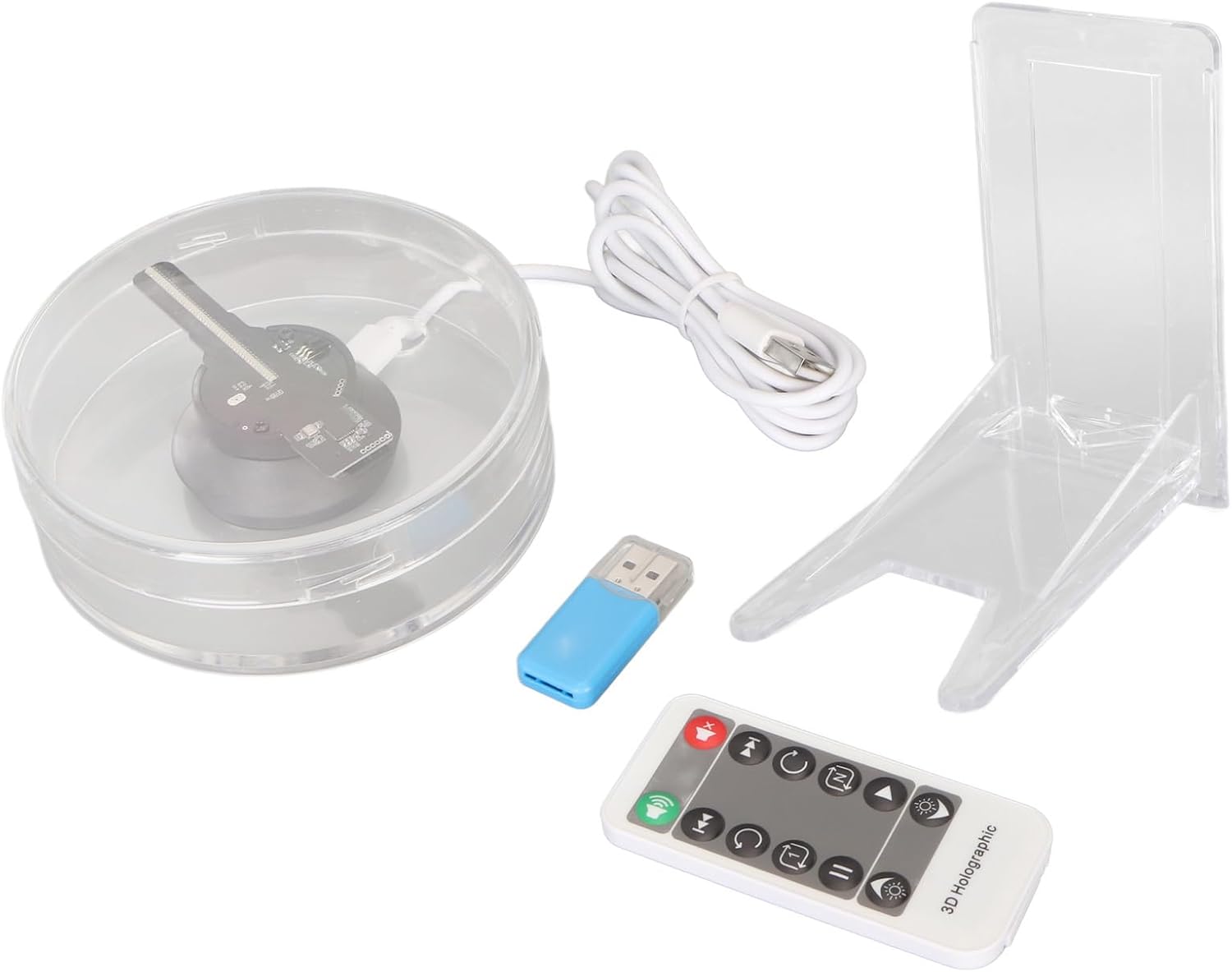
Image: A complete view of the Luqeeg 3D Hologram Fan package contents, including the main unit, two base brackets, a memory card, a remote control, and a card reader.
Setup
1. Unpacking and Placement
Carefully remove all components from the packaging. Place the 3D Hologram Fan on a stable, flat surface. The transparent protective cover is pre-installed for safety and noise reduction.
2. Attaching Base Brackets (Optional)
If desired, attach the two provided base brackets to the bottom of the fan unit for enhanced stability or specific display angles. Ensure they are securely fastened.
3. Power Connection
Connect the USB power cable to the fan unit and then to a compatible USB power source (e.g., a USB wall adapter, computer USB port). The device will power on automatically.

Image: A top-down view of the 3D Hologram Fan, illustrating the internal LED blade and the USB power input connection.
Operating Instructions
1. Content Preparation
The 3D Hologram Fan supports various content formats including MP4, AVI, RMVB, MKV, GIF, JPG, and PNG. Prepare your desired 3D visuals or images in one of these formats.
2. Loading Content via Memory Card
- Insert the included memory card into the card reader.
- Connect the card reader to your computer.
- Transfer your prepared content files to the memory card.
- Safely eject the card reader from your computer.
- Insert the memory card into the designated slot on the 3D Hologram Fan.
- The device will automatically detect and begin playing the content.

Image: The blue USB memory card reader, used for transferring content to the device's memory card.
3. Mobile App Control (5D Displayer)
For advanced control and content management, download the "5D Displayer" mobile application. Instructions for downloading the app are available on the included memory card. The app allows for easy and fast data transfer, enabling you to access and play files from the 3D image database wirelessly.

Image: The 3D Hologram Fan with an overlay highlighting its WiFi compatibility for seamless content transfer and playback.
4. Remote Control Functions
Use the provided remote control to manage playback, adjust volume, and control other display settings. The remote control comes with a built-in CR2025 battery.

Image: The remote control for the 3D Hologram Fan, featuring buttons for volume, track navigation, loop modes, play/pause, and brightness adjustment.
Maintenance
- Cleaning: Gently wipe the transparent cover and the device's exterior with a soft, dry cloth. Do not use abrasive cleaners or solvents.
- Storage: When not in use for extended periods, store the device in a cool, dry place, away from direct sunlight and extreme temperatures.
- Blade Care: The LED blade is delicate. Avoid touching it directly. The transparent cover is designed to protect it during operation.
Troubleshooting
| Problem | Possible Cause | Solution |
|---|---|---|
| Device does not power on. | No power supply or faulty connection. | Ensure the USB cable is securely connected to both the fan and a working power source. Try a different USB port or adapter. |
| No 3D image displayed. | Incorrect content format or memory card issue. | Verify content is in a supported format (MP4, AVI, RMVB, MKV, GIF, JPG, PNG). Ensure the memory card is properly inserted and contains valid files. Reformat the memory card if necessary (backup data first). |
| Remote control not working. | Battery drained or obstruction. | Ensure there is no obstruction between the remote and the fan. Replace the CR2025 battery in the remote control. |
| Image appears distorted or blurry. | Dust on cover or incorrect file resolution. | Clean the transparent cover with a soft cloth. Ensure your content files are of sufficient resolution for optimal display. |
Specifications
| Feature | Detail |
|---|---|
| Item Type | 3D Hologram Fan |
| Material | PMMA, PC, Hardware |
| LEDs | 48 |
| Remote Control Battery | Built-in 160mAh CR2025 Battery |
| Memory Card Support | Up to 16GB (Included) |
| Mobile App Name | 5D Displayer |
| Use Site | Indoor, Outdoor (Outdoor Needs Measures) |
| Useful Life | 50,000 Hours |
| Package Dimensions | 5.12 x 4.72 x 3.15 inches |
| Item Weight | 3 pounds |
| Model Number | Luqeegyt3eudbc92 |
Warranty and Support
This product is typically covered by a return policy allowing for refunds or replacements within 30 days of purchase. For specific warranty details and technical support, please refer to the seller's information or contact Luqeeg customer service directly through their official channels or the platform where the product was purchased.
For further assistance, visit the Luqeeg Store on Amazon.
Ask a question about this manual
Ask about setup, troubleshooting, compatibility, parts, safety, or missing instructions. Manuals+ will review the question and use this page’s manual context to help answer it.