1. Introduction
The FiveHome Kids Sleep Trainer Alarm Clock, Model A100, is designed to assist children in developing healthy sleep habits. This digital alarm clock combines a sleep trainer, multi-color night light, timer, and snooze functions to create a supportive environment for both sleep and wake-up routines. It features a clear digital display and intuitive controls.

Figure 1: Front view of the FiveHome Kids Sleep Trainer Alarm Clock, Model A100.
2. Package Contents
- FiveHome Kids Sleep Trainer Alarm Clock (Model A100)
- Power Adapter
- USB Power Cable
- User Manual (this document)
3. Setup
3.1 Power Connection
- Connect the USB power cable to the alarm clock's power input port, located at the back.
- Plug the power adapter into a standard electrical outlet.
- The clock requires continuous power to function. It has a memory function that retains settings during power interruptions.

Figure 2: Connecting the alarm clock to power. The device must be plugged in to operate.
3.2 Initial Time Setting
Upon first power-up or after a prolonged power outage, you may need to set the current time. Refer to the 'Operating Instructions' section for detailed steps on setting the time.
4. Operating Instructions
4.1 Button Functions Overview
The alarm clock features buttons on its sides for various functions. Familiarize yourself with these controls:

Figure 3: Side view illustrating button functions.
- Color Button: Activates/deactivates color light, cycles through colors.
- Time Button: Enters time setting mode.
- Sleep Button: Sets sleep alarm.
- Snooze Button: Activates snooze during an alarm.
- Up (+) / Down (-) Buttons: Adjust values (time, brightness, volume).
- Nap Button: Sets nap timer.
- Backlight Button: Adjusts screen brightness.
4.2 Sleep Trainer Function
The sleep trainer uses color cues to indicate when it's time to sleep and when to wake up.
- Red Light (Time to Sleep): When the red light is displayed, it indicates that it is time to stay in bed. The clock face may show closed eyes.
- Green Light (Time to Wake Up): When the green light is displayed, it indicates that it is time to get up. The clock face may show open eyes.
The light duration for the wake-up signal is 13 hours. To deactivate the color light, press the 'Color' button. To silence an alarm, press any button.
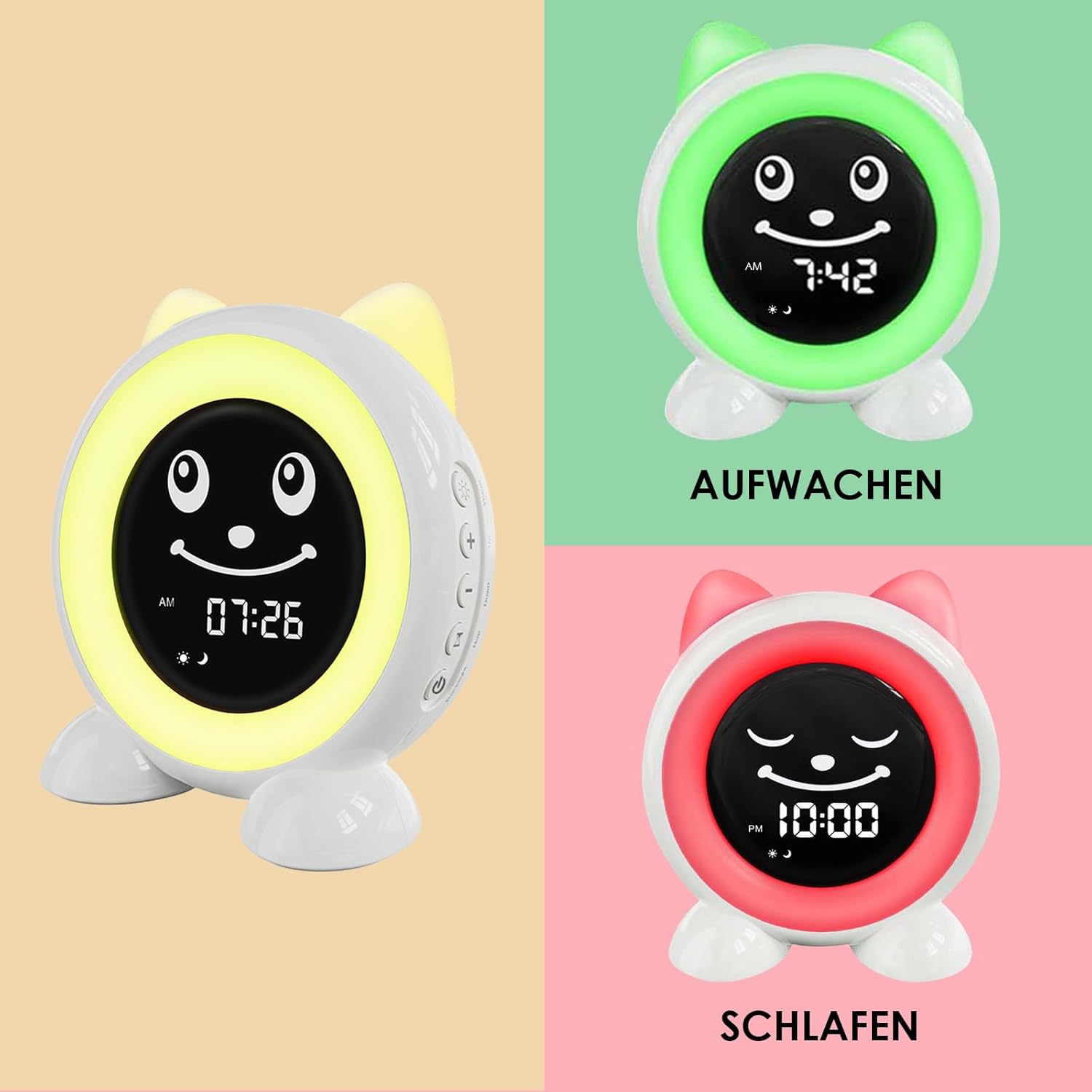
Figure 4: Visual cues for sleep and wake times.

Figure 5: The clock displaying 'Time to Sleep' with red light and closed eyes.
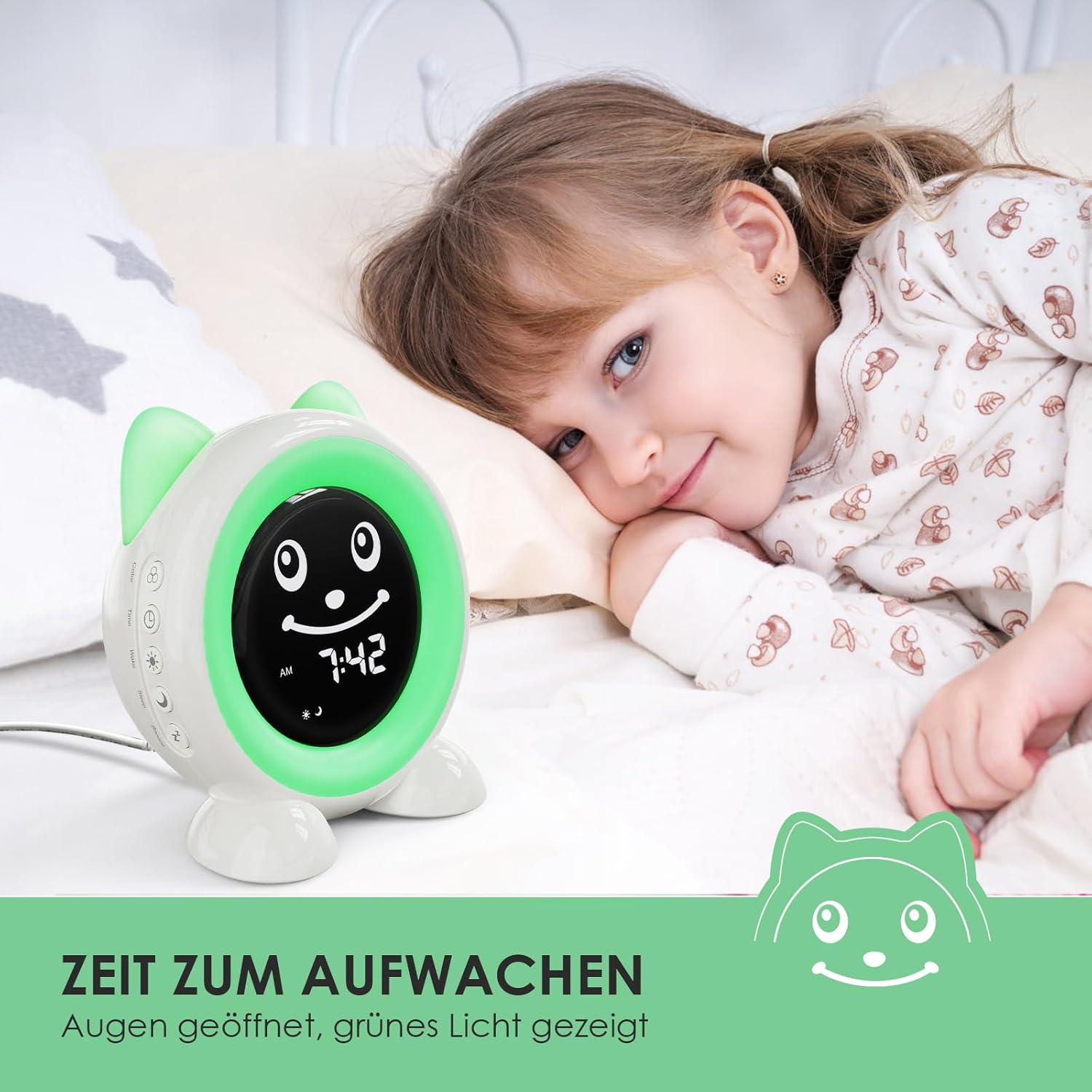
Figure 6: The clock displaying 'Time to Wake Up' with green light and open eyes.
4.3 Night Light Function
The alarm clock can function as a night light with customizable settings.
- Color Options: Choose from ten different colored lights.
- Warm Light: Select from three intensities of warm light.
- Screen Brightness: The display brightness can be adjusted to prevent disturbance during sleep.

Figure 7: Examples of the 10 available night light colors.
4.4 Timer and Snooze Functions
- Timer Options: Three timer durations are available: 15, 30, and 60 minutes. A red light illuminates when the timer is active and turns off when the timer concludes.
- Snooze Function: The alarm clock supports a snooze function.
4.5 Alarm Programs
The device allows for setting two distinct alarm programs:
- Light Only: The alarm activates only the light signal.
- Light and Music: The alarm activates both the light signal and one of the four available alarm tones.
Note: The alarm settings do not differentiate between weekdays and weekends.
4.6 Memory Function
The FiveHome Kids Sleep Trainer Alarm Clock includes a memory function. In the event of a power outage or when reconnected to power, the device retains its time and alarm settings, eliminating the need for manual re-initialization.
5. Maintenance
To ensure the longevity and proper functioning of your alarm clock, follow these maintenance guidelines:
- Cleaning: Wipe the device with a soft, dry cloth. Avoid using abrasive cleaners or solvents.
- Placement: Place the alarm clock on a stable, flat surface away from direct sunlight, heat sources, and moisture.
- Power: Always use the provided power adapter and cable.
6. Troubleshooting
If you encounter issues with your FiveHome Kids Sleep Trainer Alarm Clock, refer to the following common problems and solutions:
| Problem | Possible Cause | Solution |
|---|---|---|
| Clock does not power on. | Not connected to power or power outlet issue. | Ensure the power cable is securely connected to the clock and the adapter is plugged into a working electrical outlet. |
| Settings are lost after power interruption. | This should not occur due to the memory function. | If settings are consistently lost, contact customer support. |
| Night light or sleep trainer light is not changing colors. | Incorrect setting or feature deactivated. | Press the 'Color' button to activate or cycle through colors. Check the sleep trainer settings. |
| Alarm does not sound. | Alarm not set, volume too low, or 'light only' program selected. | Verify alarm settings, adjust volume, and ensure 'light and music' program is selected if sound is desired. |
7. Specifications
| Feature | Detail |
|---|---|
| Brand | FiveHome |
| Model Number | A100 |
| Color | White |
| Dimensions (L x W x H) | 15 x 3.81 x 15 cm (approximately 5.9 x 1.5 x 5.9 inches) |
| Weight | 410 grams (approximately 0.9 lbs) |
| Material | Plastic |
| Display Type | Digital |
| Power Source | Corded Electric |
| Special Features | Kids Sleep Trainer, Memory Function, Timer, Snooze, Night Light |

Figure 8: Product dimensions.
8. Warranty and Support
For warranty information or technical support, please refer to the contact details provided with your purchase or visit the official FiveHome website. Keep your purchase receipt as proof of purchase for any warranty claims.


