
Product Overview
This manual provides comprehensive instructions for setting up and operating your HAPPRUN Projector. This portable outdoor projector features auto-focus, WiFi and Bluetooth connectivity, 15000Lux brightness, 4K support, 6D keystone correction, and 50% zoom. It is compatible with various devices including HDMI, USB, AV, TV Stick, and PS5.
Package Contents
- HAPPRUN Projector
- HDMI Cable
- Power Cord
- Remote Control
- Component Cable with Adapters
- Adjustable Leg Screw
- User Manual
Key Features
- Brilliant Display: Features a 6X lens, 15000lux (500 ANSI) brightness, and native 1080P Full HD resolution with 12000:1 contrast ratio. Utilizes IPS screen and German RGB+PB lamp for enhanced brightness and 80% brightness uniformity.
- Smart Auto-Focus & Keystone: Equipped with a CMOS camera for automatic 4-point/6D keystone correction (±50° horizontal, vertical, and rotational adjustment) and auto-focus, providing a clear image within 3 seconds regardless of placement. Includes a one-click reset function.
- High-Speed Connectivity: Supports 5G WiFi for faster and smoother streaming and gaming with lower latency. Both mirroring and screen casting are supported.
- Enhanced Audio: Built-in 5W dual stereo speakers with SRS sound system deliver powerful and clear audio. Bluetooth 5.1 allows easy connection to external Bluetooth speakers, soundbars, or headphones.
- Durable Lamp Life: Offers a lamp life of 10,000 hours.
- Portable Design: Compact dimensions of 8.5 x 6 x 3 inches and a weight of 10.6 ounces make it suitable for both indoor and outdoor use.
Setup Guide
Physical Components

Front view of the HAPPRUN Projector, highlighting its compact design and lens.
Rear view of the HAPPRUN Projector, showing the various input ports including HDMI, USB, AV, and headphone jack.

Top view of the HAPPRUN Projector, displaying the control buttons for navigation, power, source selection, and menu access.

Side view of the HAPPRUN Projector with dimensions indicated: 8.66 inches (length), 7.60 inches (width), and 3.54 inches (height).
Ports and Controls
The projector features two HDMI ports, two USB ports, an AV port, and a 3.5mm headphone jack on the rear for connecting various devices.
On the top panel, you will find directional buttons for navigation, an 'OK' button, power button, source selection button, and a menu button.
A cooling fan is located on the side to maintain optimal operating temperature.
The bottom of the projector has four padded feet to prevent scratching surfaces and a screw-in leg for adjustable elevation.
The front features the main projection lens and a sensor panel for keystone correction and signal reception. Remember to remove the protective film from the lens before use.Initial Power On
Connecting Power
Connect the provided power cord to the power input on the side of the projector and then to a power outlet.
Menu Navigation
Upon powering on, the projector will display the main menu. Use the directional buttons on the top panel or the remote control to navigate through options like Movie, Music, Photo, Setting, Support, and Surprise.

The main menu interface of the HAPPRUN Projector, showing options for Movie, Music, Photo, Setting, Support, and Surprise.
Keystone Correction
The HAPPRUN Projector features advanced keystone correction to ensure a perfectly rectangular image, even when the projector is not perfectly aligned with the screen or wall.
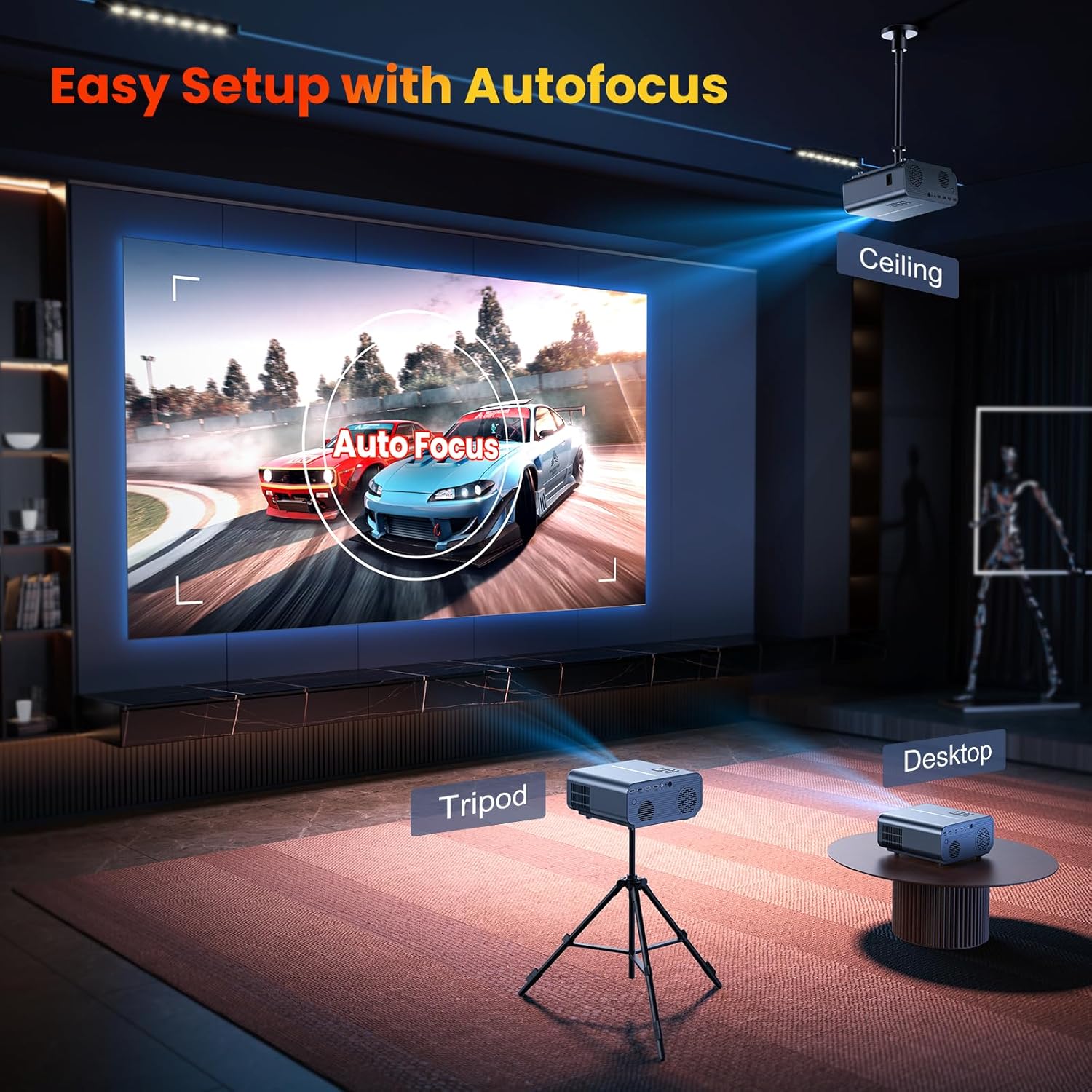
Illustrates the projector's auto-focus and 6D keystone capabilities, showing flexible placement options on a tripod, desktop, or ceiling.
To adjust, navigate to "Setting" then "Projection Image Setting". Select "4-Point Keystone" or "Keystone Advanced" to fine-tune the image. The auto-focus feature will automatically adjust for clarity.
The included adjustable leg can be screwed into the bottom of the projector to elevate it to the desired height, eliminating the need for external supports.
Connectivity
Bluetooth Connection
Connect your projector to external Bluetooth speakers, soundbars, or headphones for an enhanced audio experience.

Depicts the HAPPRUN Projector wirelessly connecting to a Bluetooth speaker and headphones, illustrating its audio connectivity.
Go to "Setting" then "BT Setting". Turn Bluetooth ON and select "Scan for devices". Choose your desired Bluetooth device from the list to pair.
WiFi Connection
The projector supports 5G WiFi for fast and stable wireless connections, enabling screen mirroring and casting from your devices.
Shows the projector connected via WiFi, displaying a motorcycle racing game, and indicating compatibility with iOS, Android, and Windows devices.
Navigate to "Setting" then "Wifi Setting". Turn WiFi ON and select "Add Wifi". The projector will scan for available networks. Select your network and enter the password to connect.
Wired Connections
The projector offers multiple wired input options for various devices.
An image showing the projector connected to a TV stick, with various input icons below, including USB, HDMI, AV, and Audio.
- HDMI: Connect laptops, gaming consoles (PS5, XBOX), Blu-ray players, or TV sticks using the HDMI 1 or HDMI 2 ports.
- USB: Plug in USB drives for direct media playback using the USB 1 or USB 2 ports.
- AV: Use the AV port for older devices with composite video output.
- 3.5mm Audio Jack: Connect wired headphones or external speakers.
After connecting a device, use the "Source" button on the projector or remote to select the corresponding input.
Operation
Media Playback
From the main menu, select "Movie", "Music", or "Photo" to browse and play media from connected USB devices.
Screen Mirroring/Casting
For wireless display from smartphones or tablets, select "Miracast" from the main menu. Follow the on-screen instructions for Android Cast or iOS Cast to connect your device. Ensure your device and the projector are on the same WiFi network.
Adjusting Settings
Access the "Setting" menu to configure various projector parameters, including WiFi, Bluetooth, projection image settings (keystone, focus, zoom), and system updates.
Maintenance
Lens Cleaning
To ensure optimal image quality, regularly clean the projector lens. Use a soft, lint-free cloth specifically designed for optical lenses. Avoid harsh chemicals or abrasive materials.
Ventilation
Ensure the projector's ventilation grilles are clear of obstructions to prevent overheating. The built-in fan helps maintain proper temperature during operation.
Storage
When not in use, store the projector in a cool, dry place, away from direct sunlight and excessive dust.
Troubleshooting
No Signal / Weak Signal
If you see a "No Signal or Weak Signal" message, ensure your input device is properly connected to the correct port (HDMI, USB, AV) and that the correct source is selected on the projector. Check all cable connections.
Blurry Image
Use the auto-focus feature or manually adjust the focus via the "Projection Image Setting" menu. Ensure the lens is clean and free of smudges.
Distorted Image
Utilize the 4-Point Keystone or Keystone Advanced settings in the "Projection Image Setting" menu to correct any trapezoidal or angled images.
No Audio
Check the volume settings on both the projector and the connected device. If using external Bluetooth speakers, ensure they are properly paired and connected via the "BT Setting" menu.
Technical Specifications
| Feature | Detail |
|---|---|
| Brand | HAPPRUN |
| Model Number | HAPPRUN C12H |
| Display Resolution | 1920 x 1080 (Native 1080P) |
| Brightness | 15000 Lux (500 ANSI) |
| Contrast Ratio | 12000:1 |
| Connectivity Technology | Bluetooth 5.1, Wi-Fi (5G), USB (x2), HDMI (x2), 3.5mm Jack, AV |
| Special Features | Auto Focus, 6D Keystone, Built-In Wi-Fi, Bluetooth |
| Recommended Uses | Indoor/Outdoor |
| Item Weight | 10.6 ounces |
| Product Dimensions | 8.5 x 6 x 3 inches |
| Lamp Life | 10,000 hours |
Warranty and Support
For warranty information or technical support, please refer to the contact details provided in the original product packaging or visit the official HAPPRUN website.
Verified by Transparency: Each item has a unique code that is verified before shipping.

