
1. Introduction
The DJI Osmo Action 4 is a versatile action camera designed to capture high-quality footage in various dynamic environments. This manual provides essential information for setting up, operating, and maintaining your device, ensuring optimal performance and longevity.
Key Features:
- Impeccable Image Quality: Features a large 1/1.3-inch sensor for stunning 4K video capture and excellent low-light performance.
- Vivid Color Performance: Supports 10-bit & D-Log M color for true-to-life colors.
- Advanced Stabilization: Offers 3 stabilization modes, including RockSteady and 360° HorizonSteady, for smooth footage.
- Waterproof Design: Waterproof up to 18 meters (59 ft) without a case.
- Magnetic Quick Release: Allows for effortless switching between horizontal and vertical shooting.
- Dual Full-Color Touchscreens: Provides intuitive control and easy selfie composition.
- Extreme Temperature Resistance: Operates in temperatures as low as -20°C (-4°F).

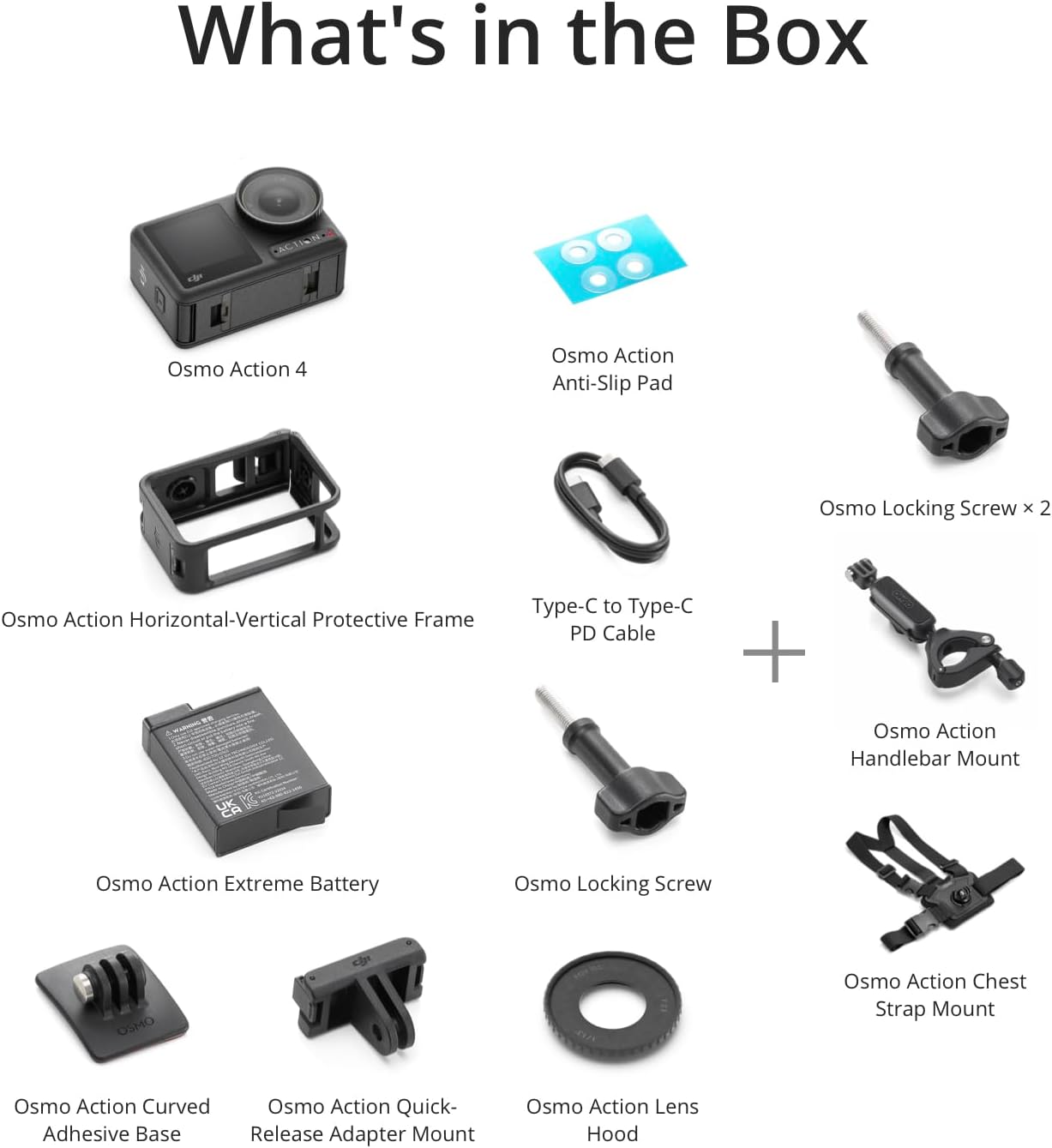
2. What's in the Box
The DJI Osmo Action 4 Motorcycling/Mountain Cycling Combo includes the following items:
- Osmo Action 4 Camera × 1
- Osmo Action Extreme Battery × 1
- Osmo Action Horizontal-Vertical Protective Frame × 1
- Osmo Action Biking Accessory Kit × 1
- Osmo Action Quick-Release Adapter Mount × 1
- Osmo Action Curved Adhesive Base × 1
- Osmo Locking Screw × 1
- Type-C to Type-C PD Cable × 1
- Osmo Action Lens Hood × 1
- Osmo Action Anti-Slip Pad × 1
3. Setup
3.1 Battery and MicroSD Card Installation
- Press the release button on the battery compartment cover and slide to open it.
- Insert a MicroSD card into the MicroSD card slot.
- Insert the Osmo Action Extreme Battery into the battery compartment.
- Close the battery compartment cover, ensuring it is properly mounted without any gaps.
- Press the release button on the USB-C port cover and slide to open it.
- Use the included Type-C to Type-C PD Cable to connect the camera to a power adapter (DJI 30W USB-C Charger recommended) for charging.
3.2 Mounting Accessories
The DJI Osmo Action 4 features a magnetic quick-release design for easy attachment to various mounts.
- Chest Strap Mount: Secure the camera to your chest for a first-person perspective. The mount is adjustable for comfort and stability.
- Handlebar Mount: Attach the camera to your bicycle handlebars using the provided biking accessory kit. The magnetic mount ensures a strong hold.
- Curved Adhesive Base: Use this base to attach the camera to helmets or other curved surfaces. Ensure the surface is clean and dry before applying.

3.3 Activation and Firmware Update
Before first use, activate your Osmo Action 4 via the DJI Mimo app and ensure the firmware is up to date.
- Ensure your mobile device has a stable internet connection.
- Download and install the DJI Mimo app from your device's app store.
- Launch the DJI Mimo app and log in to your DJI account.
- Follow the on-screen prompts to connect your Osmo Action 4 to the app via Bluetooth/Wi-Fi.
- Confirm the device verification code displayed on both the camera and the app.
- If a firmware update is available, the app will prompt you to download and install it. Follow the instructions carefully and do not power off the camera or disconnect it during the update process.
4. Operating Instructions
4.1 Power On/Off
- Power On: Press and hold the Quick Switch button (left side of the camera) for one second.
- Power Off: When the camera is powered on, press and hold the Quick Switch button for one second.
4.2 Switching Shooting Modes
You can switch between various shooting modes (Photo, Video, Slow Motion, Timelapse, Hyperlapse, Playback) by swiping left or right on the touchscreen or by short-pressing the Quick Switch button.
4.3 Parameter Settings
In the camera view, swipe up or tap the parameter adjustment icon to access settings. You can adjust:
- Aspect Ratio & Countdown: For photo mode.
- Resolution, Frame Rate, Stabilization Mode, Loop Duration: For video mode.
- FOV (Field of View): Choose between Narrow, Standard (Dewarp), Wide, and Ultra Wide.
- Pro Settings: Tap the 'PRO' icon to access advanced settings like Exposure (Auto/Manual), White Balance (AWB/Manual), Color (Normal/D-Cinelike), Image Adjustment, Low-Light Image Enhancement, and Audio Settings (Channel, Wind Noise Reduction).


4.4 Voice Control
Enable or disable voice control from the control menu. Available voice commands include


