
Introduction
Thank you for purchasing the bonsaii C277-A Micro-Cut Paper Shredder. This manual provides important information regarding the safe operation, setup, maintenance, and troubleshooting of your new shredder. Please read this manual thoroughly before use and keep it for future reference.
This shredder is designed for home and small office use, offering high-security micro-cut shredding for sensitive documents, credit cards, staples, and paper clips.
Safety Instructions
- Keep children and pets away from the shredder.
- Keep loose clothing, jewelry, hair, and hands away from the paper entry slot.
- Do not spray any flammable products onto the shredder or use near flammable materials.
- Do not shred adhesive labels, continuous forms, or plastic sheets other than credit cards.
- Always unplug the shredder before moving, cleaning, or emptying the waste bin.
- Do not operate the shredder if the power cord is damaged.
- Do not attempt to repair the shredder yourself. Contact customer support for assistance.
- Ensure the shredder is placed on a stable, level surface.
Package Contents
Upon opening the package, please ensure all items are present and in good condition:
- bonsaii C277-A Micro-Cut Paper Shredder Unit
- Waste Bin (13L capacity)
- Instruction Manual (this document)
Product Overview
Familiarize yourself with the components of your bonsaii C277-A shredder.
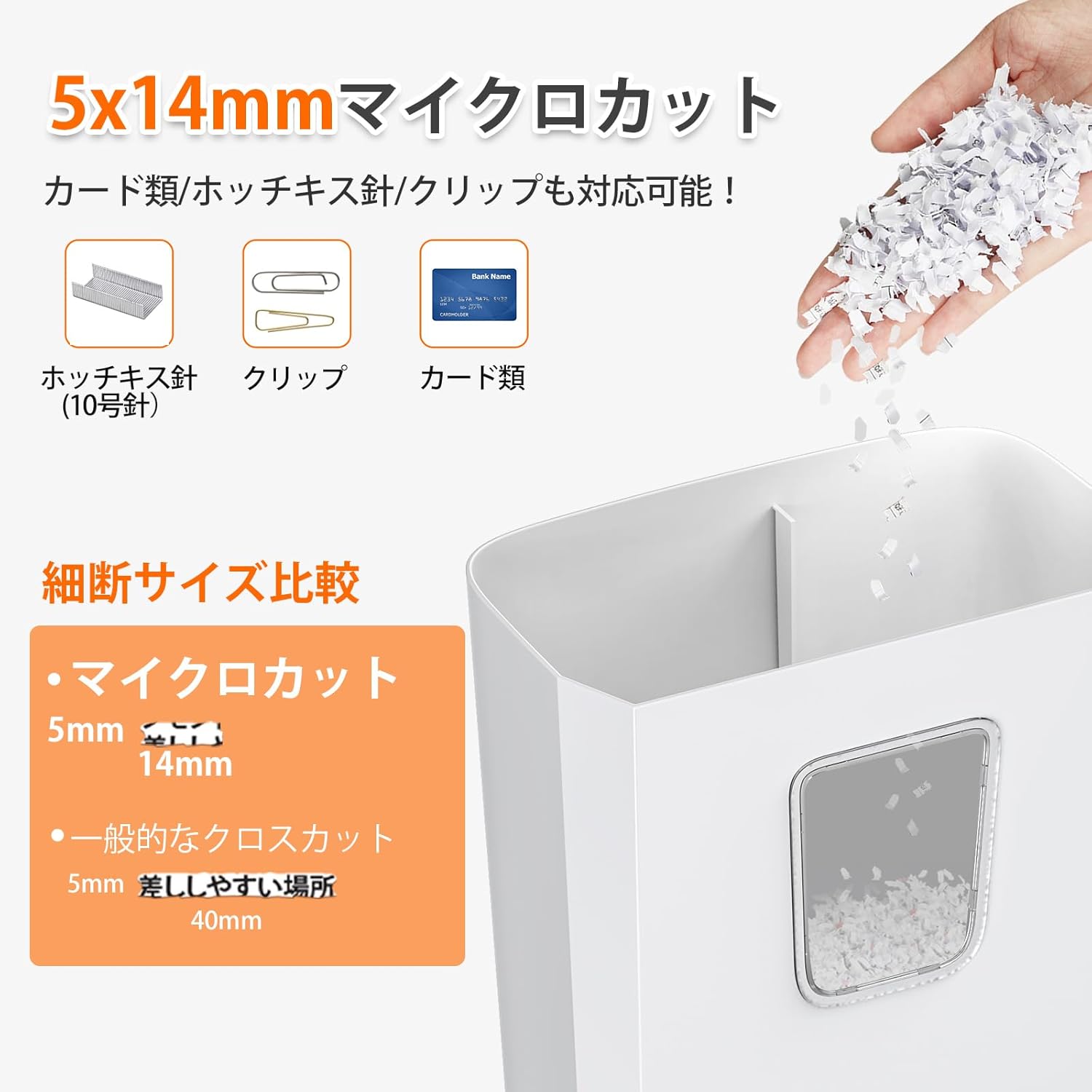
Image: The bonsaii C277-A shredder demonstrating its ability to micro-cut paper into 5x14mm particles and handle staples, paper clips, and credit cards.
- Paper Entry Slot: For inserting paper, credit cards, staples, and paper clips.
- Control Switch: Located on top, with settings for Auto, Off, and Reverse.
- Power Lamp: Indicates power status.
- Overheat Lamp: Illuminates when the shredder is overheating.
- Waste Bin: 13-liter capacity for shredded materials.
- Viewing Window: Allows monitoring of shredded paper level in the waste bin.
- Handle: Integrated handle for easy lifting and moving of the shredder head.

Image: Close-up of the shredder's control panel, illustrating the manual shred, shred, stop, and reverse functions.
Setup
- Unpack the shredder and remove all packaging materials.
- Place the shredder on a flat, stable surface.
- Ensure the waste bin is correctly inserted into the main unit. The shredder will not operate if the bin is not properly seated due to the safety interlock switch.
- Plug the power cord into a standard electrical outlet.

Image: Illustration of the automatic power-off safety feature, which activates if the shredder head is lifted from the waste bin, highlighting the interlock switch.
Operating Instructions
Basic Operation
- Set the control switch to the "Shred" (細断) position. The power lamp will illuminate.
- Insert up to 5 sheets of A4 paper (64g/m²) into the paper entry slot. The shredder will automatically start and stop once shredding is complete.
- For credit cards, staples, or paper clips, insert them into the designated slot (if separate) or the main paper entry.
- The shredder can operate continuously for up to 3 minutes. Allow a cool-down period if the overheat lamp illuminates.
Control Switch Functions
- Shred (細断): Automatic shredding mode. The blades rotate when paper is inserted and stop when shredding is finished.
- Stop (停止): Turns off the shredder. Always set to "Stop" when emptying the waste bin or moving the unit.
- Reverse (逆転): Reverses the blades to clear paper jams.
- Manual Shred (手動細断): Forces the blades to rotate continuously. (Not recommended for prolonged use).

Image: The bonsaii C277-A shredder processing paper, highlighting its capacity of 5 sheets per pass and a 3-minute continuous operation time.
Maintenance
- Emptying the Waste Bin: When the viewing window indicates the bin is full, unplug the shredder, lift the shredder head using the handle, and empty the waste bin. Reattach the head securely.
- Cleaning: Wipe the exterior of the shredder with a soft, dry cloth. Do not use abrasive cleaners or solvents.
- Blade Lubrication (Optional): For optimal performance and longevity, periodically lubricate the shredder blades with shredder oil sheets or liquid shredder oil. Follow the instructions provided with the oil product.

Image: The shredder head being lifted by its handle, revealing the 13L waste bin and its transparent window for checking shredded paper levels.
Troubleshooting
| Problem | Possible Cause | Solution |
|---|---|---|
| Shredder does not operate. |
|
|
| Paper jam. |
|
|
| Overheat lamp illuminates. |
|
|

Image: The shredder's top panel with illuminated power (green) and overheat (red) indicators, demonstrating the safety features like automatic power cut-off and overheat protection.
Specifications
| Shred Type | Micro-Cut |
| Shred Size | 5x14mm |
| Sheet Capacity | 5 sheets (A4, 64g/m²) |
| Waste Bin Capacity | 13 Liters |
| Continuous Operation Time | 3 minutes |
| Cool-down Time | 40 minutes |
| Noise Level | Approximately 62dB |
| Paper Entry Width | 220mm (A4 size) |
| Dimensions (W x D x H) | 300 x 180 x 362.2 mm |
| Weight | 2.86 kg |
| Power Supply | AC 100V (50/60Hz) |
| Rated Power Consumption | 140W (50/60Hz) |
| Safety Features | Overheat Protection, Dust Box Switch (Interlock) |

Image: The bonsaii C277-A shredder positioned under a desk in an office environment, accompanied by a detailed table of its technical specifications.
Warranty and Support
bonsaii provides a one-year long-term warranty for this product, assuming normal usage as outlined in this manual. If you encounter any issues or have questions regarding your shredder, please do not hesitate to contact our customer support.
Please note that due to factory quality control testing, a small amount of shredded paper may be present in the waste bin or main unit upon delivery. This is normal and does not indicate a used or defective product.

Image: A customer service representative wearing a headset, symbolizing bonsaii's commitment to responsive and helpful customer support.
