1. Safety Instructions
Please read these safety instructions carefully before operating the FEKTIK M486 turntable system. Keep this manual for future reference.
- Power Source: Use only the provided power adapter (DC 15V, 3A). Ensure the voltage matches your local power supply.
- Water and Moisture: Do not expose the unit to rain, moisture, or excessive humidity. Do not place objects filled with liquids on the unit.
- Heat: Keep the unit away from heat sources such as radiators, heat registers, stoves, or other apparatus that produce heat.
- Ventilation: Ensure proper ventilation. Do not block any ventilation openings.
- Cleaning: Clean only with a dry cloth. Avoid using liquid cleaners or aerosols.
- Servicing: Do not attempt to service this product yourself. Refer all servicing to qualified service personnel.
- Placement: Place the turntable on a stable, level surface to prevent vibrations and ensure proper operation.
2. Package Contents
Carefully unpack all items and ensure you have received the following components:
- FEKTIK M486 Turntable Unit
- Two Bookshelf Speakers (36W total)
- Turntable Lid (Dust Cover)
- Platter (Iron alloy)
- Slip Mat (Felt)
- Drive Belt
- Belt Hook Tool
- Counterweight
- Anti-skating Weight
- 45 RPM Adapter
- Power Adapter (DC 15V, 3A)
- RCA Cables
- USB-B to USB-A Cable (for PC link)
- User Manual
- Quick Start Guide
- Audio Capture Software CD (Audacity)
- Two-Point Cartridge Alignment Protractor
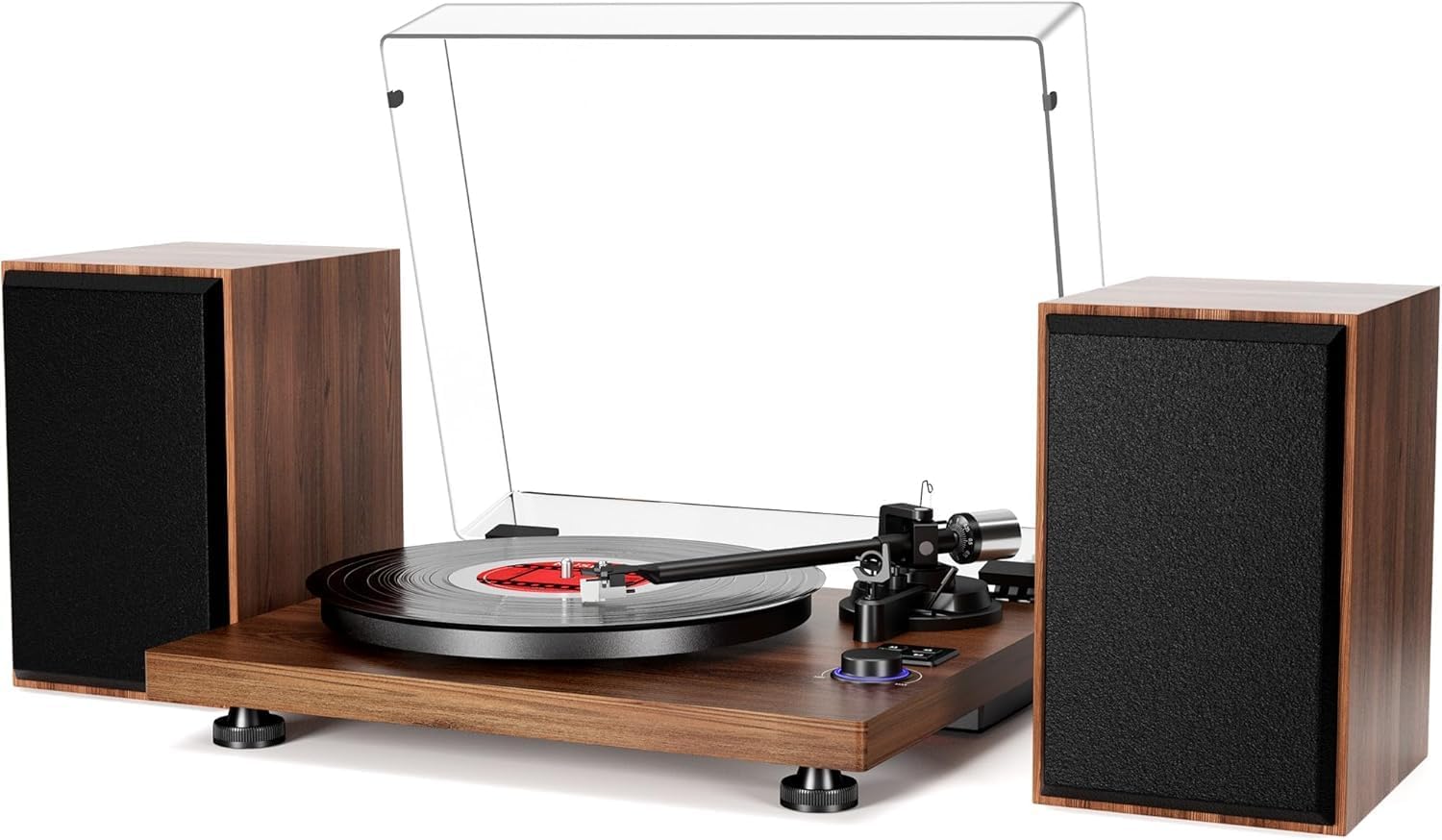
Figure 1: FEKTIK M486 Turntable HiFi System with included bookshelf speakers.
3. Product Overview
Familiarize yourself with the main components of your turntable system.
3.1 Turntable Components

Figure 2: Close-up of the tonearm featuring adjustable counterweight and anti-skating mechanism.
The adjustable counterweight and anti-skating weight ensure smooth movement of the AT-3600L magnetic cartridge, preventing skipping and distortion.

Figure 3: Detail of the high-quality Audio-Technica AT-3600L moving magnet cartridge, designed for rich audio and sound clarity.

Figure 4: The precision-manufactured solid iron alloy platter (1.5KG) provides uniform inertial mass for stable and accurate rotation, enhancing high-fidelity playback.

Figure 5: The control panel features a mode button, speed selection (33/45 RPM), play/pause controls, and a volume knob with a blue LED indicator for Bluetooth mode.
The built-in Bluetooth receiver allows wireless audio streaming from compatible devices like smartphones and tablets.
3.2 Rear Panel Connections

Figure 6: Rear panel showing various input/output options. From left to right: Speaker Jacks (L+/L- and R+/R-), Grounding Lug, DC IN 15V, USB-PC port, RCA L/R Output, PHONO/LINE switch, ON/OFF switch.
The USB-PC port enables vinyl to MP3 recording. The RCA output with PHONO/LINE switch allows connection to external amplifiers or speakers.
3.3 Bookshelf Speakers

Figure 7: Exploded view of the 36W bookshelf speaker, highlighting the tweeter, woofer with paper cone, Alnico magnet, and MDF board construction. These speakers are designed to deliver warm and natural sound.
4. Setup
Follow these steps to set up your FEKTIK M486 turntable system.
4.1 Turntable Assembly
- Place the Platter: Carefully place the sub-platter into the spindle. Use the belt hook tool to loop the drive belt around the sub-platter and the motor pulley. Ensure the belt is not twisted.
- Install the Platter: Place the iron alloy platter onto the sub-platter.
- Place the Slip Mat: Position the felt slip mat on top of the platter.
- Install the Dust Cover: Insert the hinges of the dust cover into the slots at the rear of the turntable unit.
Video 1: Step-by-step installation guide for the turntable, including platter, belt, and dust cover setup. This video is provided by the seller, RIVER ELECTRIONCS.
4.2 Tonearm Balance and Anti-Skating Adjustment
- Remove Stylus Protector: Carefully remove the clear plastic protector from the stylus.
- Balance the Tonearm:
- Unlock the tonearm from its rest.
- Hold the tonearm lift lever in the down position.
- Rotate the counterweight at the rear of the tonearm until the tonearm floats horizontally and is perfectly balanced. Do not let the stylus touch the platter or any surface.
- Once balanced, lock the tonearm back into its rest.
- Set Tracking Force:
- While holding the counterweight steady, rotate the numbered ring on the counterweight until the "0" (zero) aligns with the center line on the tonearm.
- Rotate the entire counterweight (including the numbered ring) counter-clockwise until the desired tracking force is reached. The recommended tracking force for the AT-3600L cartridge is 3.5g. Each mark on the dial represents 0.5g. Rotate the counterweight 1 full circle back to "0", then continue rotating to "1.5" for a total of 3.5g.
- Install Anti-Skating Weight:
- Loop the thread of the anti-skating weight over the third groove of the stick located on the tonearm pivot.
- Allow the weight to hang freely.
4.3 Connecting Speakers and Power
- Connect Bookshelf Speakers: Insert the audio cables from the bookshelf speakers into the speaker jacks on the rear of the turntable. Connect the black ends to the black cable clamps (L- and R-) and the red ends to the red cable clamps (L+ and R+). Ensure correct polarity for optimal sound.
- Connect Power: Plug the power adapter into the DC IN 15V port on the rear of the turntable, then plug the adapter into a power outlet.
- Grounding (Optional): If experiencing hum or interference, connect a grounding wire from the grounding lug on the turntable to a suitable ground point in your audio system or home electrical system.
5. Operating Instructions
5.1 Playing a Vinyl Record
- Power On: Flip the ON/OFF switch on the rear panel to the "ON" position.
- Select Mode: Press the "MODE" button on the control panel to select "PHONO" mode (red LED indicator).
- Place Record: Place a vinyl record on the platter. If playing a 45 RPM record, use the included 45 RPM adapter.
- Select Speed: Press the "33" or "45" button to select the appropriate playback speed for your record.
- Unlock Tonearm: Unlock the tonearm from its rest.
- Position Tonearm: Gently lift the tonearm using the tonearm lift lever and manually position the stylus over the desired track on the record.
- Lower Tonearm: Slowly lower the tonearm using the tonearm lift lever. The stylus will gently descend onto the record, and playback will begin.
- Adjust Volume: Rotate the volume knob to adjust the playback volume.
- Stop Playback: When the record finishes, or you wish to stop, gently lift the tonearm using the tonearm lift lever, return it to its rest, and lock it in place. Press the "STOP" button.
5.2 Bluetooth Playback
The turntable can receive audio wirelessly from your smartphone or tablet.
- Power On: Flip the ON/OFF switch on the rear panel to the "ON" position.
- Select Mode: Press the "MODE" button on the control panel to select "BLUETOOTH" mode (blue LED indicator). The turntable will enter pairing mode.
- Pair Device: On your smartphone or tablet, enable Bluetooth and search for "Turntable" in the list of available devices. Select it to pair.
- Play Audio: Once paired, you can play audio from your device, and it will stream through the turntable's speakers.
- Adjust Volume: Adjust the volume using both your connected device's volume controls and the turntable's volume knob.
Video 2: A detailed review of the FEKTIK Record Player, including a demonstration of Bluetooth connectivity and sound quality. This video is provided by the seller, RickMakes.
5.3 USB Recording (Vinyl to MP3)
Convert your vinyl records to digital MP3 format using the USB-PC connection.
- Connect to PC: Connect the turntable to your computer using the provided USB-B to USB-A cable.
- Install Software: Install the Audacity audio capture software from the included CD or download it from the official Audacity website.
- Configure Audacity: Open Audacity and configure the input device to recognize the turntable. Refer to the Audacity user manual for detailed instructions.
- Start Recording: Start playback of your vinyl record and simultaneously click the record button in Audacity to begin capturing the audio.
- Save File: Once recording is complete, stop playback and recording. You can then edit and save the audio file in MP3 format.
6. Maintenance
Proper care will ensure the longevity and optimal performance of your turntable.
- Cleaning the Stylus: Use a soft brush to gently clean the stylus from back to front. Do not use excessive force.
- Cleaning the Turntable: Wipe the turntable unit and dust cover with a soft, dry, lint-free cloth. Avoid harsh chemicals.
- Record Care: Keep your vinyl records clean and free of dust. Store them vertically in their sleeves to prevent warping.
- Belt Maintenance: Periodically check the drive belt for wear or stretching. Replace if necessary.
7. Troubleshooting
If you encounter any issues, refer to the following common problems and solutions:
| Problem | Possible Cause | Solution |
|---|---|---|
| No power | Power adapter not connected or faulty outlet. | Ensure power adapter is securely connected and outlet is functional. |
| No sound from speakers | Speakers not connected correctly; volume too low; incorrect mode selected. | Check speaker cable connections (red to red, black to black). Increase volume. Ensure correct mode (PHONO or BLUETOOTH) is selected. |
| Skipping or distorted sound | Tracking force incorrect; record dirty or damaged; turntable not level. | Adjust counterweight and anti-skating. Clean record. Ensure turntable is on a stable, level surface. |
| Bluetooth not pairing | Turntable not in Bluetooth mode; device too far; device already paired. | Ensure turntable is in Bluetooth mode (blue LED). Move device closer. Disconnect from other Bluetooth devices. |
| Humming noise | Grounding issue; interference from other electronics. | Connect a grounding wire. Move turntable away from other electronic devices. |
8. Specifications
- Model: M486
- Brand: FEKTIK
- Speeds: 33 1/3, 45 RPM (Belt Drive)
- Cartridge: Audio-Technica AT-3600L Magnetic Cartridge
- Speakers: 2 x 18W Bookshelf Speakers (36W total)
- Connectivity: Bluetooth, USB-PC, RCA L/R Output (Phono/Line switchable)
- Special Features: Adjustable Counterweight, Anti-Skating Control, USB Vinyl to MP3 Recording
- Material: Wood (Modern+Retro Wooden style)
- Color: Brown
- Item Weight: 24.4 pounds
- Package Dimensions: 26 x 21.5 x 10 inches
- Motor Type: AC Motor
- Compatible Devices: Headphone, Personal Computer, Smartphone, Tablet
9. Warranty and Support
For warranty information and customer support, please refer to the warranty card included in your package or visit the official FEKTIK website.
You can also find additional support and product information at the FEKTIK Store on Amazon.