
Devoko 0463
Devoko Electric Height-Adjustable Standing Desk
Model: 0463
Introduction
The Devoko Electric Height-Adjustable Standing Desk is designed to enhance your workspace by allowing seamless transitions between sitting and standing positions. This ergonomic design promotes better posture, reduces fatigue, and can improve productivity throughout your workday. This manual provides essential information for the safe assembly, operation, and maintenance of your new desk.
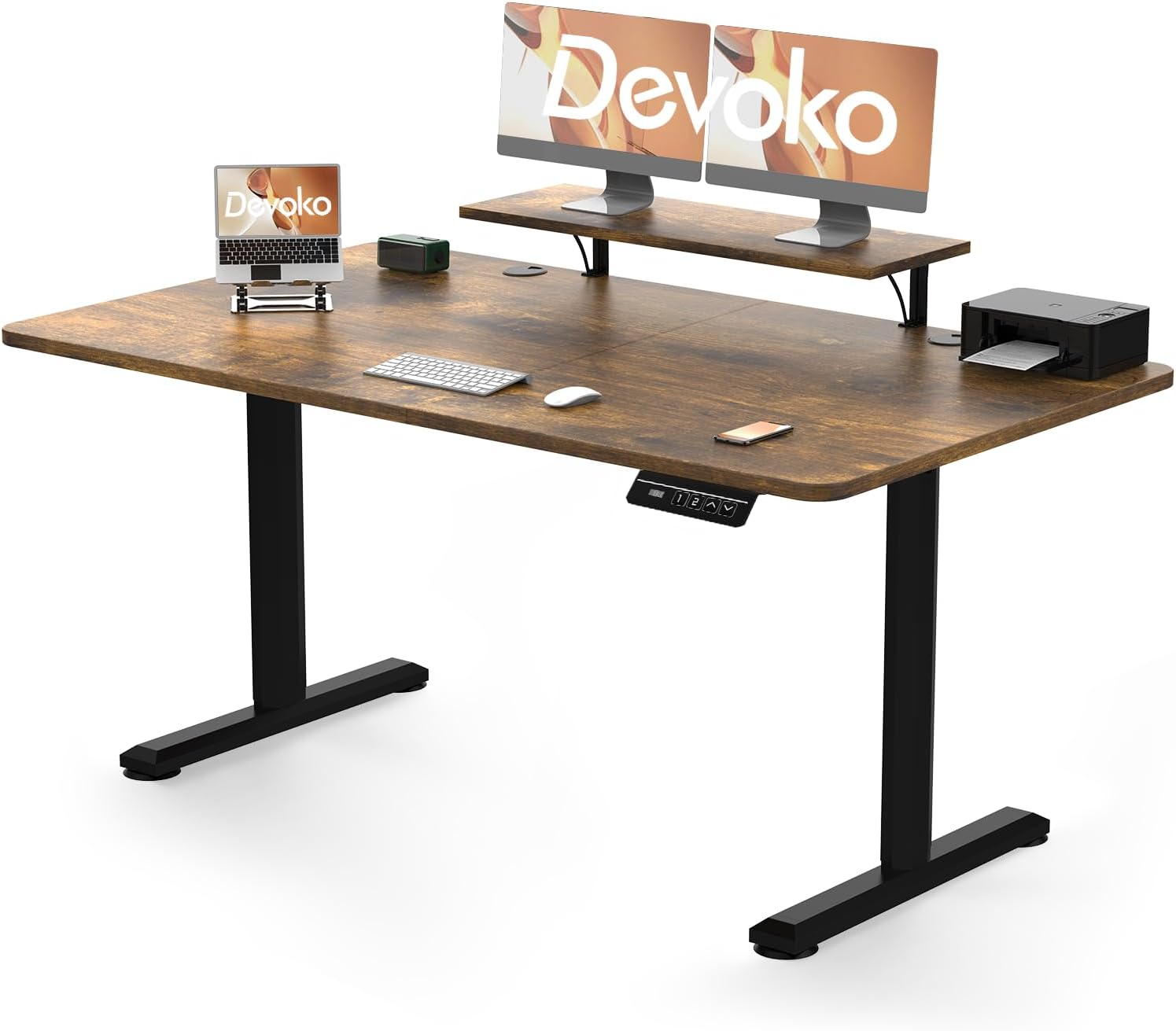
Figure 1: Devoko Electric Height-Adjustable Standing Desk in vintage brown, featuring a spacious desktop, integrated monitor stand, and an electric control panel for height adjustments. The desk is designed for both sitting and standing positions.
Safety Warnings
Please read and understand all safety warnings before assembling or operating the desk. Failure to do so may result in injury or damage to the product.
- Weight Limit: Do not exceed the maximum weight capacity of 70 kg (154 lbs) on the desktop. Overloading can cause instability and damage.
- Assembly: Two people are recommended for the assembly process to ensure safety and proper installation.
- Load Distribution: Distribute weight evenly across the desktop. Avoid placing heavy items on one side.
- Clearance: Ensure there are no obstructions above or below the desk when adjusting its height. Keep hands and fingers clear of moving parts.
- Power Cord: Do not pinch or damage the power cord. Ensure it is routed safely to prevent tripping hazards.
- Children and Pets: Keep children and pets away from the desk during operation to prevent accidents.
- Indoor Use Only: This desk is intended for indoor use in dry environments. Avoid exposure to moisture or extreme temperatures.
Product Features
Your Devoko Electric Height-Adjustable Standing Desk comes equipped with several features designed for comfort and convenience:
- Electric Height Adjustment: Smoothly adjust the desk height from 73 cm (28.7 inches) to 118 cm (46.5 inches) with the touch of a button.
- Memory Presets: Store up to 2 preferred height settings for quick and easy transitions between sitting and standing positions.
- Robust Construction: Built with high-quality metal frames and durable motors tested for over 20,000 cycles, ensuring long-lasting stability and performance. Features T-shaped feet for enhanced stability.
- Integrated Monitor Support: Includes a dedicated shelf for monitor placement, optimizing your viewing angle and freeing up desktop space.
- Anti-Collision System: The desk is equipped with an anti-collision mechanism that detects obstacles during height adjustment and automatically stops movement to prevent damage or injury.

Figure 2: A close-up view of the Devoko standing desk's edge, illustrating the anti-collision system. An orange arrow indicates upward movement, signifying the desk's ability to detect and stop movement if an obstruction is encountered, preventing damage or injury.
Setup and Assembly
Your Devoko desk requires assembly. Detailed installation instructions are included in the product packaging. Please follow these instructions carefully for proper and safe setup.
- Unpack Components: Carefully unpack all parts and verify against the parts list provided in the assembly manual.
- Prepare Workspace: Ensure you have a clear, spacious area for assembly. A soft surface is recommended to prevent scratches.
- Two-Person Assembly: As noted in the safety warnings, assembly is significantly easier and safer with two people.
- Follow Instructions: Adhere strictly to the step-by-step assembly guide provided with your desk. Pay close attention to screw types and tightening sequences.
- Cable Management: Once assembled, organize power cables and other cords to prevent tangles and ensure smooth operation during height adjustments.
Operating Instructions
The control panel allows for easy adjustment and customization of your desk's height.
- Adjusting Height:
- Press the Up (▲) button to raise the desk.
- Press the Down (▼) button to lower the desk.
- Release the button when the desired height is reached. The motor operates quietly for minimal disruption.
- Setting Memory Presets:
- Adjust the desk to your desired sitting height.
- Press the "M" button (Memory button). The display may flash or beep.
- Immediately press one of the preset buttons (e.g., "1" or "2") to save the current height to that position.
- Repeat for your desired standing height or a second sitting/standing position.
- Using Memory Presets:
- Simply press the corresponding preset button ("1" or "2") to automatically move the desk to the saved height.
- Anti-Collision System:
- The desk is equipped with an anti-collision feature. If the desk encounters an obstacle during movement, it will automatically stop and reverse slightly to prevent damage.
Maintenance
Regular maintenance helps ensure the longevity and optimal performance of your Devoko desk.
- Cleaning: Wipe the desktop and frame with a soft, damp cloth. Avoid abrasive cleaners or harsh chemicals that could damage the finish.
- Check Connections: Periodically check all screws and bolts to ensure they are tight. Retighten if necessary.
- Cable Inspection: Inspect the power cord and control panel cable for any signs of wear or damage. Replace if necessary.
- Motor Care: The motors are designed for durability. Avoid continuous operation for extended periods without rest.
Troubleshooting
If you encounter issues with your Devoko Electric Height-Adjustable Standing Desk, refer to the following common problems and solutions:
| Problem | Possible Cause | Solution |
|---|---|---|
| Desk does not move. | Power cord disconnected; motor overload; control panel issue. | Check if the power cord is securely plugged into the wall outlet and the desk. Unplug for 10 minutes, then plug back in. Reduce weight on the desk if overloaded. |
| Desk moves unevenly or makes unusual noise. | Uneven load distribution; loose connections; obstruction. | Ensure weight is evenly distributed. Check and tighten all assembly screws. Clear any obstructions around the legs. |
| Memory presets not working. | Presets not properly saved. | Re-follow the instructions for setting memory presets carefully. |
| Anti-collision system frequently triggers. | Obstruction; sensitive setting. | Ensure no objects are in the path of the desk's movement. Refer to the full assembly manual for potential sensitivity adjustments if available. |
If the problem persists after attempting these solutions, please contact Devoko customer support for further assistance.
Specifications
| Attribute | Detail |
|---|---|
| Brand | Devoko |
| Model Number | 0463 |
| Color | Vintage Brown |
| Material | Metal frame, Wood desktop |
| Product Dimensions (L x W x H) | 160 cm x 70 cm x (73-118 cm) / 63 inches x 27.6 inches x (28.7-46.5 inches) |
| Adjustable Height Range | 73 cm - 118 cm (28.7 in - 46.5 in) |
| Item Weight | 27.1 kg (59.7 lbs) |
| Maximum Load Capacity | 70 kg (154 lbs) |
| Special Features | Ergonomic, Height Adjustable, Monitor Support, Electric Motor, 2 Memory Presets, Anti-Collision System |
Warranty and Support
Devoko stands behind the quality of its products. For warranty information, technical support, or any questions regarding your Electric Height-Adjustable Standing Desk, please refer to the warranty card included in your packaging or visit the official Devoko website. You may also contact customer service through the retailer where you purchased the product.
For further assistance, please have your model number (0463) and purchase details ready.
Related documents0463


Ask a question about this manual
Ask about setup, troubleshooting, compatibility, parts, safety, or missing instructions. Manuals+ will review the question and use this page’s manual context to help answer it.