
1. Product Overview
The AODELAN ZC-3 Wireless Zoom Controller is a versatile remote control designed for Sony and Canon camcorders equipped with LANC or 2.5mm remote jacks. It offers both wireless and wired control options, integrating essential functions such as zoom, aperture, focusing, video recording start/stop, playback, automatic sleep, and button backlight.

Image: AODELAN ZC-3 Wireless Zoom Controller showcasing its main functions including Focus, IRIS, Zoom, Playback, Recording, and Sleep mode.
2. What's Included
The AODELAN ZC-3 package includes the following items:
- Wireless LANC Remote Controller (requires 2 AAA batteries, not included)
- LANC Remote Receiver
- 2.5mm Jack Cable
- Camcorder Zoom Controller Manual
Video: An unboxing and overview of the AODELAN ZC-3 Wireless Zoom Controller, showing the contents of the package and initial setup steps.
3. Product Components
Familiarize yourself with the main components of the AODELAN ZC-3 Wireless Zoom Controller and its receiver:

Image: Detailed diagram labeling all buttons and ports on the remote controller (Screen, Menu key, Record review key, A/M (IRIS) key, A/M (FOCUS) key, Adjustment keys, Record key, Zoom lever) and the receiver (Status lamp, Plug, Clamp knob, Clamp, Battery compartment cover, ON/OFF switch, USB Type-C connector, REMOTE jack).
4. Setup
4.1 Battery Installation
- Unscrew the clamp knob on the back of the remote controller to access the battery compartment.
- Insert two AAA batteries into the compartment, ensuring correct polarity.
- Securely close the battery compartment and tighten the clamp knob.
4.2 Mounting the Controller
The remote controller features a clamp with rubber padding for secure attachment to your camcorder's handle or tripod bar.
- Loosen the clamp knob.
- Position the clamp around the desired handle or bar.
- Tighten the clamp knob until the controller is firmly secured.

Image: Visual guide demonstrating how to easily install the remote controller onto a camcorder handle using the clamp mechanism.
4.3 Connecting the Receiver
The receiver can be connected to your camcorder via a wired or wireless connection.
Wired Connection:
- Connect one end of the 2.5mm Jack Cable to the REMOTE jack on the receiver.
- Connect the other end of the 2.5mm Jack Cable to the LANC or 2.5mm remote jack on your camcorder.
Wireless Connection:
- Plug the LANC Remote Receiver directly into the LANC or 2.5mm remote jack on your camcorder.
- Ensure the receiver's ON/OFF switch is in the 'ON' position.

Image: Illustration of both wireless (up to 50m/164ft) and wired (1m/3.28ft) connection methods for the AODELAN ZC-3 controller to a camcorder.
4.4 Pairing the Remote Controller and Receiver
If using the wireless connection, ensure the remote controller and receiver are paired:
- Turn on both the remote controller and the receiver.
- On the remote controller, navigate to the 'PAIR MODE' setting in the menu.
- Select 'Y' to initiate pairing. The devices should connect automatically.
5. Operating Instructions
5.1 Power On/Off
- To power on the remote controller, slide the ON/OFF switch to the 'ON' position. The LED display will illuminate.
- To power off, slide the ON/OFF switch to the 'OFF' position.
5.2 Menu Navigation and Settings
Press the 'Menu' button on the remote controller to access various settings:
- ZOOM DIRECT (R/L): Change the rotation direction of the Zoom lever.
- ZOOM SPEED (1, 2, 3): Adjust the zoom speed (3 levels).
- IRIS SPEED (1, 2): Adjust the iris manual adjustment speed (2 levels).
- FOCUS SPEED (1, 2, 3): Adjust the focus manual adjustment speed (3 levels).
- SLEEP (OFF, 10M, 1H, 4H): Set the auto-sleep duration for the remote controller (4 levels).
- PAIR MODE (Y): Set the Remote Controller to pair with the Receiver.
- KEY B.L. (AUTO, ON, OFF): Control the key backlight of the Remote Controller.
- RESET (ALL - Y): Restore factory settings.

Image: Display of the AODELAN ZC-3's setup menu, showing options for zoom direction, zoom speed, iris speed, focus speed, sleep mode, pairing, key backlight, and reset.
5.3 Zoom Control
Use the 'W' (Wide-angle) and 'T' (Telephoto) buttons on the remote controller to adjust the zoom. The speed of the zoom is pressure-sensitive: a light press results in a slow zoom, while a harder press results in a faster zoom.

Image: Demonstrates the 'W' and 'T' buttons for zoom control, with a visual representation of zooming out to wide-angle and zooming in to telephoto, and the 3-speed adjustable zoom feature.
5.4 Record Start/Stop
Press the red 'REC' button to start or stop video recording.
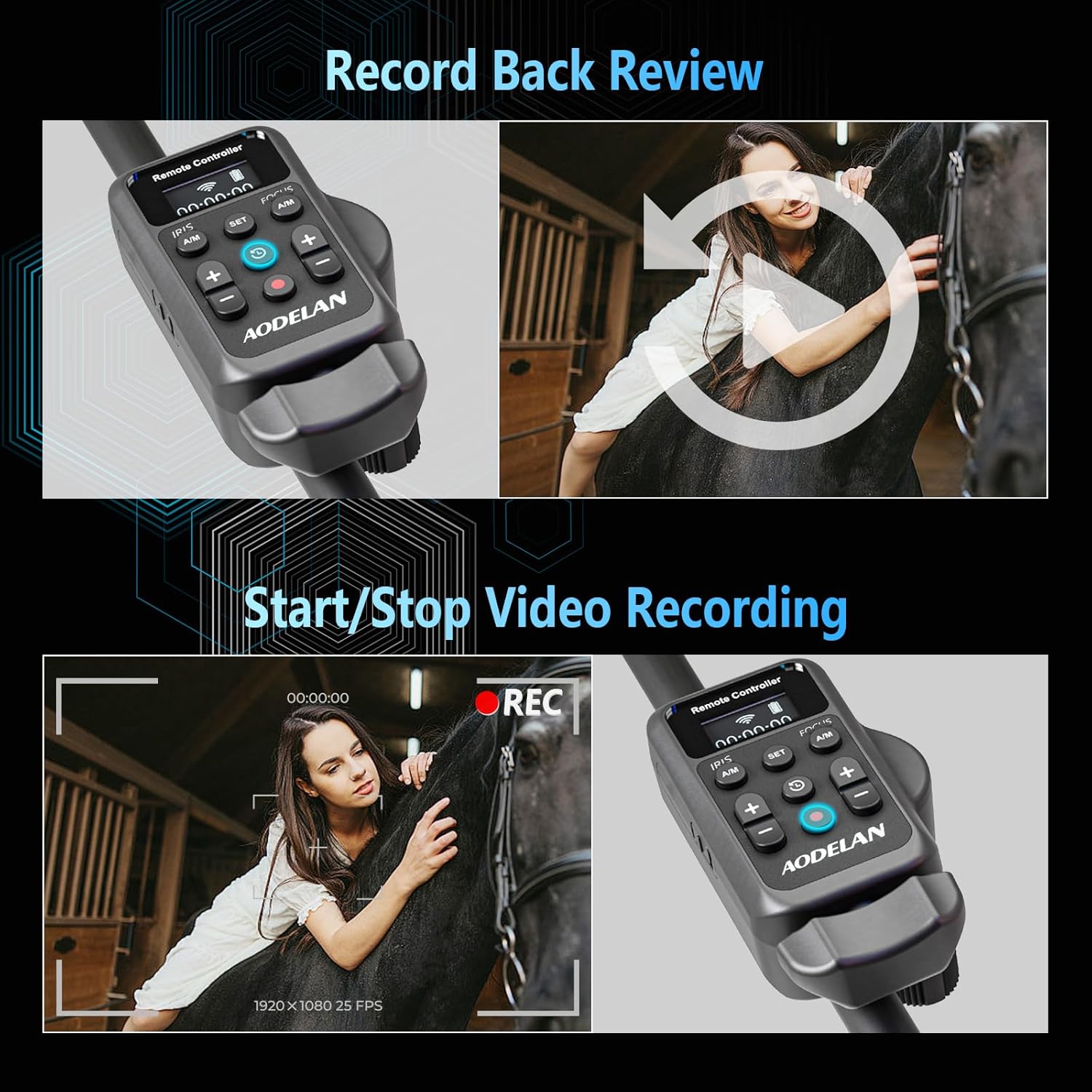
Image: Shows the 'REC' button for starting and stopping video recording, along with a 'Record Back Review' button for reviewing footage.
5.5 Iris Adjustment
Use the '+' and '-' buttons under 'IRIS' to adjust the aperture size. The adjustment speed can be set in the menu (2 levels).

Image: Illustrates the IRIS adjustment function using the '+' and '-' buttons, with a visual scale of aperture values (f/1.4 to f/8.0) and indicating 2 adjustable speeds.
5.6 Focus Adjustment
Use the '+' and '-' buttons under 'FOCUS' to adjust the focus. The adjustment speed can be set in the menu (3 levels).
Image: Highlights the Focus adjustment feature, indicating that the focus speed is adjustable in 3 speeds using the dedicated '+' and '-' buttons.
5.7 Playback Controls
The remote controller includes playback functionality for reviewing recorded footage.
- Press the 'Record Review' key (circular arrow icon) to access playback mode.
- Use the navigation buttons to control playback (e.g., play, pause, fast forward, rewind).
Video: Demonstrates the camcorder remote control's zoom and record functions in a practical setting, showing smooth operation.
6. Compatibility
The AODELAN ZC-3 Wireless Zoom Controller is compatible with a wide range of Sony and Canon camcorders that feature a LANC (2.5mm) or REMOTE (2.5mm) jack. If your model is not explicitly listed, please check the Remote Terminal on your camcorder.
Compatible with Sony Camcorders:
- PXW-Z280, Z190, Z90, Z150, Z100
- Z1C, Z5C, Z7C, X160, X180
- FS5, FS7, FS5M2, FS7M2, FS7H, FS700, FS100
- FX1E, FX7E, FX1000, 190P, 198P, HD1000
- HXR-MC88, MC2500, MC1500, MC1500C, MC2500C
- NX70, NX80, NX100, NX200, NX5R, NX5C, NX70C
- FDR-AX700, AX2000E, etc.
Compatible with Canon Camcorders:
- G70, G60, G50, G40, G30, G26, G21, G20
- XA70, XA75, XA60, XA65, XA50, XA55, XA40, XA45, XA30, XA35, XA20, XA25, XA11, XF705, XF605, XF405, XF400, XF305, XF300
- VIXIA HF, XF315, XF310, XF205, XF200, XF105, XF100
- ME200S-SH, etc.

Image: A detailed list of compatible Sony and Canon camcorder models for the AODELAN ZC-3 controller.
Video: Demonstrates the wired LANC remote control functionality with a camcorder, highlighting its ease of use for various camera operations.
7. Maintenance
- Keep the remote controller and receiver clean and dry. Use a soft, dry cloth for cleaning.
- Avoid exposing the device to extreme temperatures, humidity, or direct sunlight.
- Remove batteries if the device will not be used for an extended period to prevent leakage.
8. Troubleshooting
- Device not powering on: Check battery installation and ensure batteries are not depleted. Replace if necessary.
- Remote not responding: Ensure the remote controller and receiver are properly paired. Re-pair if connection is lost. Check if the camcorder's remote terminal is clean and the cable/receiver is securely connected.
- Intermittent connection: Ensure the remote controller and receiver are within the specified operating range (up to 50 meters/164 feet for wireless). Avoid obstructions that may interfere with the signal.
- Functions not working correctly: Verify camcorder compatibility. Some advanced functions may depend on the specific camcorder model. Try resetting the remote controller to factory settings via the menu.
9. Specifications
| Feature | Detail |
|---|---|
| Model Number | f8080ca0-0939-4367-b7f8-966ef2f6a408 (ZC-3) |
| Package Dimensions | 4.49 x 3.27 x 2.48 inches |
| Item Weight | 6.7 ounces |
| Color | Black |
| Special Feature | Digital Display |
| Max Number of Supported Devices | 1 |
| Compatible Devices | Sony, Canon camcorder models listed in compatibility section |
| Manufacturer | AODELAN |
| Date First Available | October 11, 2023 |
10. Warranty and Support
For warranty information and technical support, please refer to the contact details provided with your purchase or visit the official AODELAN website. Keep your proof of purchase for any warranty claims.


