
1. Introduction
This manual provides essential information for the assembly, operation, maintenance, and troubleshooting of your GYMAX 4-in-1 Multi Game Table. This versatile game table combines foosball, pool billiards, air hockey, and table tennis into a single unit, designed for entertainment in various settings. Please read these instructions carefully before use and retain them for future reference.

Image 1.1: A family enjoying the foosball game on the multi-game table.
2. Product Features
- 4-in-1 Multi-Game Design: Enjoy foosball, pool billiards, air hockey, and table tennis with interchangeable play surfaces.
- Space-Saving Stackable Design: Easily switch between games by stacking the play surfaces, allowing for compact storage.
- Durable Construction: Made from engineered wood, metal, and polypropylene for stability and longevity.
- Complete Accessory Set: Includes all necessary accessories for each game, such as balls, paddles, cues, and pushers.
- Considerate Details: Features like manual scoreboards, goal boxes, kick-off holes, smooth metal rods with non-slip grips, and anti-slip foot pads enhance the playing experience.

Image 2.1: Visual representation of the four games included: Billiards, Air Hockey, Table Tennis, and Foosball.
3. What's in the Box
The package includes the main game table structure and all necessary accessories for each game mode:
- Main Game Table Frame
- Foosball Play Surface with 18 Football Players
- Pool Billiards Play Surface
- Air Hockey Play Surface
- Table Tennis Play Surface
- 2 Foosballs
- 2 Table Tennis Balls
- 2 Table Tennis Paddles
- Table Tennis Net and Post
- 2 Hockey Pushers
- 2 Hockey Pucks
- 2 Cue Sticks
- 2 Cue Chalks
- 1 Brush
- 1 Billiard Balls Set
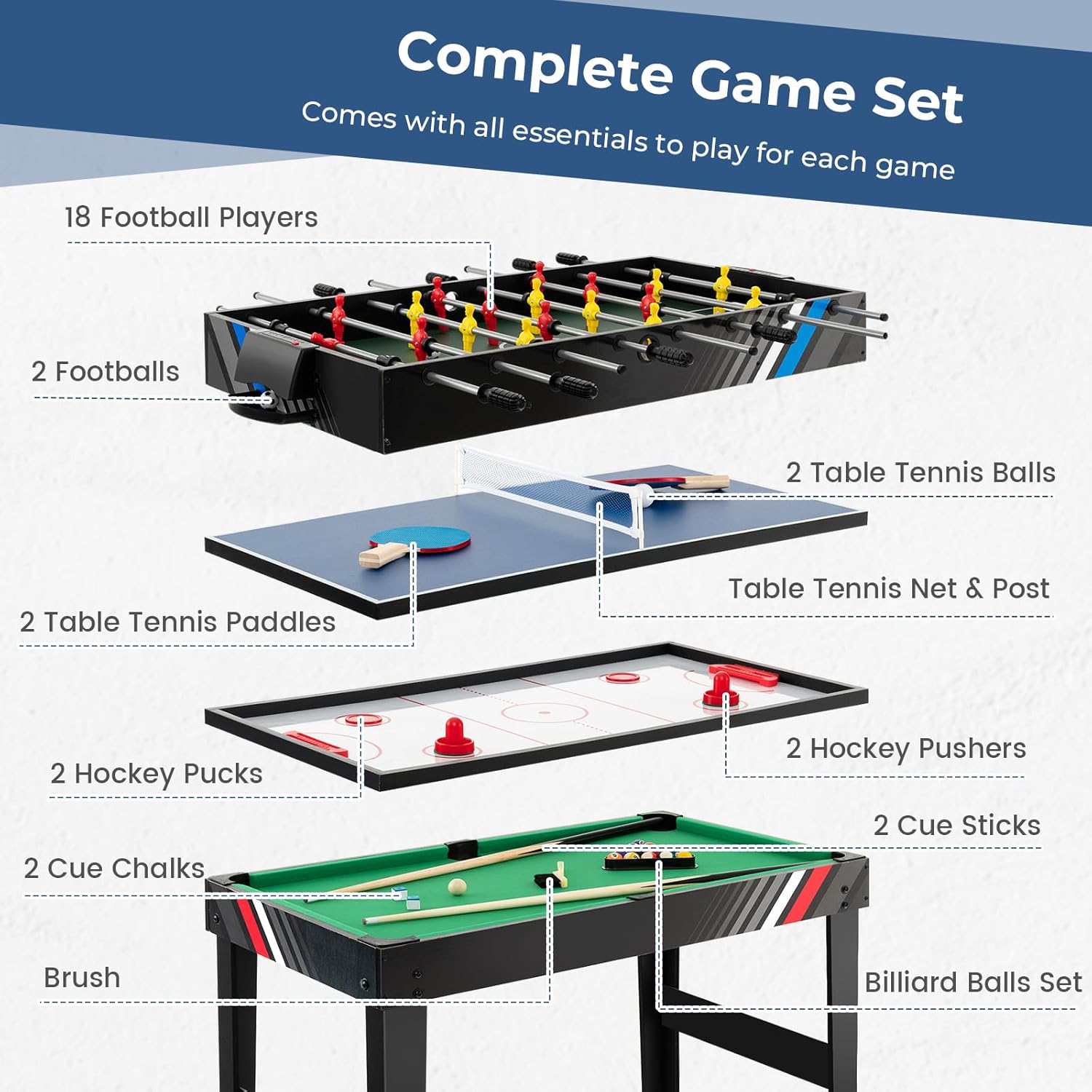
Image 3.1: All accessories included with the GYMAX 4-in-1 Multi Game Table.
4. Setup Instructions
Assembly of the GYMAX 4-in-1 Multi Game Table requires careful attention to detail. Please follow the steps outlined in the included assembly guide. For a visual aid, refer to the official installation video below.
4.1. Assembly Video Guide
Video 4.1: Official installation video for the GYMAX 4-in-1 Multi Game Table. This video demonstrates the step-by-step assembly process.
4.2. General Assembly Steps
- Unpack Components: Carefully remove all parts from the packaging and verify against the 'What's in the Box' section.
- Assemble Base Frame: Follow the instructions to connect the table legs and support beams securely. Ensure all screws are tightened.
- Attach Main Table Body: Secure the main table body to the assembled base frame.
- Install Foosball Rods and Players: Insert the foosball rods through the table and attach the players, ensuring they face the correct direction.
- Prepare Game Surfaces: The game surfaces (Billiards, Air Hockey, Table Tennis, Foosball) are designed to stack. Place the desired game surface on top of the main table structure.
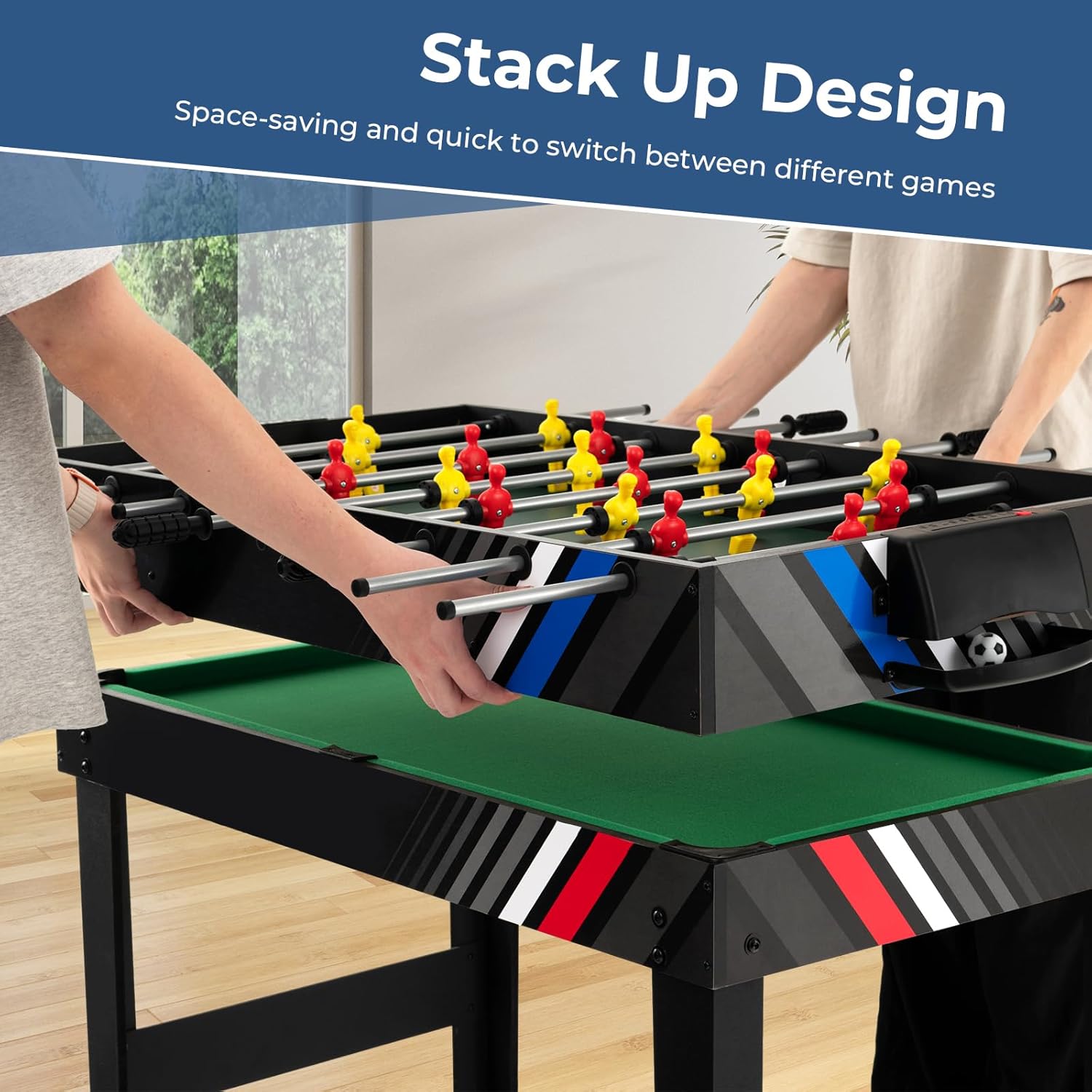
Image 4.2: Illustration of the stackable design, showing how to switch between game surfaces.
5. Operating Instructions
5.1. Switching Game Modes
The GYMAX 4-in-1 Multi Game Table features a stackable design for easy conversion between games. To switch games:
- Remove the current game surface by lifting it off the table frame.
- Carefully place the desired game surface onto the table frame, ensuring it is properly aligned and stable.
- Store unused game surfaces in a safe, flat location to prevent damage.
5.2. Game Specific Instructions
Each game mode utilizes its specific accessories and rules. Refer to standard game rules for detailed gameplay.
- Foosball: Use the provided foosballs and manipulate the rods to control your players and score goals. Utilize the manual scoreboards to keep track of points.
- Pool Billiards: Place the billiard play surface on the table. Arrange the billiard balls using the triangle rack. Use the cue sticks and chalk to play.
- Air Hockey: Place the air hockey play surface. Use the hockey pushers to strike the puck into your opponent's goal.
- Table Tennis: Place the table tennis play surface and set up the net. Use the paddles and table tennis balls to play.

Image 5.1: The game table is suitable for various environments, including home, office, pub, and dormitory.
6. Maintenance
Proper maintenance ensures the longevity and optimal performance of your game table.
- Cleaning: Wipe down all surfaces with a soft, damp cloth. Avoid abrasive cleaners or solvents that may damage the finish.
- Storage: When not in use, store game surfaces flat and in a dry environment to prevent warping.
- Foosball Rods: Periodically apply a silicone-based lubricant to the foosball rods for smooth operation.
- Check Fasteners: Regularly inspect all screws and bolts and tighten them as needed to maintain stability.
7. Troubleshooting
If you encounter issues with your GYMAX 4-in-1 Multi Game Table, refer to the following common solutions:
- Wobbly Table: Ensure all leg bolts and frame fasteners are securely tightened. Check that the table is on a level surface.
- Sticking Foosball Rods: Apply a small amount of silicone lubricant to the rods. Ensure the rods are clean and free of debris.
- Game Surface Not Lying Flat: Verify that the underlying table frame is clear of obstructions and that the game surface is correctly aligned.
- Missing or Damaged Parts: Contact customer support with your model number and a description of the issue for assistance.
8. Specifications
| Brand | GYMAX |
| Model Number | B0CKTRV36Z |
| Color | Black |
| Material | Engineered Wood, Metal, Polypropylene |
| Product Dimensions (L x W x H) | 49" x 38" x 32.5" |
| Item Weight | 48.5 pounds |
| Number of Players | 2-4 |
| Included Games | Air Hockey, Billiards, Foosball, Table Tennis |
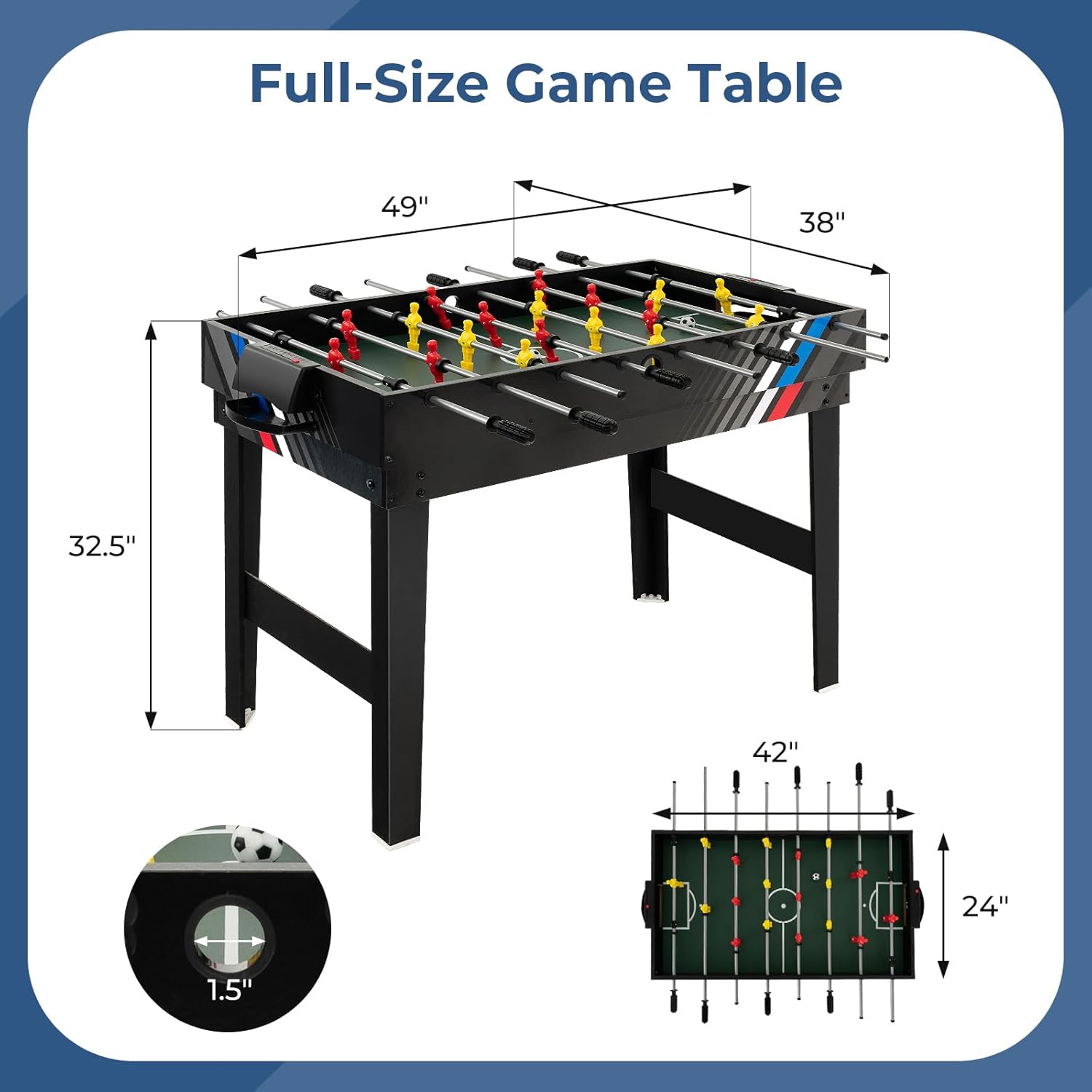
Image 8.1: Detailed dimensions of the game table.
9. Warranty and Support
Your GYMAX 4-in-1 Multi Game Table comes with a 90-day warranty from the date of purchase, covering manufacturing defects. For warranty claims, technical support, or inquiries regarding replacement parts, please contact the seller, Gymax, directly through your purchase platform.
For additional assistance, please refer to the contact information provided with your purchase documentation.
