
De'Longhi EXAM440.55.G
De'Longhi Rivelia EXAM440.55.G Automatic Bean-to-Cup Coffee Machine
User Manual
1. Introduction
This manual provides instructions for the safe and efficient operation, maintenance, and troubleshooting of your De'Longhi Rivelia EXAM440.55.G automatic bean-to-cup coffee machine. Please read this manual thoroughly before using the appliance and keep it for future reference.

Image 1: De'Longhi Rivelia EXAM440.55.G Automatic Bean-to-Cup Coffee Machine. This image shows the machine with its milk carafe, water tank, and a bean container, along with a cup of coffee and a cup of latte.
2. Important Safety Instructions
Always follow basic safety precautions when using electrical appliances to reduce the risk of fire, electric shock, and injury to persons. This appliance is intended for household use only.
- Do not immerse the appliance, power cord, or plug in water or other liquids.
- Ensure the voltage indicated on the appliance corresponds to your mains voltage.
- Do not operate the appliance with a damaged cord or plug, or after the appliance malfunctions or has been damaged in any manner.
- Keep the appliance and its cord out of reach of children.
- Always unplug the appliance from the power outlet before cleaning and when not in use.
- Do not use accessories not recommended by the manufacturer.
- Place the appliance on a stable, level surface, away from hot surfaces or open flames.
3. Components Overview
Familiarize yourself with the main parts of your De'Longhi Rivelia coffee machine.
- Water Tank: Removable tank for fresh water, 1.4 L capacity.
- Bean Container (Bean Switch System): Two interchangeable 250g containers for different coffee beans.
- Ground Coffee Funnel: For pre-ground coffee.
- Milk Carafe (LatteCrema Hot System): For automatic milk frothing.
- Drip Tray: Removable for easy cleaning.
- Coffee Spouts: Adjustable height for various cup sizes.
- Control Panel: 3.5" Full-Touch TFT color display for intuitive operation.
- Integrated Grinder: Adjustable up to 13 grind levels.
- Brewing Unit: Internal component for coffee extraction.
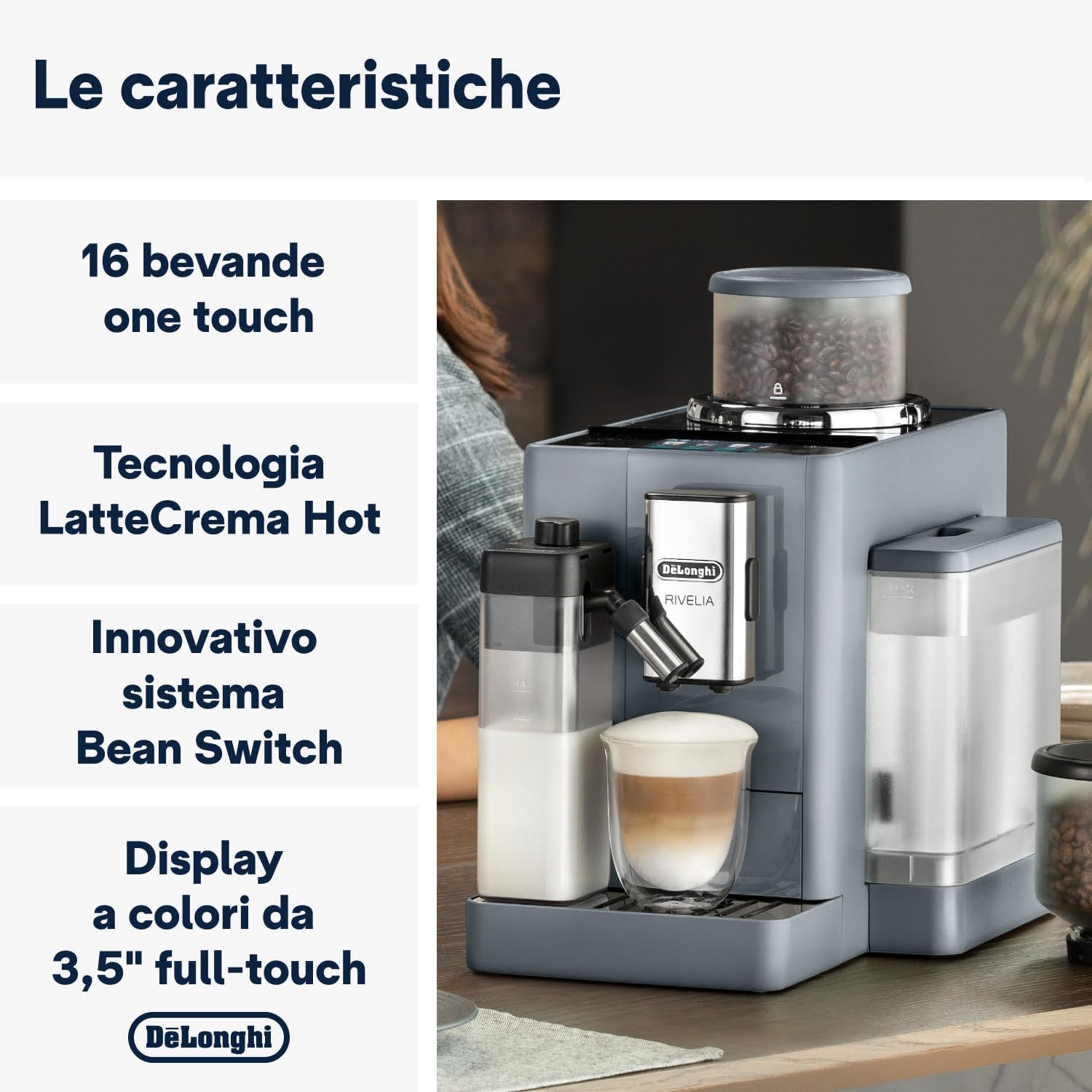
Image 2: Key features of the De'Longhi Rivelia, highlighting the 16 one-touch beverages, LatteCrema Hot technology, innovative Bean Switch System, and the 3.5-inch full-touch color display.
4. Initial Setup
- Unpacking: Carefully remove the machine from its packaging. Remove all protective films and packaging materials.
- Positioning: Place the machine on a stable, level surface, away from water splashes and heat sources. Ensure adequate space around the machine for ventilation.
- Water Tank: Remove the water tank, rinse it with fresh water, and fill it to the MAX level. Reinsert the tank securely.
- Bean Container: Choose one of the two bean containers. Fill it with your preferred whole coffee beans (max 250g). Insert the container into the machine.
- Power Connection: Plug the power cord into a suitable electrical outlet.
- First Use Wizard: The display will guide you through the initial setup process, including language selection, water hardness setting, and rinsing cycles. Follow the on-screen instructions.
5. Operating Instructions
5.1. Basic Coffee Preparation
- Ensure the water tank is filled and the bean container has coffee beans.
- Place a cup under the coffee spouts.
- On the 3.5" full-touch display, select your desired coffee beverage (e.g., Espresso, Coffee).
- The machine will automatically grind the beans and brew your coffee.
- Adjust coffee strength, temperature, and quantity via the display settings if desired.
5.2. Bean Switch System
The exclusive Bean Switch System allows you to easily switch between two different types of coffee beans.
- To change beans, ensure the machine is not brewing.
- Remove the currently used bean container by lifting it.
- Insert the second bean container with a different type of coffee beans.
- The machine will automatically detect the change and adjust settings if Bean Adapt Technology is active.

Image 3: The Bean Switch System, showing two interchangeable bean containers for easy variety changes.
5.3. LatteCrema Hot Technology (Milk Beverages)
Prepare creamy and dense hot milk foam for your favorite milk-based beverages.
- Fill the milk carafe with fresh milk (dairy or plant-based alternatives).
- Attach the milk carafe to the machine's milk frothing system.
- Place a cup under the coffee and milk spouts.
- Select a milk-based beverage from the display (e.g., Cappuccino, Latte Macchiato).
- The machine will automatically froth the milk and dispense it, followed by coffee.
- After use, the milk carafe has an automatic cleaning function. Follow the on-screen prompts to initiate cleaning.

Image 4: The LatteCrema Hot system in action, producing fine, rich, and automatic milk foam for beverages.
5.4. Bean Adapt Technology
This technology automatically adjusts the grinding degree, coffee dose, and brewing temperature to optimize the extraction for the specific coffee beans you are using, ensuring the best aroma and taste.
- The machine will prompt you to activate or configure Bean Adapt when a new bean type is introduced or selected.
- Follow the on-screen instructions to calibrate the settings for your beans.
5.5. Coffee Routines and User Profiles
The machine features 4 user profiles and a "Coffee Routines" function to personalize and save your preferred beverage settings.
- User Profiles: Create individual profiles to save customized recipes, ensuring each user gets their perfect drink with a single touch.
- Coffee Routines: This function learns your coffee habits and suggests your favorite drinks at specific times of the day.

Image 5: The 3.5-inch full-touch color display with interactive animations, showing beverage options and user profile selection.
5.6. Beverage Selection
The De'Longhi Rivelia offers 16 unique beverages accessible at the touch of a button.

Image 6: A selection of 16 unique coffee and milk beverages that can be prepared by the machine, including espresso, cappuccino, and latte macchiato.
6. Maintenance and Cleaning
Regular cleaning and maintenance ensure optimal performance and longevity of your coffee machine.
6.1. Daily Cleaning
- Drip Tray: Empty and rinse the drip tray and coffee grounds container daily.
- Milk Carafe: After each use, perform the automatic cleaning cycle for the milk carafe. Detach and rinse the components regularly.
- Coffee Spouts: Wipe the coffee spouts with a damp cloth.
6.2. Weekly Cleaning
- Brewing Unit: Remove the brewing unit (refer to the display for instructions), rinse it under running water, and let it air dry before reinserting.
- Water Tank: Rinse the water tank thoroughly.
- Bean Container: Empty and clean the bean containers, especially when switching bean types.
6.3. Descaling
The machine will indicate when descaling is required. Use only De'Longhi descaling solution and follow the on-screen instructions precisely. Descaling regularly prevents limescale buildup and ensures proper machine function.
Note: The appliance is not dishwasher safe.
7. Troubleshooting
This section addresses common issues you might encounter. For more complex problems, contact customer support.
| Problem | Possible Cause | Solution |
|---|---|---|
| Machine does not turn on. | Not plugged in; power outage. | Check power cord connection; check power supply. |
| No coffee is dispensed. | Water tank empty; coffee beans empty; brewing unit clogged. | Fill water tank; fill bean container; clean brewing unit. |
| Milk does not froth properly. | Milk carafe dirty; milk type unsuitable; milk too warm. | Clean milk carafe; use cold, fresh milk (dairy or suitable plant-based); ensure carafe is correctly assembled. |
| "Descale" message appears. | Limescale buildup. | Perform descaling cycle as instructed by the machine. |
8. Technical Specifications
| Feature | Specification |
|---|---|
| Model Name | Rivelia |
| Model Number | EXAM440.55.G |
| Dimensions (L x W x H) | 43 x 24.5 x 38.5 cm |
| Weight | 9.7 Kilograms |
| Water Tank Capacity | 1.4 Liters |
| Power | 1450 Watts |
| Voltage | 240V |
| Interface | 3.5" Full-Touch TFT Color Display |
| Coffee Type | Whole Bean, Ground Coffee |
| Special Features | Bean Switch System, Bean Adapt Technology, LatteCrema Hot Technology, 16 Beverages, 4 User Profiles, Coffee Routines |
| Included Components | Coffee bean containers, ground coffee funnel, milk carafe |
| Dishwasher Safe | No |
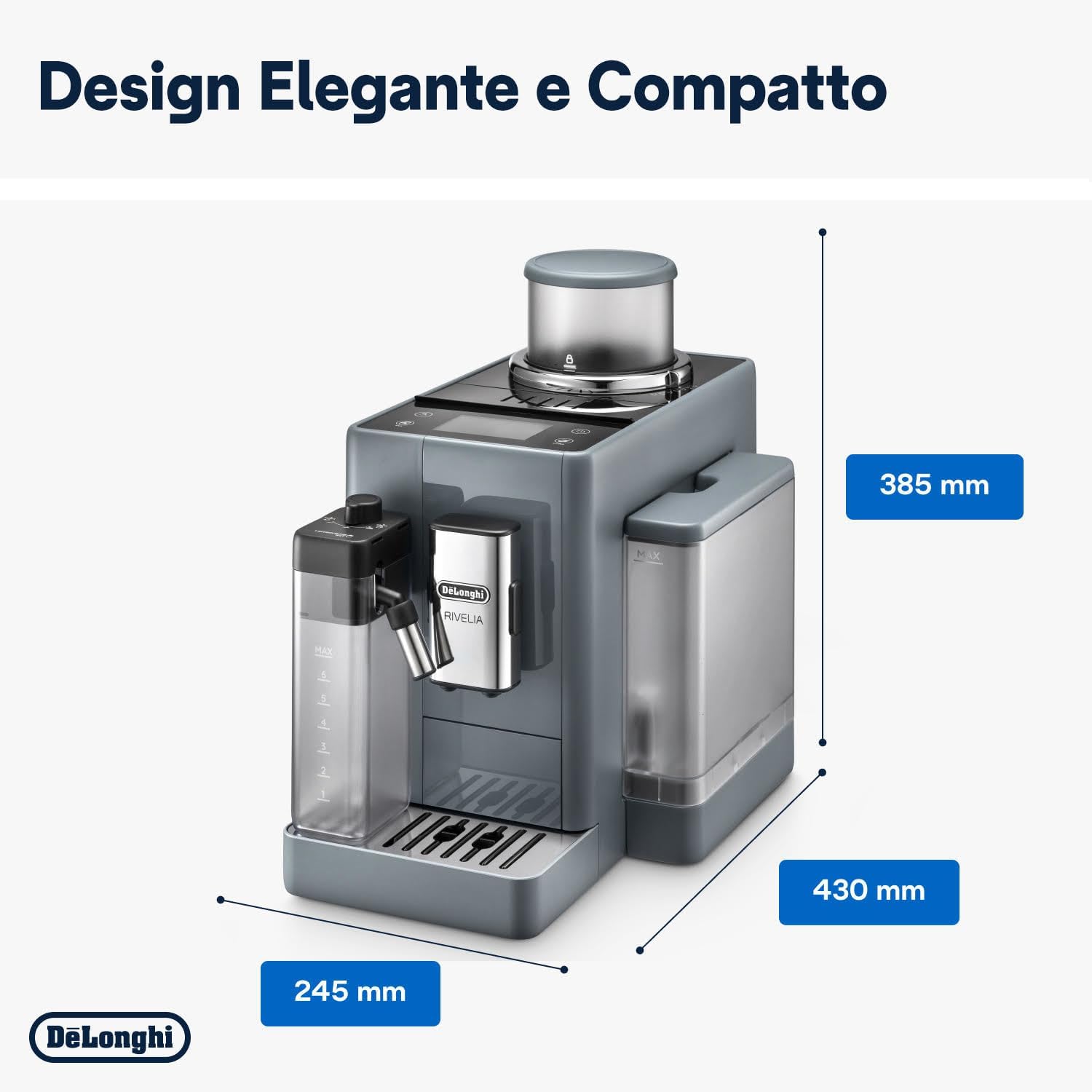
Image 7: Dimensions of the De'Longhi Rivelia coffee machine, showing its compact design.
9. Warranty and Support
For warranty information, please refer to the warranty card included with your product or visit the official De'Longhi website. For technical support, spare parts, or repairs, please contact De'Longhi customer service in your region. Always provide your product model number (EXAM440.55.G) when contacting support.
You can find contact information for your local De'Longhi service center on their official website: www.delonghi.com