
1. Product Overview
The Lucci Air Atlanta 72-inch Indoor/Outdoor Ceiling Fan is an energy-efficient DC motor fan designed for both indoor and outdoor use. It features a 6-speed remote control for convenient operation and includes an integrated 12-watt GX53 LED bulb with 3-step dimming, providing 1100 lumens of light. The DC motor technology ensures silent operation and up to 65% energy savings compared to traditional AC motors, contributing to a cooler motor temperature and extended product longevity.
- Blade Span: 72 inches
- Motor Size: D153x8mm
- Integrated LED Light: 12 Watt GX53, 3-step dimmable, 1100 lumens
- Control: 6-speed remote control
- Usage: Indoor and Outdoor rated

Figure 1.1: Main view of the Lucci Air Atlanta 72-inch Ceiling Fan in black finish.
2. Safety Information
Please read and understand all instructions before beginning installation. Failure to follow these instructions may result in electric shock, fire, or personal injury.
- Ensure the power supply is disconnected at the circuit breaker before installation or maintenance.
- All electrical connections must be performed by a qualified electrician and comply with local codes and ordinances.
- The mounting structure must be capable of supporting the weight of the fan (approximately 20.9 pounds).
- Do not operate the fan with damaged blades or housing.
- Maintain a minimum clearance of 7 feet from the floor to the bottom of the fan blades.
- Do not insert objects into the path of the fan blades.
- This fan is suitable for indoor and outdoor (damp location) use. Ensure proper weather protection for outdoor installations.
3. Package Contents
Verify that all components are present and undamaged before proceeding with installation. If any parts are missing or damaged, contact customer support.
- Motor Housing Assembly
- Fan Blades (7 blades)
- Downrod (6 inches)
- Canopy and Mounting Bracket
- Remote Control with Wall Mount Holster
- 2 x AAA Batteries (for remote)
- Integrated LED Light Kit
- Hardware Pack (screws, washers, wire nuts)
- Instruction Manual
4. Setup and Installation
Installation should be performed by a qualified individual. Follow these general steps for safe and proper installation.
- Prepare the Mounting Location: Ensure the electrical box is securely mounted to the building structure and can support the fan's weight. Run electrical wiring to the box.
- Install Mounting Bracket: Attach the mounting bracket to the electrical box using the provided screws and washers.
- Assemble Downrod and Motor: Feed the electrical wires from the motor through the downrod. Secure the downrod to the motor housing.
- Hang the Fan: Carefully lift the fan assembly and hang it on the mounting bracket hook.
- Make Electrical Connections: Connect the fan's electrical wires to the household wiring according to the wiring diagram in the full manual. Ensure all connections are secure with wire nuts.
- Secure Canopy: Slide the canopy up to cover the mounting bracket and electrical connections, then secure it with screws.
- Attach Blades: Securely attach each of the seven fan blades to the motor housing using the provided screws.
- Install Light Kit: Connect the light kit wiring and secure the light kit to the bottom of the fan motor housing.
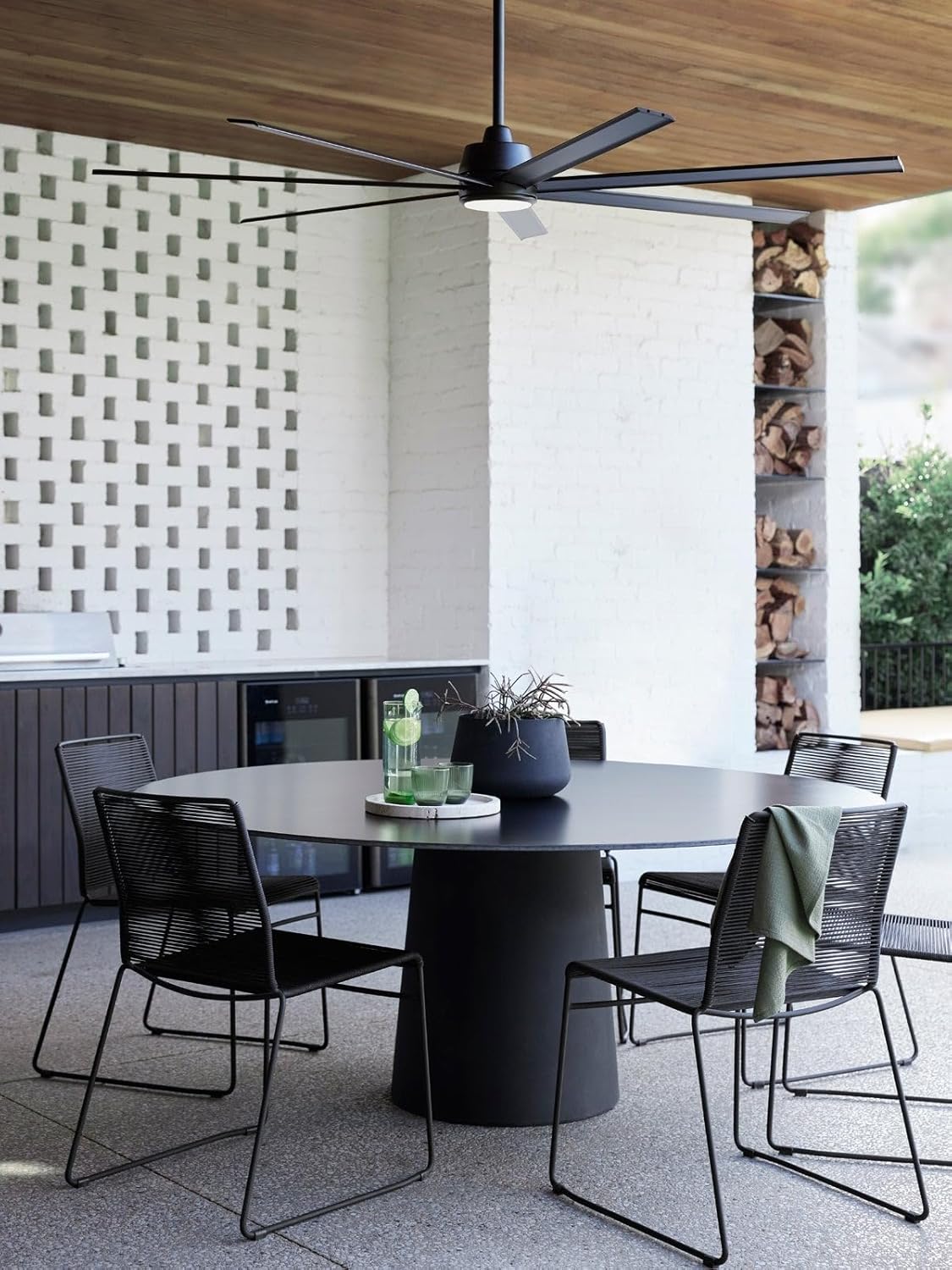
Figure 4.1: The Lucci Air Atlanta fan installed in an outdoor setting, demonstrating its indoor/outdoor capability.

Figure 4.2: Dimensional drawing showing the fan's 72-inch diameter and 13.5-inch height.
5. Operating Instructions
The Lucci Air Atlanta fan is operated using the included remote control. Install the two AAA batteries into the remote control before use.

Figure 5.1: Overview of the remote control and its functions.
- Power On/Off: Press the power button to turn the fan on or off. Settings are saved for future use.
- Fan Speed Control: Use the numbered buttons (1-6) to select desired fan speed.
- Reverse Switch: Press the reverse button to change the direction of blade rotation, useful for seasonal air circulation.
- Light On/Off/Dimming: Press the light button to turn the light on or off. Hold the button to dim the light.
- Timing Control: Set the fan to turn off after 1 hour (1H), 4 hours (4H), or 8 hours (8H).
- Natural Wind/Anti-theft Function: Refer to the detailed manual for specific instructions on these advanced features.
6. Maintenance
Regular maintenance ensures optimal performance and longevity of your ceiling fan.
- Cleaning: Periodically wipe the fan blades and motor housing with a soft, damp cloth. Do not use abrasive cleaners or solvents.
- Blade Fasteners: Check all blade attachment screws annually to ensure they are tight. Loose screws can cause noise and wobble.
- Light Bulb Replacement: The integrated LED light is designed for long life. If replacement is necessary, contact a qualified electrician or customer support.
- Motor Lubrication: The DC motor is permanently lubricated and does not require additional oiling.
7. Troubleshooting
If you experience issues with your fan, consult the following common troubleshooting steps:
| Problem | Possible Cause | Solution |
|---|---|---|
| Fan does not start | No power to the fan; Remote control batteries are dead; Incorrect wiring. | Check circuit breaker; Replace remote batteries; Verify wiring connections. |
| Fan wobbles | Loose blade screws; Unbalanced blades; Loose mounting bracket. | Tighten all blade screws; Use a balancing kit (not included); Ensure mounting bracket is secure. |
| Light does not work | Loose wire connection; Faulty LED driver. | Check light kit wiring; Contact customer support for LED driver issues. |
| Remote control not working | Dead batteries; Remote not paired with fan. | Replace batteries; Refer to the full manual for remote pairing instructions. |
8. Specifications
| Feature | Detail |
|---|---|
| Brand | Lucci Air |
| Model Name | Atlanta |
| Item Model Number | 21610801-parent |
| Color | Black |
| Product Dimensions | 72"D x 72"W x 13.5"H |
| Item Weight | 20.9 Pounds |
| Power Source | DC Motor |
| Wattage | 41 watts |
| Voltage | 120 Volts |
| Number of Blades | 7 |
| Blade Length | 33.26 Inches |
| Air Flow Capacity | 8923 Cubic Feet Per Minute |
| Speed | 125 RPM (Max) |
| Control Method | Remote Control (6 Power Levels) |
| Indoor/Outdoor Usage | Indoor, Outdoor (Damp Location Rated) |
| Included Components | Remote, 2 AAA batteries |
| Certifications | CETL, ETL |
| UPC | 811769033426 |
9. Warranty and Support
For warranty information, technical support, or to purchase replacement parts, please visit the official Lucci Air website or contact their customer service department. Keep your purchase receipt as proof of purchase for warranty claims.
You can find more information and contact details at the Lucci Air Store on Amazon.


