
XtremepowerUS 75219-1
XtremepowerUS Pool Heater Instruction Manual
Model: 75219-1
Brand: XtremepowerUS
1. Introduction
This manual provides comprehensive instructions for the safe and efficient operation and maintenance of your XtremepowerUS 14,800BTU/HR Pool Heater. Designed specifically for above-ground pools up to 4,000 gallons, this heat pump utilizes energy absorption from the air to efficiently warm your pool water. It features a powerful compressor and a pure titanium heat exchanger, ensuring consistent temperature control and corrosion resistance. Please read this manual thoroughly before installation and use.

Figure 1.1: Front view of the XtremepowerUS Pool Heater.
2. Safety Information
Always adhere to the following safety precautions to prevent injury or damage:
- Electrical Safety: Ensure the unit is connected to a properly grounded outlet. Do not use extension cords. Keep all electrical connections dry and away from water.
- Water Flow: The heater requires continuous water flow from your pool pump to operate safely. Never operate the heater without adequate water circulation.
- Placement: Position the unit on a stable, level surface with adequate clearance for air intake and exhaust. Do not block the fan or air vents.
- Children and Pets: Keep children and pets away from the unit during operation.
- Maintenance: Disconnect power before performing any maintenance or cleaning.
3. Components
Your XtremepowerUS Pool Heater package includes the main heat pump unit, necessary hose connections, and a power cord. Familiarize yourself with the unit's external features:
- Heat Pump Unit (with integrated fan and control panel)
- Water Inlet Port (typically blue, for cold water from pool)
- Water Outlet Port (typically red, for heated water returning to pool)
- Power Cord
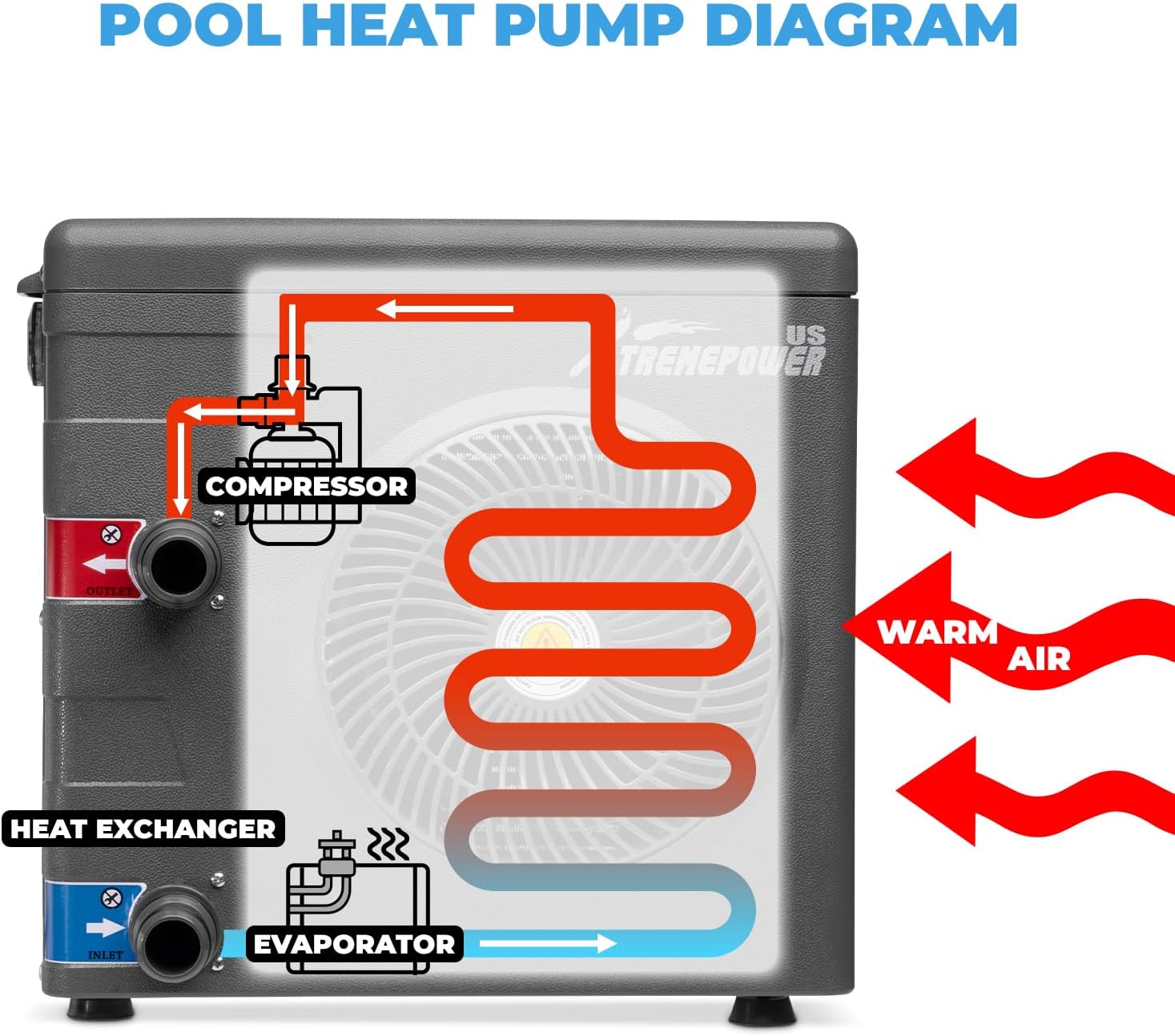
Figure 3.1: Internal Heat Pump Diagram showing compressor, heat exchanger, and evaporator.
4. Setup and Installation
The XtremepowerUS Pool Heater is designed for fast and easy hookup. No professional tools or plumbing are typically required for basic installation.
4.1 Placement
Choose a location near your above-ground pool that allows for good airflow around the unit. Ensure it is on a stable, level surface. The unit's dimensions are approximately 12 x 15.75 x 15 inches, and it weighs 45 pounds.

Figure 4.1: Pool Heater Dimensions.
4.2 Connecting to Your Pool System
- Ensure your pool pump and filter system are already set up and operational.
- Connect the water outlet from your pool filter to the 'INLET' (blue) port on the heat pump.
- Connect the 'OUTLET' (red) port on the heat pump to the water return line of your pool.
- Secure all hose connections with clamps to prevent leaks.
The recommended water flow for optimal performance is 17 GPM (Gallons Per Minute) or 1020 GPH (Gallons Per Hour).

Figure 4.2: Compatible Above Ground Pool Types.
4.3 Electrical Connection
Plug the heat pump's power cord into a suitable 115V grounded electrical outlet. Ensure the outlet is protected by a Ground Fault Circuit Interrupter (GFCI) for safety.
5. Operating Instructions
Once installed, operating your XtremepowerUS Pool Heater is straightforward.
5.1 Initial Startup
- Ensure your pool pump is running and water is circulating through the heater.
- Plug in the heat pump. The unit will typically power on and display the current water temperature.
5.2 Setting Desired Temperature
Use the control panel on the unit to set your desired pool water temperature. The intelligent control system will maintain this temperature consistently. The unit can heat pool water up to 100°F, depending on local ambient temperatures (optimal operation between 40°F and 105°F ambient).

Figure 5.1: Control Panel for Temperature Adjustment.
5.3 Optimizing Heating Performance
For best results and to extend your swim season, consider using a solar pool cover to retain heat, especially overnight or during cooler periods.

Figure 5.2: Optimized Heating with Solar Cover.
6. Maintenance
Regular maintenance ensures the longevity and efficiency of your pool heater.
- Cleaning: Periodically clean the exterior of the unit, especially the fan and coil areas, to ensure unobstructed airflow. Use a soft cloth and mild detergent.
- Hose Connections: Regularly inspect all hose connections for leaks or signs of wear. Tighten clamps as needed.
- Winterization: Before freezing temperatures, drain all water from the heat pump and hoses. Store the unit in a dry, protected area to prevent freeze damage.
7. Troubleshooting
If you encounter issues with your pool heater, refer to the following common problems and solutions:
| Problem | Possible Cause | Solution |
|---|---|---|
| Heater not turning on | No power, tripped GFCI, loose connection | Check power outlet, reset GFCI, ensure power cord is securely plugged in. |
| Pool not heating sufficiently | Insufficient water flow, low ambient temperature, large pool volume, no solar cover | Ensure pool pump is running and filter is clean. Consider using a solar cover. Allow more time for heating, especially in cooler weather. |
| Error code displayed | Specific internal issue (e.g., E3 for low water flow) | Consult the specific error code in the full product manual or contact customer support. Often related to water flow; check pump and filter. |
| Unusual noise from unit | Debris in fan, unit not level | Disconnect power and check for debris in the fan. Ensure the unit is on a stable, level surface. |
If problems persist after attempting these solutions, please contact XtremepowerUS customer support.
8. Specifications
| Feature | Detail |
|---|---|
| Brand | XtremepowerUS |
| Model Number | 75219-1 |
| Heating Capacity | 14,800 BTU/HR |
| Recommended Pool Size | Up to 4,000 Gallons (Above Ground Pools) |
| Voltage | 115V |
| Recommended Water Flow | 17 GPM / 1020 GPH |
| Operating Temperature Range (Ambient) | 40°F to 105°F |
| Max Pool Water Temperature | Up to 100°F |
| Heat Exchanger Material | Pure Titanium |
| Product Dimensions | 12 x 15.75 x 15 inches |
| Item Weight | 45 pounds |
| Country of Origin | China |
9. Warranty and Support
For detailed warranty information, please refer to the warranty card included with your product or visit the official XtremepowerUS website. For technical support, replacement parts, or further assistance, please contact XtremepowerUS customer service through the contact information provided in your product packaging or on their official website.
Related documents75219-1


Ask a question about this manual
Ask about setup, troubleshooting, compatibility, parts, safety, or missing instructions. Manuals+ will review the question and use this page’s manual context to help answer it.