
1. Introduction
This user manual provides detailed instructions for the installation, operation, and maintenance of your SAMA 3509 Black ATX Mid Tower PC Case. Please read this manual thoroughly before beginning assembly to ensure proper setup and safe usage. This PC case is designed to accommodate a wide range of components, offering excellent airflow and a visually appealing design with its tempered glass side panel and ARGB fans.

Figure 1.1: Overview of the SAMA 3509 PC Case.
2. Safety Information
- Always disconnect the power supply from the wall outlet before installing or removing any components.
- Handle the tempered glass panel with care to prevent breakage. Avoid impacts or sharp objects.
- Wear an anti-static wrist strap when handling internal components to prevent electrostatic discharge (ESD) damage.
- Keep small parts and screws away from children.
- Ensure proper ventilation around the PC case to prevent overheating.
3. Package Contents
Verify that all items are present in the package:
- SAMA 3509 ATX Mid Tower PC Case
- Pre-installed ARGB Fans (4x 120mm)
- Accessory Box (screws, cable ties, standoffs, user manual)
4. Setup and Installation
4.1 Accessing the Interior
The SAMA 3509 features a hinged tempered glass side panel for easy access. Gently pull the panel open from the handle. The panel can be completely removed by lifting it off its hinges when fully open.
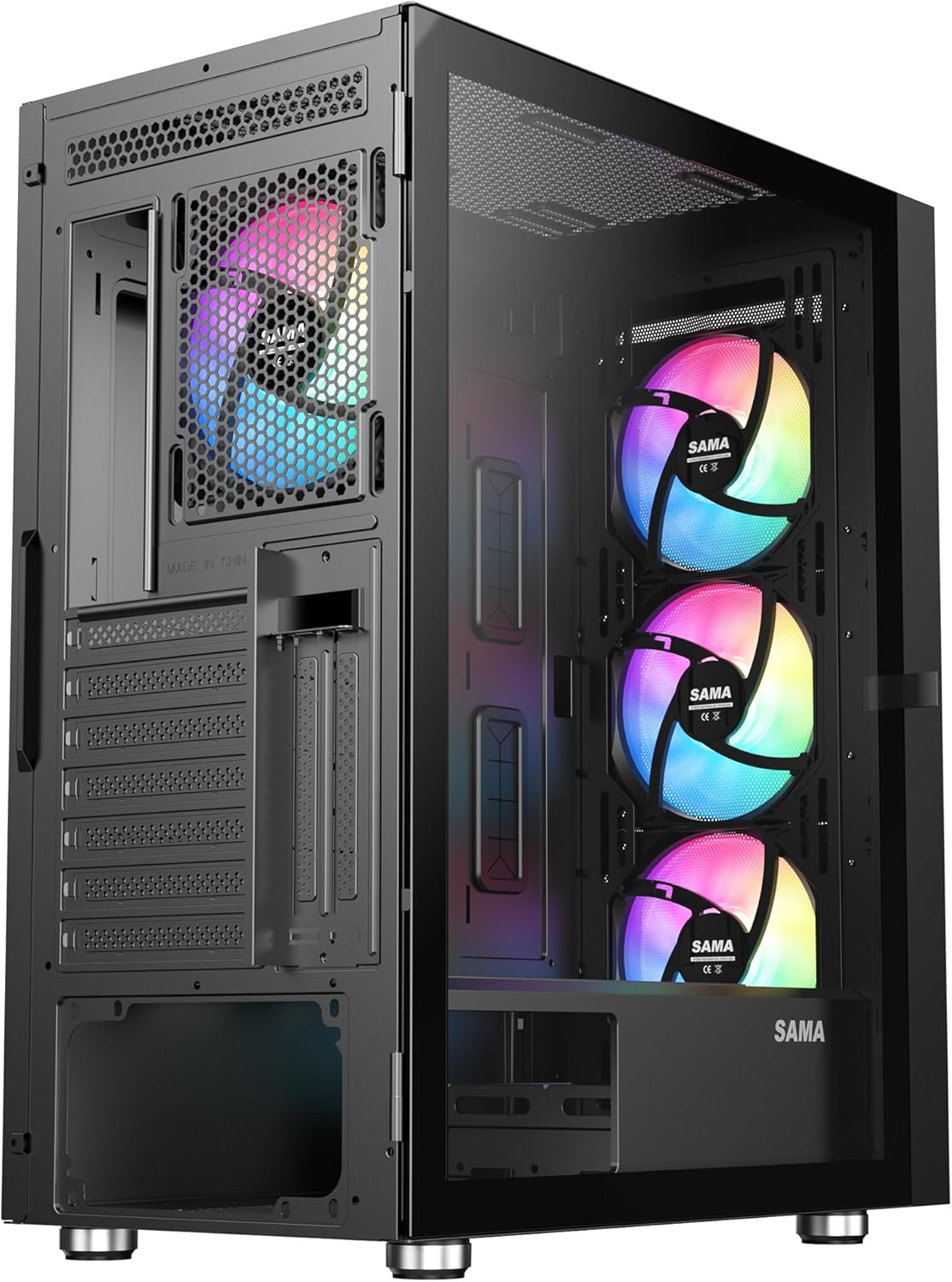
Figure 4.1: Hinged tempered glass panel in open position.
4.2 Motherboard Installation
The case supports E-ATX, ATX, Micro-ATX (M-ATX), and Mini-ITX (ITX) motherboards. Install the necessary standoffs for your motherboard form factor. Carefully align your motherboard with the standoffs and I/O shield, then secure it with screws.

Figure 4.2: Motherboard compatibility and installation zones.
4.3 Component Installation (GPU, CPU Cooler, PSU)
Install your graphics card, CPU cooler, and power supply unit. The case supports vertical GPU mounting (riser cable not included) and CPU coolers up to 163mm in height. PSUs up to 190mm in length are supported.
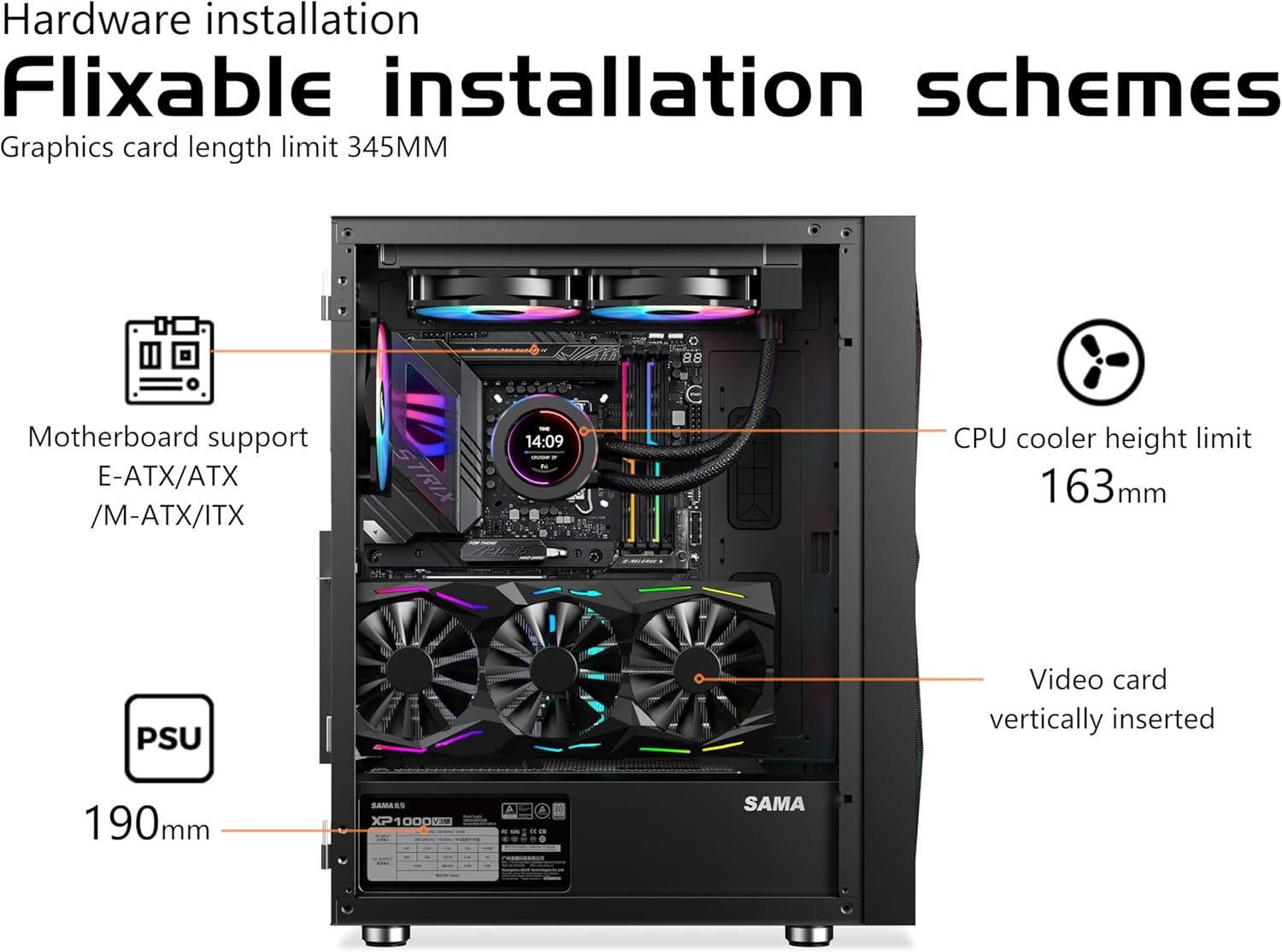
Figure 4.3: Hardware installation layout.
4.4 Cooling System Setup
The SAMA 3509 comes with four 120mm ARGB fans pre-installed (three front, one rear). The case supports up to 8x 120mm or 5x 140mm fans and 360mm radiators for liquid cooling. Ensure fans are oriented correctly for optimal airflow (intake at front, exhaust at rear/top).

Figure 4.4: Pre-installed fan configuration.
4.5 Cable Management
Utilize the ample space behind the motherboard tray and the included cable ties/velcro straps for neat cable routing. This improves airflow and aesthetics.

Figure 4.5: Cable management area behind the motherboard tray.
4.6 Front I/O Panel Connections
Connect the front I/O panel cables (USB 3.0, HD Audio, Power, Reset, LED) to the corresponding headers on your motherboard. Refer to your motherboard manual for specific header locations.

Figure 4.6: Top I/O panel connections.
4.7 Product Overview and Assembly Video
Video 4.1: A comprehensive overview of the SAMA 3509 PC case features and assembly process.
5. Operating Instructions
5.1 Powering On/Off
Press the power button located on the top I/O panel to turn on your PC. To shut down, use the operating system's shutdown function. For a forced shutdown, press and hold the power button for several seconds.
5.2 ARGB Lighting Control
The pre-installed ARGB fans are connected to an ARGB hub. You can control the lighting effects using the dedicated LED button on the top I/O panel to cycle through various modes. For motherboard synchronization, ensure the ARGB hub is connected to a compatible 3-pin 5V ARGB header on your motherboard and use your motherboard's RGB software.
6. Maintenance
6.1 Cleaning Dust Filters
The SAMA 3509 case includes magnetic dust filters on the top and a PVC dust filter at the bottom. Regularly remove and clean these filters to maintain optimal airflow and prevent dust buildup inside the case. Simply slide them out, clean with water or a soft brush, and re-install once dry.
6.2 General Cleaning
Use a soft, dry cloth to wipe down the exterior of the case. For the tempered glass panel, use a glass cleaner and a microfiber cloth. Avoid abrasive cleaners or solvents that may damage the finish.
7. Troubleshooting
- PC not powering on: Check all power connections, including the 24-pin ATX, 8-pin CPU, and GPU power cables. Ensure the PSU switch is in the 'ON' position. Verify front panel power button connection to the motherboard.
- Fans not spinning or RGB not working: Check fan connections to the ARGB hub and the hub's connection to the PSU (SATA power) and motherboard (ARGB header). Ensure the LED button cable is correctly connected.
- Overheating: Ensure proper fan orientation for airflow. Clean dust filters regularly. Verify CPU cooler and GPU cooler are properly seated and functioning.
- No display: Ensure the monitor cable is connected to the graphics card (not the motherboard I/O if a dedicated GPU is installed). Reseat the graphics card and RAM modules.
For further assistance, please refer to the support section.
8. Specifications
| Feature | Detail |
|---|---|
| Model Name | 3509 |
| Case Type | Mid Tower |
| Color | Black |
| Material | Tempered Glass |
| Product Dimensions (LxWxH) | 20 x 19 x 10 inches (approx.) |
| Item Weight | 14.02 pounds |
| Motherboard Compatibility | Extended ATX, ATX, Micro ATX, Mini ITX |
| Pre-installed Fans | 4x 120mm ARGB Fans |
| Max GPU Length | 345mm (vertical support) |
| Max CPU Cooler Height | 163mm |
| USB 3.0 Ports | 2 |
| Cooling Method | Fan cooling / Air cooling / Liquid cooling |
| Power Supply Mounting Type | Top Mount |
| Light Color | RGB |
9. Warranty and Support
9.1 Warranty Information
SAMA products come with a limited warranty against defects in materials and workmanship. Please retain your proof of purchase for warranty claims. For specific warranty terms and conditions, refer to the warranty card included with your product or visit the official SAMA website.
9.2 Customer Support
If you encounter any issues or have questions regarding your SAMA 3509 PC Case, please contact SAMA customer support through their official website or the retailer where you purchased the product. Provide your model number and a detailed description of the issue for efficient assistance.
Official SAMA Store: SAMA Official Store on Amazon