
BAOFENG UV17L-3B_O
Contents
Baofeng UV-17L Tri-Band Handheld Radio User Manual
Model: UV17L-3B_O
Introduction
This manual provides detailed instructions for the safe and efficient operation of your Baofeng UV-17L Tri-Band Handheld Radio. Please read this manual thoroughly before using the device to ensure proper functionality and to prevent damage.
Product Overview
The Baofeng UV-17L is an advanced tri-band handheld radio designed for reliable two-way communication. It features a 1.77-inch color screen, Type-C USB charging, and wireless frequency copy functionality.

Figure 1: Baofeng UV-17L Tri-Band Handheld Radio with included earpiece.

Figure 2: Detailed diagram of the Baofeng UV-17L showing key components and their functions. Includes antenna, flashlight/SOS button, PTT button, radio/squelch button, menu button, numeric keypad, volume/power key, LCD display, microphone/headphone jack, microphone, back button, up/down button, speaker, Type-C charging port, battery fixing screw, Type-C charging indicator, flashlight, and signal light.
Package Contents
Verify that all items are present in your package:
- UV-17Pro Two way radio x 1
- Li-ion Battery (with one screw) x 1
- Belt Clip x 1
- Lanyard x 1
- Headset x 1
- Power Adapter x 1
- USB Cable x 1
- User Manual x 1

Figure 3: All components included in the Baofeng UV-17L package, including the radio, battery, charger, belt clip, headset, strap, adapter, antenna, and user manual.
Setup
1. Battery Installation and Charging
Before first use, fully charge the battery. The UV-17L Pro supports Type-C USB charging.
- Align the Li-ion battery with the battery compartment on the back of the radio.
- Slide the battery into place until it clicks securely. Use the provided screw to further secure the battery if necessary.
- Connect the Type-C USB cable to the charging port on the side of the radio (refer to Figure 2, item 14).
- Connect the other end of the USB cable to the power adapter, power bank, car charger, or computer USB port.
- The Type-C charging indicator (refer to Figure 2, item 16) will show charging status.

Figure 4: The Baofeng UV-17L radio being charged via its Type-C USB port, illustrating compatibility with power banks, car chargers, and computers.

Figure 5: Diagram illustrating the 1800mAh, 7.4V high-capacity battery of the Baofeng UV-17L, indicating its energy range.
2. Antenna Attachment
Screw the antenna (refer to Figure 2, item 1) clockwise onto the connector at the top of the radio until it is finger-tight.
3. Belt Clip and Lanyard Attachment
Attach the belt clip to the back of the radio using the provided screws. The lanyard can be attached to the designated loop on the radio for easy carrying.
Operating Instructions
1. Power On/Off and Volume Control
Rotate the volume/power key (refer to Figure 2, item 7) clockwise to turn on the radio and increase volume. Rotate counter-clockwise to decrease volume and turn off the radio.
2. Display and Menu Navigation
The UV-17L features a 1.77-inch high-definition color screen (refer to Figure 2, item 8) with two display modes: frequency and channel. Use the menu button (refer to Figure 2, item 5) to access the main menu and the up/down buttons (refer to Figure 2, item 12) to navigate through options. Press the numeric keypad (refer to Figure 2, item 6) for direct frequency input or channel selection.
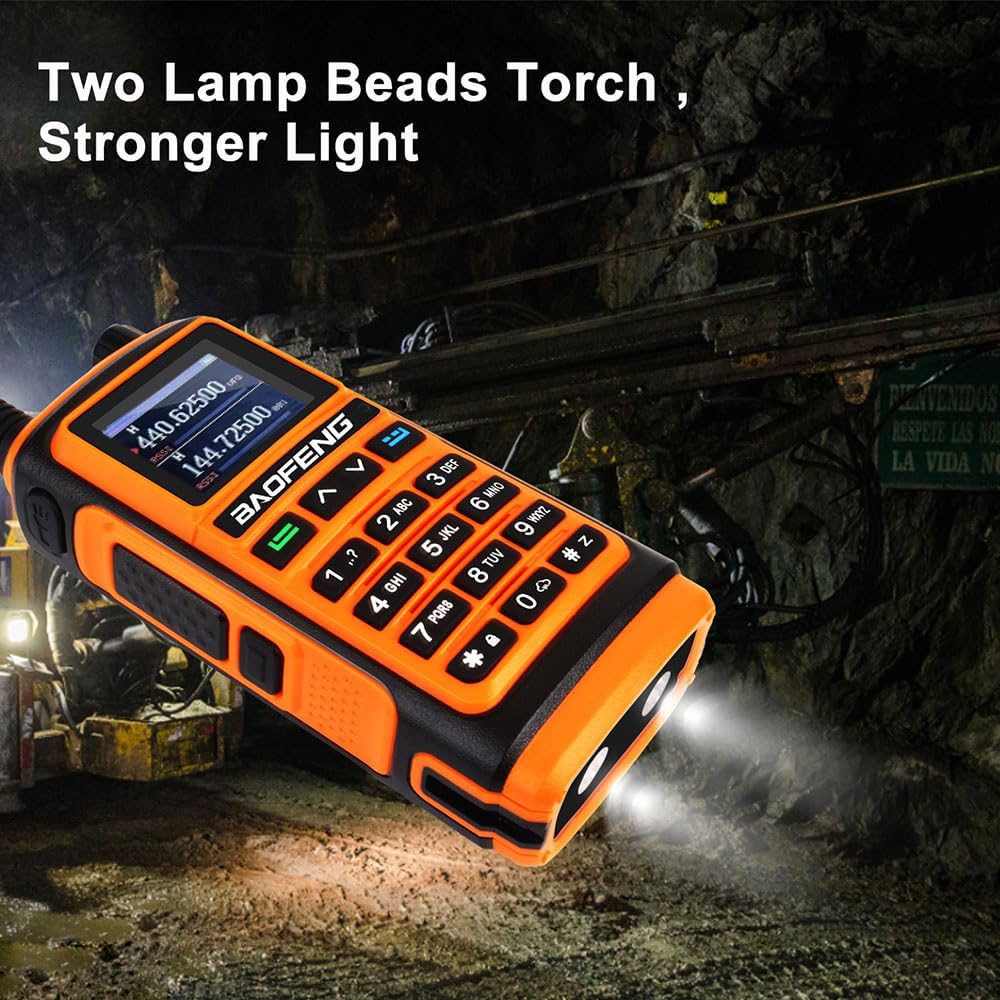
Figure 6: Close-up view of the Baofeng UV-17L's 1.77-inch color screen, displaying frequency information and menu options for VFO scanning, region, scanning, intercom settings, and positioning system.
3. Transmitting and Receiving
To transmit, press and hold the PTT (Push-To-Talk) button (refer to Figure 2, item 3) on the side of the radio. Speak clearly into the microphone (refer to Figure 2, item 10). Release the PTT button to receive.
4. Wireless Copy Frequency (FQSCAN)
This feature allows the UV-17L to quickly copy frequency and privacy codes from another radio.
- Press the menu button to enter the "FQSCAN" interface.
- Press the Menu button again. The UV-17L will begin searching for another radio's transmission frequency and privacy code.
- Once detected, press the Menu button to store the frequency.
- Two walkie-talkies can now communicate normally without manual frequency input.
5. LED Flashlight Function
The radio is equipped with an LED flashlight (refer to Figure 2, item 17). Press the dedicated flashlight/SOS button (refer to Figure 2, item 2) to activate the flashlight. This can be used for illumination in dark environments.

Figure 7: The Baofeng UV-17L demonstrating its powerful LED flashlight feature with two lamp beads, illuminating a dark environment.
Maintenance
1. Cleaning
Wipe the radio with a soft, damp cloth. Do not use harsh chemicals or abrasive cleaners. Ensure the Type-C charging port cover is securely closed to prevent dust and moisture ingress.

Figure 8: The Baofeng UV-17L shown in a rainy outdoor environment, highlighting its IP54 waterproof rating and solid construction.
2. Battery Care
To prolong battery life, avoid overcharging or completely discharging the battery. Store the radio and battery in a cool, dry place when not in use for extended periods.
3. Storage
When storing the radio for a long time, remove the battery. Store the radio in a dry, dust-free environment away from direct sunlight and extreme temperatures.
Troubleshooting
| Problem | Possible Cause | Solution |
|---|---|---|
| Radio does not power on. | Battery is low or not installed correctly. | Charge the battery. Ensure the battery is securely installed. |
| Cannot transmit or receive. | Incorrect frequency/channel. Antenna not attached. | Verify frequency/channel settings. Ensure antenna is securely attached. Check if PTT button is fully pressed. |
| Poor audio quality. | Low battery. Obstructions. Incorrect squelch level. | Charge battery. Move to an open area. Adjust squelch level. |
| Wireless Copy Frequency (FQSCAN) fails. | Target radio is too far or not transmitting. | Ensure target radio is within range and actively transmitting. Try again. |
Specifications
| Feature | Detail |
|---|---|
| Frequency Range | 136-174MHz, 220-260MHz, 400-520MHz |
| Power | 5W/2W |
| Channel Spacing | 25.0KHz (Wide) / 12.5KHz (Narrow) |
| Memory Channel | 999 Groups |
| Operation Voltage | DC 7.4 V ±10% |
| Transmission Current | ≤1800mA |
| Receive Sensitivity | 0.25µV (12dB SINAD) |
| Rated Audio Power Output | 1W @16 ohms |
| Receive Current | ≤380mA |
| Connection for Accessories | 2 pin Kenwood jack |
| Antenna Impedance | 50 Ohm |
| Display | 1.77-inch Color Screen |
| Charging Port | Type-C USB |
| Water Resistance Level | IP54 Waterproof |
| Item Weight | 1.32 pounds |
| Package Dimensions | 8.9 x 8.07 x 4.53 inches |
Warranty Information
The Baofeng UV-17L radio comes with a 6-month warranty from the date of purchase. This warranty covers manufacturing defects. Please retain your proof of purchase for warranty claims. The warranty does not cover damage caused by misuse, accidents, unauthorized modifications, or normal wear and tear.
Support
For technical support, troubleshooting assistance, or warranty inquiries, please contact BAOFENG customer service. Refer to the contact information provided with your purchase or visit the official BAOFENG website.
You can also visit the BAOFENG Store on Amazon for additional product information and support resources.
Documents and downloads
Ask a question about this manual
Ask about setup, troubleshooting, compatibility, parts, safety, or missing instructions. Manuals+ will review the question and use this page’s manual context to help answer it.