1. Product Overview
The VICTOR 60H is an intelligent micro device designed for precise insulation resistance measurement. It offers powerful measurement capabilities and data processing software, making it suitable for various electrical testing applications.
Key Features:
- Intelligent micro device for insulation resistance measurement.
- Powerful measurement and data processing software.
- Eight measuring ranges: 50V, 100V, 250V, 500V, 1000V, 1500V, 2000V, 2500V.
- Safety rating: CAT III 600V, Pollution degree 2.
- Accomplishes parameter measurement of insulation resistance and voltage.
- 2000-word display for clear readings.
- Data storage capability.
- White backlight for improved visibility.
- Automatic shut-down function to conserve battery.
- Over-range prompt.
- Automatic discharge feature.
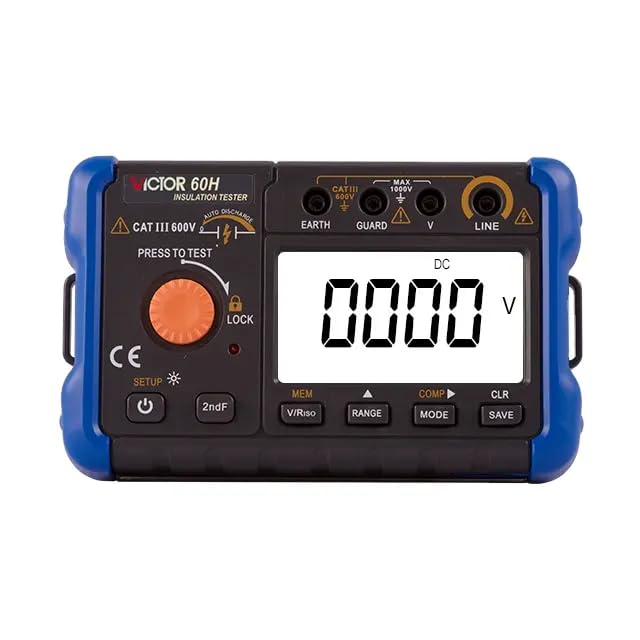
Image 1.1: Front view of the VICTOR 60H Digital Insulation Resistance Meter, showing the display, control buttons, and input terminals.
2. Safety Information
Please read and understand all safety warnings and operating instructions before using this instrument. Failure to follow these instructions may result in electric shock, fire, or serious injury.
General Safety Precautions:
- Always adhere to local and national safety codes.
- Do not use the meter if it appears damaged or if the test leads are damaged.
- Ensure the battery compartment is securely closed before operation.
- Avoid using the meter in wet environments or in the presence of explosive gases or dust.
- Always disconnect power to the circuit under test before making connections.
- Use caution when working with voltages above 30V AC RMS, 42V peak, or 60V DC. These voltages pose a shock hazard.
- Do not exceed the maximum input limits for any function.
- The instrument is rated CAT III 600V. This rating indicates its suitability for measurements in building installation and fixed installations.
3. Product Components and Controls
Familiarize yourself with the various parts and controls of your VICTOR 60H meter for proper operation.

Image 3.1: Diagram showing the labeled components of the VICTOR 60H (similar to 60F model).
- Rope Hanging Hole: For attaching a wrist strap or hanging the device.
- Measuring Knob: Rotary switch for selecting measurement functions and ranges.
- Ground Terminal (EARTH): Connection point for the ground test lead.
- Protection Terminal (GUARD): Used for guard measurements to reduce surface leakage currents.
- Voltage Measurement Terminal (V): Input for voltage measurements.
- Voltage Output Terminal (LINE): Output for insulation resistance testing.
- Display Screen: LCD display showing measurement readings, units, and indicators.
- Data Save/Delete Key (SAVE/CLR): To save or clear measurement data.
- Power Adapter Interface: Port for connecting an external power adapter (if applicable).
- Function/Shift Right Key (MODE): To select different functions or navigate menus.
- Setting/Range Key (RANGE): To adjust measurement range or settings.
- Function Selection Keys (MEM/V/Riso, COMP): For memory functions, voltage/resistance selection, and comparison mode.
- Second Function Key (2ndF): Activates secondary functions of buttons.
- Power/Backlight Button: Turns the device on/off and controls the display backlight.

Image 3.2: Detailed view of the HD large screen display, function buttons, battery compartment, and power adapter jack.
4. Setup and Battery Installation
Battery Installation:
The VICTOR 60H requires 1 Lithium Ion battery (included). Ensure proper polarity when installing batteries.
- Locate the battery compartment on the back of the meter.
- Open the battery compartment cover.
- Insert the Lithium Ion battery, observing the correct polarity markings.
- Close the battery compartment cover securely.
Initial Power On:
Press the Power/Backlight button (U) to turn on the meter. The display will illuminate, and the device will perform a self-test.
5. Operating Instructions
This section details how to perform various measurements with your VICTOR 60H.
Insulation Resistance Measurement:
- Ensure the circuit under test is de-energized and safely discharged.
- Connect the test leads: Connect the red test lead to the LINE terminal and the black test lead to the EARTH terminal. For guard measurements, connect the guard lead to the GUARD terminal.
- Turn the Measuring Knob to the desired insulation resistance test voltage (e.g., 100V, 250V, 500V, 1000V).
- Press and hold the 'PRESS TO TEST' button to initiate the measurement. The voltage will be applied, and the insulation resistance value will be displayed.
- Release the 'PRESS TO TEST' button to stop the measurement. The meter will automatically discharge the circuit.
- To lock the test for continuous measurement, press the 'LOCK' button while holding 'PRESS TO TEST'. Press 'LOCK' again to unlock.
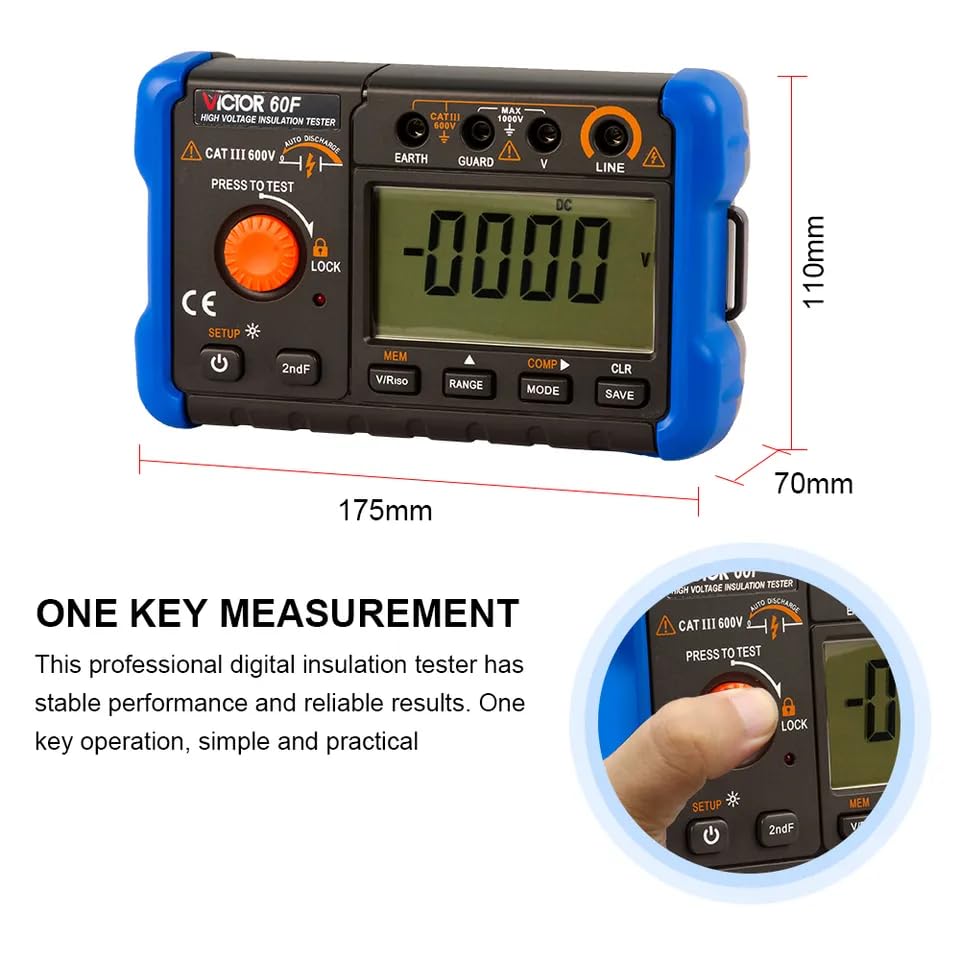
Image 5.1: Illustrates the 'One Key Measurement' feature, showing a hand pressing the 'PRESS TO TEST' button.
Voltage Measurement:
- Turn the Measuring Knob to the voltage measurement function (V).
- Connect the test leads to the circuit in parallel.
- Read the voltage value on the display.
Data Storage and Recall:
- After a measurement, press the 'SAVE' button to store the reading.
- Use the 'MEM' button to enter memory recall mode.
- Use the 'MODE' or 'RANGE' buttons to navigate through stored data.
- Press 'CLR' to clear selected data or all data (refer to specific instructions in the full manual for clearing all data).
6. Maintenance
Cleaning:
Wipe the meter with a dry, soft cloth. Do not use abrasives or solvents. Keep the terminals free from dirt and moisture.
Battery Replacement:
When the low battery indicator appears on the display, replace the battery promptly to ensure accurate measurements. Refer to the 'Battery Installation' section for instructions.
Storage:
If the meter is not used for an extended period, remove the battery to prevent leakage and damage. Store the meter in a cool, dry place away from direct sunlight.
7. Troubleshooting
If you encounter issues with your VICTOR 60H, refer to the following common problems and solutions:
- Meter does not power on: Check battery installation and ensure batteries are charged.
- No reading or 'OL' displayed: Ensure test leads are properly connected. 'OL' (Overload) indicates the measured value exceeds the selected range; try a higher range or check for open circuits.
- Inaccurate readings: Check battery level. Ensure test leads are not damaged and connections are secure. Verify the correct measurement function and range are selected.
- Display backlight not working: Press the Power/Backlight button to toggle the backlight. If it still doesn't work, check battery level.
For persistent issues, contact customer support.
8. Specifications
The following table outlines the technical specifications for the VICTOR 60H Digital Insulation Resistance Meter.

Image 8.1: Detailed specifications table for VICTOR 60F, 60G, and 60H models.
| Parameter | Value |
|---|---|
| Model | 60H |
| Insulation Resistance Measurement Ranges | 50V, 100V, 250V, 500V, 1000V, 1500V, 2000V, 2500V |
| Short Circuit Current | 1.3 mA (approx.) |
| Safety Rating | CAT III 600V, Pollution Degree 2 |
| Power Source | 1 Lithium Ion battery (included) |
| Product Dimensions | 8.66 x 5.91 x 4.72 inches |
| Item Weight | 1.1 Pounds (0.5 Kilograms) |
| Display | Digital LCD with backlight |
9. Warranty and Support
For warranty information, technical support, or service inquiries, please contact the manufacturer or your authorized dealer. Keep your purchase receipt as proof of purchase.
Manufacturer: Victor
Brand: GuliTech


