
ENERNOVA D5
ENERNOVA ETA ULTRA 2000W/2160Wh Portable Power Station and 200W Solar Panel User Manual
Model: D5
1. Introduction
Thank you for choosing the ENERNOVA ETA ULTRA Portable Power Station and 200W Solar Panel. This manual provides essential information for the safe and efficient operation, maintenance, and troubleshooting of your solar generator system. Please read this manual thoroughly before use and retain it for future reference.
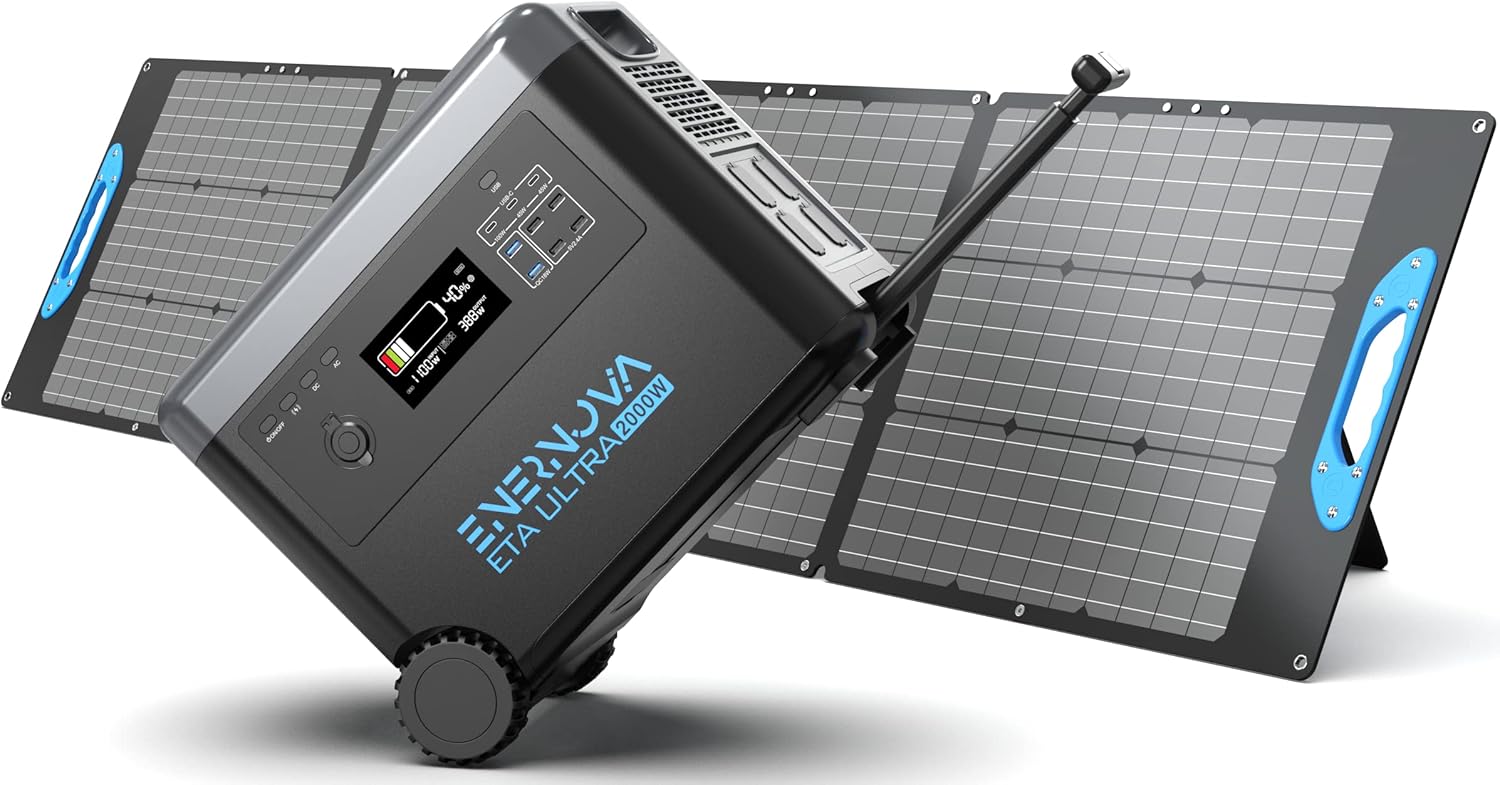
Figure 1.1: ENERNOVA ETA ULTRA Portable Power Station and 200W Solar Panels.
2. Safety Instructions
- Do not disassemble, repair, or modify the unit or solar panel. Incorrect reassembly may cause fire or electric shock.
- Do not place the unit near fire or expose it to direct heat.
- Do not store or use the unit in high-temperature environments, such as inside a car in direct sunlight.
- Do not use or store the unit in a bathroom or in areas exposed to water or moisture.
- Use only original or certified charging cables and accessories.
- Keep the unit away from children and pets.
- Avoid dropping, heavy impacts, or strong vibrations to the unit.
- Do not insert foreign objects into the ports.
- Ensure proper ventilation during use and charging. Do not cover the unit.
- In case of fire, use a dry powder fire extinguisher. Water may cause electric shock.
3. Package Contents
Verify that all items are present in your package:
- 1 x ENERNOVA ETA ULTRA Portable Power Station
- 1 x 200W Solar Panel
- 1 x 3-in-1 Adapter Cable (XT60, DC5521, Anderson)
- 1 x AC Charge Cable
- 1 x Car Charge Cable
- 1 x User Manual
Note: The power station and solar panel(s) may be shipped separately.
4. Product Overview
4.1. ETA ULTRA Portable Power Station
The ETA ULTRA features a robust design with multiple output ports and an intuitive display for monitoring. It includes a retractable handle and wheels for portability.

Figure 4.1: Overview of 15 Versatile Outlets.
- AC Outlets: 4 x 110V AC outlets for standard appliances.
- USB-C Ports: 1 x PD 100W, 2 x PD 65W for fast charging compatible devices.
- USB-A Ports: 2 x QC3.0, 4 x standard USB-A for various USB devices.
- Carport: 1 x 12.5V/8A for car-powered devices.
- Wireless Charging Pad: For compatible smartphones and accessories.
- XT60 Port: For solar panel input or other compatible DC inputs.
4.2. 200W Solar Panel
The included 200W foldable solar panel is designed for outdoor use, featuring high efficiency and durability.

Figure 4.2: IP68 Waterproof Solar Panel.
- Monocrystalline Solar Cells: Achieve up to 23% conversion efficiency.
- ETFE Coating: Provides durability and 95% light transmittance.
- IP68 Rating: Waterproof and dustproof for various environmental conditions (junction box is IP67).
4.3. LCD Display
The LCD display provides real-time information about the power station's status.

Figure 4.3: LCD Display Indicators.
- Battery Capacity: Remaining battery level.
- Input/Output Power: Real-time wattage for charging and discharging.
- Charging Indicators: AC, DC, USB, and Wireless charging status.
- Temperature: Internal temperature of the unit.
- Fan System: Indicates fan operation.
- Frequency Display: 50Hz/60Hz.
- Error Indication: Alerts for operational issues.
5. Setup
5.1. Initial Charging
Before first use, fully charge the ENERNOVA ETA ULTRA power station. Connect the AC Charge Cable to the power station's AC input port and then to a wall outlet. The LCD display will show the charging status. A full charge from 0% takes approximately 1.8 hours.

Figure 5.1: Fast Charging Speeds.
5.2. Connecting the Solar Panel
To charge the power station using the solar panel:
- Unfold the 200W solar panel and position it in direct sunlight.
- Connect the 3-in-1 Adapter Cable to the solar panel's output.
- Connect the XT60 end of the adapter cable to the XT60 input port on the ENERNOVA ETA ULTRA power station.

Figure 5.2: Solar Panel Connection Steps.
The LCD display will indicate solar charging. Optimal charging time with one 200W solar panel is typically 10-12 hours under ideal sunlight conditions.
6. Operating Instructions
6.1. Charging the Power Station
The ETA ULTRA can be charged via three methods:
- AC Wall Outlet: Use the provided AC Charge Cable.
- Solar Panels: Connect the 200W solar panel(s) using the 3-in-1 Adapter Cable.
- Car Charger: Use the provided Car Charge Cable to charge from a vehicle's 12V outlet.
6.2. Using the Power Station to Power Devices
To power your devices:
- Press the main power button to turn on the unit.
- Activate the desired output section (AC, DC, USB, Wireless) by pressing its respective button. The indicator light for the activated section will illuminate.
- Connect your devices to the appropriate output ports.
- Monitor the LCD display for output wattage and remaining battery capacity.
- When finished, turn off the output sections and then the main power button to conserve battery.
6.3. EPS (Emergency Power Supply) Function
The ETA ULTRA features an EPS function for uninterrupted power during outages.

Figure 6.1: EPS Auto-Switch in action.
When the ETA ULTRA is plugged into a wall outlet and devices are connected to its AC output, it acts as a bypass, supplying power directly from the grid. In the event of a power outage, the unit automatically switches to its internal battery supply within 30 milliseconds, providing continuous power to connected devices. This function is ideal for critical appliances like CPAP machines, fish tanks, or routers.
7. Maintenance
7.1. Battery Care
The ETA ULTRA uses a LiFePO4 (LFP) battery, known for its longevity (3000+ cycles) and stability.

Figure 7.1: LiFePO4 Battery System.
- Regular Charging: For optimal battery life, fully charge the unit at least once every 3-6 months, even if not in use.
- Avoid Extreme Temperatures: Do not expose the unit to extreme heat or cold for prolonged periods.
- Partial Discharges: LiFePO4 batteries benefit from partial discharges rather than frequent full discharges.
7.2. Cleaning and Storage
- Cleaning: Use a dry, soft cloth to wipe the exterior of the power station and solar panel. Do not use harsh chemicals or abrasive materials.
- Storage: Store the unit in a cool, dry place, away from direct sunlight and moisture. Ensure the unit is charged to at least 50% before long-term storage.
8. Troubleshooting
| Problem | Possible Cause | Solution |
|---|---|---|
| Unit does not turn on | Battery is depleted. | Charge the unit using the AC adapter. |
| No output from ports | Output section not activated. Overload protection triggered. | Press the corresponding output button. Reduce connected load; restart the unit. |
| Solar panel not charging | Insufficient sunlight. Incorrect connection. Damaged panel/cable. | Reposition panel for direct sunlight. Check all cable connections. Inspect for damage. |
| LCD display shows error code | Internal fault or specific issue. | Refer to the specific error code in the full user manual (if available) or contact customer support. |
9. Specifications
| Feature | Specification |
|---|---|
| Brand | ENERNOVA |
| Model Name | D5 (ETA ULTRA) |
| Battery Type | LiFePO4 (LFP) |
| Capacity | 2160Wh |
| AC Output | 2000W (Rated), 110V |
| Max AC Input | 1500W |
| Solar Panel Wattage | 200W |
| Solar Panel Efficiency | Up to 23% |
| Solar Panel IP Rating | IP68 (Panel), IP67 (Junction Box) |
| USB-C Output | 1 x PD 100W, 2 x PD 65W |
| USB-A Output | 2 x QC3.0, 4 x 5V/2.4A |
| Carport Output | 1 x 12.5V/8A |
| Wireless Output | 1 x Wireless Charging Pad |
| Dimensions (L x W x H) | 25" x 20" x 22" |
| Weight | 76 Pounds |
| Operating Temperature | Refer to full manual for specific range |
10. Warranty and Support
The ENERNOVA ETA ULTRA Portable Power Station and 200W Solar Panel come with a 5-year warranty from the date of purchase. This warranty covers manufacturing defects and ensures the quality and reliability of your product.
For technical support, warranty claims, or any questions regarding your product, please contact ENERNOVA customer service through the retailer where you purchased the product or visit the official ENERNOVA website for contact information.
Please have your purchase receipt and product model number (D5) ready when contacting support.
Related documentsD5


Ask a question about this manual
Ask about setup, troubleshooting, compatibility, parts, safety, or missing instructions. Manuals+ will review the question and use this page’s manual context to help answer it.