1. Introduction
The Hollyland Mars M1 Enhanced is a versatile 3-in-1 device that functions as a wireless video transmitter, receiver, and monitor. Designed to streamline your video production workflow, it integrates essential monitoring capabilities with robust wireless video transmission, reducing equipment complexity and enhancing operational convenience. This manual provides detailed instructions for setting up, operating, and maintaining your Mars M1 Enhanced device.

Image: Overview of the Mars M1 Enhanced, highlighting its 3-in-1 functionality, compatibility with Mars series, 450ft range, 0.08s latency, 4K 30FPS support, SDI/HDMI ports, 1000 Nits brightness, camera trigger, DC out, 5.5-inch screen, app support, 3D LUT, and HollyOS.

Image: The Mars M1 Enhanced mounted on a camera rig, illustrating its role as a 3-in-1 wireless video transmission system, combining transmitter, receiver, and monitor functions.
2. Product Overview
2.1 Key Features
- 3-in-1 Functionality: Integrates wireless transmitter, receiver, and monitor into a single device.
- HollyOS System: Features a new operating system with advanced monitoring tools like waveform, vectorscope, zebra pattern, aspect mark, anamorphic desqueeze, and crosshatch.
- HollyView App: Supports monitoring on up to 4 mobile devices when operating as a transmitter, with image analysis functions such as image overlay and sharpness.
- Extended Range & Low Latency: Achieves up to 450ft (150m) line-of-sight (LOS) range with ultra-low latency of 0.08s.
- HDMI & SDI Support: Offers 4K/30fps HDMI input and loopout, along with SDI input for broad compatibility.
- Smart Channel Scan: Automatically identifies and selects optimal channels for stable, interference-free transmission.
2.2 Package Contents
Verify that all items are present in your package:
- Mars M1 Enhanced 5.5" Wireless Transceiving Monitor *1
- Capsule Antenna *2
- OTG Adapter *1
- D-Tap to DC Cable *1
- Tempered Glass Screen Protector *1
- User Manual *1

Image: Visual representation of the Mars M1 Enhanced packing list, including the monitor, two capsule antennas, an OTG adapter, a D-Tap to DC cable, a tempered glass screen protector, and the user manual.
2.3 Display Features
- Screen Size: 5.5 inches
- Pixel Density: 403 PPI
- Contrast Ratio: 1000:1
- Screen Brightness: 1,000 nits
- Color Depth: 16.7 Million Natural Colors (Rec. 709)
- Color Calibration: Supports CalMAN Color Calibration and RGB Gain adjustment.

Image: The 5.5-inch responsive touch LCD screen of the Mars M1 Enhanced, highlighting its CalMAN Color Calibration, Rec. 709 color space, 16.7 million natural colors, and screen size.
3. Setup
3.1 Power Supply
The Mars M1 Enhanced offers flexible power options:
- DC Power: Connect a DC power source (7V to 16V) to the DC input port.
- NP-F Battery: Attach a compatible NP-F series battery to the battery plate on the rear of the device (battery not included).
- D-Tap Battery: Use the provided D-Tap to DC cable to connect to a D-Tap power source (battery not included).

Image: Diagram illustrating the flexible power supply options for the Mars M1 Enhanced, including DC power (7V to 16V), NP-F battery (not included), and D-Tap battery (not included).
3.2 Video Connections
Connect your video source and output devices:
- HDMI Input: Connect your camera or video source to the HDMI IN port. The device supports 4K/30fps HDMI input.
- HDMI Output: Use the HDMI OUT port to loop out the video signal to another monitor or device.
- SDI Input: Connect professional video sources to the SDI IN port for robust signal transmission.
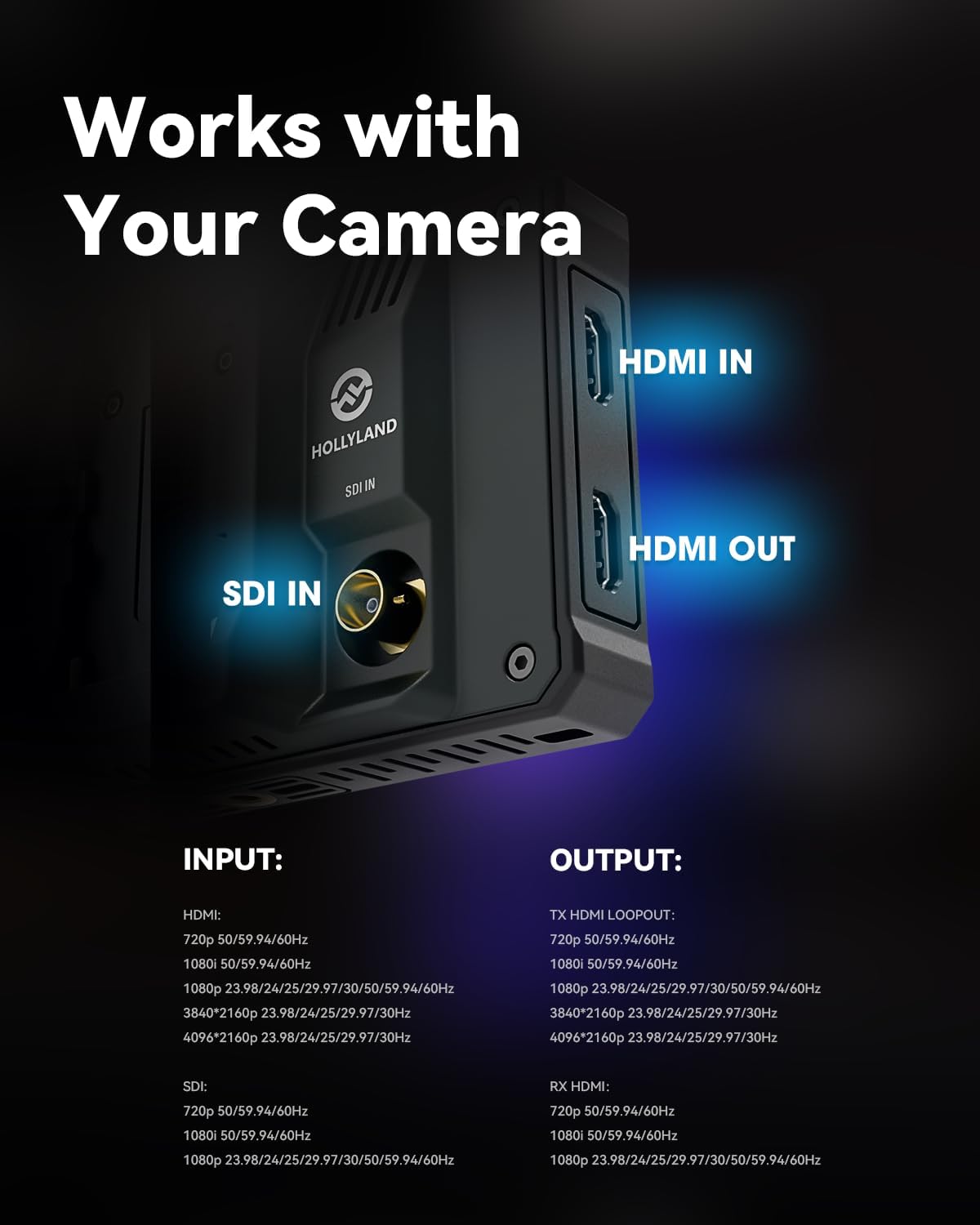
Image: Close-up view of the Mars M1 Enhanced ports, showing HDMI IN, HDMI OUT, and SDI IN connections, along with supported input and output resolutions and frame rates.
3.3 Antenna Installation
Carefully screw the two capsule antennas onto the designated antenna ports on the top of the Mars M1 Enhanced. Ensure they are securely fastened for optimal wireless performance.
4. Operating Instructions
4.1 Basic Operation
The Mars M1 Enhanced can be easily switched between Transmitter (TX) and Receiver (RX) modes. Refer to the on-screen interface for mode selection. It is compatible with other Hollyland Mars series devices, including Mars 4K, Mars 400S Pro/II, and Mars 300 Pro, allowing for flexible system integration.

Image: Diagram illustrating the compatibility of the Mars M1 Enhanced with other Hollyland Mars series products, including Mars 4K, Mars 400S Pro II, and Mars 300 Pro.
4.2 HollyOS System and Monitoring Tools
The device is powered by the HollyOS system, offering a comprehensive suite of advanced monitoring tools. These tools provide precise control over your image:
- Waveform: Analyzes video signal luminance levels.
- Vectorscope: Displays color information and saturation.
- Zebra Pattern: Indicates overexposed areas.
- Focus Assist: Highlights in-focus edges.
- False Color: Represents exposure levels with different colors.
- Aspect Mark: Guides for various aspect ratios.
- 3D LUT: Supports importing LUT files for color grading and monitoring.
- Anamorphic Desqueeze: Corrects distorted anamorphic footage.
- Crosshatch: Grid overlay for composition.
- Zoom-in: Magnifies parts of the image for detailed inspection.
Access these tools via the intuitive touch screen interface to fine-tune your shots.

Image: The user interface of the Mars M1 Enhanced, showcasing various monitoring tools such as waveform, vectorscope, histogram, zebra pattern, focus assist, false color, aspect mark, 3D LUT, anamorphic desqueeze, image flip, crosshatch, and zoom-in.

Image: The 3D LUT feature on the Mars M1 Enhanced, demonstrating its capability to import CUBE format LUT files for accurate color representation.

Image: The CalMAN Color Calibration and RGB Gain adjustment interface on the Mars M1 Enhanced, allowing users to fine-tune display colors.
4.3 HollyView App Monitoring
When the Mars M1 Enhanced operates as a transmitter, you can monitor the video feed on up to four mobile devices using the HollyView app. This app provides additional image analysis functions and enhances your preview capabilities on set.

Image: Diagram illustrating how the Mars M1 Enhanced supports mobile monitoring, showing configurations for receive mode, transmit mode, and HollyView app monitoring on up to four mobile devices.
4.4 Channel Scan and Selection
The smart channel scan feature helps ensure a stable wireless connection. Upon startup, the device can automatically scan for available channels and identify those with minimal interference, allowing for optimal transmission performance. Use the one-click switching function to select the best channel.

Image: Representation of the automatic frequency scanning and one-click switching feature of the Mars M1 Enhanced, showing available channels and the device's ability to select the optimal one.
4.5 Synchronized Recording
The Mars M1 Enhanced supports one-button synchronized recording. When connected to a compatible camera, this feature allows you to initiate recording on both the camera and the monitor simultaneously. Note that the camera must have the Trigger function enabled for this feature to work.

Image: The Mars M1 Enhanced connected to a camera, illustrating the one-button synchronized recording feature. A note indicates that the camera also requires the Trigger function to be enabled.
4.6 Wireless Transmission Performance
The device is engineered for reliable wireless transmission, offering an impressive line-of-sight (LOS) range of up to 450 feet (150 meters) and an ultra-low latency of 0.08 seconds. This performance ensures real-time video monitoring with minimal delay, providing flexibility in device placement. Please note that the actual range may vary depending on environmental factors and obstacles.

Image: The Mars M1 Enhanced in an outdoor setting, highlighting its stable wireless transmission with a 450ft (150m) range and 0.08s latency. A note indicates that connection range may vary with obstacles.
5. Maintenance
5.1 General Care
- Keep the device clean and free from dust and debris. Use a soft, dry cloth for cleaning the exterior.
- Avoid exposing the device to extreme temperatures, humidity, or direct sunlight for prolonged periods.
- Store the device in a protective case when not in use to prevent physical damage.
5.2 Screen Cleaning
- For the screen, use a microfiber cloth specifically designed for electronics.
- If necessary, lightly dampen the cloth with a screen cleaning solution (do not spray directly onto the screen).
- Gently wipe the screen to remove smudges and fingerprints.
5.3 Battery Care
- If using NP-F batteries, ensure they are charged regularly and stored in a cool, dry place.
- Avoid fully discharging lithium-ion batteries to prolong their lifespan.
- Remove batteries if the device will not be used for an extended period.
6. Troubleshooting
This section addresses common issues you might encounter with your Mars M1 Enhanced. If you experience problems not covered here, please refer to the official troubleshooting guide or contact customer support.
6.1 No Video Signal
- Check Cables: Ensure HDMI or SDI cables are securely connected to both the source and the Mars M1 Enhanced.
- Input Source: Verify that the correct input source (HDMI or SDI) is selected on the monitor.
- Source Output: Confirm that your camera or video source is outputting a signal and is configured to a compatible resolution and frame rate.
- Mode Selection: Ensure the Mars M1 Enhanced is in the correct mode (TX for transmitting, RX for receiving).
6.2 Poor Wireless Transmission / Interference
- Antennas: Ensure antennas are securely attached and oriented correctly.
- Line of Sight: Minimize obstacles between the transmitter and receiver for optimal signal.
- Channel Scan: Use the smart channel scan feature to find and switch to a less congested frequency channel.
- Distance: Ensure the devices are within the specified operating range (450ft LOS).
- Environmental Factors: High levels of Wi-Fi or other wireless interference can affect performance.
6.3 Power Issues
- Battery Level: Check the battery level if using NP-F or D-Tap batteries. Recharge or replace if low.
- Power Connection: If using DC power, ensure the power adapter is correctly connected and the power outlet is functional.
- Power Button: Press and hold the power button for a few seconds to ensure the device is attempting to power on.
For more detailed troubleshooting, please refer to the official Troubleshooting Guide (PDF).
7. Specifications
| Feature | Detail |
|---|---|
| Product Dimensions | 5.98 x 3.78 x 1.57 inches |
| Item Weight | 14 ounces |
| ASIN | B0CKPL53LN |
| Item Model Number | 9803Pro |
| Batteries Required | 1 Lithium Ion battery (not included) |
| Manufacturer | Hollyland |
| Language | English |
| Wireless Range | 450ft (150m) LOS |
| Latency | 0.08s |
| Video Input | HDMI (up to 4K/30fps), SDI |
| Video Output | HDMI Loopout (up to 4K/30fps) |
| Screen Size | 5.5 inches |
| Screen Brightness | 1000 nits |
8. Warranty and Support
8.1 Warranty Information
The Hollyland Mars M1 Enhanced comes with a standard manufacturer's warranty. Please refer to the warranty card included in your product packaging or visit the official Hollyland website for detailed terms and conditions regarding warranty coverage and duration.
8.2 Customer Support
For technical assistance, product inquiries, or support, please contact Hollyland customer service through their official website or the contact information provided in your product documentation. You can also find additional resources, FAQs, and software updates on the Hollyland support page.
Official User Manual (PDF): Download Here


