
Ochangqi 334AAK
Ochangqi Self-Cleaning Cat Litter Box User Manual
Model: 334AAK
Introduction
This manual provides comprehensive instructions for the setup, operation, maintenance, and troubleshooting of your Ochangqi Self-Cleaning Cat Litter Box. Please read this manual thoroughly before using the product to ensure safe and efficient operation.

Figure 1: Ochangqi Self-Cleaning Cat Litter Box. This image shows the main unit of the self-cleaning litter box, a white spherical design with a large opening for the cat. A cat is visible inside the opening, and a cat scratching post is shown to the right.
Safety Precautions
- Ensure the device is placed on a stable, level surface.
- Do not immerse the main unit in water or any other liquid.
- Keep out of reach of small children and pets not intended for use with the device.
- Use only the provided power adapter.
- Do not attempt to disassemble or repair the unit yourself. Contact customer support for assistance.
- Ensure the litter box is unplugged before cleaning or performing any maintenance.
- The device is equipped with multiple safety sensors to prevent injury to pets. Do not interfere with these sensors.
- Only use clumping cat litter. Crystal cat litters are not compatible.

Figure 2: Safety Features. This diagram highlights the safety mechanisms of the litter box, including 3 types of sensors to stop rotation if a pet enters, a panel lock to prevent accidental touch, a pyramid structure to avoid collapsing, and a non-enclosed space design to prevent suffocation.
Package Contents
Verify that all components are present in the package:
- Ochangqi Self-Cleaning Cat Litter Box Main Unit
- Waste Collection Bin
- Power Adapter
- User Manual (this document)
- Litter Bags (may be included)
Setup
- Unpacking: Carefully remove all components from the packaging.
- Placement: Place the litter box on a flat, stable surface in a well-ventilated area, away from direct sunlight and heat sources. Ensure there is enough space around the unit for proper operation and cleaning.
- Assemble Waste Bin: Insert a litter bag into the waste collection bin and slide the bin into the designated compartment at the bottom front of the unit.
- Add Cat Litter: Pour clumping cat litter into the main litter basin. Ensure the litter level does not exceed the maximum fill line (approximately 6L).
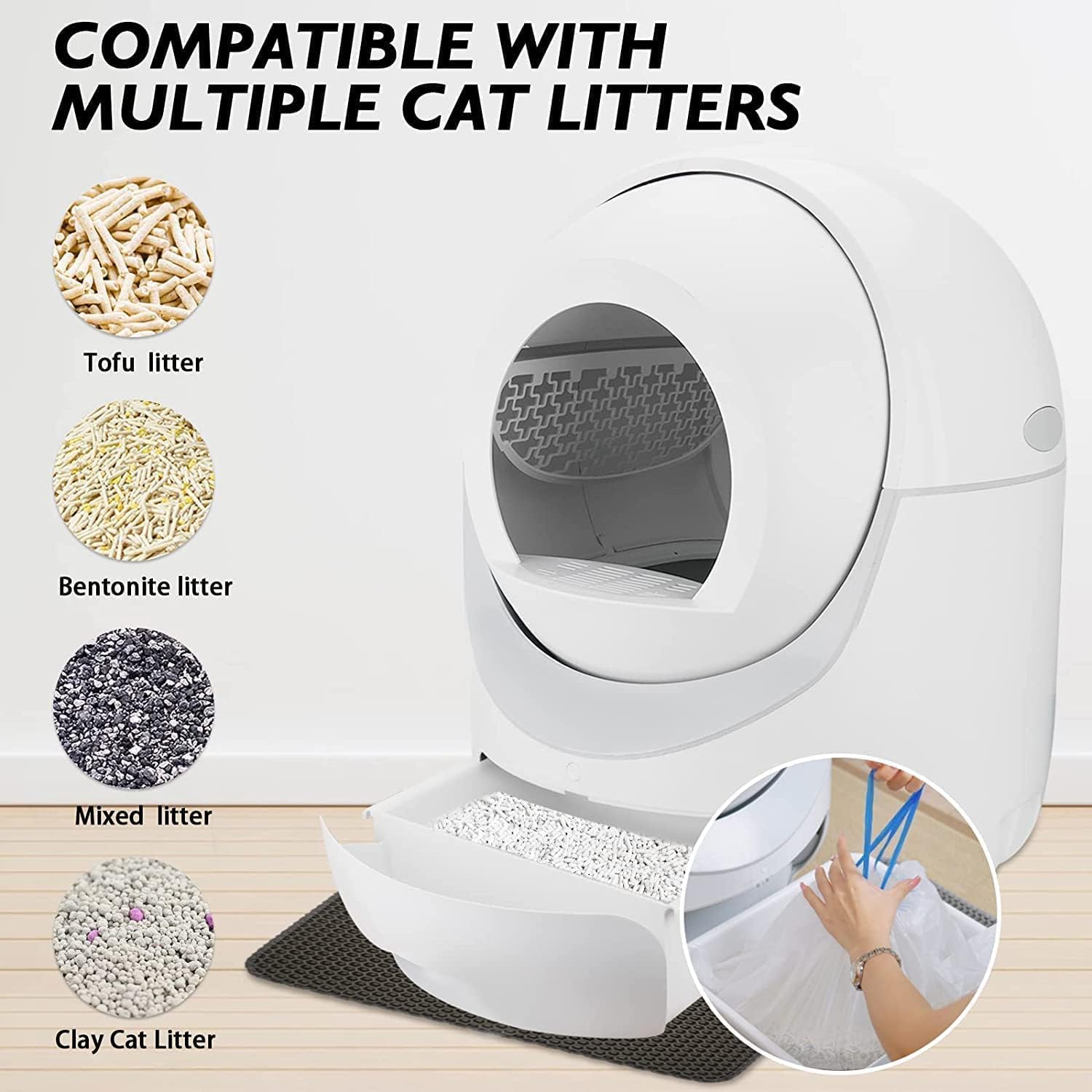
Figure 3: Compatible Cat Litters. The litter box is compatible with various clumping litters including Tofu litter, Bentonite litter, Mixed litter, and Clay Cat Litter. This image also shows the process of adding litter to the main basin and preparing the waste bin.
- Power Connection: Connect the power adapter to the litter box and then plug it into a wall outlet. The unit will perform an initial self-check.
Operating Instructions
Control Modes
The Ochangqi Self-Cleaning Cat Litter Box offers three primary operating modes:
- Automatic Mode: The system automatically cleans after your cat exits the litter box, following a set delay (default 3 minutes). This mode provides continuous cleaning and protection.
- Manual Mode: Allows you to initiate a cleaning cycle remotely via the mobile application. This is useful for on-demand cleaning or when you are away from home.
- Sleep Mode (Night Mode): From 12 PM to 7 AM, the unit will not perform automatic cleaning to ensure quiet operation during sleep hours. Cleaning can still be initiated manually via the app during this period.

Figure 4: Three Control Modes. This image illustrates the Manual Mode for remote operation, Automatic Mode for continuous cleaning, and Night Mode for quiet operation during specific hours.
APP Remote Control
The litter box can be controlled via the TUYA app, connecting via 2.4GHz or 5G Wi-Fi. This allows for remote control and monitoring.
- Download the App: Search for "HM Pet" in your app store (iOS/Android) or scan the QR code provided in the app connection guide. You can also visit https://www.pgyer.com/QFXz to download.
- Initial Setup:
- Ensure your phone's Wi-Fi and Bluetooth are turned on.
- Do not plug in the power adapter yet. Press and hold the button on the unit, then plug in the power adapter (do not release the button).
- After holding for approximately 2 seconds, you will hear "Di Di Di". Release the button. The device is now in app binding mode.
- Connect to Wi-Fi: In the app, select your Wi-Fi network and enter the password.
- Bind Device: The app will detect the litter box. Bind the device and name it. A successful connection will be confirmed by a ringing sound.

Figure 5: Easy Operation - App Connection. This multi-panel image provides a visual guide for connecting the litter box to the mobile application, including Wi-Fi and Bluetooth settings, app download, device binding, and Wi-Fi password entry.

Figure 6: Smart Cat Litter Box Overview. This image summarizes the operational flow: cat exits, litter is dumped, and easy litter removal. It also highlights odor removal and the three cleaning modes (Auto, Manual, Empty).
Automatic Cleaning System
The system automatically sifts and deposits waste into the sealed waste bin after your cat uses the litter box. The integrated purifying device releases ozone to neutralize odors after each cleaning cycle.
- One-Click Litter Replace: The app features a "Clearance" or "Empty" function that allows you to empty all old litter from the basin into the waste bin for easy disposal and refilling.
- Quiet Operation: The working state noise is approximately 35dB, and cleaning noise is around 50dB, designed to be quiet enough not to disturb you or your pets.

Figure 7: Ultra-Quiet Motor. This image depicts the litter box in a bedroom setting, emphasizing its low noise level (35dB working, 50dB cleaning) to avoid disturbing sleep.
Maintenance
Waste Bin Management
- The 10L waste collection bin can hold waste for up to two weeks for a single cat. Monitor the waste level via the app.
- When the waste bin is full, slide it out, tie the litter bag, and dispose of it. Replace with a new litter bag.
Cleaning the Unit
The Ochangqi Self-Cleaning Cat Litter Box is designed for easy disassembly and cleaning.
- Disassembly: The unit consists of only 4 main parts that can be easily separated without tools (no screws required).

Figure 8: Easy Disassembly for Cleaning. This image illustrates the four main components of the litter box that can be easily separated for thorough cleaning, highlighting the 6L sand basin capacity and 10L collecting bin capacity.
- Cleaning Components:
- Wipe down the exterior with a damp cloth and mild detergent.
- The internal components (litter basin, waste bin) can be washed with water and mild soap. Ensure they are completely dry before reassembly.
- Do not use abrasive cleaners or solvents.
- Reassembly: Reassemble the parts by aligning them correctly. The design ensures a straightforward reassembly process.
Troubleshooting
| Problem | Possible Cause | Solution |
|---|---|---|
| Unit not powering on. | Power adapter not connected; power outlet issue. | Ensure power adapter is securely plugged into the unit and a working outlet. Try a different outlet. |
| Unit not cleaning automatically. | Automatic mode not enabled; sensors obstructed; litter level too high/low. | Check app settings to ensure Automatic Mode is active. Clean sensors. Adjust litter level. |
| App connection issues. | Incorrect Wi-Fi password; weak Wi-Fi signal; device not in binding mode. | Verify Wi-Fi password. Move unit closer to router. Re-enter binding mode (refer to APP Remote Control section). Ensure 2.4GHz or 5G Wi-Fi is used. |
| Odor persists. | Waste bin full; odor removal function off; poor ventilation. | Empty waste bin. Check app to ensure odor removal is active. Ensure unit is in a well-ventilated area. |
| Litter not sifting properly. | Incorrect litter type; litter too wet/sticky; mechanism obstructed. | Ensure only clumping litter is used (no crystal litter). Clean the internal sifting mechanism. |
| Error Sound Effect Reminder. | Indicates a fault detected by sensors. | Check for obstructions, ensure cat is not inside, verify litter level. If issue persists, contact support. |
Specifications
| Feature | Detail |
|---|---|
| Brand | Ochangqi |
| Model Number | 334AAK |
| Dimensions (LxWxH) | 22.24" x 22.24" x 25.98" |
| Item Weight | 24.25 Pounds |
| Litter Basin Capacity | Approx. 6L (Max fill) |
| Waste Collection Bin Capacity | 10L |
| Material | Acrylonitrile Butadiene Styrene (ABS) |
| Color | White |
| Noise Level (Working) | Approx. 35dB |
| Noise Level (Cleaning) | Approx. 50dB |
| Connectivity | 2.4GHz/5G Wi-Fi (TUYA App) |
| Compatible Litter Types | Plant litter, bentonite litter, clay litter, mixed litters, tofu litters (EXCEPT CRYSTAL CAT LITTERS) |
| Safety Features | Anti-pinch cat safety hatch, four gravity sensors, fault sound effect reminder, infrared sensor, smart detection. |

Figure 9: Dimensions and Capacity. This image provides detailed measurements of the litter box (22.24in width, 25.98in height) and highlights the 10L waste collection bin capacity and the 6L cat litter basin capacity.
Warranty
The Ochangqi Self-Cleaning Cat Litter Box comes with a 1-year warranty from the date of purchase. This warranty covers manufacturing defects and malfunctions under normal use. It does not cover damage caused by misuse, accidents, unauthorized modifications, or failure to follow the instructions in this manual.
Please retain your proof of purchase for warranty claims.
Customer Support
For any questions, technical assistance, or warranty claims, please contact Ochangqi customer support. Refer to the product packaging or the official Ochangqi website for the most up-to-date contact information.
When contacting support, please have your product model number (334AAK) and proof of purchase ready.
Ask a question about this manual
Ask about setup, troubleshooting, compatibility, parts, safety, or missing instructions. Manuals+ will review the question and use this page’s manual context to help answer it.