1. Introduction
Thank you for choosing the ONVIAN 2000 Lumen Rechargeable Bike Headlight. This manual provides essential information for the safe and effective use of your new bike light. Please read it thoroughly before installation and operation, and retain it for future reference.
2. Safety Information
- Always ensure the light is securely mounted before riding.
- Do not look directly into the light beam to avoid temporary vision impairment.
- Keep the light away from children.
- Use only the provided USB-A to USB-C cable for charging. Using other USB-C cables or power delivery (PD) chargers may not work or could potentially damage the device due to non-standard USB-C implementation.
- Avoid disassembling the light, as this may void the warranty and cause damage.
- Ensure the USB-C port cover is properly sealed when not charging to maintain water resistance.
3. Package Contents
Verify that all items are present in your package:
- ONVIAN 2000 Lumen Bike Headlight
- Aluminum Alloy Handlebar Bracket
- USB-A to USB-C Charging Cable
- Various Shims and Non-slip Pads for Handlebar Mounting
4. Product Features
- Brightness: Up to 2000 Lumens for enhanced visibility.
- Lighting Modes: Four distinct modes: Low Beam, High Beam, Low+High Beam, and Flashing.
- Battery: Integrated 4000mAh rechargeable Lithium-Ion battery.
- Charging: USB-C port (5V/2A input) with blue power indicators.
- Construction: Durable aluminum alloy housing.
- Water Resistance: IPX5 waterproof rating.
- Installation: Tool-free mounting system for handlebars 20-30mm in diameter.
- Beam Design: German anti-glare design to prevent dazzling oncoming traffic and pedestrians.

Image: Key features of the ONVIAN Bike Headlight, including its 2000 lumen output and multiple modes.

Image: Illustration of the anti-glare German design, demonstrating how it prevents blinding pedestrians and drivers.
5. Setup and Installation
The ONVIAN bike headlight features a tool-free installation process.
- Prepare the Bracket: Select the appropriate shims and non-slip pads to match your handlebar diameter (20-30mm). Place them inside the handlebar connector.
- Attach to Handlebar: Position the bracket on your bicycle handlebar. Tighten the knob by hand until the bracket is secure and does not move freely.
- Mount the Headlight: Slide the ONVIAN headlight onto the bracket until it clicks into place. Ensure it is firmly seated.
- Adjust Angle: The headlight can be easily twisted and adjusted to the desired angle for optimal illumination.
- Removal: To remove, simply twist the light off the bracket. The bracket can remain on the handlebar.

Image: Step-by-step installation guide for the bike headlight on a handlebar.
6. Operating Instructions
The ONVIAN bike headlight features a single ON/OFF button to control all lighting modes.
- Power On: Press the ON/OFF button located on the side of the light to turn it on.
- Cycle Modes: Each subsequent press of the ON/OFF button will cycle through the four available lighting modes in the following order:
- Low Beam: The two outer lights illuminate.
- High Beam: The center light illuminates.
- Low + High Beam: All three lights illuminate for maximum brightness.
- Flashing: All lights flash.
- Power Off: After cycling through all modes, pressing the button again will turn the light off.

Image: Visual representation of the four distinct lighting modes.
7. Charging Instructions
The bike headlight is equipped with a built-in 4000mAh rechargeable battery.
- Connect Charger: Open the protective cover over the USB-C port on the side of the light. Connect the provided USB-A to USB-C charging cable to the light and a compatible 5V/2A USB power source.
- Monitor Charging: Blue power indicator lights on the side of the light will illuminate to show charging progress.
- Full Charge: A full charge typically takes approximately 4.5 hours. All blue indicator lights will remain solid when fully charged.
- Battery Life: The light offers a run time of 2-3.5 hours on low and flash modes, and up to 4 hours on high beam, depending on the selected mode.
- Seal Port: After charging, ensure the USB-C port cover is securely closed to maintain the light's waterproof integrity.

Image: The USB-C charging port and battery indicator lights during charging.
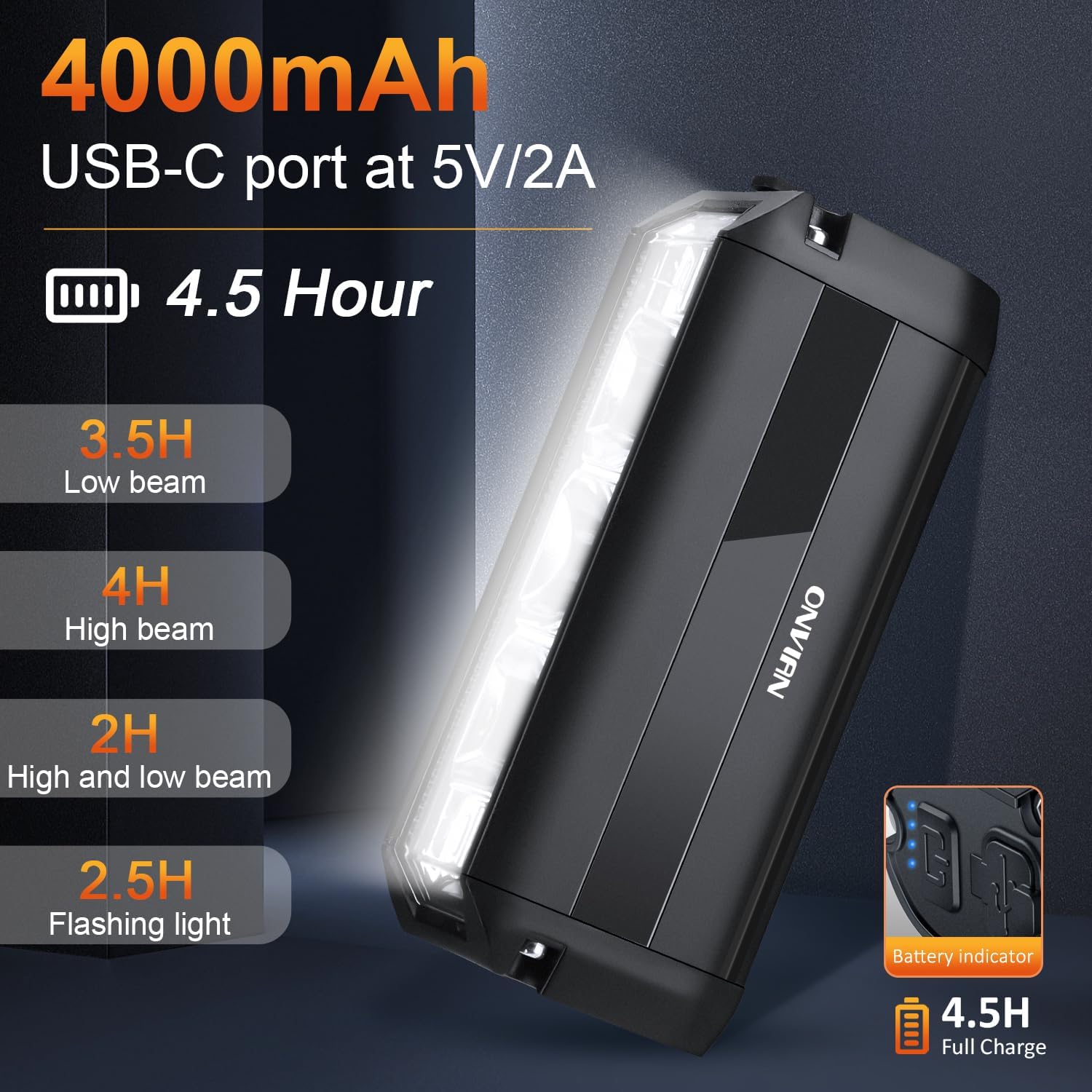
Image: Battery specifications and estimated run times for each lighting mode.
8. Maintenance
- Cleaning: Wipe the light's exterior with a soft, damp cloth. Do not use abrasive cleaners or solvents.
- Storage: Store the light in a cool, dry place when not in use. For long-term storage, charge the battery to approximately 50% every 3-6 months to prolong battery life.
- Water Resistance: Regularly check the USB-C port cover for proper sealing to ensure water resistance.
- Battery Care: Avoid fully depleting the battery frequently, as this can reduce its overall lifespan.
9. Troubleshooting
| Problem | Possible Cause | Solution |
|---|---|---|
| Light does not turn on. | Battery is depleted. | Charge the light using the provided USB-A to USB-C cable. |
| Light does not charge. | Incorrect charging cable/adapter used. | Ensure you are using the included USB-A to USB-C cable and a standard 5V/2A USB power source. This light may not be compatible with all USB-C to USB-C cables or USB Power Delivery (PD) chargers. |
| Light moves or shifts on handlebar during riding. | Mounting bracket not sufficiently tightened or incorrect shims used. | Ensure the mounting knob is tightened firmly by hand. Use the appropriate shims and non-slip pads to achieve a snug fit for your handlebar diameter (20-30mm). |
| Reduced battery life. | Battery degradation over time or frequent use of high brightness modes. | Ensure the battery is fully charged before each use. Consider using lower brightness modes when maximum output is not required. |
10. Specifications
| Feature | Specification |
|---|---|
| Model | B0CKP7NPWT |
| Brand | Onvian |
| Brightness | 2000 Lumens |
| Battery Capacity | 4000mAh Lithium Ion |
| Charging Port | USB-C (5V/2A input) |
| Full Charge Time | Approximately 4.5 hours |
| Run Time (Low/Flash) | 2-3.5 hours |
| Run Time (High) | Up to 4 hours |
| Material | Aluminum, Plastic |
| Water Resistance | IPX5 Waterproof |
| Mounting Type | Handlebar Mount (20-30mm diameter) |
| Item Weight | 259 g (0.26 Kilograms) |
| Parcel Dimensions | 16.21 x 10.31 x 4.39 cm |
11. Warranty and Support
For warranty information or technical support, please contact Onvian customer service through the retailer where the product was purchased or visit the official Onvian store page:
Please have your model number (B0CKP7NPWT) and purchase details ready when contacting support.


