
Aheaplus B0CKP55SG3
Aheaplus Twin Headboard Instruction Manual
Model: B0CKP55SG3 | Color: Black Oak
Introduction
Thank you for choosing the Aheaplus Twin Headboard. This headboard is designed to enhance your bedroom with convenient features including integrated power outlets, USB charging ports, customizable LED lighting, and practical storage shelves. This manual provides detailed instructions for assembly, operation, maintenance, and troubleshooting to ensure safe and optimal use of your new headboard.

Image: The Aheaplus Twin Headboard in Black Oak, showcasing its integrated LED lighting, storage shelves, and modern design.
Product Features
- Integrated Power and USB Charging: Equipped with 3 AC outlets and 2 USB ports for convenient charging of electronic devices. The power cable is 6.56 feet long.
- Colorful LED RGB Lights: Features over 60,000 color options and multiple flashing modes. Includes music sync and timer functions, controllable via remote or mobile application.
- Practical 2-Tier Storage Shelf: Provides ample space for storing personal items such as phones, glasses, and alarm clocks, contributing to a clutter-free environment.
- Durable and Stable Construction: Crafted from high-quality wood and a metal frame, designed for stability and longevity. Features round corners for safety.
- Height Adjustable and Bed Frame Adapters: The headboard's height is adjustable, and it includes 2 bed frame adapters for easy connection to various bed frames.

Image: Detailed view of the headboard's features, highlighting the two-tier shelves, rounded safety corners, integrated power and USB ports, and the included bed frame connectors.
Setup Instructions
- Unpack Components: Carefully remove all parts from the packaging. Verify that all components and hardware listed in the included assembly guide are present.
- Assemble Headboard Frame: Follow the step-by-step instructions provided in the assembly manual to construct the headboard frame. Ensure all screws are tightened securely.
- Install Shelves: Attach the 2-tier storage shelves to the headboard frame as indicated in the instructions.
- Connect Power Unit: Install the power strip with 3 AC outlets and 2 USB ports into its designated slot. Route the power cable underneath the bed to a wall outlet.
- Attach LED Lights: If desired, install the LED light strips according to the instructions.
- Adjust Height: The headboard features adjustable height. Position the headboard to your preferred height before securing it to the bed frame.
- Connect to Bed Frame: Use the provided bed frame adapters to securely attach the headboard to your existing twin-size bed frame. The connectors are designed to be adjustable for various bed frame styles.
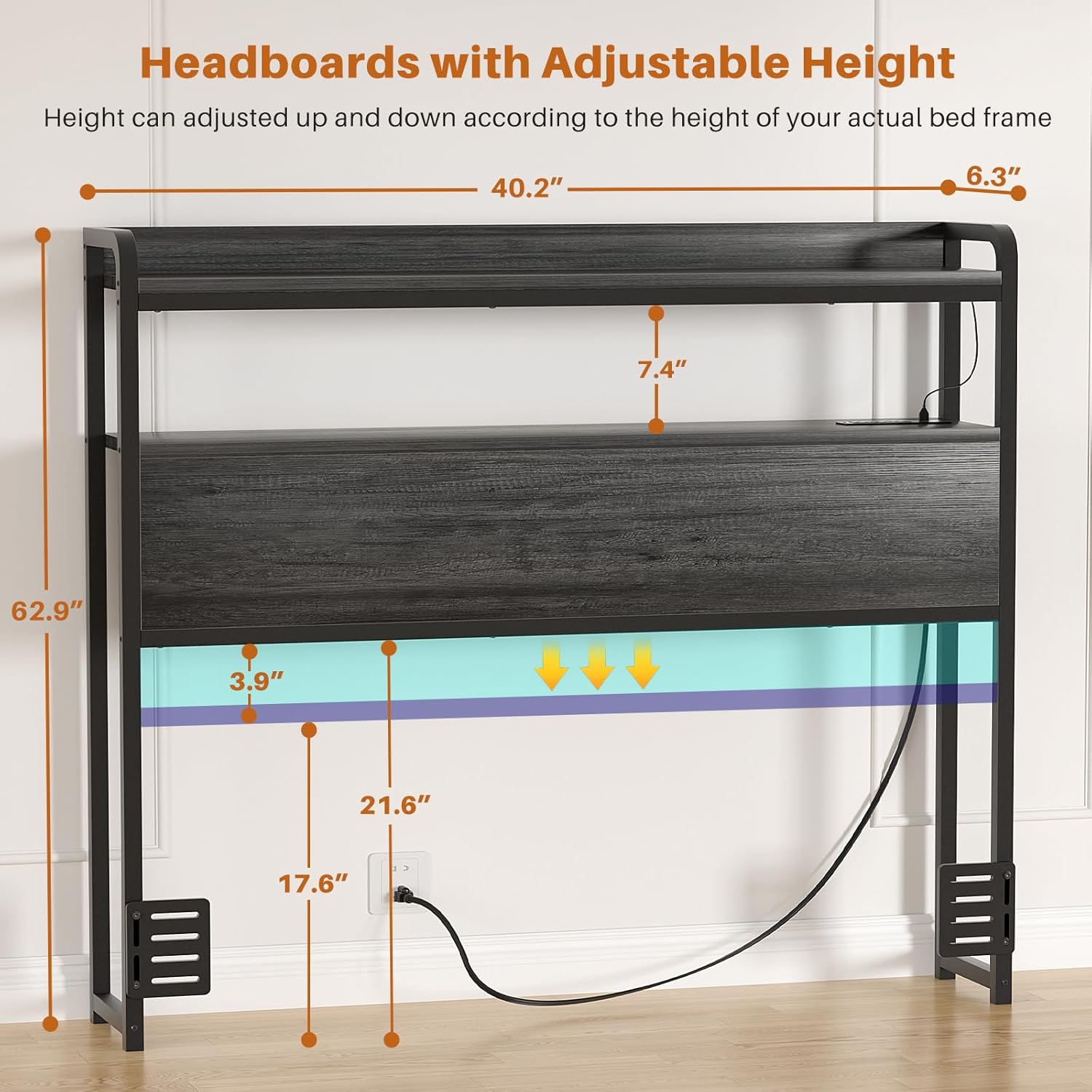
Image: A diagram illustrating the adjustable height feature of the headboard, along with key dimensions for proper setup.
Operating Instructions
Power Outlets and USB Ports
The headboard includes a built-in power strip with 3 standard AC outlets (120V/12A) and 2 USB ports (5V/2A). To use, ensure the headboard's power cable is securely plugged into a wall outlet. You can then plug in and charge your electronic devices directly from the headboard.

Image: The headboard's integrated charging station, featuring three AC power outlets and two USB charging ports for convenient access.
LED RGB Lights
The integrated LED RGB lights offer extensive customization:
- Color Selection: Choose from over 60,000 colors to match your preference or room decor.
- Flashing Modes: Select from multiple flashing modes for dynamic lighting effects.
- Music Sync Function: The lights can change color and rhythm in sync with sound and music.
- Timer Functions: Set a timer for the lights to turn on or off automatically.
- Control: The LED lights can be controlled using the provided remote control or a dedicated mobile application. Refer to the LED light specific instructions for app pairing and detailed remote functions.
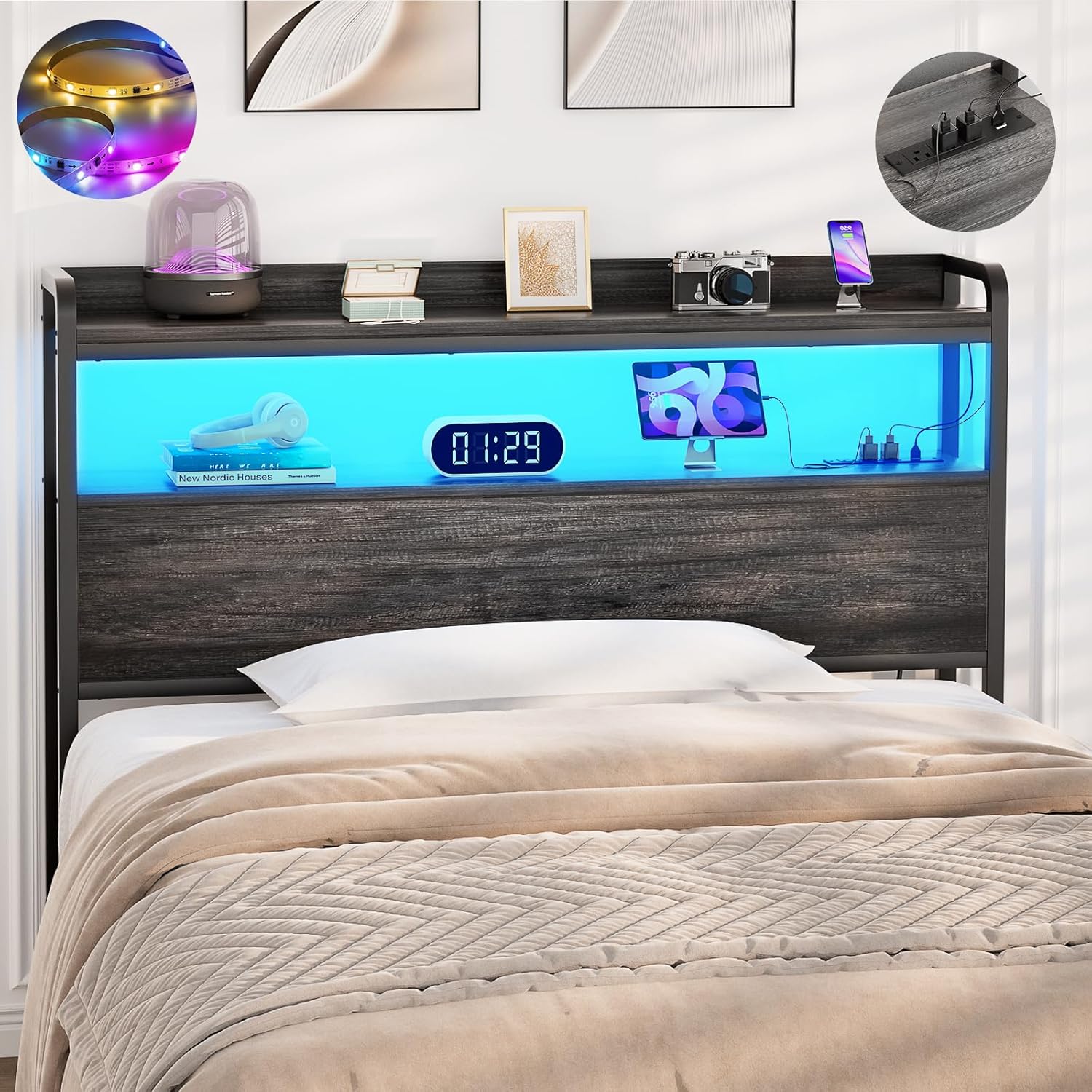
Image: The headboard illuminated by its RGB LED lights, demonstrating the range of colors and control features like music sync and app control.
Maintenance
To maintain the appearance and longevity of your Aheaplus Headboard, regularly wipe all surfaces with a dry, soft cloth. Avoid using abrasive cleaners or harsh chemicals, which may damage the finish. Ensure all electrical connections are secure and free from dust buildup.
Troubleshooting
| Problem | Possible Cause | Solution |
|---|---|---|
| No power from outlets/USB ports | Headboard not plugged in; wall outlet not functioning; internal wiring issue. | Ensure the headboard's power cable is fully plugged into a live wall outlet. Test the wall outlet with another device. Check for loose connections if accessible. |
| LED lights not working | Power issue; remote control battery low; app connection problem; LED strip damage. | Verify power to the headboard. Replace remote control batteries. Re-pair the app if disconnected. Inspect LED strips for visible damage. |
| Headboard feels wobbly | Loose assembly screws; improper connection to bed frame. | Check and tighten all assembly screws. Ensure the bed frame adapters are securely fastened to both the headboard and the bed frame. |
Specifications
| Brand: | Aheaplus |
| Model: | B0CKP55SG3 |
| Size: | Twin |
| Color: | Black Oak |
| Material: | Wood and Metal Frame |
| Special Features: | Storage Space, LED Light, Power Outlet (3 AC, 2 USB) |
| Power Cable Length: | 6.56 FT |
| Mounting Type: | Free standing (with bed frame connectors) |
| Product Care: | Wipe with Dry Cloth |
| Assembly Required: | Yes |
Warranty and Support
This product comes with No warranty as per manufacturer specifications. However, Aheaplus offers lifetime customer support. For any assistance with issues before or after your purchase, please reach out to our experienced team.
Related documentsB0CKP55SG3


Ask a question about this manual
Ask about setup, troubleshooting, compatibility, parts, safety, or missing instructions. Manuals+ will review the question and use this page’s manual context to help answer it.