
Aheaplus B0CKP48JL5
Aheaplus Queen Size Headboard with Outlets, USB Ports, LED Light, and Storage - Instruction Manual
Model: B0CKP48JL5 | Brand: Aheaplus
1. Introduction
Thank you for choosing the Aheaplus Queen Size Headboard. This manual provides detailed instructions for the assembly, operation, and maintenance of your new headboard. Please read this manual thoroughly before beginning assembly or use to ensure proper installation and safe operation. Keep this manual for future reference.

Image 1.1: Aheaplus Queen Size Headboard with integrated LED lighting, power outlets, and storage shelves.
2. Safety Information
For your safety and to prevent damage to the product, please adhere to the following guidelines:
- Wall Mounting: Includes safety instructions for wall mounting. Ensure proper anchors are used for your wall type if choosing to wall mount.
- Assembly: Follow all assembly steps precisely. Do not overtighten screws.
- Electrical Safety: Do not overload the power outlets or USB ports. Ensure the power cord is not pinched or damaged.
- Stability: Ensure the headboard is securely attached to the bed frame or wall before use to prevent wobbling or tipping.
- Weight Capacity: Do not place excessively heavy items on the storage shelves.
- Children: Keep small parts away from children during assembly.
3. Product Features
The Aheaplus Queen Size Headboard is designed with multiple functionalities to enhance your bedroom experience:
- Integrated Power and USB Charging: Equipped with 3 AC outlets (120V/12A) and 2 USB ports (5V/2A) for convenient charging of electronic devices. The power cord is 6.56 feet long.
- Colorful LED RGB Lights: Features over 60,000 color options and multiple flashing modes. Includes music sync and timer functions, controllable via remote or mobile application.
- Practical 2-Tier Storage Shelf: Provides ample space for items such as phones, glasses, and alarm clocks, promoting a clutter-free environment.
- Durable and Stable Structure: Constructed from high-quality wood and a metal frame with rounded corners for safety. Designed for stability without wobbling or noise.
- Height Adjustable: The headboard's height can be adjusted to accommodate various bed frame heights.
- Bed Frame Adapters: Includes 2 adjustable bed frame adapters for easy connection to different bed frame sizes and styles.
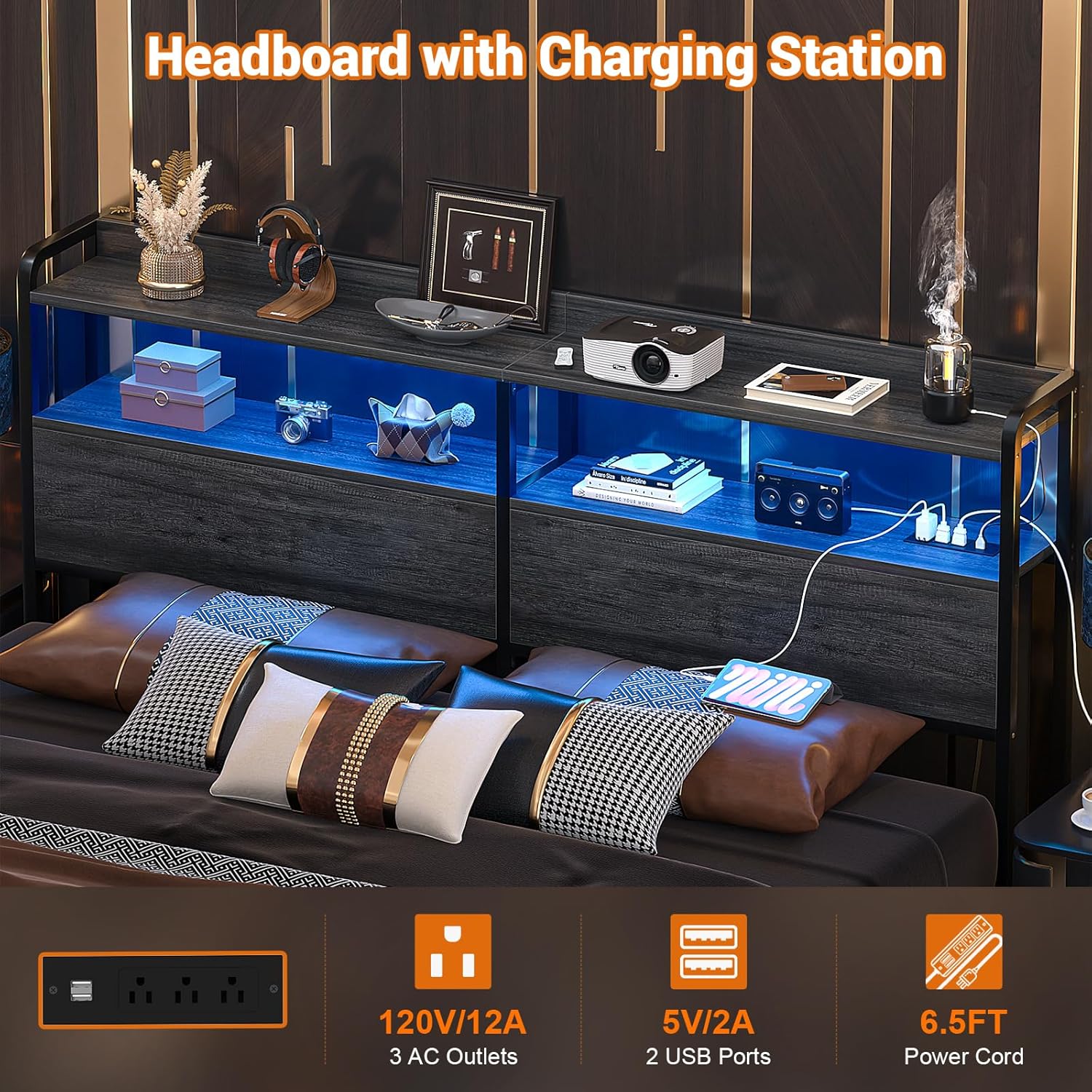
Image 3.1: Detail of the integrated charging station and LED lighting.

Image 3.2: Headboard dimensions and adjustable height range.
4. Package Contents
Before assembly, please verify that all components are present and undamaged. Refer to the included parts list in your package for exact quantities. Typically, the package includes:
- Headboard panels (wood/particle board)
- Metal frame components
- Integrated power strip with AC outlets and USB ports
- LED light strip and controller (remote/app compatible)
- Bed frame connectors/adapters
- All necessary screws, bolts, and assembly tools (e.g., Allen wrench)
- Instruction manual
5. Assembly Instructions
Assembly typically requires two people. Follow the step-by-step instructions provided in the separate assembly guide included in your package. Ensure all parts are correctly oriented before tightening screws.
- Unpack and Identify Parts: Lay out all components on a clean, soft surface to prevent scratches. Compare with the parts list.
- Assemble Frame: Begin by connecting the main metal frame components. Ensure holes align properly before inserting screws.
- Attach Wood Panels: Secure the wood panels to the assembled frame.
- Install Power Unit: Place the power strip into its designated slot and route the power cord.
- Install LED Lights: Adhere the LED light strip to the designated area, typically under the top shelf. Connect the controller.
- Attach to Bed Frame: Use the provided bed frame connectors to securely attach the headboard to your bed frame. Adjust the height as needed.
- Final Check: Ensure all screws are tightened and the headboard is stable.
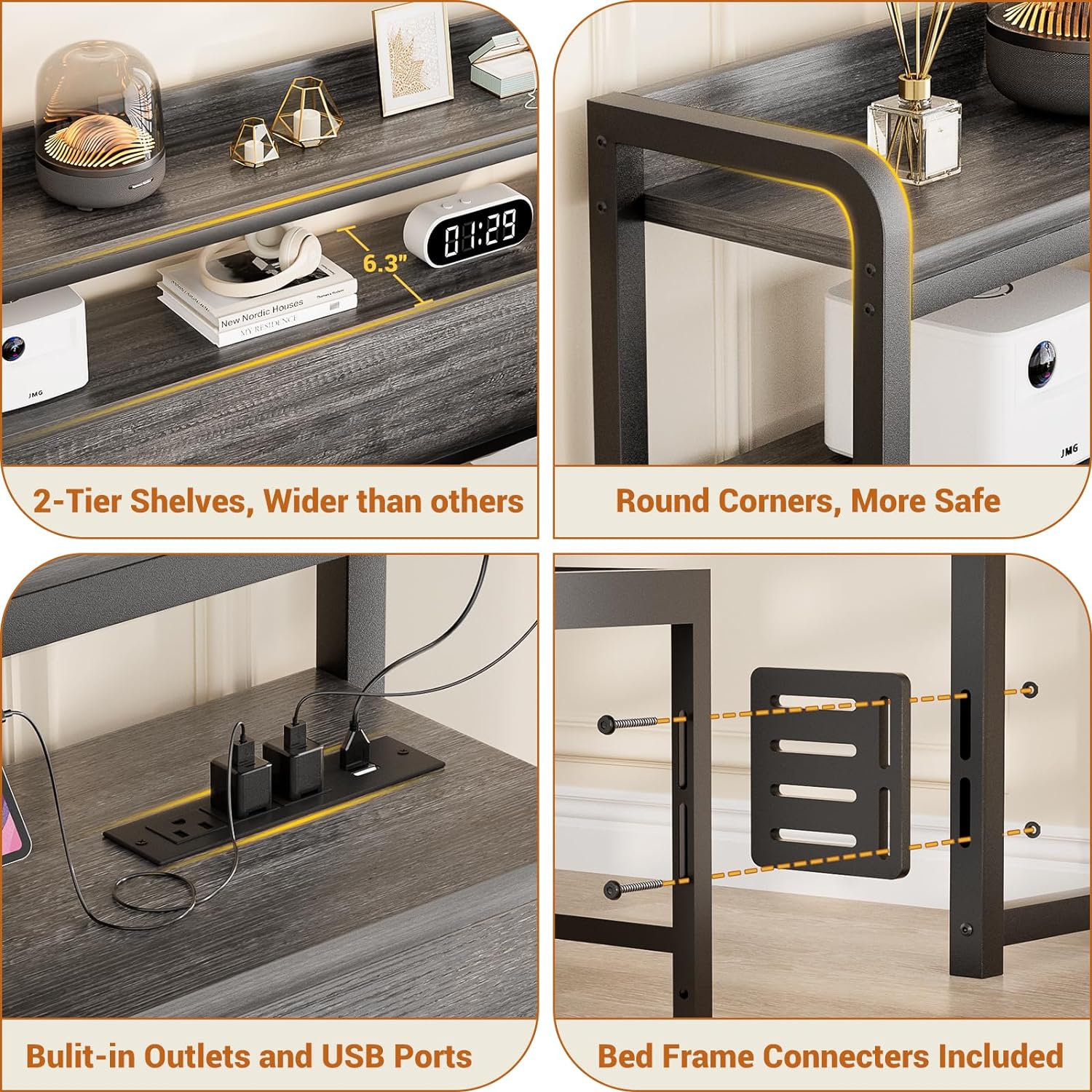
Image 5.1: Key assembly points and features including shelves, rounded corners, power outlets, and bed frame connectors.
6. Operating Instructions
6.1 Power Outlets and USB Ports
Plug the headboard's main power cord into a standard wall outlet. The 3 AC outlets and 2 USB ports are now ready for use. Connect your devices for charging. Avoid exceeding the rated capacity of the power strip.
6.2 LED Lighting System
The LED lights can be controlled via the included remote control or a dedicated mobile application. Refer to the LED light kit's specific instructions for pairing the remote/app and accessing all features.
- Color Selection: Choose from over 60,000 colors to match your preference.
- Flashing Modes: Select from various dynamic lighting modes.
- Music Sync Function: The lights can change color and pattern in rhythm with sound and music.
- Timer Functions: Set schedules for the lights to turn on or off automatically.

Image 6.1: Headboard with LED lights set to a warm color, showcasing the ambiance.

Image 6.2: Headboard with LED lights set to a purple color, demonstrating color options.
7. Maintenance
To maintain the appearance and functionality of your headboard:
- Cleaning: Wipe surfaces with a dry cloth. Avoid abrasive cleaners or harsh chemicals that may damage the finish.
- Dusting: Regularly dust the shelves and frame to prevent buildup.
- Inspections: Periodically check all screws and connections to ensure they remain tight. Retighten if necessary.
- Electrical Components: Ensure the power cord and LED light connections are secure and undamaged.
8. Troubleshooting
| Problem | Possible Cause | Solution |
|---|---|---|
| Holes do not align during assembly. | Components may be slightly misaligned or screws were tightened prematurely. | Loosen all screws on the affected section to allow for more flexibility. Gently adjust the components until the holes align, then carefully tighten all screws. Avoid forcing parts together. |
| LED lights not turning on. | Power cord not plugged in, loose connection, or remote/app issue. | Ensure the headboard's main power cord is securely plugged into a working wall outlet. Check the connection of the LED strip to its controller. Verify remote batteries or app connectivity. |
| Power outlets/USB ports not working. | Headboard not powered, overloaded circuit, or faulty device. | Confirm the headboard is plugged in. Ensure the total power draw of connected devices does not exceed the power strip's rating. Test with a different device. |
| Headboard feels wobbly. | Loose connections or improper attachment to bed frame/wall. | Check and tighten all assembly screws. Ensure the bed frame connectors are securely fastened to both the headboard and your bed frame. If wall-mounted, verify wall anchors are secure. |
9. Specifications
- Brand: Aheaplus
- Model: B0CKP48JL5
- Size: Queen
- Color: Black Oak
- Style: Wood
- Product Dimensions: 6.3"W x 41.34"H (Note: Width refers to depth from wall, height is adjustable)
- Item Weight: 31.9 pounds
- Mounting Type: Bed Frame Mount (Wall mounting also possible with appropriate hardware)
- Special Features: Storage Space, LED Light, Power Outlet (3 AC, 2 USB)
- Power Cord Length: 6.56 feet
- Included Components: Bed Frame Connectors
- Product Care Instructions: Wipe with Dry Cloth
10. Warranty and Support
Warranty Type: No Warranty is explicitly stated for this product in the provided information. Please refer to your purchase documentation or contact the seller directly for any warranty details.
Customer Support: For assistance with assembly, missing parts, or any other issues, please contact Aheaplus customer support. Contact information can typically be found on the seller's page or within your product packaging. The manufacturer offers lifetime customer support.
You can visit the Aheaplus Store for more information.
Ask a question about this manual
Ask about setup, troubleshooting, compatibility, parts, safety, or missing instructions. Manuals+ will review the question and use this page’s manual context to help answer it.