
1. Introduction
Thank you for choosing the SOERDMX Maple Retro Stage Light, Model SOL-260F. This high-performance stage lighting product is designed to create stunning visual effects for various events, including concerts, bars, and band shows. It features high power output, multiple control channels, and advanced illumination capabilities. Please read this manual thoroughly before installation and operation to ensure safe and optimal performance.
1.1 What's in the Box
- SOERDMX Maple Retro Stage Light unit(s)
- Power Cable
- User Manual
- Light kit included (as per product specifications)

Figure 1: Front view of the SOERDMX Maple Retro Stage Light, showcasing its unique design.
2. Safety Instructions
To prevent electric shock, fire, or injury, always follow these basic safety precautions:
- Read all instructions: Before operating the device, read and understand all safety and operating instructions.
- Power supply: Connect the device only to a grounded power outlet with the specified voltage (110 Volts AC).
- Water and moisture: Do not expose the device to rain or moisture. Do not use it near water.
- Heat: Do not place the device near heat sources such as radiators, heat registers, stoves, or other apparatus that produce heat.
- Ventilation: Ensure proper ventilation. Do not block any ventilation openings.
- Cleaning: Unplug the device from the wall outlet before cleaning. Use a dry cloth for cleaning.
- Servicing: Do not attempt to service the device yourself. Refer all servicing to qualified service personnel.
- Mounting: Ensure the device is securely mounted using appropriate hardware and techniques, especially for floor mount applications.
- Eye protection: Avoid direct eye exposure to the light source, as it can be intense.
3. Setup
3.1 Unpacking
Carefully remove the stage light from its packaging. Inspect the unit for any signs of damage during transit. If any damage is found, contact your supplier immediately.
3.2 Placement and Mounting
The SOERDMX Maple Retro Stage Light supports floor mount installation. Ensure the mounting surface is stable and capable of supporting the weight of the fixture. For optimal light distribution, consider the venue's layout and desired effects.
3.3 Connections
Connect the power cable to the unit's power input and then to a suitable 110V AC power outlet. For DMX control, connect a DMX cable from your DMX controller to the DMX IN port of the first fixture. For multiple fixtures, daisy-chain them by connecting the DMX OUT of the first fixture to the DMX IN of the next, and so on.

Figure 2: Rear panel of the stage light, highlighting the power input and DMX IN/OUT ports for control connections.
4. Operating Instructions
4.1 Powering On/Off
Once all connections are secure, plug the power cable into the main power supply. The unit will power on. To turn off, simply unplug the power cable.
4.2 Control Modes
The SOERDMX Maple Retro Stage Light offers several control modes:
- DMX512 Control: Connect to a DMX controller to access 15, 20, or 26 channels for precise control over light intensity, color, patterns, and movement. Refer to the DMX chart in Appendix A (if applicable) for channel assignments.
- Master/Slave Mode: Link multiple units together. Set one unit as the 'Master' and others as 'Slaves'. The slave units will mirror the master's operation.
- Self-Propelled Mode: The unit operates through pre-programmed internal sequences and patterns without external control.
- Voice Control Mode: The light reacts to sound and music, changing patterns and intensity in sync with audio input.

Figure 3: Examples of dynamic light effects and patterns achievable with the stage light.
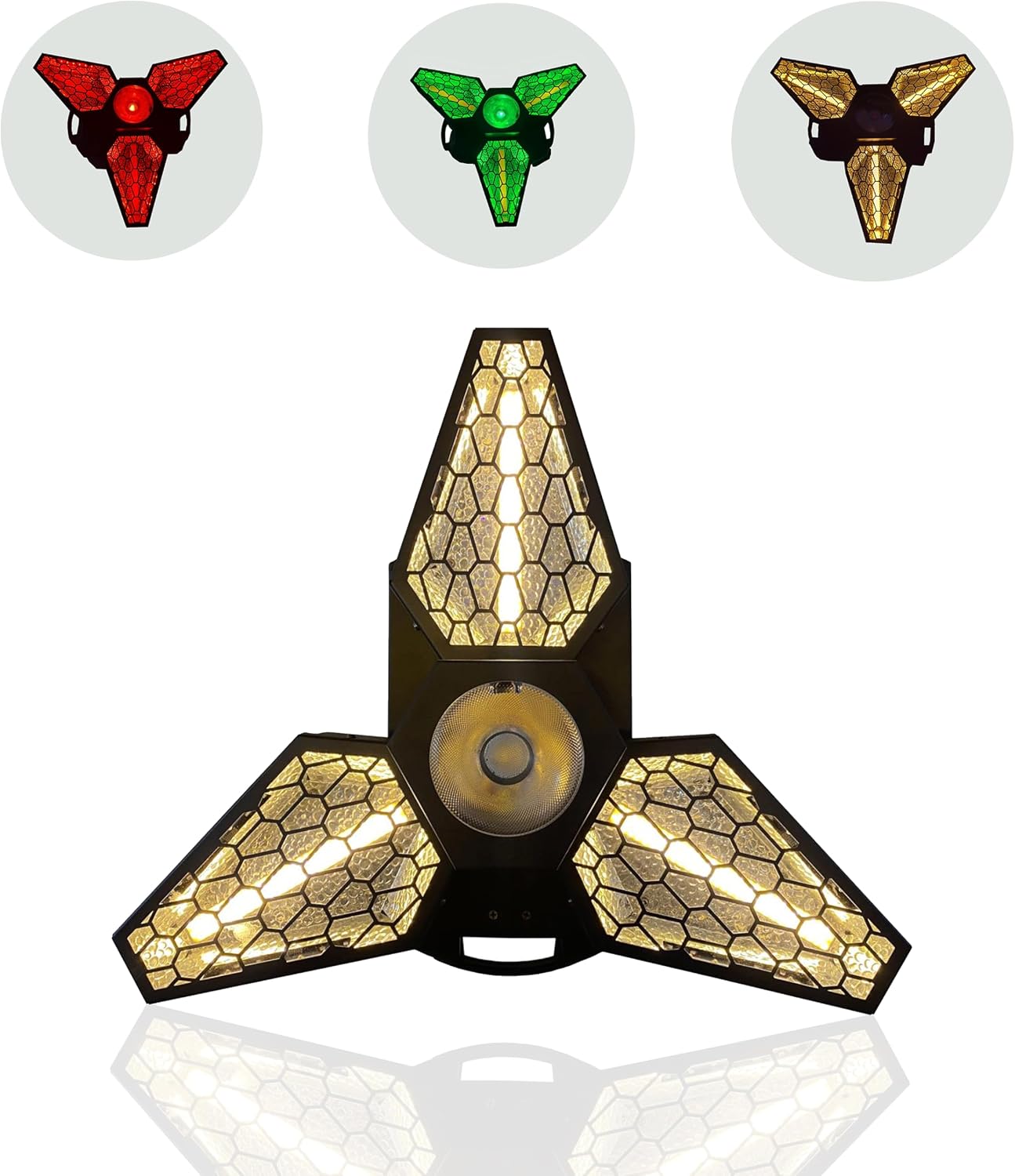
Figure 4: The stage light showcasing its ability to produce various colors and combinations.
4.3 Video Demonstration
Video 1: A demonstration of the SOERDMX Maple Retro Stage Light's various effects and capabilities in a stage setting.
5. Maintenance
5.1 Cleaning
Regularly clean the exterior of the fixture with a soft, dry cloth. For optical components, use a lint-free cloth and a specialized lens cleaning solution. Ensure the device is unplugged before cleaning.
5.2 Storage
When not in use, store the stage light in a dry, dust-free environment. If storing for extended periods, consider using the original packaging or a protective case.
6. Troubleshooting
| Problem | Possible Cause | Solution |
|---|---|---|
| No power | Power cable not connected; outlet malfunction; fuse blown | Check power cable connection; test outlet with another device; replace fuse if necessary. |
| No light output | Unit in standby; DMX signal issue; lamp failure | Check display for standby mode; verify DMX connections and address; contact support if lamp failure is suspected. |
| DMX control not working | Incorrect DMX address; faulty DMX cable; controller issue | Verify DMX address settings on fixture and controller; test with a different DMX cable; check DMX controller functionality. |
| Light flickering or inconsistent | Unstable power supply; loose connections; internal fault | Ensure stable power source; check all cable connections; contact support if problem persists. |
7. Specifications
| Feature | Detail |
|---|---|
| Model Number | SOL-260F |
| Power | 260 Watts |
| Voltage | 110 Volts (AC) |
| Light Source Type | LED (3x 60W gold COB, 36x 3W 3535 tricolor LED, 1x 40W four-in-one) |
| Control Channels | 15/20/26CH |
| Control Modes | DMX512, Master/Slave, Self-propelled, Voice control |
| Material | Plastic |
| Mounting Type | Floor Mount |
| Bulb Features | Dimmable |
| Product Dimensions | 19.29"L x 17.71"W x 9"H |
| Item Weight | 18 Pounds |
| Certification | CE |
8. Warranty and Support
8.1 Product Warranty
This SOERDMX product is guaranteed for 180 days from the date of purchase. This warranty covers manufacturing defects and ensures the product functions as intended under normal use.
8.2 Customer Support
If you have any questions or encounter issues during the warranty period or at any other time, please contact our customer support team. We are committed to providing assistance and will respond to your inquiries within 24 hours.
For support, please visit the SOERDMX Store on Amazon or refer to the contact information provided with your purchase documentation.