
1. Introduction
Thank you for purchasing the Aheaplus L-Shaped Desk. This manual provides detailed instructions for assembly, operation, maintenance, and troubleshooting to ensure optimal use of your new desk. Please read this manual thoroughly before assembly and use.
2. Product Overview
The Aheaplus 66 Inch L-Shaped Desk is designed for home office, gaming, or study environments, offering a reversible configuration to fit various room layouts. Key features include:
- Ample Storage: Two fabric file drawers, two-tier under-desk storage shelves, a printer cabinet, and a CPU stand.
- Integrated Power Outlet: Features 3 AC outlets and 2 USB charging ports for convenient device charging.
- LED Light Strips: Built-in RGB LED light strip with app control, offering over 60,000 colors and music sync function.
- Long Monitor Stand: Ergonomically designed to elevate monitors, promoting better posture and providing additional storage.
- Reversible Design: Can be assembled as a left or right-corner desk.

Image: The Aheaplus 66 Inch L-Shaped Desk with its various components, including the monitor stand, storage shelves, and file drawers, set up in an office environment.
3. Safety Information
Please observe the following safety guidelines:
- Ensure all assembly instructions are followed carefully for proper stability.
- Do not exceed the maximum weight recommendation of 100 pounds on the desk surface.
- Avoid overloading shelves and drawers.
- Keep electrical components (power outlet, LED strip) away from liquids.
- Periodically check all screws and connections to ensure they remain tight.
4. Setup and Assembly
Assembly is required for this product. All necessary hardware and tools are included, and parts are clearly labeled. It is recommended to have at least two people for assembly, though it can be done by one person.
4.1. Unpacking and Parts Identification
Carefully unpack all components and verify against the included parts list. If any parts are damaged, scratched, or missing, contact customer support immediately.

Image: Detailed dimensions of the desk and its components, illustrating the reversible design for left or right corner setup. Also shows the fabric drawer dimensions.
4.2. Assembly Steps
Follow the step-by-step instructions provided in the physical manual included with your product. Pay close attention to the orientation of parts, especially for the reversible sections. Ensure all screws are tightened securely but do not overtighten.
Video: An official product video from Aheaplus demonstrating the features and assembly process of the L-Shaped Desk with File Drawer.
4.3. Reversible Configuration
The desk can be configured for either a left-hand or right-hand L-shape. Decide on your preferred orientation before starting assembly and follow the corresponding instructions in the manual.

Image: Visual representation of the two possible reversible configurations for the L-shaped desk, allowing users to choose between left or right orientation.
5. Operating Instructions
5.1. Power Outlet Usage
The integrated power strip includes 3 AC outlets and 2 USB charging ports. Connect the desk's power cord (6.56 ft) to a wall outlet. You can then plug in your devices directly to the desk for power.

Image: A close-up view of the recessed power strip, highlighting the 3 AC outlets and 2 USB ports, along with their electrical specifications.
5.2. LED Light Strip Control
The built-in RGB LED light strip can be controlled via a smart application. Download the recommended app (details in the physical manual) to access over 60,000 colors, multiple lighting modes, and a music sync function. This allows the lights to change color with the rhythm of sound and music.

Image: The L-shaped desk illuminated by RGB LED lights, showcasing its use in a gaming setup with multiple monitors and accessories.
5.3. Monitor Stand
Utilize the long monitor stand to elevate your display(s) to an ergonomic height, which can help maintain correct sitting posture and reduce neck strain. The space beneath the monitor stand can be used for additional storage.
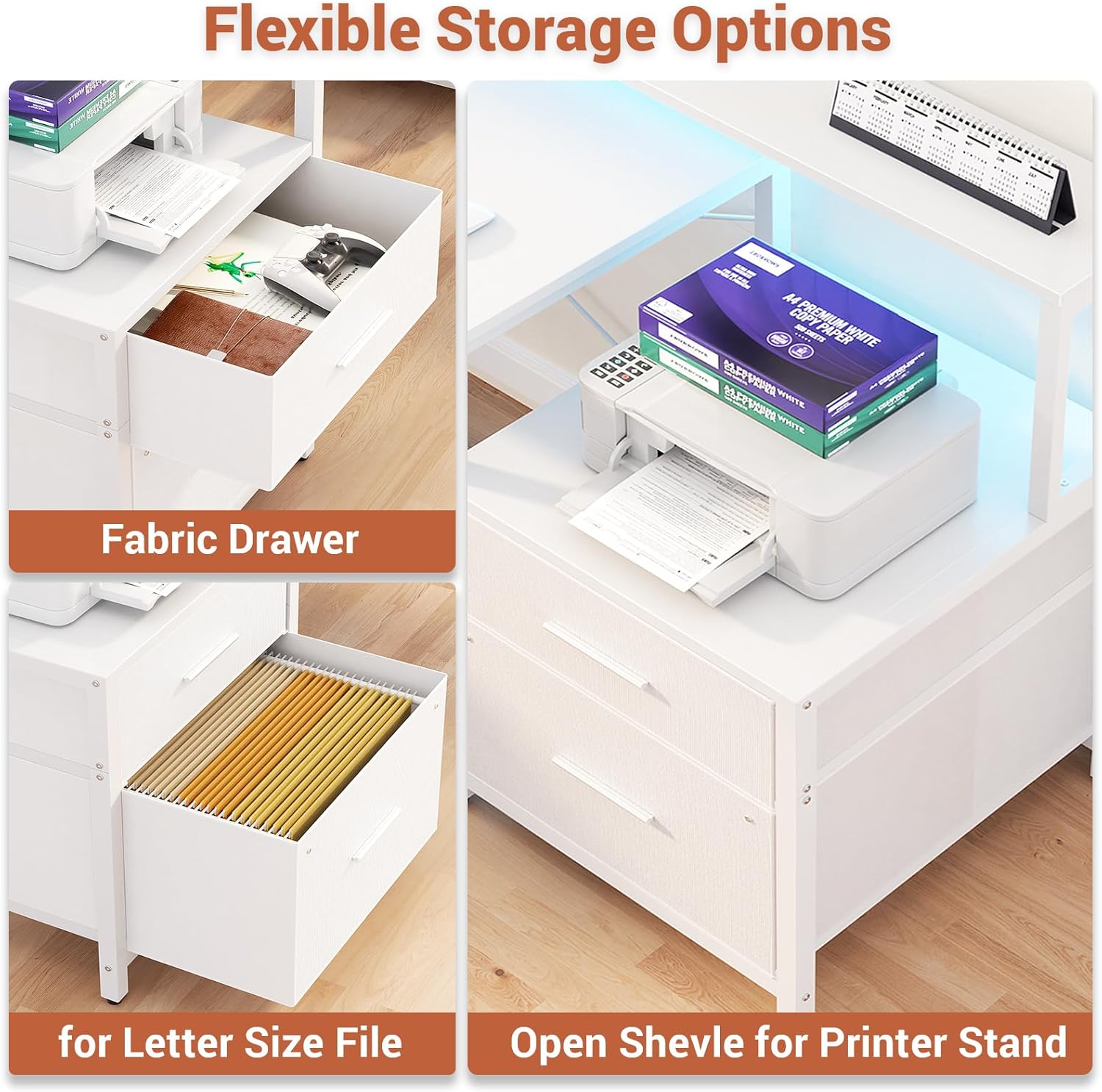
Image: An illustration demonstrating the benefits of the monitor stand for maintaining proper ergonomic posture, comparing correct and incorrect monitor heights.
6. Storage Options
The desk provides various storage solutions:
- Fabric File Drawers: Two drawers are included for organizing documents, suitable for letter-size files.
- Under-Desk Shelves: Two tiers of open shelves provide space for books, decor, or other office supplies.
- Printer Cabinet: A dedicated space for a printer or other larger equipment.
- CPU Stand: A designated area to keep your computer tower off the floor.

Image: An aerial view of the L-shaped desk, highlighting the integrated storage solutions including the file drawers, open shelves, and monitor stand.
7. Maintenance
- Cleaning: Wipe surfaces with a soft, damp cloth. Avoid harsh chemicals that may damage the finish.
- Hardware Check: Periodically inspect all screws and connections to ensure they are tight. Retighten as necessary to maintain stability.
- LED Strip Care: Avoid bending or sharply creasing the LED strip. If issues arise, check connections before contacting support.
8. Troubleshooting
| Problem | Possible Cause | Solution |
|---|---|---|
| Desk is wobbly. | Loose screws or uneven floor. | Check and tighten all assembly screws. Adjust leveling feet if present, or place shims under legs on uneven surfaces. |
| LED lights not working. | Power connection issue, faulty strip, or app malfunction. | Ensure the LED strip is properly connected to the power source. Check the power outlet. Restart the control app or reinstall it. |
| Power outlets not functioning. | Desk power cord not plugged in, or circuit overload. | Verify the desk's main power cord is securely plugged into a working wall outlet. Check if the wall outlet has power. Avoid plugging in too many high-power devices simultaneously. |
| Drawers are difficult to open/close. | Misaligned drawer slides or overloaded drawers. | Ensure drawer slides are correctly installed and aligned. Reduce the weight or volume of items in the drawers. |
9. Specifications
- Brand: Aheaplus
- Model: 66 Inch L-Shaped Desk
- Dimensions (D x W x H): 39.4" x 67" x 35"
- Shape: L-Shape, Reversible
- Color: White
- Top Material: Engineered Wood
- Base Material: Metal
- Number of Drawers: 2 (Fabric File Drawers)
- Number of Shelves: 2 (Under-desk)
- Power Outlet: 3 AC Outlets (120V/12A), 2 USB Ports (5V/2A)
- Power Cord Length: 6.56 ft
- Special Features: Built-In USB Outlet, LED Lights, Reversible Design, File Drawer, Long Monitor Stand
- Maximum Weight Recommendation: 100 Pounds
- Assembly Required: Yes
- Recommended Number of People for Assembly: 1-2
10. Warranty and Support
This product comes with a limited warranty. For specific warranty details, please refer to the documentation included with your purchase. If your item arrives damaged, scratched, or with missing parts, or if you encounter any issues during assembly or use, please contact Aheaplus customer service for assistance. They aim to resolve all problems promptly.
Contact Information: Refer to the contact details provided in your product packaging or visit the official Aheaplus website.
