
rastar 94400
rastar 94400 Technic F1 Racing Car Building Kit User Manual
Brand: rastar | Model: 94400
1. Introduction
This manual provides essential information for the assembly, operation, and maintenance of your rastar 94400 Technic F1 Racing Car Building Kit. This dynamic version model, based on the Alfa Romeo F1 Team Orlen C42 2022 car, consists of 2306 precision-engineered parts, allowing for a highly detailed and functional replica.
The kit includes components for remote control functionality, offering an engaging building and play experience. Please read this manual thoroughly before beginning assembly or operation to ensure proper use and longevity of your model.

Image 1: Overview of the rastar 94400 Technic F1 Racing Car Building Kit, showing the product packaging, the fully assembled model, and the included remote control and motor components.
2. Safety Information
WARNING:
- This product contains small parts. Keep out of reach of children under 3 years of age to prevent choking hazards.
- Recommended age for assembly and use is 14 years and up.
- Always supervise younger users during assembly and operation.
- Do not ingest any parts.
- Ensure all electrical components (motors, battery compartment, remote control) are handled with care and installed correctly to avoid damage or malfunction.
- Do not expose the model or its components to water or excessive moisture.
- Use only the specified batteries for the remote control and model. Do not mix old and new batteries, or different types of batteries.
3. Package Contents
Upon opening the package, verify that all components are present and undamaged. The rastar 94400 Technic F1 Racing Car Building Kit includes:
- 2306 Building Blocks (divided into numbered bags)
- 1x XL Motor
- 1x Servo Motor
- 1x Battery Compartment
- 1x 2.4 GHz Remote Control
- 1x Color-printed Assembly Instruction Manual
- Exquisite Original Packaging
Note: Batteries required for operation are not included and must be purchased separately.

Image 2: The rastar 94400 Technic F1 Racing Car model displayed next to its original packaging, highlighting the scale and detail of the assembled product.
4. Setup and Assembly
The assembly of the rastar 94400 Technic F1 Racing Car is a detailed process designed to be rewarding. Follow the included color-printed assembly instruction manual carefully for step-by-step guidance.
- Unpack and Organize: Open all bags containing building blocks. The parts are sorted into different bags to simplify the process. It is recommended to organize parts by type or color as you proceed.
- Follow the Manual: The assembly manual provides clear, visual instructions. Pay close attention to the orientation of parts and the correct placement of Technic pins and axles.
- Motor and Battery Compartment Installation: Integrate the XL motor, servo motor, and battery compartment as indicated in the manual. Ensure all connections are secure.
- Battery Installation: Once the battery compartment is assembled into the model, insert the required batteries (not included) into the compartment. Refer to the manual for battery type and polarity.
- Remote Control Setup: Install batteries into the 2.4 GHz remote control. Pair the remote control with the model according to the instructions in the manual.

Image 3: A detailed view of the underside of the assembled F1 racing car, illustrating the intricate Technic construction and the integration of various building elements.
5. Operating Instructions
Once assembled and powered, your rastar Technic F1 Racing Car is ready for operation via the 2.4 GHz remote control.
5.1. Remote Control Functions
The remote control allows for precise movement and steering of the model. Familiarize yourself with the controls:
- Forward/Backward: Use the designated lever or button to move the car forward or backward.
- Steering (Left/Right): The steering mechanism is linked to the steering wheel on the model, providing realistic control. Use the corresponding control on the remote to turn the wheels left or right.
- Power On/Off: Ensure both the model and the remote control are switched on before use.
5.2. Driving Tips
- Operate the model on a clean, flat surface for optimal performance.
- Avoid driving on rough terrain, sand, or water, as this can damage the motors and components.
- Practice gentle acceleration and steering to master control of the model.
- If the model's performance degrades, check the batteries in both the car and the remote control.
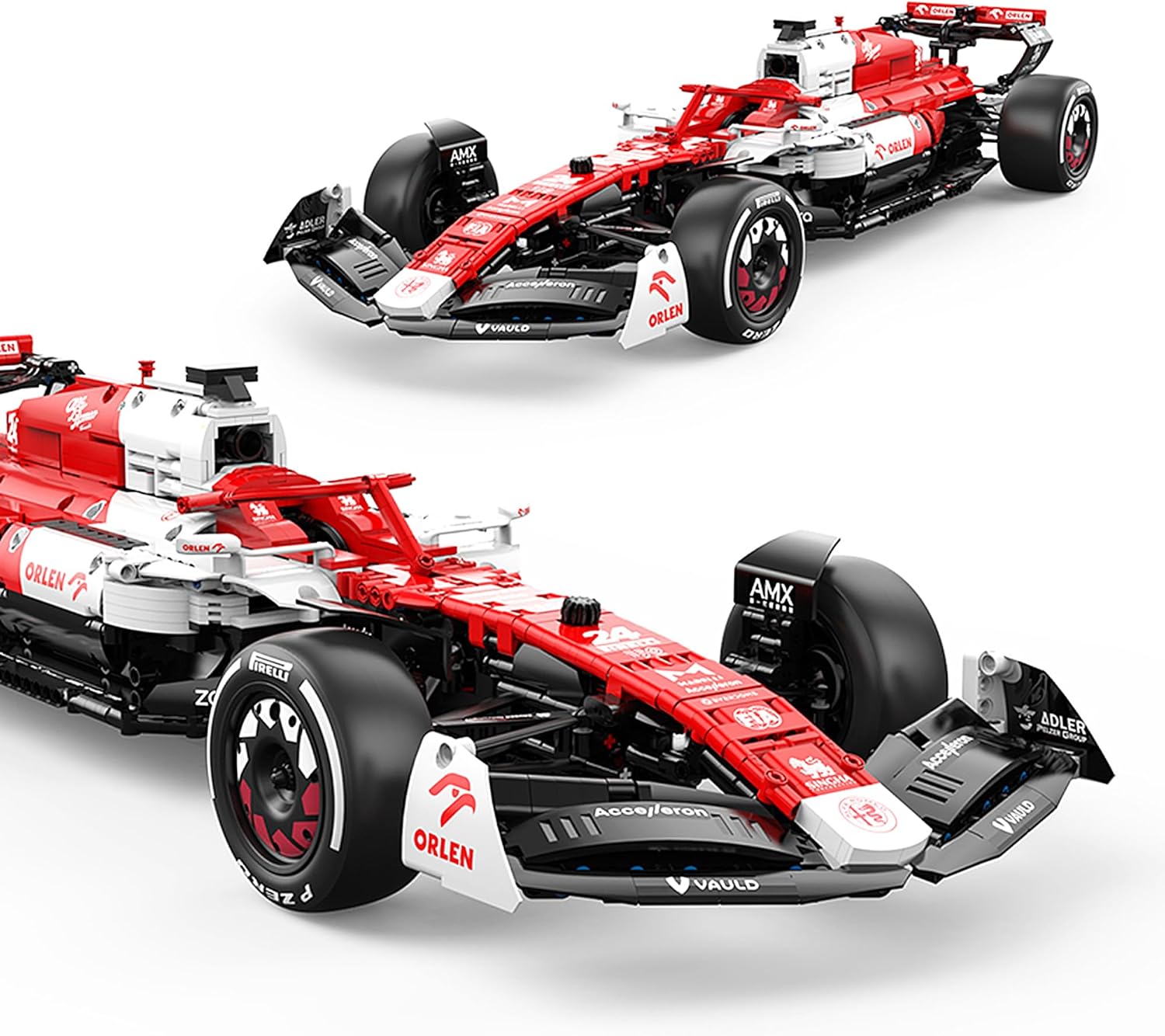
Image 4: Two views of the assembled rastar F1 racing car, showcasing its sleek design and detailed features from slightly different perspectives.
6. Maintenance
Proper maintenance will ensure the longevity and optimal performance of your rastar Technic F1 Racing Car.
- Cleaning: Use a soft, dry cloth to wipe down the model. For hard-to-reach areas, a soft brush or compressed air can be used. Do not use water or chemical cleaners.
- Storage: Store the model in a cool, dry place away from direct sunlight and extreme temperatures.
- Battery Care: Remove batteries from both the model and the remote control if the product will not be used for an extended period. This prevents battery leakage and corrosion.
- Component Check: Periodically inspect all connections, gears, and moving parts for any signs of wear or damage. Replace any broken or worn-out parts as needed.
7. Troubleshooting
If you encounter issues with your rastar Technic F1 Racing Car, refer to the following common troubleshooting steps:
| Problem | Possible Cause | Solution |
|---|---|---|
| Model does not respond to remote control. |
|
|
| Model moves slowly or erratically. |
|
|
| Steering is not responsive. |
|
|
8. Specifications
| Feature | Detail |
|---|---|
| Model Name | Alfa Romeo F1 Team Orlen C42 2022 |
| Model Number | 94400 |
| Brand | rastar |
| Number of Parts | 2306 |
| Product Dimensions (L x W x H) | 68 x 25.6 x 13.8 cm (26.8 x 10.1 x 5.4 inches) |
| Scale | 1:8 |
| Material | Acrylonitrile Butadiene Styrene (ABS) |
| Power Source | Battery Powered (Batteries not included) |
| Motors Included | 1x XL Motor, 1x Servo Motor |
| Remote Control | 2.4 GHz |
| Assembly Required | Yes |
| Manufacturer's Recommended Age | 14 years and up |

Image 5: A top-down perspective of the assembled rastar F1 racing car, highlighting its aerodynamic shape and the intricate details of the cockpit and engine cover.
9. Warranty and Support
For detailed warranty information, product support, or to inquire about replacement parts, please refer to the official rastar website or contact their customer service directly. Contact information can typically be found on the product packaging or the manufacturer's official online channels.
No official product videos were found for this item from the seller. Please refer to the detailed assembly manual for visual guidance during construction.
Related documents94400


Ask a question about this manual
Ask about setup, troubleshooting, compatibility, parts, safety, or missing instructions. Manuals+ will review the question and use this page’s manual context to help answer it.