
Introduction
Thank you for choosing the KRIOS BK2 Wireless Bluetooth Headphones. These headphones are designed to provide a high-quality audio experience with advanced features such as Active Noise Cancellation (ANC), 7.1 surround sound, and a comfortable, lightweight design. This manual will guide you through the setup, operation, maintenance, and troubleshooting of your new headphones.
Product Overview
The KRIOS BK2 headphones feature 40mm drivers for rich audio, Bluetooth 5.3 for stable wireless connectivity, and a dual-mode option for wired use via an AUX cable. The ergonomic design ensures comfort during extended listening sessions, and the foldable structure allows for easy portability.
- Powerful Active Noise Cancellation (ANC): Effectively reduces external noise by up to 42dB, ideal for various environments.
- 7.1 Surround Heavy Bass: Large sound unit provides deep bass and immersive surround sound.
- Wireless & AUX Dual Mode: Connect wirelessly via Bluetooth 5.3 or use the included AUX cable for wired listening.
- Lightweight and Comfortable: High-strength protein earmuffs ensure long-term comfort.
- Long Battery Life: Up to 25 hours of continuous use on a single 2-hour charge.
Setup
1. Charging the Headphones
Before first use, fully charge your KRIOS BK2 headphones. A full charge takes approximately 2 hours and provides up to 25 hours of playback.
- Connect the charging cable (USB-C) to the charging port on the headphones.
- Connect the other end of the cable to a USB power adapter (not included) or a computer's USB port.
- The LED indicator will show the charging status (e.g., red for charging, blue for fully charged). Refer to the LED indicator section for specific details.

Figure 1: KRIOS BK2 Headphones highlighting long battery life and charging time.
2. Bluetooth Pairing
Pair your KRIOS BK2 headphones with your device (smartphone, tablet, computer) via Bluetooth for wireless audio.
- Ensure the headphones are charged and powered off.
- Press and hold the Power button on the headphones until the LED indicator flashes blue and red alternately, indicating pairing mode.
- On your device, go to Bluetooth settings and enable Bluetooth.
- Search for available devices and select "KRIOS BK2" from the list.
- Once connected, the LED indicator on the headphones will turn solid blue or flash blue slowly.
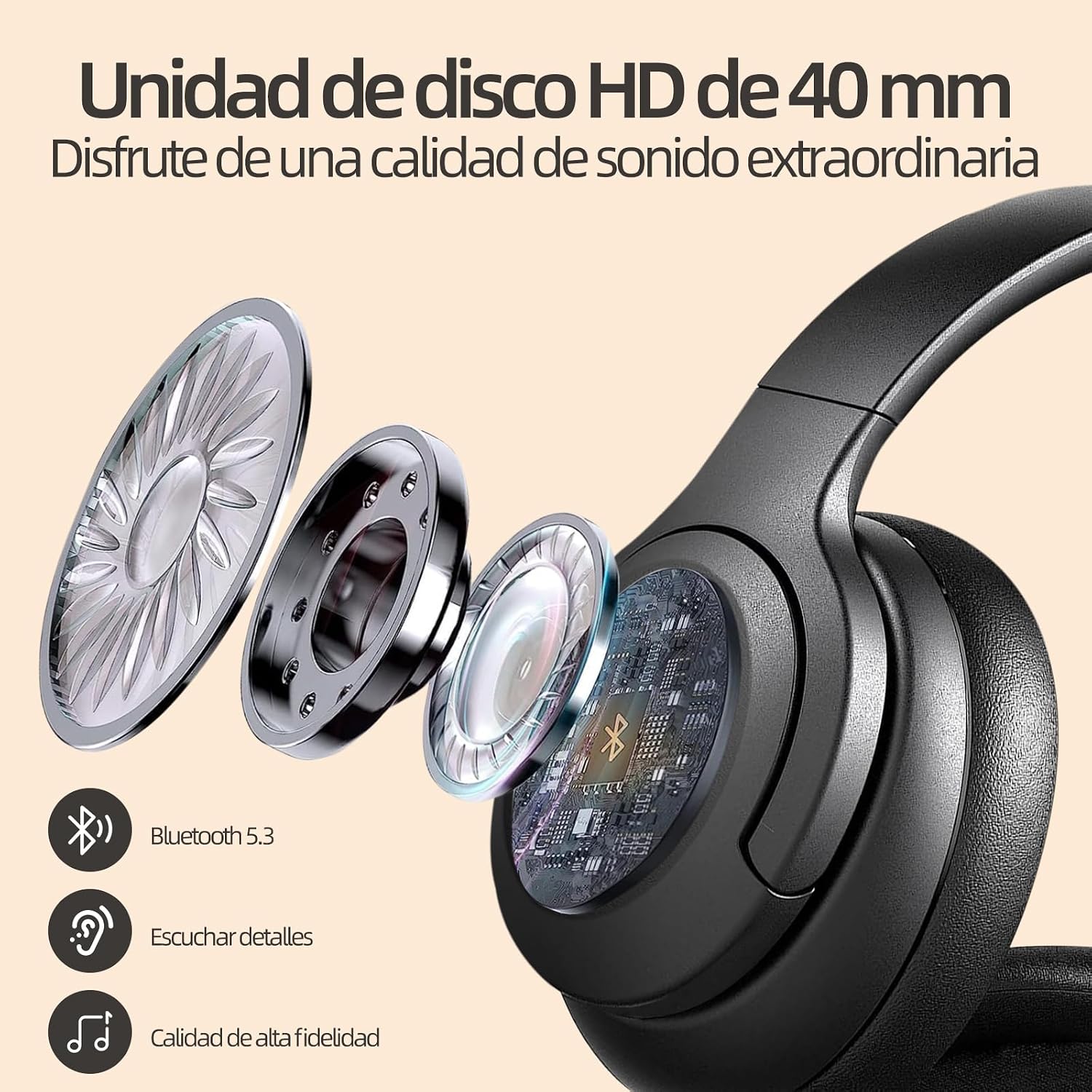
Figure 2: Internal components of the KRIOS BK2 headphones, illustrating the 40mm driver and Bluetooth 5.3.
Operating Instructions
1. Power On/Off
- Power On: Press and hold the Power button for 3 seconds. The LED indicator will flash blue.
- Power Off: Press and hold the Power button for 3 seconds. The LED indicator will turn off.
2. Music Playback
- Play/Pause: Press the Multi-function button once.
- Next Track: Press and hold the Volume Up button.
- Previous Track: Press and hold the Volume Down button.
- Volume Up: Short press the Volume Up button.
- Volume Down: Short press the Volume Down button.
3. Call Management
- Answer/End Call: Press the Multi-function button once.
- Reject Call: Press and hold the Multi-function button for 2 seconds.
- Redial Last Number: Double-press the Multi-function button.
4. Active Noise Cancellation (ANC)
The KRIOS BK2 headphones feature powerful ANC to reduce ambient noise.
- Activate ANC: Press the ANC button once. The ANC indicator light will turn on.
- Deactivate ANC: Press the ANC button once again. The ANC indicator light will turn off.

Figure 3: KRIOS BK2 headphones with ANC function active, suitable for travel.

Figure 4: KRIOS BK2 headphones providing Hybrid Active Noise Cancellation for a peaceful listening experience.
5. AUX Wired Mode
You can use the KRIOS BK2 headphones in wired mode even if the battery is depleted.
- Connect one end of the 3.5mm AUX cable (not included) to the AUX port on the headphones.
- Connect the other end to the 3.5mm audio jack of your device.
- In AUX mode, the headphone controls (volume, play/pause, ANC) may not function, and control will be managed by your connected device.
Maintenance
1. Cleaning
- Wipe the headphones with a soft, dry cloth.
- Do not use abrasive cleaners, alcohol, or chemical solvents.
- Clean the ear cushions gently with a slightly damp cloth if necessary, and allow them to air dry completely before use.
2. Storage
- Store the headphones in a cool, dry place, away from direct sunlight and extreme temperatures.
- When not in use, fold the headphones to save space and protect them.
- Avoid placing heavy objects on the headphones.

Figure 5: KRIOS BK2 headphones demonstrating features for comfortable wear and compact storage.
Troubleshooting
| Problem | Possible Cause | Solution |
|---|---|---|
| No power | Battery is depleted. | Charge the headphones for at least 2 hours. |
| Cannot pair via Bluetooth | Headphones not in pairing mode; Bluetooth disabled on device; device too far. | Ensure headphones are in pairing mode (flashing blue/red). Enable Bluetooth on your device. Move device closer to headphones (within 10 meters). Forget previous pairings and try again. |
| No sound | Volume too low; headphones not connected; incorrect audio output selected. | Increase volume on both headphones and device. Re-pair headphones. Check audio output settings on your device. |
| ANC not working | ANC feature not activated. | Press the ANC button to activate. Ensure the ANC indicator light is on. |
| Poor sound quality | Weak Bluetooth signal; interference; low battery. | Move closer to your device. Avoid obstacles. Charge the headphones. Try wired AUX connection. |
Specifications
| Feature | Detail |
|---|---|
| Model Name | BK2 |
| Brand | KRIOS |
| Connectivity Technology | Wireless (Bluetooth 5.3), AUX Cable |
| Form Factor | Over-Ear |
| Driver Size | 40mm |
| Battery Capacity | 500 mAh |
| Playback Time | Up to 25 hours |
| Charging Time | Approximately 2 hours |
| Noise Cancellation | Active Noise Cancellation (ANC) up to 42dB |
| Color | Black |
| Special Features | Rechargeable Battery, Foldable Design, Adjustable Headband |

Figure 6: KRIOS BK2 headphones designed for comfort and versatility in various daily activities.
Warranty Information
The KRIOS BK2 headphones come with a 6-month warranty from the date of purchase. This warranty covers manufacturing defects and workmanship under normal use. It does not cover damage caused by misuse, accidents, unauthorized modifications, or normal wear and tear.
Please retain your proof of purchase for warranty claims.
Support
For technical support, warranty claims, or any questions regarding your KRIOS BK2 headphones, please contact our customer service team.
- Email: support@krios.com
- Website: www.krios.com
When contacting support, please provide your product model (BK2) and a detailed description of the issue.