
Liiiyuan A600
Liiiyuan A600 OBD+GPS Dual System Head-Up Display User Manual
Model: A600
1. Introduction
This manual provides detailed instructions for the installation, operation, and maintenance of your Liiiyuan A600 Head-Up Display (HUD). The A600 is an advanced automotive display system featuring both OBD II and GPS dual modes, designed to enhance driving safety by projecting essential vehicle data onto a clear, multi-screen interface. Please read this manual thoroughly before using the device to ensure proper functionality and to maximize your driving experience.
2. Product Overview
2.1 Key Features
- OBD II + GPS Dual System: Operates in two modes, allowing simultaneous display of data from both OBD and GPS sources for comprehensive vehicle monitoring.
- Three LCD Screens: Provides a clear and multi-faceted display of information, enhancing readability and data organization.
- Automatic Power On/Off: The HUD automatically powers down when the engine is turned off, ensuring convenience and preventing battery drain.
- Day and Night Visibility: Designed for clear data display under various lighting conditions.
- Multiple Display Interfaces: Offers 9 customizable display interfaces, allowing users to switch between different data layouts.
- Comprehensive Data Display: Shows vehicle speed, engine speed (RPM), battery voltage, fuel consumption, coolant temperature, turbocharger pressure, oil temperature, water temperature, clock, distance traveled, time traveled, and PSI.
- Multi-functional Alarm System: Includes alarms for overspeed, engine speed, water temperature, voltage, exhaust temperature, oil temperature, oil pressure, and fuel pressure. Alarms are indicated by a red flashing display.
- Automatic Unit Switching: When speed units are set to MPH, water temperature automatically switches to °F, and single driving distance switches to miles.
2.2 Package Contents
Please verify that all the following items are included in your package:
- Liiiyuan A600 HUD Meter
- OBD2 Cable
- Adhesive Tape
- User Manual
- Installation Crowbar

Figure 2.2.1: Included accessories for the Liiiyuan A600 HUD, showing the main unit, OBD2 cable, adhesive tape, user manual, and installation crowbar.
2.3 Product Components and Dimensions
Familiarize yourself with the physical components and dimensions of the A600 HUD.
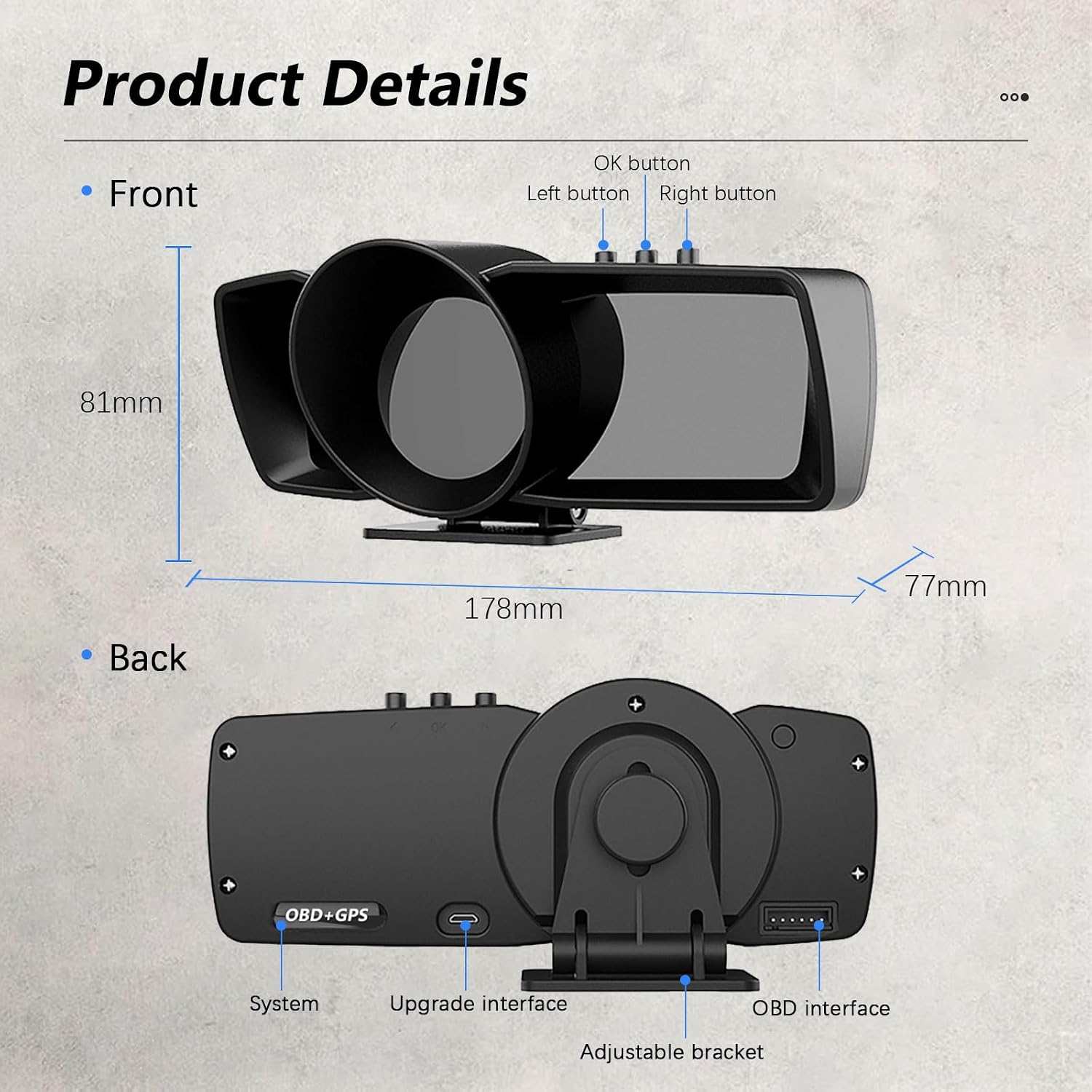
Figure 2.3.1: Front and back views of the Liiiyuan A600 HUD, detailing button locations (OK, Left, Right), system port, upgrade interface, OBD interface, and adjustable bracket. Dimensions are approximately 178mm (width) x 81mm (height) x 77mm (depth).
3. Setup and Installation
- Identify OBD2 Port: Locate the OBD2 diagnostic port in your vehicle. This is typically found under the dashboard on the driver's side.
- Connect OBD2 Cable: Plug one end of the provided OBD2 cable into your vehicle's OBD2 port and the other end into the "OBD interface" port on the back of the A600 HUD.
- Position the HUD: Place the A600 HUD on your dashboard in a position that does not obstruct your view of the road. Use the adjustable bracket to angle the display for optimal visibility.
- Secure the HUD: Use the provided adhesive tape to firmly secure the HUD to the dashboard, preventing movement during driving.
- Route the Cable: Carefully route the OBD2 cable to avoid interference with driving controls and to maintain a tidy appearance. The included crowbar can assist in tucking the cable into dashboard gaps.
- Power On: Start your vehicle's engine. The A600 HUD should automatically power on and begin displaying data.
Note: For vehicles without an OBD2 port or for those preferring GPS-only data, the device will automatically switch to GPS mode. Ensure the device has a clear view of the sky for optimal GPS signal reception.
4. Operating Instructions
4.1 Power On/Off
- The A600 HUD is designed to power on automatically when the vehicle's engine starts.
- It will power off automatically when the vehicle's engine is turned off.
4.2 Button Functions
The device features three buttons (OK, Left, Right) for navigation and settings adjustments. Refer to Figure 2.3.1 for button locations.
- OK Button: Used to confirm selections or enter menu options.
- Left Button: Used to navigate left, decrease values, or switch display interfaces.
- Right Button: Used to navigate right, increase values, or switch display interfaces.
4.3 Switching Display Modes (OBD/GPS)
The A600 supports both OBD and GPS modes. The system automatically detects the connection. If both are available, you can switch between modes or display both simultaneously on the 3 LCD screens by navigating through the display interfaces using the Left/Right buttons.
4.4 Changing Display Interfaces
The A600 offers 9 different display interfaces. Use the Left or Right buttons to cycle through these interfaces to find your preferred data layout.

Figure 4.4.1: Examples of four different display interfaces available on the left screen of the Liiiyuan A600 HUD, including styles like "British gentleman style" and "Future technology".

Figure 4.4.2: Examples of five different display interfaces available on the right screen of the Liiiyuan A600 HUD, including GPS precise positioning, nine grid data, PID data list, accelerated testing, and brake test.
5. Functions and Data Display
The Liiiyuan A600 HUD provides a wide range of vehicle data and functions through its OBD+GPS dual system. The specific data available may vary slightly depending on your vehicle's compatibility with the OBD II protocol.
5.1 Displayed Data Parameters
The HUD can display the following parameters:
- Speed: Current vehicle speed (MPH or KM/H).
- Engine Speed (RPM): Revolutions per minute of the engine.
- Battery Voltage: Vehicle battery voltage.
- Fuel Consumption: Real-time fuel usage.
- Coolant Temperature: Engine coolant temperature (°C or °F).
- Turbocharger Pressure: Turbo boost pressure.
- Oil Temperature: Engine oil temperature.
- Water Temperature: Engine water temperature.
- Clock: Current time.
- Distance Traveled: Trip distance.
- Time Traveled: Trip duration.
- PSI: Pressure measurement.
- Altitude: Current altitude (GPS mode).
- Compass: Driving direction (GPS mode).
- Satellite Number: Number of connected GPS satellites (GPS mode).
- Longitude/Latitude: Geographic coordinates (GPS mode).
- Engine Load: Percentage of engine load.
- Fuel Inject: Fuel injection status.
- Fuel Rail Pressure: Pressure in the fuel rail.
- Oil Pressure: Engine oil pressure.
- Accelerator Test: Performance test for acceleration.
- Brake Test: Performance test for braking.

Figure 5.1.1: Visual representation of various functions and data points available through the Liiiyuan A600 HUD's OBD+GPS system, including speed, voltage, coolant, RPM, altitude, oil temperature, turbo, fuel consumption, GPS speed, compass, and more.

Figure 5.1.2: Diagram illustrating the dual functionality of the Liiiyuan A600 HUD, highlighting that the OBD system reads over 100 kinds of car data, while the GPS system provides satellite speed, clock, altitude, satellite number, compass, and driving time.
6. Alarm Functions
The A600 HUD is equipped with multiple alarm functions to alert the driver to potential issues, enhancing safety. When an alarm condition is met, the middle screen of the HUD will turn red and flash.
- Overspeed Alarm: Alerts when the vehicle exceeds a preset speed limit.
- Engine Speed Alarm: Alerts when engine RPM exceeds a preset limit.
- Water Temperature Alarm: Alerts if the engine's water temperature becomes too high.
- Voltage Alarm: Alerts if the battery voltage is outside the normal operating range.
- Exhaust Temperature Alarm: Alerts if the exhaust gas temperature is too high.
- Oil Temperature Alarm: Alerts if the engine oil temperature is too high.
- Oil Pressure Alarm: Alerts if the engine oil pressure is too low or too high.
- Fuel Pressure Alarm: Alerts if the fuel pressure is outside the normal operating range.
These alarms are designed to provide timely warnings, allowing the driver to take appropriate action.
7. Specifications
| Feature | Detail |
|---|---|
| Brand | Liiiyuan |
| Model Number | A600 |
| Display Type | Head-Up Display (HUD) with 3 LCD Screens |
| System | OBD II + GPS Dual System |
| Display Size | 6 Inches (approximate) |
| Material | Plastic |
| Power Source | Vehicle OBD2 Port |
| Batteries Included | No |
| Operating Temperature | Not specified (standard automotive range implied) |
8. Maintenance
- Cleaning: Use a soft, dry cloth to clean the display screens and the device body. Avoid using abrasive cleaners or solvents, as these can damage the surface.
- Placement: Ensure the device is securely mounted to prevent it from falling or shifting during driving, which could cause damage.
- Cable Care: Periodically check the OBD2 cable for any signs of wear or damage. Ensure it is not pinched or stretched excessively.
- Environmental Conditions: Avoid exposing the device to extreme temperatures, direct sunlight for prolonged periods, or excessive moisture.
9. Troubleshooting
If you encounter issues with your Liiiyuan A600 HUD, please refer to the following common troubleshooting steps:
- HUD Does Not Power On:
- Ensure the OBD2 cable is securely connected to both the HUD and the vehicle's OBD2 port.
- Verify that the vehicle's engine is running. The HUD powers on with the engine.
- Check your vehicle's fuse box for any blown fuses related to the OBD2 port or accessory power.
- No Data Displayed in OBD Mode:
- Confirm your vehicle is OBD II compliant (most vehicles manufactured after 1996 are).
- Ensure the OBD2 cable connection is firm.
- Try restarting the vehicle and the HUD.
- If the issue persists, the HUD may automatically switch to GPS mode.
- Inaccurate Speed or GPS Data:
- For GPS mode, ensure the HUD has a clear, unobstructed view of the sky to receive satellite signals. Avoid placing it under metallic objects or tinted windshield areas that block signals.
- Allow a few minutes for the GPS to acquire sufficient satellites upon startup.
- Compare the HUD speed with your vehicle's speedometer. Small discrepancies are normal.
- HUD Does Not Shut Down Automatically:
- Some vehicles may continue to supply power to the OBD2 port after the engine is off. If this occurs, manually unplug the OBD2 cable to prevent battery drain.
- Check the HUD settings for any power-off delay options (if available in advanced settings).
- Temperature Display in Celsius Only (when MPH is selected):
- The product description states that when speed is switched to MPH, water temperature automatically switches to °F. If this is not happening, check the device's settings menu for unit conversion options. If no such option is found, the device may only support Celsius for temperature display, despite the description.
- Display is Unclear or Flickering:
- Ensure the display screens are clean and free from dust or smudges.
- Check the cable connection for looseness.
- Adjust the brightness settings if available.
If these steps do not resolve the issue, please contact customer support for further assistance.
10. Warranty and Support
Liiiyuan products undergo strict quality inspection. The A600 HUD has passed international certification, and its product appearance has a patent. We guarantee the quality of this product.
If you encounter any problems with the goods you receive, you are eligible for a free exchange. For technical support, warranty claims, or any other inquiries, please refer to the contact information provided with your purchase or visit the official Liiiyuan support website.
Related documentsA600

Ask a question about this manual
Ask about setup, troubleshooting, compatibility, parts, safety, or missing instructions. Manuals+ will review the question and use this page’s manual context to help answer it.