
Introduction
The Acoustic Research Portable Outdoor Wireless Speaker with LED Flickering Flame Light is designed to provide high-quality audio and ambient lighting for various indoor and outdoor settings. This rechargeable speaker features multiple light modes, including a realistic flickering flame, and is built with an IPX5 water-resistant rating, making it suitable for outdoor use. It also includes built-in nature sounds for relaxation and can be stereo-paired with another compatible AR speaker for an enhanced audio experience.
Package Contents
- Acoustic Research Portable Outdoor Wireless Speaker (Model: AWSF9R)
- USB Charging Cable
- User Manual
Product Features
- 7 Light Modes: Soft White, Bright White, Flicker Flame, Soft Glow, Candlelight, Aurora. Separate controls for light and speaker.
- Extended Playtime: Up to 12 hours of audio playback on a single charge.
- Water Resistance: IPX5 rated for protection against splashing water.
- Nature Sounds: Includes Forest, Waves, Running Stream, and Rain.
- Portable Design: Attractive lantern style with a handle for easy carrying or hanging.
- Bluetooth Connectivity: Seamless wireless audio streaming from compatible devices.
- Stereo Pairing: Connect two AWSF9R speakers for true wireless stereo sound (second speaker sold separately).
Controls and Indicators

Figure 1: Speaker Control Panel. This image shows a close-up of the speaker's control buttons, including power, volume, track skip, light mode, and nature sound buttons, along with the DC charging port.
| Button/Indicator | Function |
|---|---|
| Power Button (⏻) | Press and hold to power the speaker ON or OFF. Press briefly to Play/Pause music. |
| Volume Down / Previous Track (− / ⏮) | Press briefly to decrease volume. Press and hold to go to the previous track. |
| Volume Up / Next Track (+ / ⏭) | Press briefly to increase volume. Press and hold to go to the next track. |
| Light Mode Button (💡) | Press to cycle through 7 light modes: Soft White, Bright White, Flicker Flame, Soft Glow, Candlelight, Aurora, and OFF. |
| Nature Sound Button (♫) | Press to cycle through 4 nature sounds: Forest, Waves, Running Stream, Rain, and OFF. |
| DC Charging Port | Connect the USB charging cable here to recharge the speaker's battery. |
| LED Indicator | Indicates charging status and Bluetooth pairing status. |
Setup
Charging the Speaker
- Locate the DC charging port on the speaker's control panel.
- Connect the small end of the provided USB charging cable to the speaker's DC port.
- Connect the larger end of the USB cable to a USB power adapter (not included) or a computer's USB port.
- The LED indicator will illuminate to show charging status. Allow approximately 3-4 hours for a full charge. The indicator will change or turn off when charging is complete.
Note: Fully charge the speaker before first use to maximize battery life.
Operating Instructions
Powering On/Off
- To power ON, press and hold the ⏻ Power button for 2-3 seconds until you hear an audible prompt.
- To power OFF, press and hold the ⏻ Power button for 2-3 seconds until you hear an audible prompt.
Bluetooth Pairing
- Ensure the speaker is powered ON and within 10 meters (33 feet) of your Bluetooth device (smartphone, tablet, etc.).
- The speaker will automatically enter Bluetooth pairing mode when powered on for the first time or if no device is connected. The LED indicator will flash, indicating it's ready to pair.
- On your Bluetooth device, go to the Bluetooth settings and enable Bluetooth.
- Search for available devices and select "AR Speaker" (or similar name) from the list.
- Once paired, the LED indicator will stop flashing and remain solid, and you will hear a confirmation sound.
- You can now play music from your device through the speaker.
Note: The speaker will automatically attempt to reconnect to the last paired device when powered on.
Controlling Light Modes
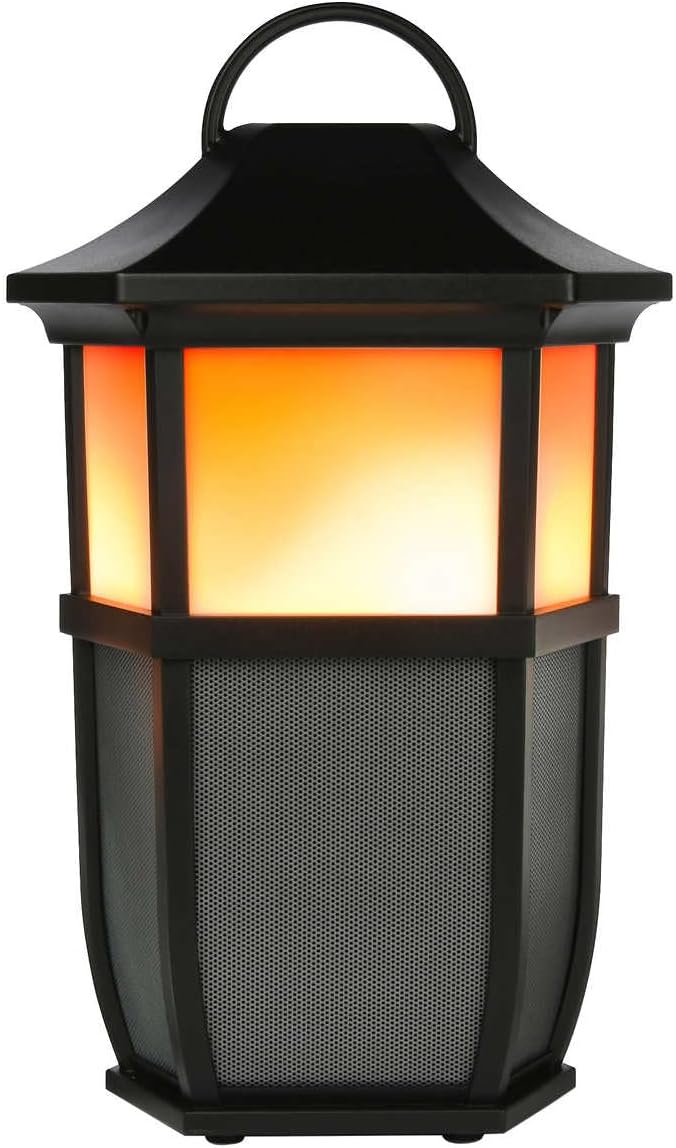

Figure 2: Speaker Light Modes. The left image shows the speaker with a warm, flickering flame light, while the right image shows it with a bright white light, demonstrating two of the available light modes.
Press the 💡 Light Mode button repeatedly to cycle through the 7 available light modes:
- Flicker Flame
- Soft White
- Bright White
- Soft Glow
- Candlelight
- Aurora
- Light OFF
Playing Nature Sounds
Press the ♫ Nature Sound button repeatedly to cycle through the 4 built-in nature sounds:
- Forest
- Waves
- Running Stream
- Rain
- Nature Sound OFF
True Wireless Stereo (TWS) Pairing (Optional)
To achieve a true stereo sound experience, you can pair two Acoustic Research AWSF9R speakers together. (Second speaker sold separately).
- Ensure both speakers are powered ON and not connected to any Bluetooth device.
- On one speaker (this will be your primary speaker), press and hold the ⏻ Power button for 5 seconds until you hear a distinct pairing tone.
- The primary speaker will now search for the second speaker.
- Once connected, you will hear a confirmation tone, and the LED indicators on both speakers will change to indicate a successful TWS connection.
- Now, connect your Bluetooth device to the primary speaker as described in the "Bluetooth Pairing" section. Audio will play in stereo through both speakers.
Note: TWS pairing only works with two identical AWSF9R speakers.
Maintenance
- Cleaning: Use a soft, dry cloth to clean the speaker's exterior. Do not use abrasive cleaners or solvents.
- Water Exposure: While IPX5 water-resistant, do not submerge the speaker in water. Ensure the charging port cover is securely closed when exposed to water.
- Storage: Store the speaker in a cool, dry place away from direct sunlight and extreme temperatures when not in use for extended periods.
- Battery Care: To prolong battery life, fully charge the speaker at least once every three months, even if not in regular use.
Troubleshooting
| Problem | Possible Solution |
|---|---|
| Speaker does not power on. | Ensure the battery is charged. Connect the speaker to a power source using the USB cable and allow it to charge for at least 30 minutes before attempting to power on again. |
| Cannot pair with Bluetooth device. |
|
| No sound or low volume. |
|
| Light modes are not working. | Press the Light Mode button repeatedly to cycle through all modes. Ensure the speaker has sufficient battery charge. |
| Nature sounds are not working. | Press the Nature Sound button repeatedly to cycle through all sounds. |
Specifications

Figure 3: Product Dimensions. This image illustrates the height (9.76 inches), width (7.2 inches), and depth (6.54 inches) of the speaker.
| Feature | Detail |
|---|---|
| Model Name | AWSF9R |
| Brand | Acoustic Research |
| Speaker Type | Outdoor, Portable |
| Connectivity | Bluetooth (Wireless) |
| Bluetooth Range | Up to 10 meters (33 feet) |
| Water Resistance | IPX5 (Water Resistant) |
| Power Output | 30 Watts |
| Audio Output Mode | Stereo (with TWS pairing) |
| Battery Life | Up to 12 Hours |
| Power Source | Battery Powered |
| Product Dimensions (D x W x H) | 6.54" x 7.2" x 9.76" |
| Item Weight | 5 Pounds |
| UPC | 044476151811 |
Warranty and Support
This Acoustic Research product comes with a Limited Warranty. For detailed warranty information, technical support, or service inquiries, please refer to the warranty card included with your product or visit the official Acoustic Research website. Please retain your proof of purchase for warranty claims.
For further assistance, you may contact Acoustic Research customer support through their official channels.
