
aigo UM98
aigo Smart Watch User Manual
Model: UM98
1. Introduction
The aigo Smart Watch UM98 is a versatile wearable device designed to enhance your daily life with smart features and comprehensive health monitoring. This manual provides essential information for setting up, operating, and maintaining your smartwatch to ensure optimal performance and longevity.
2. What's in the Box
- aigo Smartwatch UM98
- Magnetic Charging Cable
- Faux Leather Strap
- Sports Band
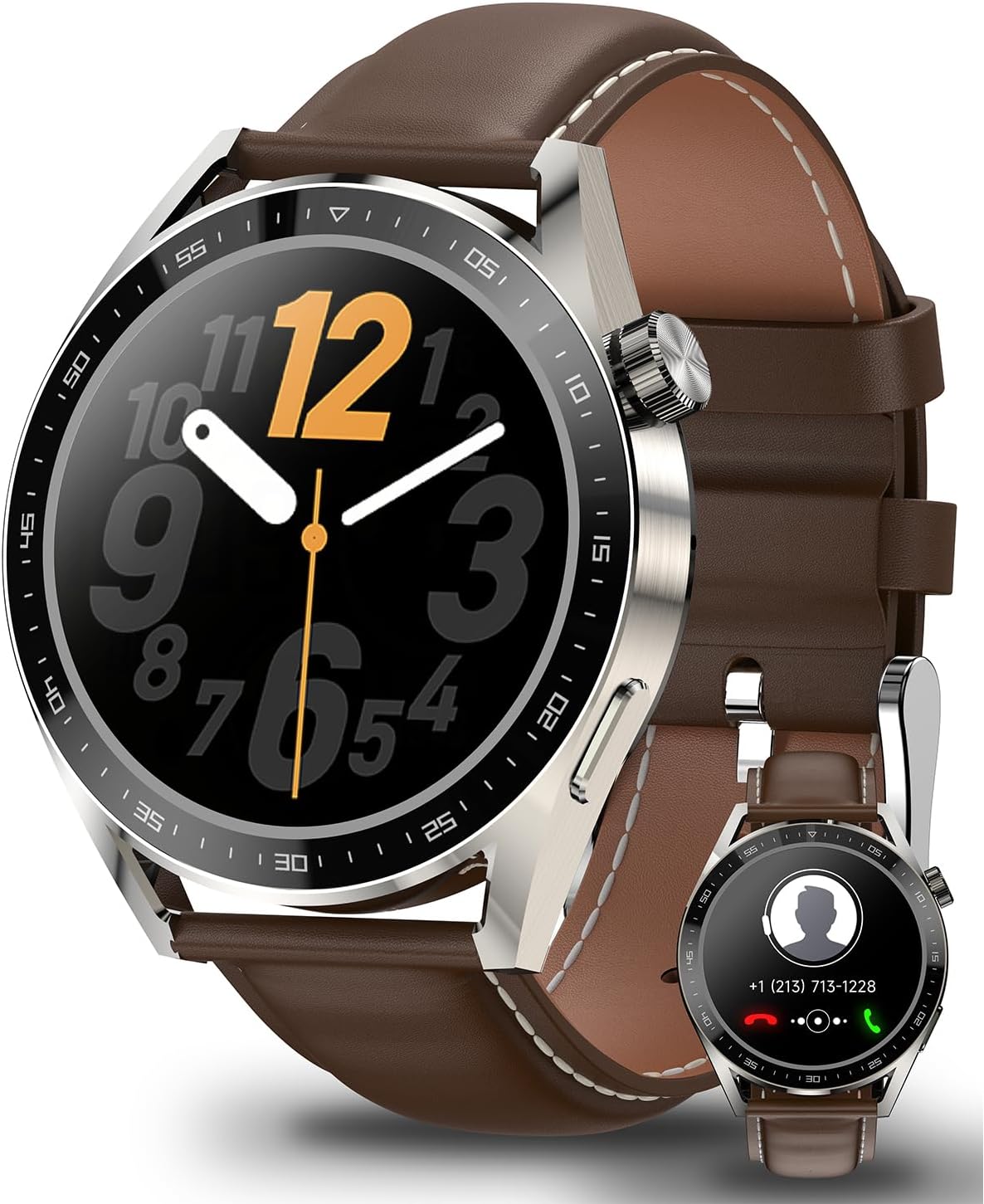
Image: The aigo Smart Watch UM98, showcasing its elegant design with a brown leather strap. An inset image displays the watch's call interface, highlighting its communication capabilities.

Image: The aigo Smart Watch UM98 displayed alongside its two included strap options: a classic brown leather strap and a durable black sports band, offering versatility for different occasions.
3. Setup
3.1 App Installation
To unlock the full potential of your aigo Smart Watch UM98, download and install the companion application on your smartphone. The app is compatible with iOS 11.0+ and Android 5.0+ devices. Search for "Wearfit Pro" in your device's app store.
3.2 Device Pairing
- Ensure your smartwatch is charged and powered on.
- Enable Bluetooth on your smartphone.
- Open the "Wearfit Pro" app and follow the on-screen instructions to add a new device.
- Select "UM98" from the list of available devices.
- Confirm the pairing request on both your watch and smartphone.
4. Operating Your Smart Watch
4.1 Basic Navigation
The aigo Smart Watch UM98 features a 1.45-inch full touchscreen display for intuitive navigation. Swipe across the screen to access different functions and menus. The physical crown on the side can be rotated to scroll and pressed to select or return to the home screen.
4.2 Bluetooth Calling
Once paired with your smartphone, the UM98 allows you to manage calls directly from your wrist.
- Make a Call: Access the dialer or contacts list on your watch.
- Take a Call: Answer incoming calls with a tap on the screen.
- Refuse a Call: Decline incoming calls from your watch.

Image: The aigo Smart Watch UM98 showing its connectivity features, including the ability to make, take, or refuse phone calls, and receive notifications from various social media applications.
4.3 Intelligent Voice Assistant (IVA)
Seamlessly access your smartphone's voice assistant by long-pressing the designated button on your watch. This feature supports multilingual translation, making it convenient for various communication needs.

Image: The aigo Smart Watch UM98 demonstrating its Intelligent Voice Assistant (IVA) feature, with a prompt "Hello, do you need help?" on the screen. Smaller insets show weather and camera control interfaces.
4.4 Customizable Watch Faces
Personalize your UM98 with a wide variety of watch face options available through the "Wearfit Pro" app. Choose from over 100 dials to match your style and preferences.

Image: A selection of diverse watch face designs available for the aigo Smart Watch UM98, illustrating the extensive customization options through the companion app.
5. Health Monitoring
The UM98 provides comprehensive health tracking features to help you monitor your well-being.
5.1 Heart Rate and Blood Oxygen Monitoring
Continuously track your heart rate and blood oxygen levels throughout the day. View real-time data and historical trends in the companion app.

Image: The aigo Smart Watch UM98 showing real-time health monitoring data, specifically blood oxygen saturation (SpO2) and heart rate (BPM) readings with corresponding graphs.
5.2 Sleep Tracking
The watch automatically monitors your sleep patterns, recording light sleep, deep sleep, and duration. Analyze your sleep quality in the app to improve your rest.

Image: The aigo Smart Watch UM98 in 'Sleep Mode', illustrating its ability to record sleep throughout the night. The image shows individuals sleeping with the watch, and a phone screen displaying detailed sleep analysis including light and deep sleep percentages.
6. Exercise Modes
The UM98 supports 11+ exercise modes to track your physical activities accurately. Select the appropriate mode before starting your workout to record data such as steps, distance, calories burned, and heart rate during exercise.

Image: A man at the gym wearing the aigo Smart Watch UM98, highlighting its 'Sporting Moments' feature with a choice of 11 motion modes. Icons at the bottom represent various activities like running, swimming, cycling, and more.
7. Battery Life & Charging
The UM98 is equipped with a 270mAh battery, providing extended usage of up to 7 days on a single charge, depending on usage patterns. The watch uses a magnetic charging cable for convenient power replenishment.

Image: The aigo Smart Watch UM98 being charged via its magnetic charging cable, illustrating the 270mAh battery capacity and IP68 waterproof rating.
8. Water Resistance
The aigo Smart Watch UM98 features an IP68 water resistance rating, meaning it is protected against dust ingress and can withstand immersion in water up to 1.5 meters for 30 minutes. It is suitable for daily use, including hand washing and light rain, but not recommended for hot showers, saunas, or diving.

Image: The aigo Smart Watch UM98 being worn on a wrist partially submerged in water, demonstrating its water resistance capabilities.
9. Maintenance
- Cleaning: Regularly wipe your watch and straps with a soft, dry cloth. For stubborn dirt, use a slightly damp cloth and dry thoroughly.
- Avoid Chemicals: Do not use harsh chemicals, cleaning solvents, or strong detergents, as they may damage the watch's finish or internal components.
- Storage: Store the watch in a cool, dry place when not in use.
- Charging: Use only the provided magnetic charging cable. Ensure the charging contacts are clean and dry before charging.
10. Troubleshooting
- Watch not turning on: Ensure the watch is fully charged. Connect it to the charger for at least 30 minutes.
- Cannot pair with phone: Ensure Bluetooth is enabled on your phone and the watch. Restart both devices and try pairing again. Check if the "Wearfit Pro" app is updated to the latest version.
- Inaccurate health data: Ensure the watch is worn snugly on your wrist, not too tight or too loose. Clean the sensor on the back of the watch.
- Short battery life: Reduce screen brightness, disable unnecessary notifications, and limit continuous heart rate monitoring if not needed.
- Screen unresponsive: Try restarting the watch by pressing and holding the crown button until it powers off, then power it back on.
11. Specifications
| Feature | Detail |
|---|---|
| Model Name | Smartwatch UM98 |
| Brand | aigo |
| Screen Size | 1.45 Inches |
| Connectivity Technology | Bluetooth |
| Wireless Communication Standard | Bluetooth |
| Special Features | Audio Recording, Blood Pressure Monitor, Breath Monitor, Camera, Heart Rate Monitor |
| Water Resistance | IP68 |
| Battery Capacity | 270mAh |
| Item Weight | 7.8 ounces |
| Package Dimensions | 9.21 x 3.94 x 1.54 inches |
| First Available Date | November 10, 2023 |
12. Warranty and Support
For warranty information and technical support, please refer to the warranty card included with your product or visit the official aigo website. You may also contact aigo customer service through the contact details provided on their website for assistance with any issues or inquiries.
Ask a question about this manual
Ask about setup, troubleshooting, compatibility, parts, safety, or missing instructions. Manuals+ will review the question and use this page’s manual context to help answer it.