
1. Product Overview
The Sonik Digital Folding Scales are designed for accurate and convenient weighing. Featuring a compact, foldable design, a large backlit LCD display, and a maximum capacity of 50 kg (110 lbs) with 10g precision, these scales are suitable for various weighing tasks. Key functions include a simple tare function, a heaviest weight hold function, and a temperature display.
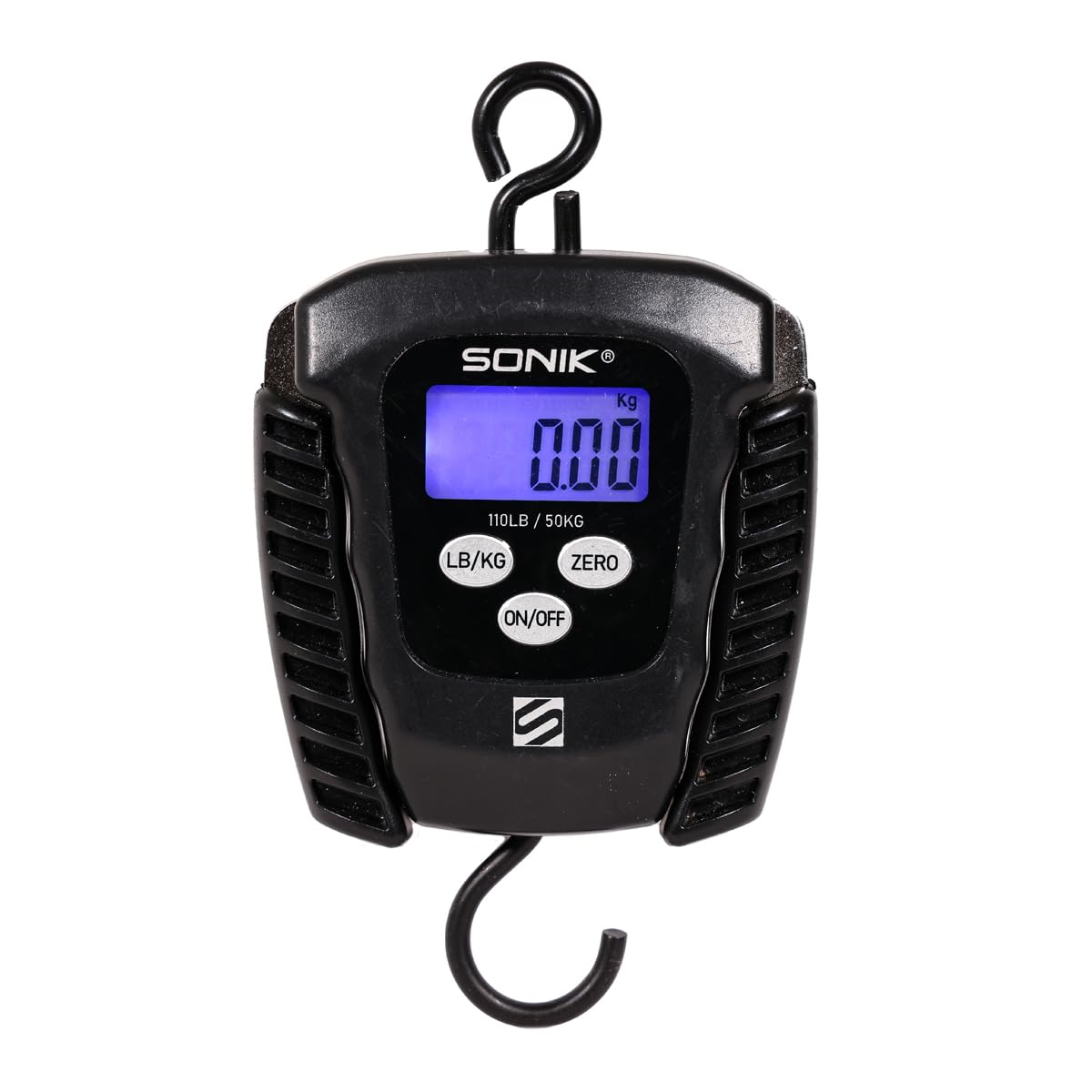
Image 1.1: Sonik Digital Folding Scales. This image shows the front view of the black digital scale with its foldable handles extended. The LCD screen displays "0.00 Kg" and the buttons for "LB/KG", "ZERO", and "ON/OFF" are visible below the screen. A hook is present at the bottom for attaching items to be weighed.
2. Safety Information
- Do not immerse the scale in water or other liquids.
- Avoid dropping or subjecting the scale to strong impacts.
- Do not attempt to disassemble or modify the scale. This will void the warranty.
- Keep out of reach of children.
- Use the scale on a stable surface or hold it steadily when weighing.
- Ensure batteries are inserted with correct polarity. Remove batteries if the scale will not be used for an extended period.
3. Package Contents
Upon unpacking, please ensure all items are present and in good condition:
- 1 x Sonik Digital Folding Scales (Model HC0090)
- 1 x Instruction Manual (this document)
Note: 2 x AAA batteries are required for operation and are not included in the package.
4. Setup
4.1 Battery Installation
- Locate the battery compartment cover on the back of the scale.
- Slide or unclip the cover to open the compartment.
- Insert 2 AAA batteries, ensuring the correct polarity (+ and -) as indicated inside the compartment.
- Replace the battery compartment cover securely.
The scale is now ready for use.
5. Operating Instructions
5.1 Power On/Off
- To turn on: Press the ON/OFF button. The display will light up and show "0.00".
- To turn off: Press and hold the ON/OFF button for a few seconds, or the scale will automatically shut off after 60 seconds of inactivity to conserve battery life.
5.2 Unit Conversion (LB/KG)
- With the scale on, press the LB/KG button to switch between kilograms (kg) and pounds (lb). The selected unit will be displayed on the LCD screen.
5.3 Tare Function
The tare function allows you to zero out the weight of a container or sling, so you only measure the contents.
- Turn on the scale.
- Hang the empty container or sling onto the hook. The display will show its weight.
- Press the ZERO button. The display will reset to "0.00".
- You can now add the item to be weighed into the container/sling, and the display will show only the net weight of the item.
5.4 Heaviest Weight Hold Function
This function automatically records and displays the heaviest weight measured during a weighing session, useful for fluctuating loads.
- When weighing an item, the scale will automatically detect and hold the peak weight on the display.
- This allows you to remove the item and still see the maximum weight recorded.
5.5 Temperature Function
The scale also features a temperature display.
- The temperature will be displayed on the LCD screen, typically alternating with the weight reading or accessible via a specific button press (if not explicitly stated, assume it alternates or is always visible).
6. Maintenance
6.1 Cleaning
- Wipe the scale with a soft, damp cloth.
- Do not use abrasive cleaners, solvents, or harsh chemicals, as these may damage the finish or internal components.
- Ensure the scale is completely dry before storage or next use.
6.2 Storage
- Store the scale in a cool, dry place, away from direct sunlight and extreme temperatures.
- If storing for an extended period, remove the batteries to prevent leakage and potential damage.
- Utilize the folding design for compact storage.
7. Troubleshooting
| Problem | Possible Cause | Solution |
|---|---|---|
| No display / Scale does not turn on | Dead or incorrectly installed batteries. | Check battery polarity. Replace with new AAA batteries. |
| Inaccurate readings | Scale not zeroed. Overload. Unstable weighing conditions. | Press the ZERO button before weighing. Do not exceed 50 kg capacity. Ensure the scale is held steadily. |
| "Err" or "O-Ld" displayed | Overload. | Remove the item immediately. Do not exceed the maximum capacity of 50 kg (110 lbs). |
8. Specifications
| Model Number | HC0090 |
| Brand | Sonik |
| Maximum Weight Capacity | 50 kg (110 lbs) |
| Accuracy | 10g |
| Display Type | Large Backlit LCD |
| Power Source | 2 x AAA Batteries (not included) |
| Automatic Shut-off | After 60 seconds of inactivity |
| Material | Plastic |
| Special Features | Tare function, Heaviest weight hold, Temperature display, Compact folding design |
9. Warranty and Support
9.1 Warranty Information
This product is covered by a standard manufacturer's warranty against defects in materials and workmanship. Please refer to your purchase documentation or contact your retailer for specific warranty terms and conditions applicable in your region. The warranty does not cover damage caused by misuse, accident, unauthorized modification, or normal wear and tear.
9.2 Customer Support
For technical assistance, troubleshooting, or inquiries regarding your Sonik Digital Folding Scales, please contact the retailer where the product was purchased. You may also visit the official Sonik website for additional support resources.