
Camcamp SC23x
Camcamp Wireless Security Camera System User Manual
Model: SC23x
Brand: Camcamp
Introduction
The Camcamp Wireless Security Camera System provides comprehensive outdoor and indoor surveillance with solar-powered cameras and a 500GB HDD NVR. Designed for easy installation, this system offers 4MP resolution, color night vision, two-way audio, and dual-band WiFi connectivity for enhanced home security.
What's in the Box
- 6x 4.0MP Wireless PTZ Security Cameras
- 1x 8.0MP 10-Channel NVR Built-in 500GB HDD
- 6x Solar Panels
- 6x Type-C Charge Cable for Camera
- 1x 12V 2A Power Cord for NVR
Product Overview
Camcamp SC23 Camera
The Camcamp SC23 camera is a solar-powered PTZ (Pan-Tilt-Zoom) unit designed for outdoor use. It features a durable, IP66 waterproof construction and integrates a solar panel for continuous power. The camera includes a lens, passive infrared (PIR) sensor, dual-source lights (infrared and white light), a light sensor, microphone, indicator light, and adjustable antennas for optimal wireless signal reception. A USB-C port is available for charging, and a reset button is located at the bottom.
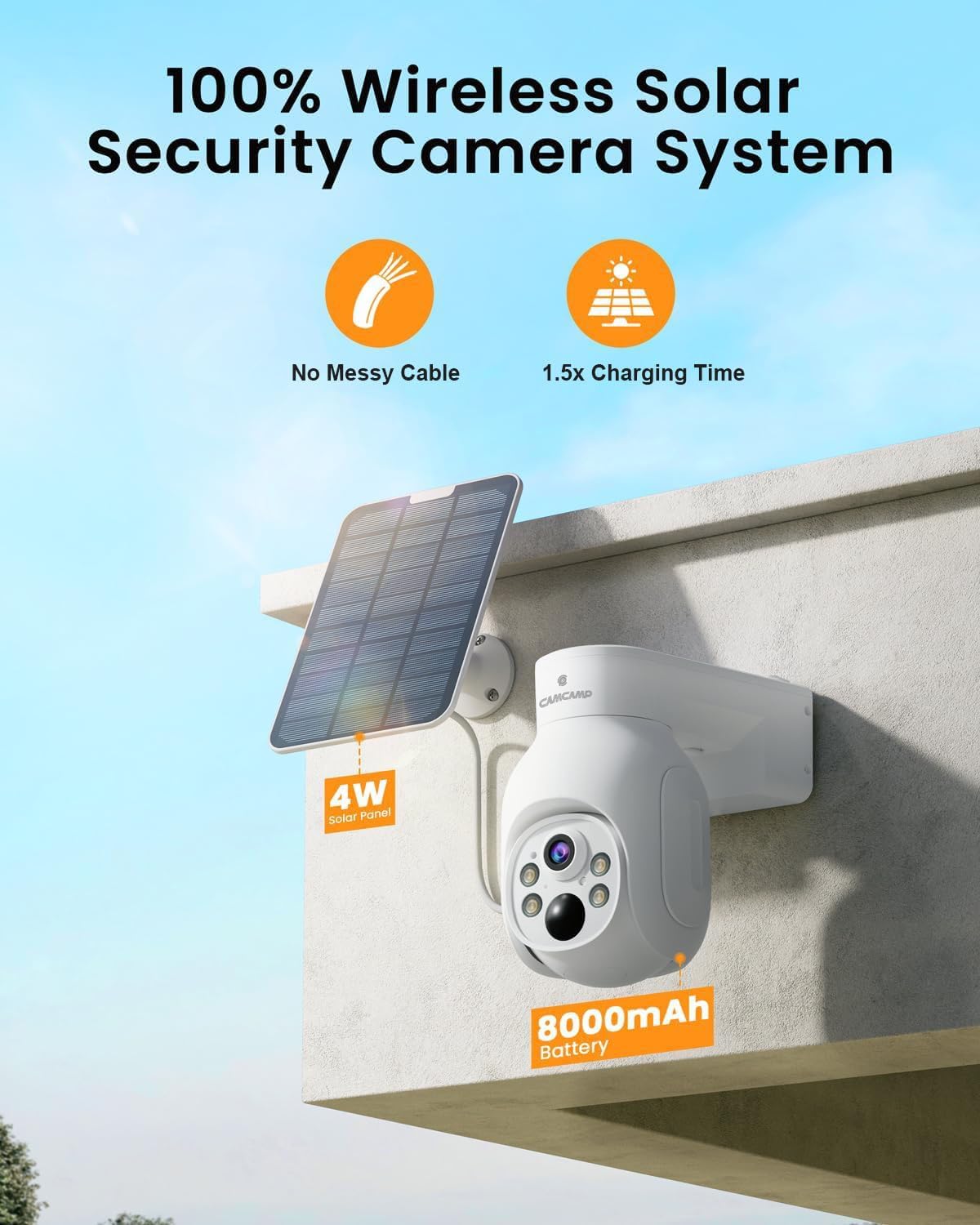
Image: Camcamp SC23 Wireless Solar Security Camera with integrated solar panel.

Image: The camera offers 355° pan and 90° tilt for comprehensive coverage.

Image: The camera supports both spotlight mode for full-color night vision and infrared mode for discreet monitoring.

Image: The camera is IP66 waterproof, suitable for various weather conditions.
NVR (Network Video Recorder)
The NVR serves as the central hub for the security system. It features a slim design with a base stand for vertical placement. The front panel includes indicator lights, while the sides have ventilation holes. The top features a SYNC button. The rear panel provides ports for power, USB, HDMI output, WAN (Ethernet), a reset button, and a microSD card slot. The NVR comes with a pre-installed 500GB HDD, which can be expanded up to 6TB (2.5-inch hard disk only).
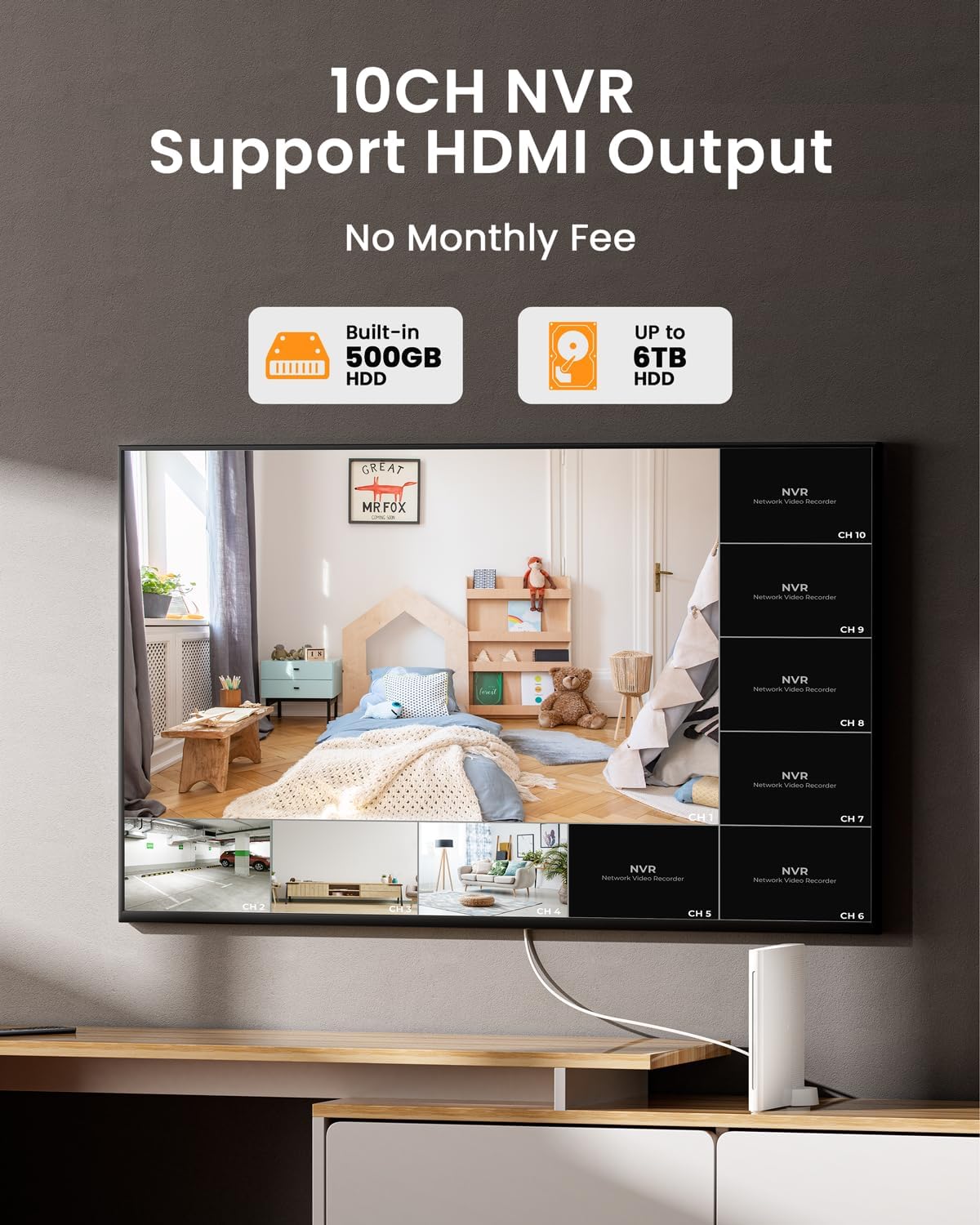
Image: The NVR supports up to 10 channels and includes a 500GB HDD for local storage.

Image: The NVR offers local storage with no monthly fees, supporting up to 6TB HDD.
Video Overview of Components
Video: This video provides a detailed physical overview of the Camcamp SC23 camera and the NVR unit, including various ports and features.
Setup
The Camcamp Wireless Security Camera System is designed for easy installation with its plug-and-play functionality. Cameras are pre-synced with the NVR for automatic connection.
Initial Setup
- Unpack all components and verify contents against the "What's in the Box" list.
- Connect the NVR to a power source using the provided 12V 2A power cord.
- Connect the NVR to a monitor or TV via the HDMI port for local viewing.
- Ensure all cameras are charged. The solar panels will maintain charge after initial setup.
- For remote access, connect the NVR to your home network via the WAN (Ethernet) port or Wi-Fi.

Image: Illustrates the plug-and-play setup, showing the camera, solar panel, and NVR connected to a monitor.

Image: The system can operate locally without an internet connection by connecting the NVR directly to a display.
App Installation and Pairing
Download the CloudEye 365 app from your device's app store to monitor your property remotely.
- Scan the QR code in the user guide or search for "CloudEye 365" in the App Store (iOS) or Google Play Store (Android).
- Follow the in-app instructions to add your NVR and cameras.

Image: Download the CloudEye 365 app for mobile access.

Image: Remote access to your cameras via the CloudEye 365 app when the NVR is connected to the internet.
Operating Instructions
Viewing and Recording
The system captures video in ultra-clear 4MP resolution. You can view live feeds and recorded footage through the NVR connected to a monitor or via the CloudEye 365 app.

Image: Demonstrates the 4MP Ultra HD image quality of the Camcamp system.

Image: Example of the video playback interface, showing timeline and channel selection.
Night Vision Modes
The cameras are equipped with 4 spotlights and IR lights, providing two night vision options:
- Full-Color Night Vision (Spotlight Mode): Utilizes the spotlights to illuminate the area, capturing clear and bright full-color images up to 65 feet.
- Infrared Night Vision: Provides discreet monitoring using infrared lights, saving energy.
- Smart Night Vision Mode: Activates spotlights and records when motion is detected in dark environments.
Motion Detection and Alerts
The system features tailored smart home surveillance. Upon detecting an intruder, the cameras will record video and send instant alert notifications to your device. Spotlights and a siren can be activated to deter unwelcome individuals.

Image: Depicts smart human motion detection triggering alerts and actions.

Image: Smart alerts with spotlights and siren to deter intruders.
Motion Detection Sensitivity Settings
- Low: Triggers an alarm for people, vehicles, or large moving objects.
- Medium: Triggers an alarm for middle-distance persons or animals.
- High: Triggers an alarm for slight movements.

Image: Visual representation of motion detection sensitivity levels.
Two-Way Audio
The cameras support two-way audio, allowing you to communicate with visitors or deter intruders directly through the app.

Image: Demonstrates the two-way audio feature, allowing communication through the camera.
Alexa Integration
The system is compatible with Alexa Echo Show devices, enabling voice commands to view camera feeds.

Image: Shows the system's compatibility with Alexa for voice-controlled viewing.
Recording Modes
The system offers three different recording modes:
- Best Power Saving: Records a small snippet video when an event is detected. Recording duration and sleep duration are adjustable.
- Best Recording: Initiates continuous recording upon event detection until the event concludes.
- Keep Recording: The device continuously records. If the camera battery level drops below 30%, it automatically switches to Best Recording mode. Continuous recording resumes when the battery level is above 50%. This mode consumes more power and is suitable for external power supply.

Image: Explains the three available recording modes for the system.

Image: For 24/7 continuous protection, connect the camera to an outlet and select the appropriate recording mode in the app.
Maintenance
Proper maintenance ensures the longevity and optimal performance of your Camcamp security system.
- Cleaning: Regularly wipe the camera lens and solar panel with a soft, damp cloth to ensure clear vision and efficient solar charging. Avoid abrasive cleaners.
- Weather Protection: The cameras are IP66 waterproof, designed to withstand various weather conditions. However, ensure proper installation to prevent water accumulation around connections.
- Hard Disk Management: The NVR's 500GB HDD is pre-installed. It is recommended to format the hard disk before first use. The hard disk can be replaced if needed, supporting up to 6TB (2.5-inch hard disk only).
Troubleshooting
Here are some important considerations and troubleshooting tips for your Camcamp security system:
- Signal Reception: The wireless signal receiving distance between the camera and the NVR can be reduced by environmental factors such as walls. Test the actual signal receiving distance in your home before final camera installation.
- Camera Placement: Avoid installing cameras on the side of roads with heavy traffic or in areas with frequent pedestrians and vehicles. This can lead to frequent camera wake-ups, resulting in frequent alarms and faster power consumption.
- Storage: The NVR has a pre-installed 500GB hard drive, expandable to a maximum of 6TB (2.5-inch hard disk only). The NVR also supports Micro SD (up to 128GB) or cloud storage. Note that only one storage method can be active at the same time.

Image: Key considerations for optimal system performance and placement.
Specifications
| Feature | Specification |
|---|---|
| Indoor/Outdoor Usage | Outdoor, Indoor |
| Power Source | Battery Powered; Solar Powered |
| Video Capture Resolution | 4MP |
| Number of Channels (NVR) | 10 |
| NVR Storage | 500GB HDD (expandable to 6TB, 2.5-inch) |
| Wireless Communication Technology | Bluetooth, Wi-Fi (2.4G & 5G) |
| Viewing Angle | 355 Degrees (Pan), 90 Degrees (Tilt) |
| Night Vision Range | 65 Feet |
| Water Resistance Level | IP66 Waterproof |
| Two-Way Audio | Yes |
| Compatible Devices | Smartphone, Alexa Echo Show |
| Controller Type | CloudEye365 App |
| Item Dimensions (L x W x H) | 13.39 x 11.42 x 15.75 inches |
| Item Weight | 13.07 pounds |
| Model Number | SC23x |
Warranty and Support
Camcamp is committed to providing excellent customer service and product support.
- Warranty: 12-Months Only Replace, No Repair.
- Money Back Guarantee: 30-Day Money Back Guarantee.
- Technical Support: Lifetime Professional Technical Support.
- Customer Service: 24/7 Customer Support available.
For any after-sales questions or support, please contact:
- Phone: +1(626)420-9375 (9 AM - 5 PM GMT, Mon-Fri)
- Email: SC@yoooomail.com


Images: Camcamp's commitment to customer satisfaction and available support channels.
Related documentsSC23x


Ask a question about this manual
Ask about setup, troubleshooting, compatibility, parts, safety, or missing instructions. Manuals+ will review the question and use this page’s manual context to help answer it.