
CIRCOOTER Raptor Pro
Circooter Raptor Pro Electric Scooter User Manual
Model: Raptor Pro
Brand: CIRCOOTER
1. Product Overview
The Circooter Raptor Pro is a high-performance electric scooter designed for both off-road exploration and daily commuting. It features dual motors, a long-range battery, and a comprehensive lighting system for enhanced safety and visibility.

Image: Circooter Raptor Pro Electric Scooter, showcasing its sleek design, included storage bag, and dual chargers.
2. Setup
2.1 Unboxing and Assembly
Carefully remove all components from the packaging. The scooter comes partially assembled. Follow these steps to complete the setup:
- Lift the handlebar stem into the upright position until it clicks securely into place.
- Secure the handlebar assembly by tightening the locking mechanism.
- Connect any loose cables from the handlebar to the main stem, ensuring they are properly seated.
- Attach any accessories, such as the storage bag, to the designated areas.
2.2 Initial Charging
Before first use, fully charge the scooter's battery. The Raptor Pro includes two chargers and dual charging ports to reduce charging time.
- Locate the charging ports on the scooter's deck.
- Plug the chargers into a standard power outlet.
- Connect the charging cables to the scooter's charging ports.
- The charging indicator on the charger will change color (typically red to green) when fully charged.
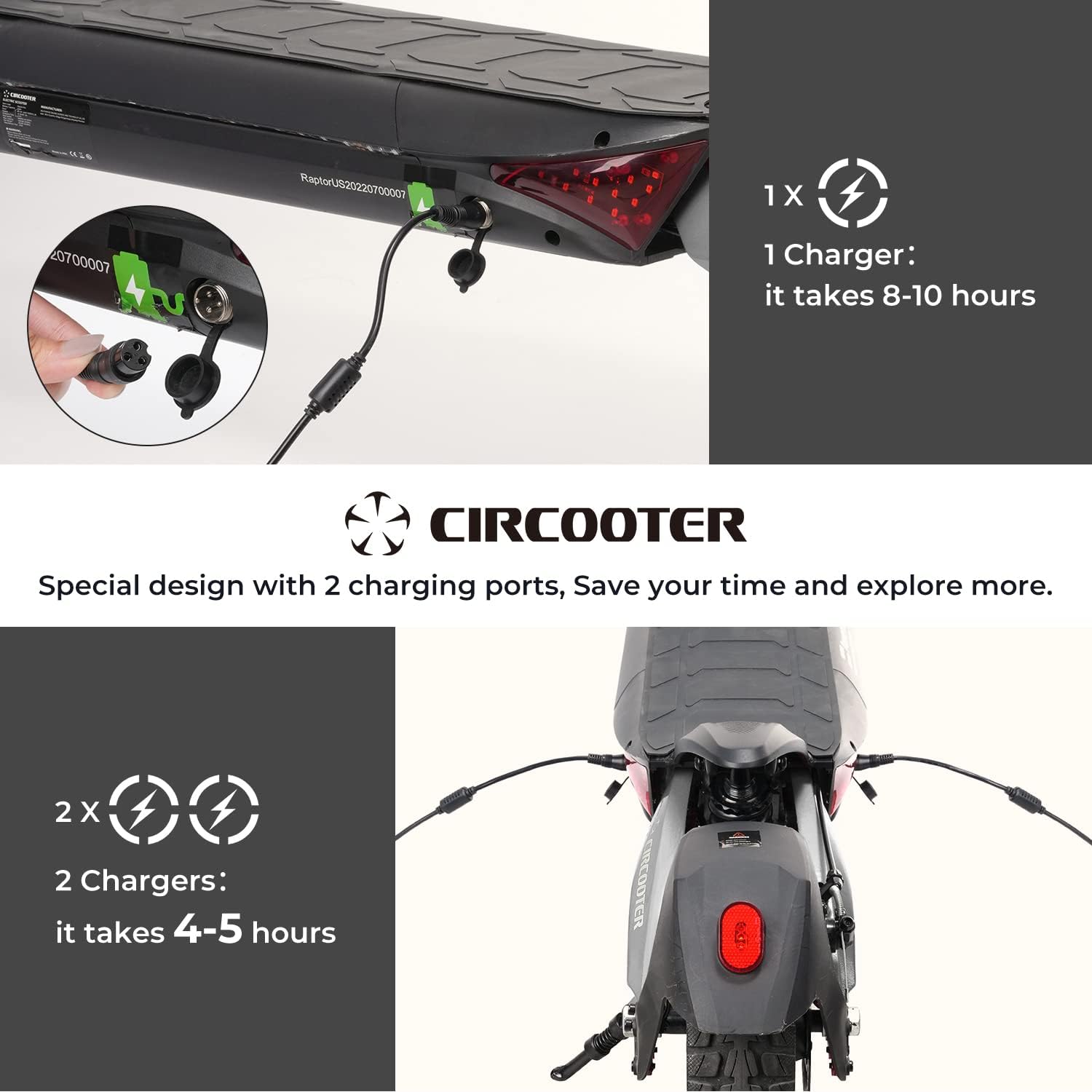
Image: Close-up of the Circooter Raptor Pro's dual charging ports, illustrating the use of two chargers for faster charging (4-5 hours).
3. Operating Instructions
3.1 Controls and Display
The scooter features an intuitive control panel and a clear display to monitor your ride.
- Power Button: Turns the scooter on/off.
- Mode Button: Cycles through different riding modes (ECO, Standard, Turbo).
- Headlight Button: Activates the dual headlights and side moonlights.
- Horn Button: Sounds the horn.
- Turn Signals: Front and rear turn signals are integrated into the deck for visibility.
- Display: Shows speed, battery level, trip mileage, and temperature.

Image: The Circooter Raptor Pro's comprehensive 360-degree lighting system, including dual headlights, side moonlights, and integrated turn signals.
3.2 Riding Modes
The Raptor Pro offers multiple riding modes to suit different terrains and preferences:
- ECO Mode: Maximizes battery range, suitable for casual rides.
- Standard Mode: Balanced performance for everyday use.
- Turbo Mode: Unleashes full power for maximum speed (up to 28 MPH) and acceleration.
3.3 App Connectivity
Connect your Raptor Pro scooter to your smartphone via the dedicated app for additional controls and ride data.
- Monitor single and total mileage.
- Lock/unlock the scooter for security.
- Control headlights and cruise mode.
- Adjust start mode (push-start vs. immediate throttle).
Video: A detailed product introduction, demonstrating the scooter's features and app connectivity.
4. Maintenance
4.1 General Care
- Regularly inspect tires for wear and proper inflation (though solid tires reduce this need).
- Keep the scooter clean and free of dirt and debris.
- Check all bolts and fasteners periodically to ensure they are tight.
4.2 Battery Care
- Always use the original chargers provided.
- Avoid completely draining the battery before recharging.
- Store the scooter in a cool, dry place when not in use, and ensure the battery is partially charged (around 50-70%) for long-term storage.

Image: The Circooter Raptor Pro demonstrating its IPX4 waterproof rating, indicating resistance to water splashes from any direction.
5. Troubleshooting
If you encounter issues with your Circooter Raptor Pro, please refer to the following common solutions:
- Scooter not turning on: Ensure the battery is charged and the power button is pressed firmly. Check all cable connections.
- Loss of power/speed: This may indicate a low battery. Recharge the scooter fully. Performance may also decrease in extreme temperatures or on steep inclines.
- Braking issues: Check brake cables for proper tension. Ensure brake pads are not excessively worn.
- App connectivity problems: Ensure Bluetooth is enabled on your device and the scooter is powered on. Try restarting both the app and the scooter.
For persistent issues, please contact customer support.
Video: A detailed riding experience video, which may offer insights into common operational scenarios and performance.
6. Specifications
| Feature | Specification |
|---|---|
| Brand | CIRCOOTER |
| Model Name | T8 (Raptor Pro) |
| Motor Power | Dual 800W brushless hub motors (1600W total) |
| Max Speed | 28 MPH |
| Max Distance Range | 31 Miles (with 48V 20Ah battery) |
| Battery Capacity | 48V 20Ah |
| Charging Time | 4-5 hours (with 2 chargers) |
| Weight Limit | 440 Pounds |
| Wheel Size | 10 Inches off-road solid tires |
| Suspension Type | Dual Suspension |
| Brake Style | Dual Braking Systems (EBS) |
| Frame Material | Aluminum |
| Special Features | 2 Chargers, 2 Charging ports, Dual Motors, 1600W, 360-degree lighting system |
7. Warranty and Support
7.1 Warranty Information
Circooter offers a limited warranty for the Raptor Pro Electric Scooter:
- 12 months and 365 days for various accessories (e.g., rear fender, throttle, disc brake).
- 180 days for motor & battery.
Please retain your proof of purchase for warranty claims.
7.2 Customer Support
For any inquiries, technical assistance, or warranty claims, please contact Circooter customer support:
- Email: hello@circooter.com
- Seller: CIRCOOTER DIRECT
Related documentsRaptor Pro


Ask a question about this manual
Ask about setup, troubleshooting, compatibility, parts, safety, or missing instructions. Manuals+ will review the question and use this page’s manual context to help answer it.