
1. Introduction
Thank you for purchasing the Pericat PJ133E Projector. This device is designed to provide a superior visual and audio experience for home entertainment, gaming, and business presentations. Featuring advanced projection technology, high brightness, and versatile connectivity, the PJ133E offers an immersive viewing experience on screens up to 350 inches.
This manual provides essential information for setting up, operating, maintaining, and troubleshooting your projector. Please read it thoroughly before use and keep it for future reference.
2. Safety Information
To ensure safe operation and prolong the life of your projector, please observe the following safety guidelines:
- Power Supply: Use only the power adapter provided with the projector. Ensure the voltage matches your local power supply.
- Ventilation: Do not block the ventilation openings. Ensure adequate space around the projector for proper airflow to prevent overheating.
- Placement: Place the projector on a stable, level surface. Avoid placing it in direct sunlight, near heat sources, or in environments with high humidity or dust.
- Handling: Do not drop or subject the projector to strong impacts. Avoid looking directly into the lens when the projector is on, as the bright light can cause eye strain.
- Cleaning: Disconnect the power before cleaning. Use a soft, dry cloth. Do not use liquid or aerosol cleaners.
- Repairs: Do not attempt to repair the projector yourself. Refer all servicing to qualified personnel.
3. Package Contents
Please check the box for the following items:
- Pericat PJ133E Projector
- Remote Control
- Power Cable
- HDMI Cable
- AV Cable
- User Manual
- Projection Screen
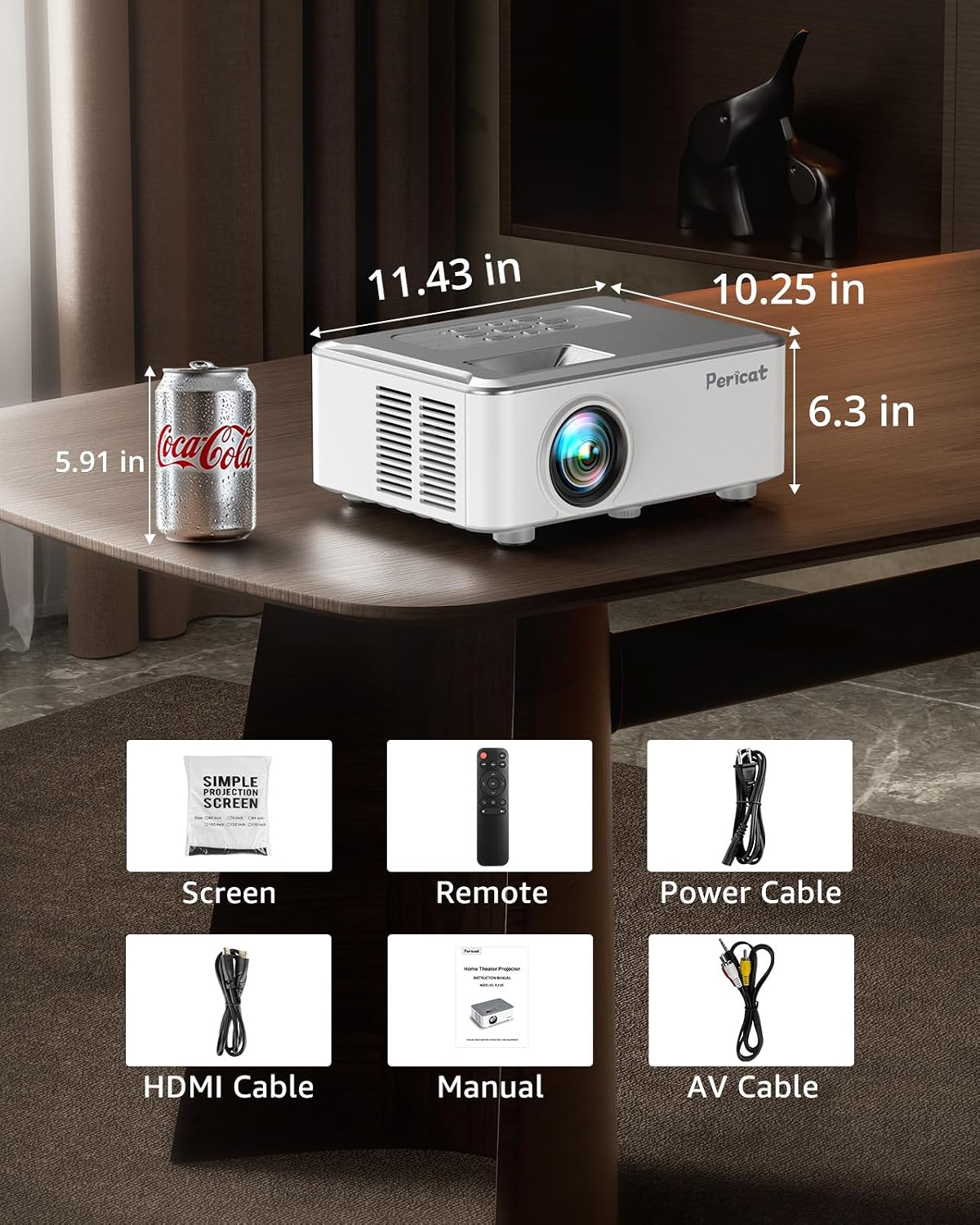
Image: Pericat PJ133E Projector and included accessories.
4. Product Overview
The Pericat PJ133E Projector features a compact design with various input/output ports for versatile connectivity.
4.1 Front View
The front of the projector houses the projection lens and an infrared receiver for the remote control.
4.2 Rear View
The rear panel includes the power input and ventilation outlets.
4.3 Side View
The sides feature additional ventilation and focus/keystone adjustment dials.
4.4 Top View
The top panel contains control buttons for basic navigation and settings.
4.5 Input/Output Ports
The projector is equipped with the following ports:
- HDMI: Connect to laptops, gaming consoles (PS5, Switch), TV sticks, etc.
- USB: Connect USB drives for media playback.
- AV: Connect to older devices using the included AV cable.
- TF Card Slot: Insert TF cards for direct media playback.
- 3.5mm Audio Jack: Connect external headphones or speakers.
- VGA: Connect to computers with VGA output.

Image: Pericat PJ133E Projector Input/Output Ports.
5. Setup
5.1 Placement
The PJ133E projector supports various placement options:
- Tabletop: Place on a flat surface in front of the projection area.
- Ceiling Mount: The projector can be mounted upside down on the ceiling.
- Tripod Mount: Use a compatible tripod for flexible positioning.
The projector features short-throw technology, capable of projecting a 100-inch screen from approximately 2.8 meters. The projection size ranges from 33 inches to 350 inches, with an optimal viewing experience recommended at 120 inches.

Image: Flexible Projection Options.

Image: Projection Size and Adjustment Features.
5.2 Power Connection
Connect the provided power cable to the projector's power input port and then plug it into a power outlet.
5.3 Initial Power On
Press the power button on the projector or the remote control to turn on the device. The indicator light will illuminate.
5.4 Focus and Keystone Correction
- Focus Adjustment: Rotate the focus ring near the lens until the projected image is sharp and clear.
- Keystone Correction: Use the keystone correction dial to adjust the image shape if it appears trapezoidal. The PJ133E supports manual ±15° keystone correction.
5.5 Connectivity
5.5.1 WiFi Connection (Screen Mirroring)
The PJ133E supports 5G and 2.4G WiFi for high-speed and stable screen mirroring. It can mirror content from your smartphone or tablet even without a home WiFi network.
- Select "Screen Mirroring" from the main menu.
- Choose "iOS Screen" or "Android Screen" based on your device.
- Follow the on-screen instructions to connect your device. For iOS devices, connect to the projector's internal WiFi. For Android, enable screen mirroring on your device and select the projector.

Image: WiFi Screen Mirroring Setup for iOS and Android.

Image: Wireless Connectivity via 5G/2.4G Wi-Fi.
5.5.2 Bluetooth Connection
The projector features Bluetooth 5.3 for connecting external audio devices like headphones or speakers.
- Go to the projector's settings menu and select "Bluetooth".
- Enable Bluetooth and search for available devices.
- Select your desired audio device from the list to pair.
5.5.3 Wired Connections
Connect your devices using the appropriate cables to the HDMI, USB, AV, TF, or VGA ports as described in Section 4.5.
6. Operating Instructions
6.1 Basic Operation
- Power On/Off: Press the power button on the projector or remote.
- Menu Navigation: Use the arrow keys and OK button on the remote or projector to navigate through menus.
- Source Selection: Press the "Source" button on the remote to select input sources (HDMI, USB, AV, TF, Screen Mirroring).
6.2 Media Playback
Once a source is selected, the projector will display content from that source. For USB drives or TF cards, navigate to the media files using the on-screen menu and select to play.
6.3 Zoom Function
The PJ133E features a 75% zoom function, allowing you to adjust the image size without moving the projector. Access this feature through the projector's menu settings.
6.4 Sound Settings
The projector has a built-in 8W HiFi speaker. You can adjust volume and select sound modes (Cinema, Standard, Movie, Sports, Music) through the audio settings menu. For enhanced audio, connect external speakers via Bluetooth or the 3.5mm audio jack.

Image: Streaming Entertainment Compatibility.

Image: Screen Casting Functionality.
7. Maintenance
7.1 Cleaning
The PJ133E features a sealed optical engine design, which helps prevent dust accumulation and maintains image quality over time. For external cleaning, gently wipe the projector's surface with a soft, dry cloth. Do not use abrasive cleaners or solvents.
7.2 Cooling System
The projector incorporates a unique circulating heat dissipation system for efficient cooling and quiet operation, typically below 35dB. Ensure the ventilation vents are clear of obstructions to maintain optimal performance and prevent overheating.

Image: Sealed Optical Engine and Cooling System.
7.3 Lamp Life
The projector utilizes a durable laser light source with an estimated lifespan of 70,000 hours. This translates to approximately 25 years of use if operated for 8 hours per day, significantly reducing the need for lamp replacement.
8. Troubleshooting
If you encounter issues with your Pericat PJ133E Projector, please refer to the following common problems and solutions:
- No Image:
- Ensure the projector is powered on and the power cable is securely connected.
- Verify the input source is correctly selected (HDMI, USB, etc.).
- Check all connection cables for proper seating and damage.
- Adjust the focus and keystone correction.
- No Sound:
- Check the volume level on both the projector and the connected source device.
- Ensure any external audio devices (Bluetooth speakers, headphones) are correctly paired and connected.
- If using HDMI, verify the audio output settings on your source device.
- Blurred Image:
- Adjust the focus ring until the image is clear.
- Ensure the projection surface is flat and smooth.
- Check the projection distance is within the recommended range.
- Remote Control Not Working:
- Replace the batteries in the remote control.
- Ensure there are no obstructions between the remote and the projector's IR receiver.
- Overheating Warning:
- Ensure the ventilation vents are not blocked.
- Turn off the projector and allow it to cool down before restarting.
If the problem persists, please contact customer support for assistance.
9. Specifications
| Feature | Specification |
|---|---|
| Brand | Pericat |
| Model Number | PJ133E |
| Recommended Use | Home Theater, Gaming, Business |
| Display Type | LED |
| Brightness | 20000 Lumens |
| Native Resolution | 1920 x 1080 (Full HD) |
| Supported Max Resolution | 3840 x 2160 (4K) |
| Contrast Ratio | 12000:1 |
| Max Image Size | 350 inches |
| Min Projection Distance | 0.9 meters |
| Max Projection Distance | 9 meters |
| Keystone Correction | Manual ±15° |
| Zoom Function | 75% |
| Connectivity Technology | Wi-Fi (5G & 2.4G), Bluetooth 5.3, HDMI, USB, AV, TF Card, 3.5mm Audio Jack, VGA |
| Built-in Speaker | 8W HiFi Speaker |
| Lamp Life | 70,000 hours |
| Power Consumption | Max 68W |
| Item Dimensions (L x W x H) | 24 x 18 x 9.6 cm |
| Item Weight | 1.8 kg |
10. Warranty and Support
The Pericat PJ133E Projector comes with a 2-year manufacturer's warranty from the date of purchase. This warranty covers initial defects and natural failures under normal use.
During the warranty period, we offer:
- Free exchange for defective units.
- 100% refund guarantee for eligible issues.
For any warranty claims, technical support, or inquiries, please contact our customer service team. We are committed to providing you with the best possible support and ensuring your satisfaction.
Please have your purchase details and model number (PJ133E) ready when contacting support.