
1. Product Overview
The Duracell Ultra LED Flashlight is designed to provide reliable and powerful illumination for a variety of tasks and situations. This pack includes three compact, high-performance flashlights, each delivering up to 1000 lumens of bright light. Their robust construction and versatile features make them ideal for everyday use, outdoor adventures, and emergency preparedness.

Image 1.1: The Duracell Ultra LED Flashlight 3-pack, showcasing the product in its retail packaging. This image highlights the compact design and the inclusion of three individual flashlights.
Key Features:
- High Brightness: Up to 1000 lumens of intense LED light.
- Variable Focus: Sliding head allows seamless transition from a high-intensity spot beam to a wide flood beam.
- Multiple Modes: Features High, Low, and Strobe light modes for different lighting needs.
- Durable Construction: Made from aluminum with an anodized finish, providing shock resistance.
- Water-Resistant: IPX4 rated for protection against splashing water from any direction.
- Compact Design: Small enough to fit in a wallet, pocket, or glove compartment.
- Battery Included: Each flashlight operates on 4 AAA alkaline batteries (12 total included in the pack).
2. Setup and Battery Installation
Your Duracell Ultra LED Flashlights come with the necessary AAA batteries. Follow these steps to install them and prepare your flashlight for first use.
- Unscrew the Tail Cap: Hold the flashlight firmly and twist the tail cap counter-clockwise until it detaches from the body.
- Insert Batteries: Insert four (4) AAA alkaline batteries into the battery compartment. Ensure the positive (+) and negative (-) ends of the batteries align correctly with the indicators inside the flashlight. Incorrect insertion can prevent the flashlight from working.
- Replace Tail Cap: Carefully screw the tail cap back onto the flashlight body by turning it clockwise until it is securely tightened. Do not overtighten.

Image 2.1: A clear view of the three Duracell Ultra LED Flashlights, illustrating their sleek design and compact form factor. Each flashlight requires 4 AAA batteries for operation.
3. Operating Instructions
The Duracell Ultra LED Flashlight features a simple operation with multiple lighting modes and a variable focus function.
Power On/Off and Mode Selection:
The power button is located on the tail cap of the flashlight. Press the button to cycle through the different light modes:
- First Press: Activates High mode (1000 lumens).
- Second Press: Activates Low mode (100 lumens).
- Third Press: Activates Strobe mode.
- Fourth Press: Turns the flashlight Off.
To turn off the flashlight from any mode, press the button until it cycles back to the off position, or press and hold the button for approximately 2 seconds.
Variable Focus (Zoom Function):
The flashlight features a sliding head for adjusting the beam focus. To change the beam from a narrow spot to a wide flood, simply slide the head of the flashlight forward or backward.
- Spot Beam: Slide the head forward (away from the tail cap) for a concentrated, high-intensity beam, ideal for long-distance illumination (up to 140 meters).
- Flood Beam: Slide the head backward (towards the tail cap) for a wide, diffused light, suitable for illuminating a larger area (up to 70 meters).
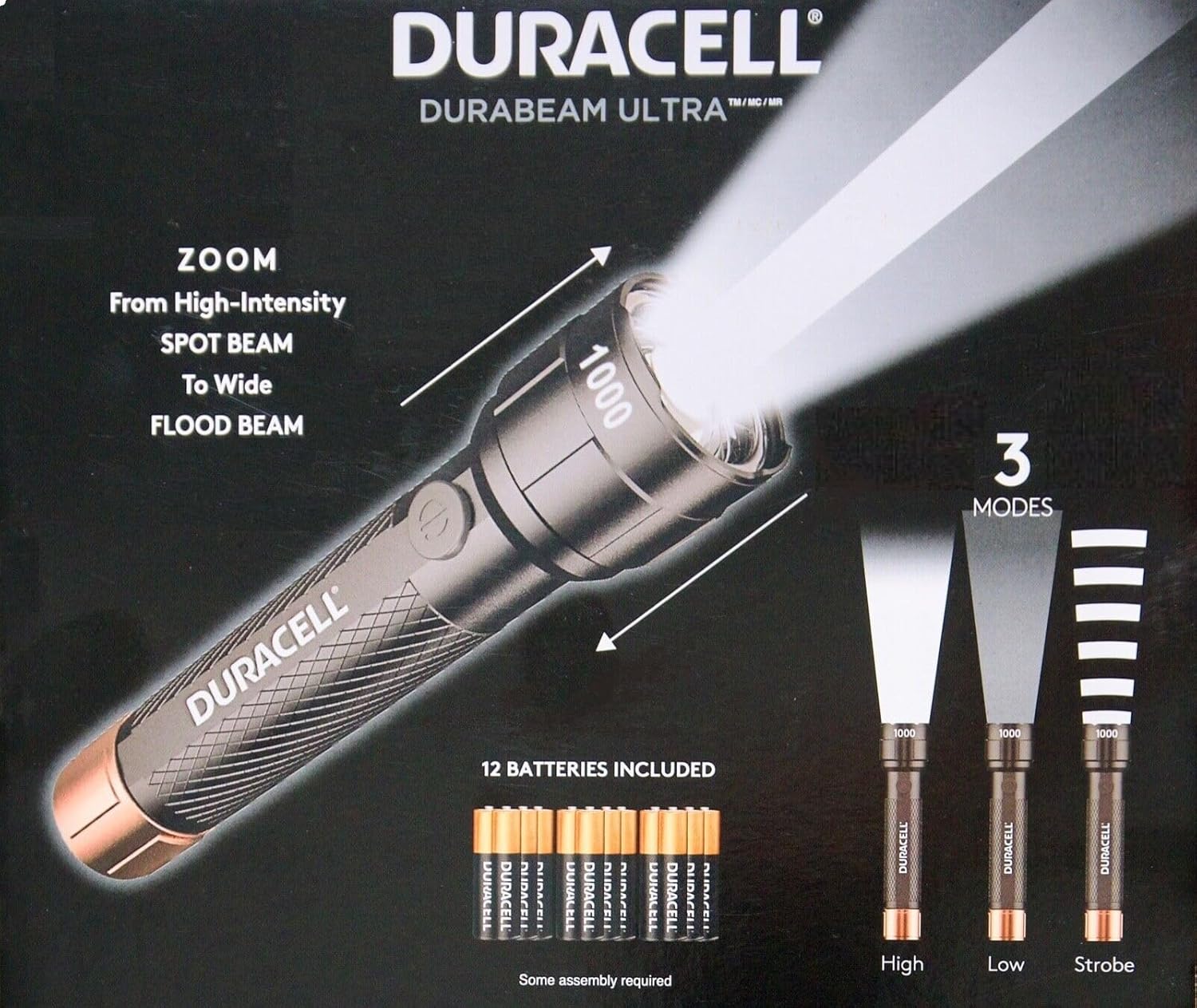
Image 3.1: An illustration demonstrating the variable focus (zoom) capability of the Duracell Ultra LED Flashlight, showing the transition from a spot beam to a wide flood beam. It also depicts the three available light modes: High, Low, and Strobe.
4. Maintenance and Care
Proper maintenance ensures the longevity and optimal performance of your Duracell Ultra LED Flashlight.
- Cleaning: Wipe the flashlight body with a soft, damp cloth. Do not use abrasive cleaners or solvents.
- Battery Replacement: When the light output diminishes, it is time to replace the batteries. Always replace all four AAA batteries at the same time with new, fresh alkaline batteries. Do not mix old and new batteries or different battery types.
- Storage: If the flashlight will not be used for an extended period, remove the batteries to prevent potential leakage and damage to the device. Store in a cool, dry place.
- Water Resistance: While IPX4 water-resistant, avoid submerging the flashlight in water. Ensure the tail cap is securely tightened to maintain water resistance.
5. Troubleshooting
If you encounter issues with your Duracell Ultra LED Flashlight, refer to the following common problems and solutions:
| Problem | Possible Cause | Solution |
|---|---|---|
| Flashlight does not turn on. |
|
|
| Light is dim or flickers. |
|
|
| Beam focus (zoom) is stiff. | Dirt or debris in the sliding mechanism. | Gently clean the sliding mechanism with a soft cloth. Do not apply lubricants. |
6. Specifications
Detailed technical specifications for the Duracell Ultra LED Flashlight:
| Feature | Specification |
|---|---|
| Brand | Duracell |
| Model Number | 1671629 |
| Light Source Type | LED |
| Brightness (High Mode) | 1000 Lumens |
| Brightness (Low Mode) | 100 Lumens |
| Beam Distance (High Mode) | Up to 140 meters |
| Beam Distance (Low Mode) | Up to 70 meters |
| Runtime (High Mode) | Up to 1.5 hours |
| Runtime (Low Mode) | Up to 5 hours |
| Power Source | Battery Powered |
| Battery Type | 4 x AAA Alkaline batteries per flashlight (12 total included) |
| Voltage | 6 Volts |
| Material | Aluminum and Hard Plastic |
| Special Feature | Impact Resistant, Water Resistant (IPX4) |
| Product Dimensions (per flashlight, approx.) | 4.01 cm (Depth) x 4.01 cm (Width) x 17.12 cm (Height) |
| Item Weight (pack of 3) | 721 grams (1.59 pounds) |
7. Warranty and Support
For warranty information or technical support regarding your Duracell Ultra LED Flashlight, please refer to the packaging or contact Duracell customer service directly. Keep your purchase receipt as proof of purchase.
You can often find additional support and contact information by visiting the official Duracell website or the retailer's support page where the product was purchased.
Online Support: www.duracell.com