
1. Introduction
This manual provides instructions for the NKF RM-C3348, RM-C3349, and RM-C3354 replacement remote controls. This remote is designed to be compatible with various JVC TV models, including LT-65KC595, LT-50KB585, LT-55KB695, and LT-32KC197. It functions as a direct replacement, requiring no programming or setup beyond battery installation.
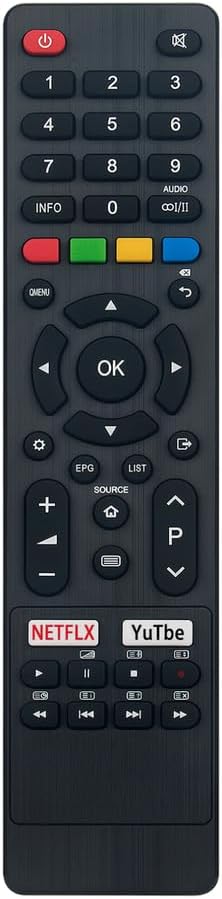
Figure 1: Front view of the NKF RM-C3348 remote control.
2. Setup and Battery Installation
The NKF replacement remote control requires two AAA alkaline batteries for operation. No additional setup or programming is needed; simply insert the batteries correctly, and the remote will be ready for use with your compatible JVC TV.
- Locate the battery compartment on the back of the remote control.
- Slide the battery compartment cover downwards to open it.
- Insert two 1.5V AAA alkaline batteries, ensuring the positive (+) and negative (-) terminals align with the markings inside the compartment.
- Slide the battery compartment cover back into place until it clicks securely.
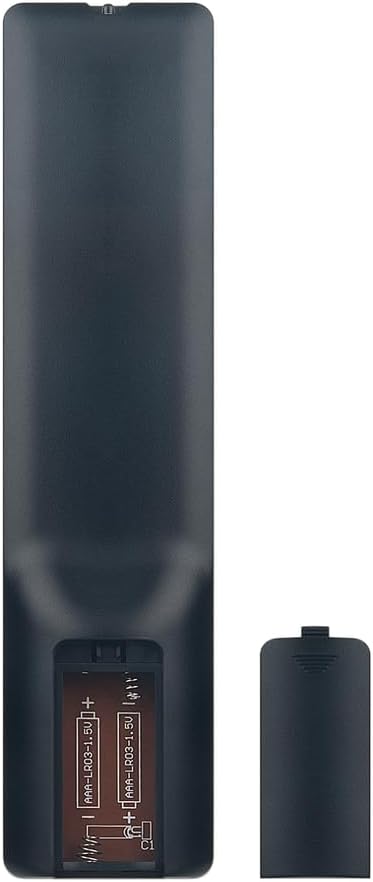
Figure 2: Battery compartment with AAA batteries.
3. Operating Instructions
This remote control provides full functionality for your compatible JVC TV. Below is a general guide to the main buttons and their functions.

Figure 3: Remote control button layout.
- Power Button (●): Turns the TV on or off.
- Number Buttons (0-9): Directly select TV channels.
- Volume Up/Down (+/-): Adjusts the TV volume.
- Channel Up/Down (P^/Pv): Changes TV channels sequentially.
- Mute Button (🔇): Mutes or unmutes the TV audio.
- Navigation Pad (Up, Down, Left, Right, OK): Navigates through menus and confirms selections.
- Back/Return Button (↶): Returns to the previous screen or menu.
- Source Button: Selects input sources (HDMI, AV, etc.).
- Menu Button: Opens the TV's main menu.
- Netflix / YouTube Buttons: Direct access to streaming applications (functionality depends on TV model and internet connection).
- Media Control Buttons (Play, Pause, Stop, Rewind, Fast Forward): Controls media playback.
For specific functions related to your JVC TV model, please refer to your television's original user manual.
4. Maintenance and Care
To ensure the longevity and optimal performance of your remote control, follow these care guidelines:
- Keep the remote control dry. Avoid exposure to liquids.
- Do not expose the remote to extreme temperatures or direct sunlight.
- Clean the remote with a soft, dry cloth. Do not use abrasive cleaners or solvents.
- If the remote will not be used for an extended period, remove the batteries to prevent leakage.
- Handle the remote with care to avoid dropping or physical damage.
5. Troubleshooting
If you experience issues with your remote control, please consult the following troubleshooting steps:
- Remote not responding:
- Check if the batteries are inserted correctly with the correct polarity (+/-).
- Replace old batteries with new 1.5V AAA alkaline batteries.
- Ensure there are no obstructions between the remote control and the TV's infrared sensor.
- Confirm the remote is pointed directly at the TV's IR sensor.
- Buttons not working:
- Clean the remote control surface, especially around the unresponsive buttons, to remove any dirt or debris.
- If only specific buttons are not working, it might indicate internal damage.
- Limited range:
- Ensure batteries are fresh. Low battery power can reduce the remote's effective range.
- Remove any potential sources of infrared interference in the room.
If problems persist after trying these steps, please contact customer support.
6. Specifications
| Brand | NKF |
| Model Numbers | RM-C3348, RM-C3349, RM-C3354 |
| Compatible TV Models | JVC LT-65KC595, LT-50KB585, LT-55KB695, LT-32KC197 |
| Power Supply | 2 x 1.5V AAA Alkaline Batteries |
| Connectivity Technology | Infrared (IR) |
| Maximum Range | Up to 10 meters (33 feet) |
| Number of Buttons | 45 |
| Color | Black |
| Dimensions (L x W x H) | 7" x 2" x 0.65" (17.78 cm x 5.08 cm x 1.65 cm) |
| Weight | 2.08 ounces (59 grams) |
7. Warranty and Support
For any issues or inquiries regarding your NKF remote control, please contact the seller directly through the platform where the purchase was made. They can provide assistance with troubleshooting, replacements, or returns as per their policy.
Note: This product is a replacement remote control and may not be covered by the original TV manufacturer's warranty.